Listen to this Post
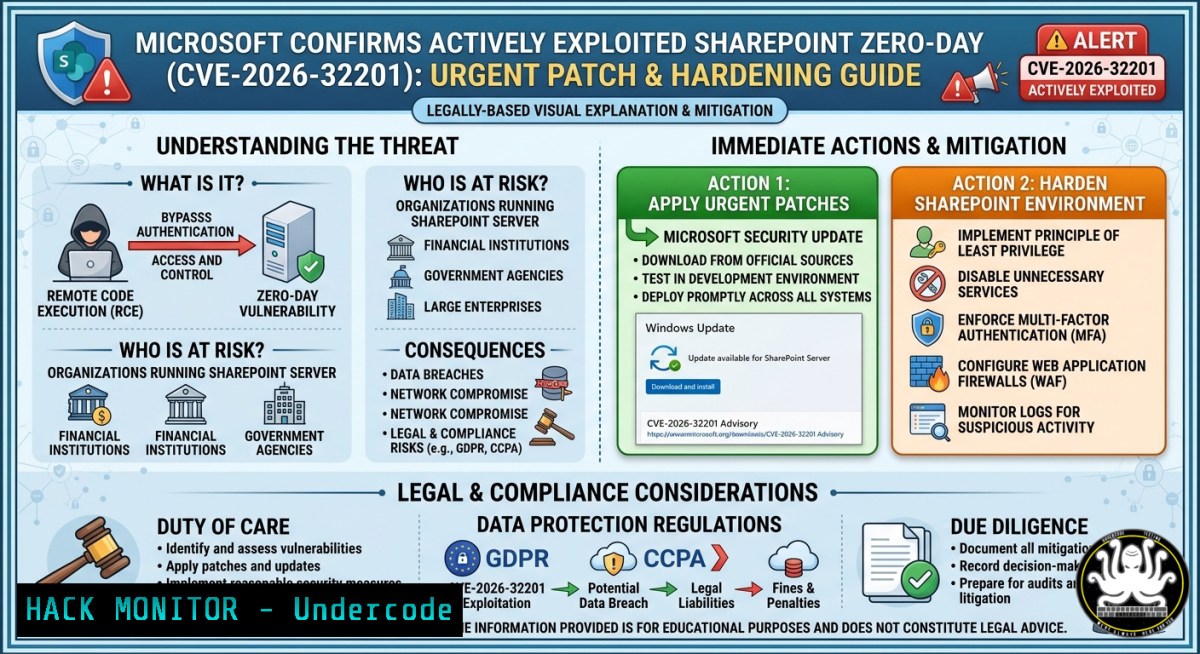
Introduction:
A critical zero-day spoofing vulnerability in Microsoft SharePoint Server, tracked as CVE-2026-32201, is being actively exploited in the wild. Microsoft confirmed the flaw on April 14, 2026, as part of its monthly security update cycle. The vulnerability, stemming from improper input validation (CWE-20), allows an unauthenticated remote attacker to perform spoofing attacks over a network, potentially leading to phishing, unauthorized data manipulation, or social engineering campaigns.
Learning Objectives:
- Understand the technical root cause and potential impact of CVE-2026-32201.
- Learn to detect vulnerable SharePoint Server installations using PowerShell and other methods.
- Master step-by-step patching, mitigation, and hardening procedures for affected systems.
You Should Know:
1. Vulnerability Deep Dive: CVE-2026-32201 (CWE-20)
The vulnerability is due to insufficient validation of user-supplied input. A remote attacker can exploit this to perform spoofing attacks, presenting falsified information within trusted SharePoint environments. While assigned a CVSS base score of 6.5 (Important), its active exploitation significantly increases organizational risk. Attackers can chain this with other vulnerabilities to gain access to sensitive information and make changes to disclosed information. The Cybersecurity and Infrastructure Security Agency (CISA) has added CVE-2026-32201 to its Known Exploited Vulnerabilities (KEV) catalog.
Step-by-step guide:
- Identify vulnerable versions: Affected software includes Microsoft SharePoint Server 2016, 2019, and Subscription Edition.
- Assess the risk: The flaw is network-reachable with low complexity and requires no privileges or user interaction.
- Prioritize patching: Treat this as a priority 1 due to active exploitation in the wild.
2. Detection: Identifying Vulnerable SharePoint Installations
Before patching, it’s crucial to identify all potentially affected SharePoint servers in your environment.
Step-by-step guide:
1. Open SharePoint Management Shell as an administrator.
- Run the following PowerShell command to check the current build version:
Get-SPFarm | Select BuildVersion
Affected systems will show a BuildVersion value before the patched version.
Patched systems will display a version including or after the fixed release.
3. For a more detailed report, use:
Get-SPFarm | Select BuildVersion, PatchLevel
4. Linux/Unix administrators monitoring hybrid environments can check for suspicious connections to SharePoint servers:
 Monitor network connections to SharePoint servers on ports 80, 443, and 32843
netstat -tulnp | grep -E '80|443|32843'

Check for suspicious processes
ps aux | grep -i 'powershell|w3wp'
3. Patching & Mitigation: Securing Your SharePoint Environment
The primary and most effective mitigation is to apply the official security update provided by Microsoft.
Step-by-step guide:
- Download the update: Obtain the latest cumulative update for your specific SharePoint version from the Microsoft Update Catalog. For SharePoint Server 2019, the security update is KB5002854, which updates the build to version 16.0.10417.20114.
- Install the update: Run the update package with administrative privileges. From an elevated PowerShell prompt:
Start-Process -FilePath "SharePointUpdate.exe" -ArgumentList "/quiet" -Wait
- Verify the update: After installation, confirm the update was successful by running the detection command again:
Get-SPFarm | Select BuildVersion, PatchLevel
4. If patching is delayed, apply compensating controls:
Restrict network access to SharePoint servers using firewalls.
Tighten reverse-proxy routing and allowlists.
Disable unnecessary external exposure of SharePoint.
4. Post-Patch Hardening: Best Practices for SharePoint Security
Beyond patching, hardening your SharePoint environment is essential for defense-in-depth.
Step-by-step guide:
- Regular patching schedule: Automate update checks using a scheduled job.
Register-ScheduledJob -Name "SharePointUpdateCheck" -ScriptBlock { $update = Get-SPFarm | Select BuildVersion Add notification logic here } -Trigger (New-JobTrigger -Weekly -At "Saturday 2:00AM") - Disable unnecessary services: Reduce the attack surface by disabling non-essential SharePoint services.
Get-SPServiceInstance | Where-Object {$_.TypeName -notin @("SharePoint Server Search")} | Stop-SPServiceInstance - Automated backup strategy: Ensure regular, automated backups of the SharePoint farm.
Backup-SPFarm -Directory "\backup\sharepoint" -BackupMethod Full -Verbose
- Firewall configuration: Implement strict firewall rules to limit exposure. For Linux-based proxy servers:
iptables -A INPUT -p tcp --dport 80 -j ACCEPT
iptables -A INPUT -p tcp --dport 443 -j ACCEPT
iptables -A INPUT -p tcp --dport 32843 -j ACCEPT  SharePoint Central Admin
iptables -A INPUT -p udp --dport 53 -j ACCEPT  DNS if running locally
- Monitor for anomalies: Create a daily security audit report to identify potential exploitation attempts.
$logPath = "C:\SharePointAudit\SecurityAudit_$(Get-Date -Format yyyyMMdd).log"
Get-SPLogEvent -StartTime (Get-Date).AddDays(-1) | Where-Object {$<em>.Level -eq "Error" -or $</em>.Area -eq "Security"} | Export-Csv $logPath
5. Advanced Monitoring: Sigma and YARA Rules
Proactive detection of exploitation attempts is critical. Sigma and YARA rules are powerful tools for this purpose.
– YARA is used to detect malware based on file content.
– Sigma is used to detect suspicious behavior in logs.
Step-by-step guide:
- Develop custom Sigma rules to detect log patterns associated with the spoofing attack.
- Create YARA rules to scan for Indicators of Compromise (IOCs) related to known exploitation artifacts.
- Integrate these rules into your SIEM (Security Information and Event Management) system for automated alerting.
What Undercode Say:
- Key Takeaway 1: CVE-2026-32201 is a high-risk, actively exploited zero-day requiring immediate patching.
- Key Takeaway 2: Detection and mitigation require a multi-layered approach, combining PowerShell commands, network monitoring, and log analysis.
This vulnerability highlights the critical importance of maintaining rigorous patch management processes. While the CVSS score is medium, the active exploitation and potential for chaining with other flaws make it a severe threat. Organizations must prioritize applying the April 2026 security updates. The detection method using `Get-SPFarm` provides a straightforward way to assess vulnerability status, but this should be augmented with comprehensive monitoring and hardening. The increasing volume of vulnerability reports, partly driven by AI capabilities, means security teams must adapt to a faster-paced threat landscape.
Prediction:
The exploitation of CVE-2026-32201 is likely to increase in the coming weeks as more threat actors reverse-engineer the patch. Organizations that fail to apply the update promptly will be at significant risk of data breaches and compromise. This event also signals a broader trend: the use of AI in vulnerability discovery will continue to accelerate, leading to more frequent disclosures and a higher burden on defenders to keep systems updated. Expect to see this vulnerability incorporated into ransomware and automated attack toolkits soon.
▶️ Related Video (84% Match):
🎯Let’s Practice For Free:
IT/Security Reporter URL:
Reported By: Cybersecuritynews Share – Hackers Feeds
Extra Hub: Undercode MoN
Basic Verification: Pass ✅


