Listen to this Post
Introduction:
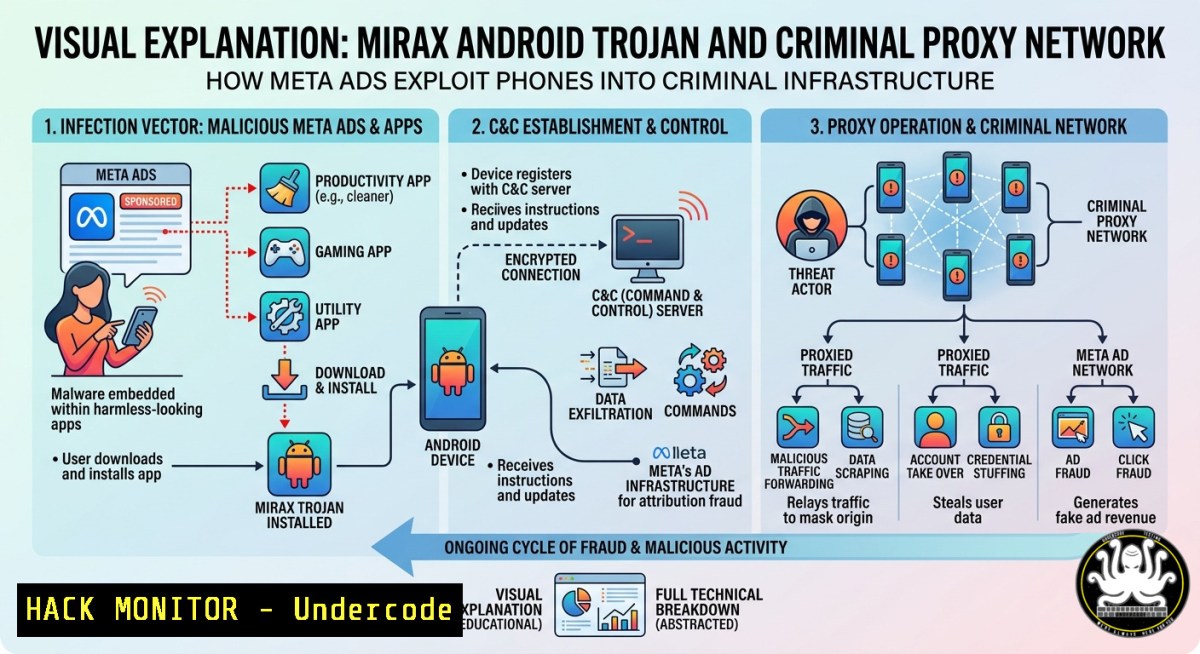
The Android trojan Mirax has infected over 220,000 accounts through malicious Meta (Facebook/Instagram) advertisements promoting fake streaming applications. Once installed, this Remote Access Trojan (RAT) grants attackers full device control and covertly converts the compromised smartphone into a proxy node, allowing cybercriminals to route their malicious traffic through real, legitimate IP addresses to mask fraud and evade detection. This article dissects the Mirax infection chain, its RAT + proxy operational model, and provides actionable detection, mitigation, and hardening techniques for security professionals and IT administrators.
Learning Objectives:
- Understand how Mirax leverages Meta ad campaigns and fake streaming apps to distribute mobile RAT malware.
- Identify indicators of compromise (IoCs) on Android devices and network traffic associated with proxy node behavior.
- Implement defensive strategies including Android hardening, network monitoring commands (Linux/Windows), and incident response procedures.
You Should Know:
- Infection Vector: Fake Streaming Apps via Meta Ads
Attackers create compelling Meta ads offering free access to popular streaming content (movies, live sports, premium TV). These ads direct users to lookalike landing pages hosting malicious APK files, often bypassing Google Play Store protections by enabling “Install from unknown sources.” The fake apps request dangerous permissions (overlay, accessibility, device admin) under the guise of “video player optimization.”
Step‑by‑step guide explaining what this does and how to use it:
– Detection on Android (manual): Go to Settings → Apps → See all apps. Look for suspicious entries with generic names (e.g., “Video Player,” “Streaming Hub”) or no icon.
– Check unknown sources: On Android 8-12, review `Settings → Security → Install unknown apps` for any browser or app that has been toggled on without your knowledge.
– Linux command to monitor incoming APK downloads (on a network gateway):
`sudo tcpdump -i eth0 -A -s 0 ‘tcp port 80 or port 443 and (http.request.uri contains “.apk”)’`
This captures HTTP/HTTPS traffic for APK files being downloaded across your network.
– Windows equivalent using PowerShell (live network capture):
`Get-NetTCPConnection -State Listen | Where-Object {$_.LocalPort -eq 443}` then use Wireshark with filter http.request.uri contains ".apk".
- RAT Capabilities: Full Device Control & Data Exfiltration
Mirax implements classic RAT functionality including keylogging, screen capture, SMS interception, contact harvesting, location tracking, and camera/mic activation. It also maintains persistent C2 communication using WebSocket or encrypted DNS tunneling to avoid firewall detection.
Step‑by‑step guide explaining what this does and how to use it:
– Check for rogue accessibility services (Android):
`adb shell settings get secure enabled_accessibility_services`
If output contains an unfamiliar package name, that service may be capturing all input.
– List running processes on Android (via adb):
`adb shell ps -A | grep -E “mirax|streaming|video”`
- Linux command to detect suspicious outbound connections from an Android device IP:
`sudo tcpdump -i eth0 -nn src host 192.168.1.X and ‘(tcp port 443 or tcp port 8443)’ | grep -i “websocket”` - Windows PowerShell monitoring for unknown processes (if Android is tethered or emulated):
`Get-Process | Where-Object {$_.ProcessName -match “mirax|streaming”}`
- Proxy Node Conversion: Turning Phones into Fraud Masking Relays
After establishing RAT control, Mirax installs a lightweight SOCKS5 or HTTP proxy server on the compromised device. The attacker then routes their fraudulent transactions, credential stuffing, or ad fraud traffic through the victim’s real mobile IP address. This makes malicious activity appear as legitimate mobile user behavior, bypassing geo‑blocks and IP reputation filters.
Step‑by‑step guide explaining what this does and how to use it:
– Detect proxy service on Android (requires root or adb):
`adb shell netstat -anp | grep -E “LISTEN.(1080|3128|8080)”`
Ports 1080 (SOCKS), 3128 (HTTP), 8080 (HTTP alt) are common proxy ports.
– Network‑level detection on Linux router/firewall:
`sudo ss -tulpn | grep -E ‘:1080|:3128|:8080’`
Look for unexpected listening services on internal client IPs.
– Windows command to scan for open proxy ports on a subnet:
`Test-NetConnection -ComputerName 192.168.1.100 -Port 1080`
Loop through IPs with `for ($i=1;$i -lt 255;$i++) { Test-NetConnection 192.168.1.$i -Port 1080 -WarningAction SilentlyContinue }`
– Analyze traffic for proxy patterns using tcpdump:
`sudo tcpdump -i eth0 -nn ‘tcp
 & (tcp-syn) != 0 and (dst port 1080 or dst port 3128)'`
This captures SYN packets to common proxy ports from internal hosts.

<ol>
<li>Linux & Windows Commands for Proxy Traffic Analysis (Incident Response)
Once you suspect a device is acting as a proxy node, you must isolate and analyze the traffic flows. Use these commands to identify the C2 server and proxy destination.</li>
</ol>

<h2 style="color: yellow;">Step‑by‑step guide:</h2>

<ul>
<li>Linux – Find all established connections from a suspect IP:
`sudo netstat -tunap | grep 192.168.1.X | grep ESTABLISHED` </li>
<li>Linux – Log all traffic to/from the infected device for 1 hour: </li>
</ul>

<h2 style="color: yellow;">`sudo tcpdump -i eth0 host 192.168.1.X -w mirax_capture.pcap`</h2>

Then analyze with Wireshark: `wireshark mirax_capture.pcap` and filter <code>(http.request or socks)</code>.
- Windows – Monitor live connections using PowerShell:
`Get-NetTCPConnection | Where-Object {$_.RemotePort -eq 443 -or $_.RemotePort -eq 8443} | Format-Table LocalAddress, LocalPort, RemoteAddress, RemotePort, State`
- Windows – Use Sysinternals TCPView to graphically see all TCP/UDP endpoints and kill malicious processes.

<h2 style="color: yellow;">5. Hardening Android Against Mirax & Similar RATs</h2>

Proactive defense is critical. Apply these steps to devices in your organization or personal fleet.

<h2 style="color: yellow;">Step‑by‑step guide:</h2>

<ul>
<li>Disable installation from unknown sources permanently (managed devices): Use Android Enterprise or Samsung Knox to enforce <code>Settings → Security → Unknown sources = OFF</code>.</li>
<li>Review accessibility permissions – Go to <code>Settings → Accessibility → Installed services</code>. Disable any unknown or unused services.</li>
<li>Enable Google Play Protect and perform a scan: <code>Settings → Security → Google Play Protect → Scan</code>.</li>
<li>Use network filtering apps like NetGuard (no-root firewall) to block all outbound connections except essential apps. Configure it to log connection attempts to ports 1080, 3128, 8080.</li>
<li>For enterprise: Deploy Mobile Threat Defense (MTD) solutions that detect proxy and RAT behavior via on-device heuristics.</li>
</ul>

<h2 style="color: yellow;">6. Incident Response: Isolating and Remediating Infected Devices</h2>

When a device is confirmed to be part of the Mirax proxy network, follow this IR procedure.

<h2 style="color: yellow;">Step‑by‑step guide:</h2>

<ul>
<li>Immediate isolation: Disable Wi-Fi and mobile data on the device. If managed via MDM, push a `lockdown` or `work profile reset` command.</li>
<li>Block the device’s IP at network perimeter (Linux iptables): </li>
</ul>

<h2 style="color: yellow;">`sudo iptables -A INPUT -s 192.168.1.X -j DROP`</h2>

<h2 style="color: yellow;">`sudo iptables -A OUTPUT -d 192.168.1.X -j DROP`</h2>

<ul>
<li>Windows Firewall block rule:
`New-NetFirewallRule -DisplayName "Block Mirax IP" -Direction Outbound -RemoteAddress 192.168.1.X -Action Block`
- Remediation: Factory reset the Android device from recovery mode (not just settings reset) to ensure the RAT is removed. After reset, change all credentials used on the device (email, banking, social media).</li>
<li>Monitor for re-infection by checking if the same IP starts showing proxy ports again after reset – this indicates a second-stage persistence or a different device.</li>
</ul>

<ol>
<li>Advanced Lab: Emulating Mirax Proxy Detection with Python & Honeypot
For blue teams, setting up a honeypot that mimics a vulnerable Android device can help detect attackers attempting to deploy proxy modules.</li>
</ol>

<h2 style="color: yellow;">Step‑by‑step guide:</h2>

<ul>
<li>Set up a low-interaction honeypot using T-Pot or Cowrie on a Linux VM.</li>
<li>Simulate fake streaming app download and monitor incoming C2 traffic. </li>
<li>Python script to detect high outbound connection rates (potential proxy forwarding):
[bash]
import psutil
import time</li>
</ul>

PROXY_PORTS = [1080, 3128, 8080]
THRESHOLD = 100  connections per minute

while True:
conn_count = 0
for conn in psutil.net_connections(kind='inet'):
if conn.status == 'ESTABLISHED' and conn.raddr and conn.raddr.port in PROXY_PORTS:
conn_count += 1
if conn_count > THRESHOLD:
print(f"[bash] Potential proxy node detected: {conn_count} connections to proxy ports")
time.sleep(60)
– Run this script on a network gateway to alert when any internal IP exceeds the connection threshold to common proxy ports.
What Undercode Say:
- Key Takeaway 1: Mirax demonstrates a dangerous evolution where mobile RATs are no longer just spyware – they actively repurpose devices as anonymizing infrastructure, making fraud attribution nearly impossible.
- Key Takeaway 2: Meta’s ad platform has become a primary vector for malware distribution, bypassing traditional app-store security by driving users to direct APK downloads via social engineering.
Analysis: The combination of RAT and proxy functionality in Mirax is a game-changer. Traditional defenses focus on inbound malware detection, but here the compromised device becomes an outbound proxy. This means even organizations with strong perimeter security can have their legitimate IP addresses blacklisted due to criminal activity routed through a single infected employee’s phone. Moreover, law enforcement cannot simply trace the attacker’s IP – they find a victim’s home Wi‑Fi. The scale of 220,000+ devices creates a vast residential proxy network available for rent on cybercriminal forums, accelerating credential stuffing, ad fraud, and even terrorist financing.
Prediction:
Over the next 12–18 months, expect a surge in similar “RAT + proxy” Android campaigns distributed via social media ads, with attackers leveraging generative AI to create thousands of unique fake streaming app interfaces that evade static detection. Mobile browsers will increasingly block direct APK downloads, but attackers will pivot to exploiting WebAPK (Trusted Web Activity) to install without explicit user permission. Mitigation will require on-device machine learning models that detect anomalous outbound proxy behavior in real time, coupled with mandatory network-level egress filtering for mobile devices. Organizations should immediately implement mobile device management policies that block all outbound traffic to dynamic DNS domains and restrict installation sources – because the next Mirax could be just one click away on your feed.
▶️ Related Video (72% Match):
🎯Let’s Practice For Free:
IT/Security Reporter URL:
Reported By: Hackermohitkumar Android – Hackers Feeds
Extra Hub: Undercode MoN
Basic Verification: Pass ✅


