
Listen to this Post
Introduction:
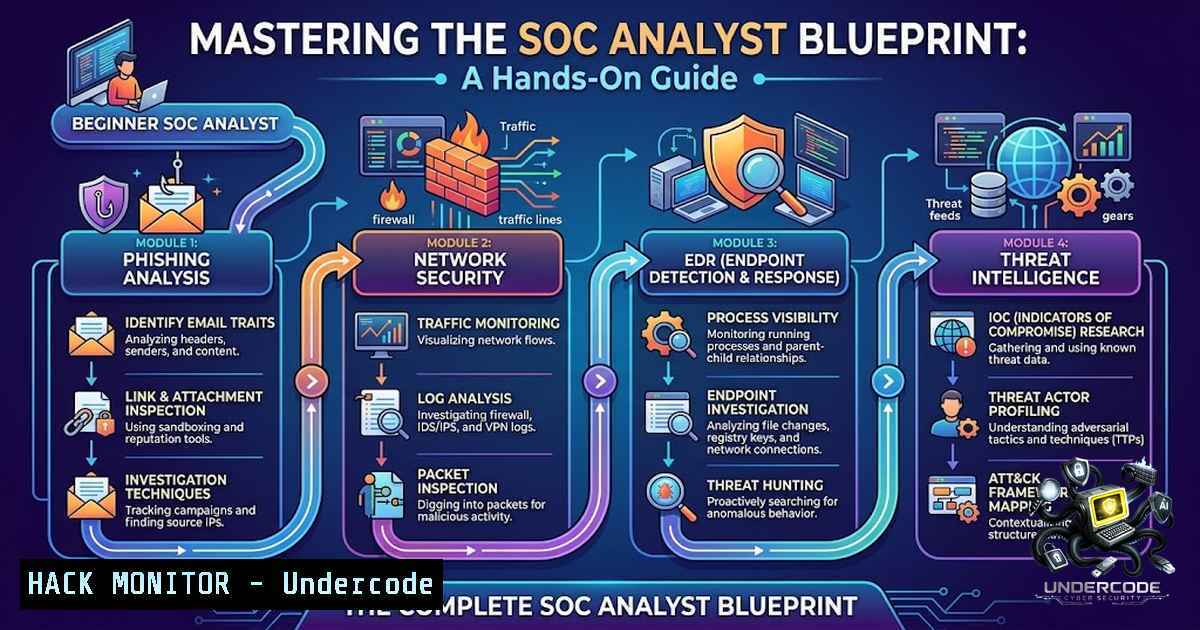
The modern Security Operations Center (SOC) is the nerve center of an organization’s defensive cybersecurity posture, demanding analysts who can investigate phishing campaigns, hunt threats across endpoints, and correlate billions of security events in real time. A comprehensive 30-hour hands-on program — TCM Security’s Security Operations (SOC) 101 — has emerged as a definitive entry point for T1/T2 SOC analysts, sharpening practical skills across phishing analysis, network monitoring, endpoint detection, SIEM correlation, threat intelligence, and digital forensics. This article extracts the core technical pillars from that training and expands them into actionable commands, detection rules, and configuration guides that every aspiring blue-teamer must master.
Learning Objectives & Secrets:
- Objective 1 — Phishing Triage & Email Forensics: Master the dissection of email headers, SPF/DKIM/DMARC authentication, and malicious attachments using automated platforms like PhishTool, which parses and enriches reported emails for rapid investigation.
- Objective 2 Secret Tips — Network IDS Rule Crafting: Go beyond basic packet capture — learn to write custom Snort rules that detect SQL injection and command injection patterns in live traffic, then tune them to reduce false positives.
- Objective 3 Secret Tips — Endpoint Telemetry Deep Dive: Leverage Sysmon event IDs (process creation, network connections, file changes) and LimaCharlie’s EDR sensors to uncover living-off-the-land binaries (LOLBins) and privilege escalation attempts in Windows/Linux environments.
You Should Know:
- Phishing Analysis Automation with PhishTool & Header Forensics
Phishing remains the 1 initial access vector, and SOC analysts must rapidly triage reported emails. PhishTool automates the heavy lifting: it ingests raw `.eml` or `.msg` files, decodes headers, extracts URLs, and enriches indicators with threat intelligence. To perform manual header analysis on Linux, use:
cat suspicious_email.eml | grep -E "^(From|To|Subject|Date|Return-Path|Authentication-Results|Received-SPF|DKIM-Signature|DMARC)"
On Windows PowerShell, extract headers with:
Get-Content .\suspicious_email.eml | Select-String -Pattern "^(From|To|Subject|Authentication-Results|Received-SPF)"
Step‑by‑step guide:
- Acquire the email sample: Save the suspicious email as an `.eml` file.
- Upload to PhishTool: Navigate to the PhishTool console and upload the file for automated parsing.
- Review authentication results: Check the `Authentication-Results` header for SPF, DKIM, and DMARC pass/fail statuses.
- Extract and analyze URLs: Use PhishTool’s URL decoder to identify redirect chains and malicious domains.
- Generate a forensic report: Document indicators of compromise (IOCs) — sender IPs, malicious domains, attachment hashes — for incident response handoff.
-
Network Security Monitoring with tcpdump, Wireshark, and Snort IDS/IPS
Network traffic analysis is the eyes and ears of the SOC. `tcpdump` captures packets from the command line, while Wireshark provides deep packet inspection. To capture HTTP traffic on port 80 and save to a PCAP file:
sudo tcpdump -i eth0 -s 65535 -w http_traffic.pcap port 80
For Windows, use `netsh` to start a trace:
netsh trace start capture=yes provider=Microsoft-Windows-Kernel-1etwork tracefile=C:\capture.etl
netsh trace stop
Snort rule writing is where detection becomes proactive. A rule to alert on SQL injection attempts (UNION SELECT) in HTTP traffic:
alert tcp $EXTERNAL_NET any -> $HOME_NET $HTTP_PORTS (msg:"SQL Injection Attempt - UNION SELECT"; flow:to_server,established; content:"UNION"; nocase; content:"SELECT"; nocase; distance:0; within:10; sid:1000001; rev:1;)
Step‑by‑step guide:
- Install Snort: On Ubuntu:
sudo apt-get install snort; on Windows, download from Cisco. - Define rule header: Specify action (
alert), protocol (tcp), source/destination IPs and ports. - Add content matches: Use `content` keywords for pattern detection; `nocase` for case-insensitivity; `distance` and `within` to constrain proximity.
- Test the rule: Run Snort in test mode:
snort -T -c /etc/snort/snort.conf -i eth0. - Deploy in IPS mode: Change `alert` to `drop` to block malicious packets in real time.
-
Endpoint Security & EDR: Sysmon and LimaCharlie Configuration
Endpoint detection relies on deep telemetry. Sysmon (System Monitor) from Microsoft Sysinternals logs process creation (Event ID 1), network connections (Event ID 3), and file changes (Event ID 11). Install Sysmon on Windows with:
 Download Sysmon from Microsoft Sysinternals
Invoke-WebRequest -Uri "https://download.sysinternals.com/files/Sysmon.zip" -OutFile "C:\Sysmon.zip"
Expand-Archive -Path "C:\Sysmon.zip" -DestinationPath "C:\Sysmon"
 Install with a configuration file
C:\Sysmon\Sysmon64.exe -accepteula -i C:\Sysmon\sysmonconfig.xml
LimaCharlie provides cloud-1ative EDR with sensors for Windows, Linux, and macOS, monitoring over 70 event types in real time. Deploy the LimaCharlie sensor on Linux:
curl -s https://downloads.limacharlie.io/sensor/linux/install.sh | sudo bash -s -- -i <YOUR_INSTALLATION_KEY>
Step‑by‑step guide:
- Deploy Sysmon: Download the Sysmon ZIP, extract, and run the installer with an XML configuration that defines which events to log.
- Verify logging: Open Event Viewer → Applications and Services Logs → Microsoft → Windows → Sysmon → Operational.
- Install LimaCharlie sensor: Use the installation script or manual package for your OS; ensure outbound HTTPS (port 443) access to LimaCharlie cloud services.
- Create Detection & Response (D&R) rules: In the LimaCharlie dashboard, write rules that match on event types (e.g., `process creation` with
powershell -enc) and trigger automated responses. - Monitor telemetry: Review the `edr` event stream for suspicious process chains, file modifications, and network beacons.
-
SIEM & Log Analysis: Building Correlation Searches in Splunk
SIEM platforms like Splunk correlate disparate logs to surface security incidents. A classic correlation search detects SSH brute-force attacks by counting failed password attempts per source IP:
index=linux_secure sourcetype=secure "Failed password"
| stats count by src_ip, user
| where count > 5
| eval threshold = "Excessive Failed Logins"
| table _time, src_ip, user, count
For web application attacks, detect SQL injection via URI parameters:
index=web_access sourcetype=access_combined uri_path=".php"
| search uri_query="SELECT" OR uri_query="UNION" OR uri_query="' OR '1'='1"
| stats count by src_ip, uri_path, uri_query
| where count > 3
Step‑by‑step guide:
- Define the use case: Identify the attack pattern (e.g., brute force, SQLi, XSS).
- Write the base search: Use
index,sourcetype, and field filters to narrow the dataset. - Apply statistical aggregation: Use `stats count by` to group events and identify anomalies.
- Set a threshold: Apply `where count > N` to filter out noise.
- Create a correlation search: In Splunk Enterprise Security, save the search as a correlation search with a severity level and trigger actions (e.g., create a notable event).
-
Threat Intelligence Frameworks: Cyber Kill Chain, Diamond Model, Pyramid of Pain, and MITRE ATT&CK
Threat intelligence transforms raw alerts into actionable context. The Cyber Kill Chain maps an attack from reconnaissance to exfiltration; the Diamond Model analyzes adversary-capability-infrastructure-victim relationships; the Pyramid of Pain prioritizes indicators by difficulty to change (hashes < IPs < domain names < network artifacts < tools < TTPs); and MITRE ATT&CK provides a knowledge base of adversary tactics and techniques.
YARA rules enable file and memory pattern detection for malware identification. A sample YARA rule to detect a suspicious PowerShell download cradle:
rule Suspicious_PowerShell_Download {
meta:
description = "Detects PowerShell download cradle"
severity = "high"
strings:
$ps = "powershell" nocase
$download = "DownloadString" nocase
$http = "http://" nocase
condition:
$ps and $download and $http
}
MISP (Malware Information Sharing Platform) is an open-source threat intelligence platform for collecting, storing, and sharing structured IOCs.
Step‑by‑step guide:
- Map an alert to MITRE ATT&CK: Identify the technique ID (e.g., T1059.001 for PowerShell) to understand adversary behavior.
- Write a YARA rule: Define metadata, strings (text, hex, or regex), and a condition.
- Test the rule: Run
yara -r my_rule.yara /path/to/suspicious/file. - Import IOCs into MISP: Create an event, add attributes (IPs, domains, hashes), and share with trusted communities.
- Apply the Pyramid of Pain: Prioritize response actions — focus on blocking tools and TTPs rather than easily replaceable hashes.
-
Digital Forensics: Chain of Custody, Order of Volatility, and FTK Imager
Forensic integrity is paramount. The order of volatility dictates that volatile data (CPU registers, memory) must be captured before persistent data (hard drives). FTK Imager is a widely used tool for acquiring forensic images. On Windows, launch FTK Imager and select “File” → “Create Disk Image” to capture a physical drive or logical volume.
For memory acquisition on Linux, use `LiME` (Linux Memory Extractor):
sudo insmod lime.ko "path=/tmp/memory.lime format=lime"
On Windows, use `WinPMEM` or FTK Imager’s memory capture capability.
Step‑by‑step guide:
- Document chain of custody: Record who accessed the evidence, when, and why.
- Prioritize volatile data: Capture RAM first, then running processes, network connections, and finally disk images.
- Acquire the disk image: Use FTK Imager to create a bit-for-bit copy (
.E01or `.dd` format) with verification hashes (MD5/SHA-1). - Preserve the image: Store the acquired image on a write-blocked forensic workstation to prevent alteration.
- Analyze with forensics tools: Mount the image in FTK or Autopsy for file system and registry analysis.
7. Incident Response Lifecycle: Preparation to Lessons Learned
The NIST-inspired IR lifecycle — Preparation, Identification, Containment, Eradication, Recovery, and Lessons Learned — provides a structured approach. Preparation involves building playbooks and deploying EDR/SIEM. Identification relies on alert triage and threat hunting. Containment may involve network segmentation or host isolation. Eradication removes the root cause (malware, backdoors). Recovery restores systems from clean backups. Lessons Learned produces a post-incident report to improve future defenses.
Step‑by‑step guide:
- Preparation: Deploy LimaCharlie EDR, configure Sysmon, and onboard logs to Splunk.
- Identification: Triage a high-severity alert — review the alert details, query SIEM for related events, and confirm false positive vs. true positive.
- Containment: Isolate the affected host using EDR (LimaCharlie’s `isolate` command) or network ACLs.
- Eradication: Kill malicious processes, delete persistence mechanisms, and remove files.
- Recovery: Reimage the host from a known-good backup or redeploy from infrastructure-as-code.
- Lessons Learned: Document the attack timeline, root cause, and remediation steps; update detection rules and playbooks accordingly.
What Undercode Say:
- Key Takeaway 1: Defensive security is investigative and puzzle-solving — every alert tells a story, and the best SOC analysts are those who can piece together disparate telemetry (network, endpoint, SIEM) into a coherent attack narrative.
- Key Takeaway 2: Hands-on, lab-driven training (like TCM Security’s SOC 101) is non-1egotiable for building practical skills; theory alone cannot prepare you for the chaos of live incident response, where attackers are constantly evolving their TTPs.
Analysis: The SOC 101 curriculum validates that modern defensive security demands cross-domain proficiency — from email headers to kernel-level EDR telemetry. The inclusion of both commercial (Splunk, LimaCharlie) and open-source (Snort, YARA, MISP) tools reflects the reality that SOCs operate in hybrid environments. The emphasis on frameworks (MITRE ATT&CK, Cyber Kill Chain) ensures that analysts think strategically, not just reactively. For aspiring analysts, mastering these pillars — and documenting them via practical labs — is the clearest path to a T1/T2 SOC role. The field remains fast-paced, with attackers leveraging AI-generated phishing and zero-day exploits, making continuous learning and certification (CompTIA Security+, PJSA) essential differentiators.
Prediction:
- +1 The demand for hands-on SOC analysts will surge as organizations adopt XDR (extended detection and response) and AI-assisted SOAR (security orchestration, automation, and response), creating new roles that blend traditional SOC skills with automation engineering.
- +1 Open-source threat intelligence platforms like MISP and YARA will become even more critical as threat sharing communities expand, enabling smaller SOCs to benefit from collective defense without expensive commercial TIPs.
- -1 The proliferation of AI-generated polymorphic malware will increasingly evade signature-based detection (Snort, YARA), forcing SOCs to invest heavily in behavioral analytics and UEBA (user and entity behavior analytics) to maintain detection efficacy.
- -1 The SOC talent shortage will persist, with entry-level roles requiring ever-broader skill sets (cloud security, container security, API security) that extend beyond traditional on-premise training, potentially widening the gap between course completion and job readiness.
▶️ Related Video (76% Match):
🎯Let’s Practice For Free:
🎓 Live Courses & Certifications:
Join Undercode Academy for Verified Certifications
🚀 Request a Custom Project:
Secure, high-velocity infrastructure and disruptive technological engineering. Contact our engineering team for high-tier development and proprietary systems:
[email protected]
💎 Smart Architecture | 🛡️ Secure by Design | ⭐ Trusted by Thousands
IT/Security Reporter URL:
Reported By: https://lnkd.in/p/ejFqEvwu – Hackers Feeds
Extra Hub: Undercode MoN
Basic Verification: Pass ✅


