
Listen to this Post
Introduction:
Large Language Model temperature settings directly influence AI predictability and security, creating critical implications for secure AI integration. Dynamic temperature optimization in multi-agent workflows represents the next frontier in maintaining both creativity and security in AI-powered systems, moving beyond static configurations that leave organizations vulnerable.
Learning Objectives:
- Understand the security implications of LLM temperature settings in production environments
- Master dynamic temperature scaling techniques for multi-agent AI systems
- Implement temperature monitoring and control mechanisms for secure AI operations
You Should Know:
1. Understanding LLM Temperature Fundamentals
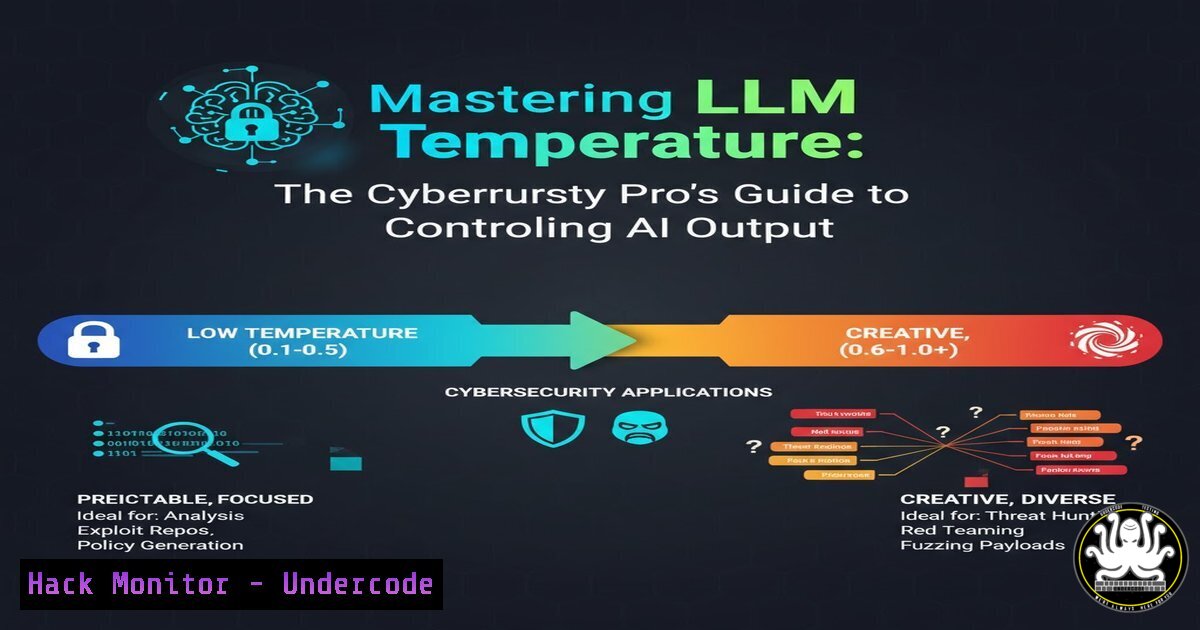
Temperature in LLMs controls the randomness of output generation, with lower values producing more deterministic results and higher values encouraging creativity. For cybersecurity applications, this translates directly to predictability versus potential security risks.
 Python example for controlling temperature in OpenAI API
import openai

response = openai.ChatCompletion.create(
model="gpt-4",
messages=[{"role": "user", "content": "Analyze this security log..."}],
temperature=0.3,  Low for consistent security analysis
max_tokens=500
)
Step-by-step guide:
- Set temperature between 0.1-0.3 for security-critical tasks requiring consistency
- Use 0.7-1.0 for creative tasks like threat scenario generation
- Implement temperature logging to track AI behavior patterns
- Monitor for temperature-induced hallucinations in security contexts
2. Dynamic Temperature Scaling for Multi-Agent Workflows
Multi-agent systems require sophisticated temperature management where different agents serve distinct purposes – from strict policy enforcement to creative threat modeling.
 Multi-agent temperature configuration
agent_temperatures = {
"security_analyzer": 0.2,
"threat_researcher": 0.6,
"incident_response": 0.3,
"vulnerability_scanner": 0.1
}

def get_agent_temperature(agent_type, context_risk_level):
base_temp = agent_temperatures[bash]
 Adjust based on real-time risk assessment
if context_risk_level > 0.7:
return min(base_temp, 0.3)  Lower temp for high-risk scenarios
return base_temp
Step-by-step guide:
- Map agent roles to appropriate temperature ranges
- Implement context-aware temperature adjustment
- Create risk-based temperature scaling algorithms
- Establish temperature boundaries for each agent type
- Monitor inter-agent consistency with varied temperatures
3. Temperature Monitoring and Security Controls
Continuous monitoring of temperature settings and their impact on output quality is essential for secure AI operations.
 Log temperature settings and output metrics
echo "$(date): Temperature change detected - Agent: $1, Old: $2, New: $3" >> /var/log/ai/temperature.log
grep "temperature" /var/log/ai/system.log | awk '{print $4, $7}' | sort -u

Monitor for temperature-induced anomalies
python3 -c "
import json
with open('/var/log/ai/responses.json') as f:
data = json.load(f)
high_temp_responses = [r for r in data if r['temperature'] > 0.8 and r['confidence'] < 0.7]
print(f'High-risk responses: {len(high_temp_responses)}')
"
Step-by-step guide:
- Implement temperature change auditing
- Set up alerts for unexpected temperature modifications
- Correlate temperature settings with output confidence scores
- Establish temperature rollback procedures
- Create temperature impact dashboards
4. API Security Hardening for Temperature Controls
Secure temperature parameter handling prevents manipulation and ensures consistent AI behavior.
 Secure temperature validation
import re
from flask import Flask, request, jsonify

app = Flask(<strong>name</strong>)

def validate_temperature(temp, user_role):
temp = float(temp)
if user_role == "security_analyst":
return max(0.0, min(temp, 0.5))  Stricter limits for security roles
elif user_role == "researcher":
return max(0.0, min(temp, 0.9))
else:
return 0.3  Default safe value

@app.route('/api/chat', methods=['POST'])
def chat_endpoint():
user_temp = request.json.get('temperature', 0.3)
user_role = request.headers.get('X-User-Role', 'default')

safe_temperature = validate_temperature(user_temp, user_role)

Proceed with API call using safe_temperature
return jsonify({"status": "processed", "temperature_used": safe_temperature})
Step-by-step guide:
- Implement role-based temperature constraints
- Validate all temperature inputs server-side
- Log temperature parameter changes
- Use API gateways for temperature enforcement
- Implement temperature-based rate limiting
5. Windows PowerShell for AI System Monitoring
Monitor AI systems and temperature impacts using Windows management tools.
 Monitor AI service performance and temperature correlations
Get-WinEvent -LogName "Application" | Where-Object {
$<em>.Message -like "temperature" -or $</em>.Message -like "AI"
} | Select-Object TimeCreated, Id, LevelDisplayName, Message

Check for temperature-related service changes
Get-Service | Where-Object {$<em>.DisplayName -like "AI"} |
ForEach-Object {
$service = $</em>
$events = Get-EventLog -LogName System -InstanceId 7036 -After (Get-Date).AddHours(-24) |
Where-Object {$_.Message -like "$($service.Name)"}
if ($events) {
Write-Host "Service: $($service.DisplayName), Status: $($service.Status)"
}
}
Step-by-step guide:
- Create scheduled tasks for AI service monitoring
- Implement event log correlation for temperature changes
- Set up performance counters for AI system metrics
- Configure alerts for abnormal temperature patterns
- Establish baseline performance with normal temperature ranges
6. Linux System Hardening for AI Deployments
Secure your AI infrastructure at the OS level to prevent unauthorized temperature manipulation.
!/bin/bash
 AI system security hardening script

Set strict permissions on configuration files
chmod 600 /etc/ai/temperature.conf
chown ai:ai /etc/ai/temperature.conf

Monitor temperature configuration changes
inotifywait -m -e modify /etc/ai/temperature.conf |
while read path action file; do
echo "$(date): Temperature config modified - investigating" >> /var/log/ai/security.log
 Trigger security analysis
python3 /opt/ai/security/analyze_temperature_change.py
done

Systemd service for temperature monitoring
cat > /etc/systemd/system/ai-temperature-monitor.service << EOF
[bash]
Description=AI Temperature Monitoring Service
After=network.target

[bash]
Type=simple
User=ai
ExecStart=/usr/local/bin/temperature_monitor.py
Restart=always

[bash]
WantedBy=multi-user.target
EOF

systemctl daemon-reload
systemctl enable ai-temperature-monitor
systemctl start ai-temperature-monitor
Step-by-step guide:
- Implement configuration file integrity monitoring
- Set up user privilege separation for temperature controls
- Configure auditd rules for AI system access
- Establish temperature change approval workflows
- Create automated response to unauthorized modifications
7. Cloud Security Configuration for AI Workloads
Secure your cloud-based AI systems with proper temperature management across distributed environments.
 CloudFormation template for secure AI deployment
Resources:
AITemperatureMonitor:
Type: AWS::Lambda::Function
Properties:
Runtime: python3.9
Handler: index.lambda_handler
Code:
ZipFile: |
import json
import boto3

def lambda_handler(event, context):
 Validate temperature settings from API Gateway
temperature = event.get('temperature', 0.3)
if temperature > 0.8:
return {
'statusCode': 400,
'body': json.dumps('Temperature too high for security operations')
}
 Process request with validated temperature
return {
'statusCode': 200,
'body': json.dumps('Request processed with safe temperature')
}

TemperatureSecurityGroup:
Type: AWS::EC2::SecurityGroup
Properties:
GroupDescription: "Limit access to AI temperature controls"
SecurityGroupIngress:
- IpProtocol: tcp
FromPort: 443
ToPort: 443
CidrIp: 10.0.0.0/16
Step-by-step guide:
- Implement cloud-native temperature monitoring
- Configure IAM policies for temperature control access
- Set up CloudWatch alerts for temperature anomalies
- Establish cross-region temperature consistency checks
- Deploy temperature-aware auto-scaling policies
What Undercode Say:
- Dynamic temperature management is becoming a security requirement, not just an optimization technique
- Organizations that fail to implement proper temperature controls will face increased AI security incidents
- The future of AI security lies in adaptive temperature systems that can self-regulate based on context and risk
The intersection of AI temperature control and cybersecurity represents a critical emerging discipline. As organizations increasingly rely on LLMs for security operations and business processes, the ability to precisely control and monitor temperature settings becomes paramount. Static temperature configurations create predictable attack surfaces, while dynamic optimization provides both performance benefits and security through adaptability. The most secure implementations will combine technical controls with organizational policies that recognize temperature management as a fundamental aspect of AI security posture.
Prediction:
Within two years, we’ll see the first major security breaches directly attributable to poor LLM temperature management, leading to industry-wide standards for temperature control and monitoring. Regulatory bodies will begin treating temperature settings as configurable security parameters subject to audit and compliance requirements, forcing organizations to implement sophisticated temperature governance frameworks.
🎯Let’s Practice For Free:
IT/Security Reporter URL:
Reported By: Briansgagne How – Hackers Feeds
Extra Hub: Undercode MoN
Basic Verification: Pass ✅


