Listen to this Post
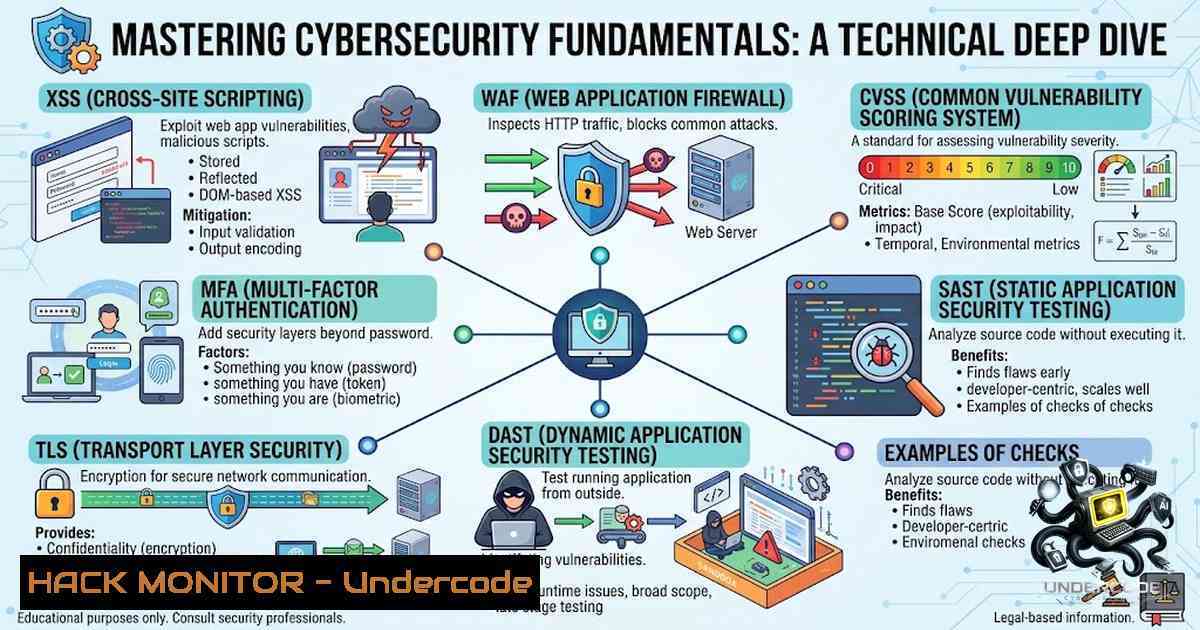
Introduction:
The modern cybersecurity landscape is defined by an overwhelming alphabet soup of acronyms—XSS, CSRF, SQLi, WAF, CVSS, SAST, DAST, TLS, MFA, and countless others. While memorizing these terms is a necessary first step, true security practitioners understand that mastery lies not in recognition but in practical application. This article bridges the gap between theory and execution, providing system administrators, DevOps engineers, and security professionals with actionable, step-by-step guides to implement the very defenses these acronyms represent—from deploying a Web Application Firewall (WAF) to hardening TLS configurations and integrating SAST/DAST into CI/CD pipelines.
Learning Objectives & Secrets:
- Objective 1: Deploy and Configure a Production-Grade WAF – Learn to install ModSecurity with the OWASP Core Rule Set (CRS) on Apache and Nginx, moving from detection-only mode to active enforcement while minimizing false positives.
-
Objective 2: Master Vulnerability Scoring with CVSS v3.1 – Understand how to calculate and interpret CVSS base scores using both interactive tools and command-line utilities, enabling data-driven risk prioritization.
-
Objective 3: Integrate SAST and DAST into DevSecOps Pipelines – Implement static and dynamic application security testing as automated gates in your CI/CD workflow, catching vulnerabilities before they reach production.
Secret Tip for Objective 2: Always pair CVSS scoring with environmental and threat metrics for context-aware prioritization—a Critical score in isolation doesn’t always mean “fix now” if the vulnerable component isn’t exposed.
Secret Tip for Objective 3: Run SAST scanners with multiple rule sets (e.g., Semgrep with `–config auto` and custom rules) to catch both OWASP Top 10 and organization-specific patterns.
You Should Know:
- Deploying a Web Application Firewall (WAF) with ModSecurity and OWASP CRS
A Web Application Firewall (WAF) acts as a gatekeeper between your web application and the internet, inspecting every HTTP request in real-time. ModSecurity, paired with the OWASP Core Rule Set, defends against SQL injection, cross-site scripting (XSS), cross-site request forgery (CSRF), and other OWASP Top 10 threats.
Step-by-Step Guide for Apache on Ubuntu/Debian:
 Update system packages
sudo apt update

Install ModSecurity for Apache
sudo apt install libapache2-mod-security2 -y

Enable the module
sudo a2enmod security2
sudo systemctl restart apache2

Verify installation
sudo apache2ctl -M | grep security2
Step-by-Step Guide for Nginx (ModSecurity v3):
Nginx requires building ModSecurity v3 as an external module:
 Install dependencies
sudo apt install git gcc g++ make libtool libpcre3 libpcre3-dev zlib1g zlib1g-dev libssl-dev -y

Clone and build ModSecurity v3
cd /usr/local/src
sudo git clone --depth 1 -b v3/master https://github.com/SpiderLabs/ModSecurity
cd ModSecurity
sudo git submodule init
sudo git submodule update
sudo ./build.sh
sudo ./configure
sudo make
sudo make install
Configure the OWASP Core Rule Set (CRS):
 Clone the CRS repository
cd /etc/modsecurity
sudo git clone https://github.com/coreruleset/coreruleset.git
sudo mv coreruleset crs

Copy the example configuration
sudo cp crs/crs-setup.conf.example crs/crs-setup.conf
Enable Rule Enforcement:
Edit `/etc/modsecurity/modsecurity.conf` and change:
SecRuleEngine DetectionOnly
to:
SecRuleEngine On
For Apache, include CRS rules in `/etc/apache2/mods-enabled/security2.conf`:
IncludeOptional /etc/modsecurity/crs/crs-setup.conf
IncludeOptional /etc/modsecurity/crs/rules/.conf
Restart and test:
sudo systemctl restart apache2
 Test with a SQL injection payload
curl "http://yourdomain.com/?id=1%27%20OR%20%271%27=%271"
 Check logs
sudo tail -f /var/log/apache2/modsec_audit.log
Production Best Practices: Start with `SecRuleEngine DetectionOnly` to monitor and fine-tune before enforcing. Review logs frequently for false positives and update CRS rules regularly from the official repository. Combine ModSecurity with Fail2ban and iptables for layered defense.
- Vulnerability Scoring with CVSS v3.1: From Theory to Practice
The Common Vulnerability Scoring System (CVSS) provides a standardized framework for rating the severity of security vulnerabilities. Understanding how to calculate and interpret CVSS scores is essential for prioritizing remediation efforts.
Using the CVSS v3.1 CLI Calculator:
The CVSS v3.1 CLI tool provides offline calculation capabilities ideal for vulnerability management engineers and red teamers.
 Clone the repository
git clone https://github.com/salehsulieman10/cvss-v3-calculator.git
cd cvss-v3-calculator
chmod +x cvss_cli.py

Calculate a score from a vector string
./cvss_cli.py "CVSS:3.1/AV:N/AC:L/PR:N/UI:N/S:C/C:H/I:H/A:H"

Get a detailed breakdown with explanations
./cvss_cli.py --explain "CVSS:3.1/AV:N/AC:L/PR:N/UI:N/S:C/C:H/I:H/A:H"

Output in JSON format for pipeline integration
./cvss_cli.py --json "CVSS:3.1/AV:N/AC:L/PR:N/UI:N/S:C/C:H/I:H/A:H"
Using the Dockerized CVSS Calculator:
For a web-based interactive interface:
 Pull and run the container
docker pull ghcr.io/friedjof/cvsscalcv3.1:latest
docker run -d -p 80:8080 ghcr.io/friedjof/cvsscalcv3.1:latest
 Navigate to http://localhost in your browser
Real-World Example – Log4Shell (CVE-2021-44228):
- Attack Vector: Network (AV:N)
- Attack Complexity: Low (AC:L)
- Privileges Required: None (PR:N)
- User Interaction: None (UI:N)
- Scope: Changed (S:C)
- CVSS v3.1 Score: 10.0 (Critical)
Understanding CVSS Metrics:
- Base Score (0.0–10.0): Represents the intrinsic characteristics of a vulnerability
- Impact Subscore: Measures confidentiality, integrity, and availability impact
- Exploitability Subscore: Reflects the ease of exploitation based on attack vector, complexity, privileges required, and user interaction
3. Integrating SAST and DAST into CI/CD Pipelines
Static Application Security Testing (SAST) scans source code at build time to identify vulnerabilities before deployment, while Dynamic Application Security Testing (DAST) tests running applications for runtime vulnerabilities and misconfigurations.
Using SecSuite for Unified Security Scanning:
SecSuite orchestrates multiple security scanners—Semgrep for SAST, Trivy for dependency scanning, Gitleaks for secrets detection, and OWASP ZAP for DAST—into a single, deduplicated report.
 Install SecSuite globally
npm i -g secsuite

Static scan (SAST + SCA + secrets + IaC)
secsuite scan .

Dynamic scan of a running application
secsuite dast https://staging.example.com

Accept current findings as baseline (gate only on NEW issues)
secsuite baseline .
git add .secsuite-baseline.json
git commit -m "Accept current security baseline"
GitHub Actions CI Integration:
jobs:
security:
runs-on: ubuntu-latest
steps:
- uses: actions/checkout@v4
with:
fetch-depth: 0  Full history for Gitleaks
- uses: kousthubha-sky/[email protected]
with:
severity: high
sarif-file: secsuite.sarif
- uses: github/codeql-action/upload-sarif@v4
if: always()
with:
sarif_file: secsuite.sarif
Running SAST with Semgrep Directly:
 Scan with auto-detected rules
docker run --rm -v ${PWD}:/src returntocorp/semgrep semgrep scan --config auto --error
Running DAST with OWASP ZAP:
 Full scan with ZAP container
docker run -v $(pwd):/zap/wrk -t ghcr.io/zaproxy/zaproxy:stable \
zap-full-scan.py -t https://staging.example.com -g gen.conf -r zap_report.html
Key Difference: SAST catches code-level vulnerabilities like SQL injection patterns and hardcoded secrets, while DAST identifies runtime issues like misconfigured headers, exposed endpoints, and input validation failures.
4. Hardening TLS Configurations on Nginx Servers
Transport Layer Security (TLS) is the first line of defense for any web service. A misconfigured TLS setup can expose your site to downgrade attacks, weak cipher suites, and man-in-the-middle snooping.
Nginx TLS Hardening Checklist:
 1. Enforce modern protocol versions
ssl_protocols TLSv1.2 TLSv1.3;
ssl_prefer_server_ciphers on;

<ol>
<li>Use strong cipher suites with AEAD and PFS
ssl_ciphers "TLS_AES_256_GCM_SHA384:TLS_AES_128_GCM_SHA256:TLS_CHACHA20_POLY1305_SHA256"
"ECDHE-ECDSA-AES256-GCM-SHA384:ECDHE-RSA-AES256-GCM-SHA384"
"ECDHE-ECDSA-AES128-GCM-SHA256:ECDHE-RSA-AES128-GCM-SHA256";
Generate a Strong Diffie-Hellman Parameter:
 Generate 4096-bit DH params (run once)
openssl dhparam -out /etc/nginx/dhparam.pem 4096
Reference it in the Nginx config:
ssl_dhparam /etc/nginx/dhparam.pem;
Enable HSTS and OCSP Stapling:
 4. HTTP Strict Transport Security
add_header Strict-Transport-Security "max-age=31536000; includeSubDomains; preload" always;

<ol>
<li>OCSP Stapling
ssl_stapling on;
ssl_stapling_verify on;
resolver 8.8.8.8 8.8.4.4 valid=300s;
resolver_timeout 5s;
Rotate Session Tickets Regularly:
 Generate a new ticket key (rotate weekly)
openssl rand -hex 48 > /etc/nginx/ticket.key
Reference in config:
ssl_session_ticket_key /etc/nginx/ticket.key;
Testing Your Configuration:
 Test with nmap
nmap --script ssl-enum-ciphers,ssl-cert -p 443 example.com

Check for Heartbleed vulnerability
nmap -p 443 --script ssl-heartbleed example.com

Local test with testssl.sh
testssl.sh https://yourdomain.com
Aim for an A+ rating on the SSL Labs test.
5. Implementing Multi-Factor Authentication (MFA)
MFA is a security framework requiring users to verify their identity using two or more independent factors. According to Microsoft, MFA blocks 99% of automated cyberattacks. With stolen credentials being the top cause of data breaches, MFA is no longer optional.
MFA Authentication Factors:
- Something You Know: Passwords, PINs
- Something You Have: Smartphone, hardware token, smart card
- Something You Are: Fingerprints, facial recognition, voice patterns
Implementation Steps:
- Assess Your Needs and Risks – Identify which systems and users require MFA protection
- Develop a Rollout Plan – Start with high-privilege accounts and expand gradually
- Choose Authentication Methods – TOTP apps (Google/Microsoft Authenticator), push notifications, SMS/email OTPs, or biometrics
- Integrate with Existing Infrastructure – Connect MFA with SSO providers, VPNs, and SaaS applications
- Provide Multiple MFA Options – Offer TOTP, push notifications, and passkeys to accommodate user preferences
MFA Best Practices:
- Deploy MFA with equal weight across internal systems and external access
- Use phishing-resistant MFA methods (e.g., FIDO2/WebAuthn) where possible
- Monitor MFA logs for failed authentication attempts—they may indicate credential stuffing attacks
- Implement conditional access policies that require MFA based on risk signals (e.g., unusual location, new device)
What Undercode Say:
- Key Takeaway 1: Cybersecurity fundamentals—XSS, WAF, CVSS, SAST, DAST, TLS, MFA—are not just vocabulary words but the building blocks of a comprehensive defense strategy. Mastery requires moving from recognition to hands-on implementation.
-
Key Takeaway 2: The shift-left movement in DevSecOps demands that security be integrated at every stage of the software development lifecycle. SAST catches issues at coding time, DAST validates running applications, and WAFs protect deployed services—each layer is essential.
Analysis: The cybersecurity industry’s reliance on acronyms can create a false sense of expertise. Knowing what “WAF” stands for is trivial; understanding how to deploy ModSecurity with OWASP CRS, tune it to minimize false positives, and integrate it with Fail2ban for layered defense is where real value lies. Similarly, CVSS scoring is meaningless without the context of environmental and threat metrics. The most effective security practitioners are those who can translate theory into action—running the commands, writing the configurations, and testing the defenses. The tools and commands provided in this article serve as a practical foundation for that journey.
Prediction:
- +1 Organizations that successfully integrate SAST, DAST, and WAF into their CI/CD pipelines will experience significantly fewer production vulnerabilities and faster mean time to remediation (MTTR), as security becomes a natural part of the development workflow rather than a post-deployment afterthought.
-
+1 The adoption of phishing-resistant MFA methods (FIDO2/WebAuthn) will accelerate as organizations recognize that SMS-based OTPs and push notifications remain vulnerable to sophisticated social engineering attacks.
-
-1 Organizations that treat cybersecurity acronyms as mere vocabulary rather than actionable capabilities will continue to suffer from preventable breaches. The gap between “knowing the terms” and “implementing the controls” represents a significant security debt that adversaries will eagerly exploit.
-
+1 The commoditization of security scanning tools—as exemplified by SecSuite’s ability to orchestrate multiple scanners with a single command—will lower the barrier to entry for DevSecOps adoption, enabling smaller teams to implement enterprise-grade security testing.
-
-1 The increasing complexity of TLS configurations (protocol versions, cipher suites, HSTS, OCSP stapling, session ticket rotation) means that misconfigurations will remain a persistent vulnerability vector. Automated configuration validation tools will become essential to prevent human error.
▶️ Related Video (76% Match):
https://www.youtube.com/watch?v=-HNaneKkF0w
🎯Let’s Practice For Free:
🎓 Live Courses & Certifications:
Join Undercode Academy for Verified Certifications
🚀 Request a Custom Project:
Secure, high-velocity infrastructure and disruptive technological engineering. Contact our engineering team for high-tier development and proprietary systems:
[email protected]
💎 Smart Architecture | 🛡️ Secure by Design | ⭐ Trusted by Thousands
IT/Security Reporter URL:
Reported By: https://lnkd.in/p/eqMHmZ3a – Hackers Feeds
Extra Hub: Undercode MoN
Basic Verification: Pass ✅


