Listen to this Post
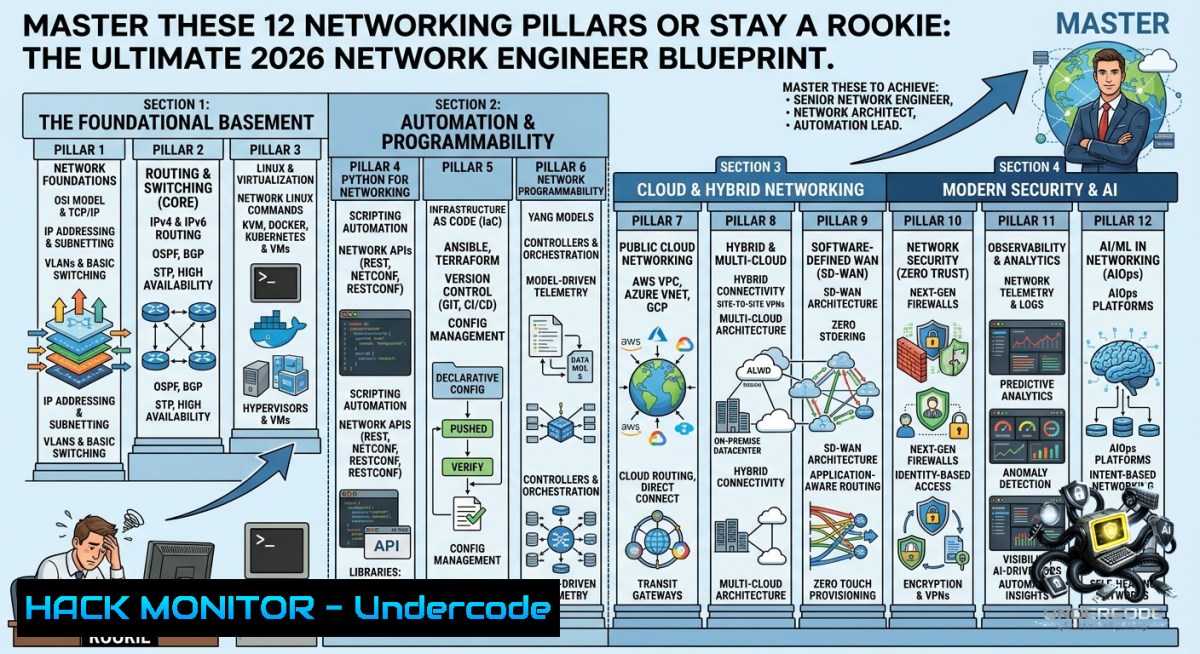
Introduction:
Networking is the backbone of modern IT infrastructure, yet many aspiring engineers jump straight into cloud or automation without mastering the core protocols and hardware interactions that keep data moving securely. This article extracts a comprehensive learning roadmap from industry expert G M Faruk Ahmed, CISSP, CISA, and adds hands-on commands, configuration examples, and scripting tutorials to transform theory into practical, job-ready skills.
Learning Objectives:
– Understand and apply IP addressing, subnetting, and CIDR notation across both IPv4 and IPv6 networks.
– Configure VLANs, inter-VLAN routing, and access control lists (ACLs) on enterprise switches and routers.
– Use Linux/Windows troubleshooting tools and Python automation to monitor, secure, and optimize network performance.
You Should Know:
1. Master Subnetting with CIDR & VLSM – The Single Most Valuable Skill
Subnetting divides a large network into smaller, manageable broadcast domains, reducing congestion and improving security. VLSM allows variable-length subnet masks to optimize address allocation. Start by practicing binary conversion and CIDR notation.
Step‑by‑step guide to calculate subnets:
– Given `192.168.10.0/24`, borrow 2 bits for 4 subnets. New mask = `/26` (255.255.255.192).
– Increment = 64. Subnets: `.0`, `.64`, `.128`, `.192`.
– For VLSM: Allocate largest subnet first (e.g., /27 for 30 hosts), then smaller.
Linux/Windows commands to verify:
 Linux – show interfaces with subnet info
ip addr show
 Windows – display IP configuration with subnet mask
ipconfig /all
 Calculate subnet using `ipcalc` (Linux)
ipcalc 192.168.10.0/26
2. Switch Configuration: VLANs, Trunking & Spanning Tree
VLANs logically segment a switch into separate broadcast domains. Trunking (802.1Q) carries multiple VLANs between switches. STP prevents loops by blocking redundant links.
Step‑by‑step guide (Cisco IOS):
1. Create VLANs: `vlan 10` → `name Sales` → `vlan 20` → `name Engineering`
2. Assign ports: `interface f0/1` → `switchport mode access` → `switchport access vlan 10`
3. Configure trunk: `interface g0/1` → `switchport mode trunk` → `switchport trunk allowed vlan 10,20`
4. Verify STP: `show spanning-tree`
Windows/Linux equivalent (using Open vSwitch):
 Create bridge and VLAN
ovs-vsctl add-br br0
ovs-vsctl add-port br0 eth0 tag=10
3. Static & Dynamic Routing (OSPF) with Route Redistribution
Static routes are manually defined; dynamic protocols like OSPF automatically learn and adapt to network changes. Route redistribution allows different protocols (e.g., OSPF and EIGRP) to exchange routes.
Step‑by‑step guide for static route (Linux):
 Add a static route to 10.0.0.0/8 via gateway 192.168.1.1
sudo ip route add 10.0.0.0/8 via 192.168.1.1
 Make persistent (Ubuntu) – edit /etc/netplan/ or add to /etc/rc.local
OSPF configuration on a Cisco router:
router ospf 1
network 192.168.1.0 0.0.0.255 area 0
network 10.0.0.0 0.0.255.255 area 0
redistribute static subnets
Verify with `show ip route ospf` and `show ip ospf neighbor`.
4. Network Troubleshooting Toolbox – Ping, Traceroute, Netstat & Wireshark
Ping tests reachability using ICMP. Traceroute maps the path. Netstat shows active connections and listening ports. Wireshark captures and analyzes packets in real time.
Step‑by‑step troubleshooting workflow:
1. Ping target: `ping 8.8.8.8` (Windows/Linux). If fails, check local connectivity.
2. Traceroute to identify hop failure: `tracert 8.8.8.8` (Windows) / `traceroute 8.8.8.8` (Linux).
3. Netstat for listening services: `netstat -an` (Windows) / `netstat -tulpn` (Linux).
4. Capture with Wireshark: Filter `icmp` or `arp` to see requests/replies. Use `tcpdump -i eth0 -w capture.pcap` (Linux) to capture CLI.
Windows command to reset TCP/IP stack:
netsh int ip reset
netsh winsock reset
5. Network Security Basics – ACLs, Firewall Rules & Zero Trust
ACLs filter traffic based on IP, port, or protocol. Firewalls enforce policies; Zero Trust assumes no implicit trust, requiring continuous verification.
Step‑by‑step guide for extended ACL on Cisco router:
access-list 101 deny tcp 192.168.1.0 0.0.0.255 any eq 23
access-list 101 permit ip any any
interface g0/0
ip access-group 101 in
This blocks Telnet (port 23) from the 192.168.1.0/24 network.
Linux iptables (firewall) example:
 Block SSH from 10.0.0.5
sudo iptables -A INPUT -s 10.0.0.5 -p tcp --dport 22 -j DROP
 Save rules
sudo iptables-save > /etc/iptables/rules.v4
Zero Trust practical step: Implement micro-segmentation using VLANs and firewall rules that require authentication for every flow, even within the same subnet.
6. Network Automation with Python & Ansible
Python scripts can SSH into devices, parse `show` commands, and push configurations. Ansible uses playbooks for idempotent network automation across hundreds of devices.
Step‑by‑step Python script using Netmiko (Cisco SSH):
from netmiko import ConnectHandler
device = {
'device_type': 'cisco_ios',
'ip': '192.168.1.1',
'username': 'admin',
'password': 'secret',
}
connection = ConnectHandler(device)
output = connection.send_command('show ip interface brief')
print(output)
connection.disconnect()
Save as `show_interfaces.py` and run with `python3 show_interfaces.py`.
Ansible playbook to back up config:
- name: Backup router config
hosts: routers
tasks:
- name: Run show run
ios_command:
commands: show running-config
register: config
- name: Save to file
copy:
content: "{{ config.stdout[bash] }}"
dest: "./backups/{{ inventory_hostname }}.cfg"
Run with `ansible-playbook backup.yml -i inventory`.
What Undercode Say:
– Key Takeaway 1: IP addressing and subnetting is the non-1egotiable foundation – without it, routing, security, and troubleshooting collapse. Master CIDR and VLSM before touching any other topic.
– Key Takeaway 2: Automation (Python + Ansible) and cloud networking (AWS VPC, Azure vNET) are now mandatory even for entry-level roles; traditional CLI-only skills are insufficient.
Analysis (approx. 10 lines):
The roadmap from G M Faruk Ahmed correctly prioritizes OSI model, subnetting, and switching/routing as the core pillars. However, modern networks demand integration of security (Zero Trust, VPN) and programmability. The inclusion of cloud networking and automation reflects industry shifts where hybrid architectures dominate. Certifications like CCNA and Network+ validate theory, but hands-on practice with Wireshark, iptables, and Python SSH libraries is what differentiates candidates. Many engineers memorize protocols without understanding packet flow – using `tcpdump` or `netstat` during simulated failures builds real intuition. The list omits SD-WAN and network observability (e.g., Prometheus + SNMP exporters), which are growing in enterprise demand. Still, following this 12‑point plan and practicing the step‑by‑step commands above will prepare anyone for junior to mid‑level network engineering roles. Regularly breaking and fixing lab environments (using GNS3, EVE‑NG, or Cisco CML) accelerates learning far faster than passive reading.
Expected Output:
A learner completing the above sections will be able to: calculate subnets for any CIDR block, configure VLANs and trunking on a switch, set up static/OSPF routing between three routers, diagnose network slowness using `traceroute` and Wireshark filters, implement ACLs to block malicious traffic, and write a Python script to backup device configurations. This skill set directly maps to the objectives of CCNA and CompTIA Network+ exams.
Prediction:
– +1 Demand for network engineers who combine traditional routing/switching with Python automation will rise 35% by 2028, as infrastructure-as-code becomes standard in hybrid clouds.
– -1 Certificate‑only candidates without practical troubleshooting experience will be filtered out by technical interviews that include live packet capture analysis and subnetting quizzes.
– +1 Adoption of eBPF for network observability and AI‑driven network analytics (e.g., Juniper Mist AI) will reduce manual monitoring, but engineers who understand underlying protocols (TCP, UDP, ICMP) will still be irreplaceable for root-cause analysis.
– -1 Over‑reliance on cloud “virtual networking” abstracts away physical issues (fiber degradation, switch buffer exhaustion), leading to a skill gap in hardware troubleshooting – a risk for on‑prem and edge data centers.
– +1 Zero Trust network access (ZTNA) will replace VPNs by 2030, so learning identity‑based segmentation (e.g., using Tailscale or OpenZiti) alongside traditional ACLs will future‑proof your career.
▶️ Related Video (78% Match):
🎯Let’s Practice For Free:
🎓 Live Courses & Certifications:
[Join Undercode Academy for Verified Certifications](https://undercode.co.uk/certifications/)
🚀 Request a Custom Project:
Secure, high-velocity infrastructure and disruptive technological engineering. Contact our engineering team for high-tier development and proprietary systems:
[[email protected]](mailto:[email protected])
💎 Smart Architecture | 🛡️ Secure by Design | ⭐ Trusted by Thousands
IT/Security Reporter URL:
Reported By: [Gmfaruk Cybersecurity](https://www.linkedin.com/posts/gmfaruk_cybersecurity-networksecurity-networkengineer-ugcPost-7467760121654382592-GucC/) – Hackers Feeds
Extra Hub: Undercode MoN
Basic Verification: Pass ✅
🔐JOIN OUR CYBER WORLD [ CVE News • HackMonitor • UndercodeNews ]
[💬 Whatsapp](https://undercode.help/whatsapp) | [💬 Telegram](https://t.me/UndercodeCommunity)
📢 Follow UndercodeTesting & Stay Tuned:
[𝕏 formerly Twitter 🐦](https://x.com/undercodeupdate) | [@ Threads](https://www.threads.net/@undercodetesting) | [🔗 Linkedin](https://www.linkedin.com/company/undercodetesting/) | [🦋BlueSky](https://bsky.app/profile/undercode.bsky.social)


