Listen to this Post
Introduction
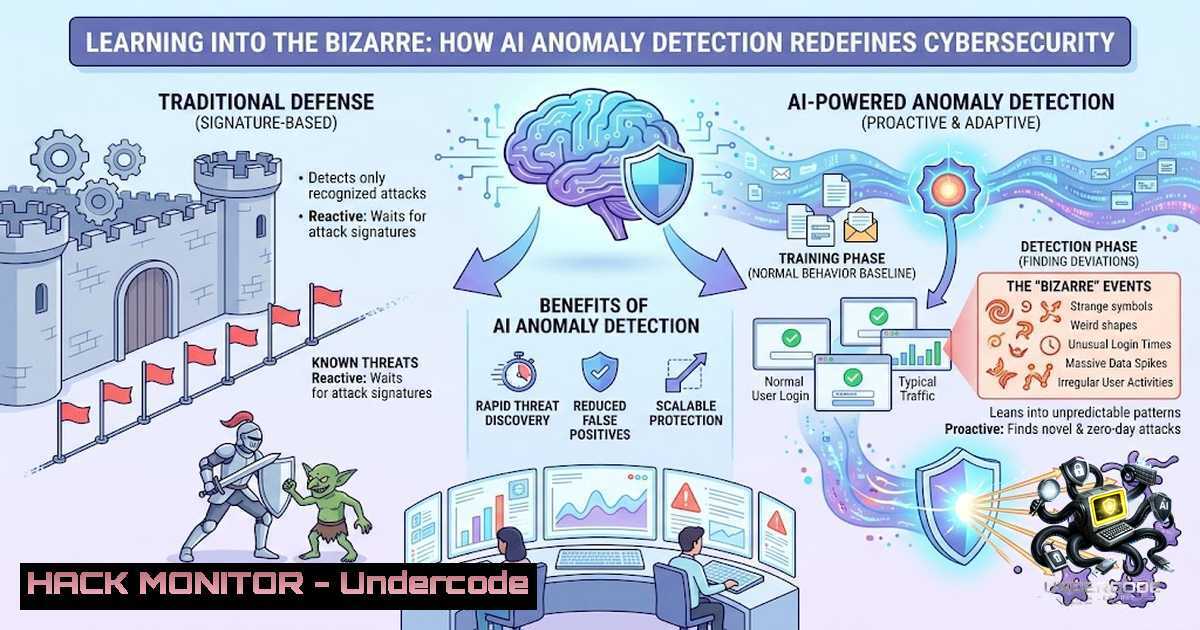
In cybersecurity, the most devastating breaches often begin with behavior that appears innocuous—a service account downloading an extra few gigabytes of data, a privileged user logging in at an unusual hour, or an AI agent executing a seemingly routine system command. Security teams traditionally dismiss these events as noise, but attackers increasingly rely on this psychological blind spot. The organizations that lean into this “bizarre” behavior—treating the unfamiliar as a signal rather than static—are the ones gaining the defensive advantage in an era where AI-generated threats evolve faster than signature-based tools can track.
Learning Objectives
- Understand how AI-driven anomaly detection transforms threat identification by establishing behavioral baselines and flagging deviations that traditional rule-based systems miss.
- Master practical implementation of anomaly detection tools across Linux, Windows, and cloud environments using both open-source and enterprise-grade solutions.
- Develop skills to configure, tune, and operationalize AI-powered security monitoring to reduce false positives and accelerate incident response.
You Should Know
1. Behavioral Baselines: The Foundation of Anomaly Detection
Traditional cybersecurity relies on signatures and rules—known patterns of malicious activity. But attackers have moved beyond these constraints. Generative AI now produces malware that mutates both its code and behavior, creating polymorphic and nondeterministic variants that evade signature-based detection. Similarly, attackers are beginning to hide malicious activity inside trusted AI coding assistants and CI pipelines, mimicking routine developer behavior so closely that current detection tools fail entirely.
Anomaly detection flips this paradigm. Instead of looking for known bad, it learns what normal looks like and flags everything else. This approach, powered by machine learning and AI, enables security teams to detect zero-day exploits, living-off-the-land (LotL) attacks, and AI-agent abuse that would otherwise slip through.
Step-by-Step: Building a Behavioral Baseline with Elastic Detection Rules
Elastic’s detection framework provides a practical entry point for AI-powered anomaly detection. The platform can detect non-allowlisted `curl` activity across Linux, macOS, and Windows hosts, using an LLM to assess whether the activity is malicious, benign, or requires investigation. It also detects child process execution from GenAI tools or MCP (Model Context Protocol) servers—a critical capability as adversaries exploit AI agents to execute system commands, exfiltrate data, or establish persistence.
Linux Command: Monitoring for Suspicious `curl` Executions
 Monitor all curl executions with detailed process information
sudo auditctl -a always,exit -F path=/usr/bin/curl -F perm=x -k curl_monitoring

Review audit logs for curl activity
sudo ausearch -k curl_monitoring --format raw | grep -E "curl.http"

Real-time monitoring of curl executions
sudo tail -f /var/log/audit/audit.log | grep "curl"
Windows Command (PowerShell): Detecting Unusual Process Creation
 Enable PowerShell script block logging for AI agent monitoring
Set-ItemProperty -Path "HKLM:\SOFTWARE\Policies\Microsoft\Windows\PowerShell\ScriptBlockLogging" -1ame "EnableScriptBlockLogging" -Value 1

Query Windows Event Log for suspicious process creation (Event ID 4688)
Get-WinEvent -FilterHashtable @{LogName='Security'; ID=4688} |
Where-Object {$<em>.Message -match "curl|wget|powershell.-enc"} |
Select-Object TimeCreated, @{N='Process';E={$</em>.Properties[bash].Value}}, @{N='CommandLine';E={$_.Properties[bash].Value}}

Monitor for AI tool child processes (e.g., Python executing from GenAI tools)
Get-WinEvent -FilterHashtable @{LogName='Security'; ID=4688} |
Where-Object {$_.Message -match "python|node|ollama"} |
Format-Table TimeCreated, Message -AutoSize
Tool Configuration: Clawguard for AI Agent Monitoring
Clawguard provides real-time monitoring for AI agent activity, detecting dangerous commands and prompt injection attacks across Windows, Mac, and Linux without installation requirements:
 Install Clawguard globally (optional)
npm install -g @stanchat/clawguard

Run Clawguard to monitor AI agent activity
npx @stanchat/clawguard monitor --agent <agent-process-id>

Detect dangerous command patterns
npx @stanchat/clawguard scan --log-file /path/to/agent.log
2. Unsupervised Learning: Detecting the Unknown Unknowns
Rule-based systems fail when faced with attacks that have no known signature. Unsupervised machine learning—particularly Isolation Forest, autoencoders, and Bayesian models—addresses this gap by identifying anomalies without requiring labeled attack datasets. These models learn the statistical patterns of normal behavior and flag deviations in real time.
For example, Darktrace’s ActiveAI Security Platform uses self-learning AI to detect both known and novel threats, employing ML and Bayesian techniques to autonomously respond without disrupting operations. Similarly, ProbeAIT integrates multi-stage AI to identify, explain, and track anomalous events across networks, applications, and human interactions.
Step-by-Step: Implementing Isolation Forest for Network Anomaly Detection
Isolation Forest is particularly effective for cybersecurity because it isolates anomalies rather than profiling normal points. Here’s how to implement it using Python:
 Install required libraries
 pip install scikit-learn pandas numpy

import pandas as pd
import numpy as np
from sklearn.ensemble import IsolationForest
from sklearn.preprocessing import StandardScaler

Load network traffic data (example: NetFlow or pcap features)
 Features: bytes_in, bytes_out, packets, duration, ports, protocol
data = pd.read_csv('network_traffic.csv')

Select numerical features for anomaly detection
features = ['bytes_in', 'bytes_out', 'packets', 'duration', 'src_port', 'dst_port']
X = data[bash]

Scale features for better model performance
scaler = StandardScaler()
X_scaled = scaler.fit_transform(X)

Train Isolation Forest model
 contamination: expected proportion of outliers (adjust based on environment)
model = IsolationForest(contamination=0.01, random_state=42)
data['anomaly_score'] = model.fit_predict(X_scaled)
data['anomaly'] = data['anomaly_score'] == -1  -1 indicates anomaly

Display detected anomalies
anomalies = data[data['anomaly'] == True]
print(f"Detected {len(anomalies)} anomalous events")
print(anomalies[['bytes_in', 'bytes_out', 'packets', 'duration']].head())
Linux Command: Real-Time Network Traffic Analysis with tcpdump
 Capture network traffic for anomaly analysis
sudo tcpdump -i eth0 -1n -c 1000 -w traffic_capture.pcap

Extract connection statistics for ML analysis
sudo tcpdump -r traffic_capture.pcap -1n | \
awk '{print $3, $5}' | \
sort | uniq -c | sort -1r | head -20

Monitor for unusual port scanning patterns
sudo tcpdump -i eth0 'tcp[bash] & (tcp-syn) != 0 and tcp[bash] & (tcp-ack) == 0' -1n
Windows Command: Network Connection Monitoring
 Monitor active network connections for anomalies
netstat -anob | Select-String "ESTABLISHED" |
ForEach-Object { $_ -replace '\s+', ' ' } |
Sort-Object | Uniq -c | Sort-Object -Descending

Log connection events for ML analysis (enable auditing first)
auditpol /set /subcategory:"Filtering Platform Connection" /success:enable /failure:enable

Query connection events from Security log
Get-WinEvent -FilterHashtable @{LogName='Security'; ID=5156} |
Select-Object TimeCreated, @{N='Source';E={$<em>.Properties[bash].Value}},
@{N='Destination';E={$</em>.Properties[bash].Value}} |
Export-Csv -Path connection_events.csv -1oTypeInformation
- API Security: Anomaly Detection at the Application Layer
APIs represent the most exposed attack surface in modern architectures. AI-driven API security platforms detect and block both known threats (OWASP Top 10) and unknown threats with no signature, significantly reducing false positives and alert fatigue. These systems use unsupervised learning to identify anomalies and zero-day attacks before they reach backend servers.
The ALERT (Agentic Learning for Event-driven Response and Threat Detection) framework exemplifies this approach—a lightweight, CPU-only closed-loop SOC agent that provides adaptive anomaly detection for web and API security.
Step-by-Step: Deploying an AI-Powered API Firewall
The `ai-api-firewall` project provides an intelligent, machine-learning-powered API Gateway that detects and blocks malicious web traffic in real time:
 Clone the AI API Firewall repository
git clone https://github.com/Wadan3/ai-api-firewall.git
cd ai-api-firewall

Install dependencies
pip install -r requirements.txt

Configure the firewall (edit config.yaml)
 - Set API endpoints to protect
 - Define baseline learning period
 - Configure anomaly thresholds

Start the firewall in learning mode (baseline establishment)
python api_firewall.py --mode learn --config config.yaml --duration 168h

Switch to detection mode after baseline is established
python api_firewall.py --mode detect --config config.yaml

Monitor real-time API traffic anomalies
python api_firewall.py --mode monitor --alert-webhook <your-webhook-url>
API Security Testing: Detecting Anomalous API Calls
 Use curl to test API endpoints with abnormal payloads
curl -X POST https://api.example.com/v1/data \
-H "Content-Type: application/json" \
-d '{"query": "'; DROP TABLE users; --"}' \
-v

Monitor API response anomalies (status codes, response times)
for i in {1..100}; do
time curl -s -o /dev/null -w "%{http_code}\n" https://api.example.com/v1/health
done | sort | uniq -c

Detect API rate-limiting bypass attempts
curl -X GET https://api.example.com/v1/users -H "X-Forwarded-For: 192.168.1.$RANDOM"
Windows PowerShell: API Security Monitoring
 Monitor IIS logs for API anomalies
$iisLogs = Get-ChildItem "C:\inetpub\logs\LogFiles\W3SVC1.log"
foreach ($log in $iisLogs) {
Get-Content $log.FullName |
Select-String "POST|PUT|DELETE" |
Where-Object {$_ -match "500|404|403"} |
Export-Csv -Path api_errors.csv -Append
}

Real-time API endpoint monitoring with custom thresholds
while ($true) {
$response = Invoke-WebRequest -Uri "https://api.example.com/v1/status" -Method GET
if ($response.StatusCode -1e 200) {
Write-Host "ALERT: API anomaly detected - Status: $($response.StatusCode)" -ForegroundColor Red
}
Start-Sleep -Seconds 5
}
- Cloud Hardening: AI-Driven Threat Detection Across Multi-Cloud Environments
Multi-cloud environments present unique challenges for anomaly detection. Coordinated attacks can span AWS, Azure, and Google Cloud, exploiting misconfigurations and IAM vulnerabilities across providers. AI-driven frameworks now enable cross-cloud threat correlation, using custom correlation functions to detect attacks that would appear isolated when viewed within a single cloud provider.
Agentic AI solutions scan IAM roles, permissions, and access policies across AWS, Azure, and GCP to detect privilege escalation risks and insecure configurations—eliminating the need for manual checks. Microsoft Defender for Cloud extends this capability by continuously monitoring AI workloads and analyzing attack paths to identify weaknesses and vulnerabilities.
Step-by-Step: Multi-Cloud Anomaly Detection with CloudQuery
CloudQuery provides a comprehensive security analysis platform that ingests multi-cloud resource data and analyzes security risks using AI-powered threat detection:
 Install CloudQuery
brew install cloudquery/tap/cloudquery  macOS
 or
curl -L https://github.com/cloudquery/cloudquery/releases/latest/download/cloudquery_linux_amd64 -o cloudquery
chmod +x cloudquery

Configure CloudQuery for multi-cloud (AWS, Azure, GCP)
 Create cloudquery.yml with sources for each provider
cat > cloudquery.yml << EOF
kind: source
spec:
name: aws
path: cloudquery/aws
version: "v23.0.0"
tables: ["aws_iam_", "aws_s3_", "aws_ec2_"]
destinations: ["postgresql"]

kind: source
spec:
name: azure
path: cloudquery/azure
version: "v11.0.0"
tables: ["azure_"]
destinations: ["postgresql"]

kind: destination
spec:
name: postgresql
path: cloudquery/postgresql
version: "v7.0.0"
spec:
connection_string: "postgresql://postgres:password@localhost:5432/cloudsecurity"
EOF

Fetch resources from all clouds
cloudquery sync cloudquery.yml

Query for IAM anomalies (e.g., overprivileged roles)
psql -d cloudsecurity -c "
SELECT account_id, role_name, policy_name,
jsonb_array_length(statement) as statement_count
FROM aws_iam_roles
WHERE jsonb_array_length(statement) > 10
ORDER BY statement_count DESC;
"
AWS CLI: Detecting Unusual API Call Patterns
 Enable CloudTrail for API call logging
aws cloudtrail create-trail --1ame security-trail --s3-bucket-1ame your-cloudtrail-bucket

Analyze CloudTrail logs for anomalous API patterns
aws cloudtrail lookup-events --lookup-attributes AttributeKey=EventName,AttributeValue=CreateUser \
--start-time "$(date -d '1 hour ago' -u +%Y-%m-%dT%H:%M:%SZ)" \
--end-time "$(date -u +%Y-%m-%dT%H:%M:%SZ)"

Detect unusual IAM role assumption patterns
aws cloudtrail lookup-events --lookup-attributes AttributeKey=EventName,AttributeValue=AssumeRole \
--max-results 50 | grep -E "userName|assumedRoleUser"
Azure CLI: Monitoring for Anomalous Activity
 Enable Azure Activity Log diagnostic settings
az monitor diagnostic-settings create \
--1ame security-diagnostics \
--resource /subscriptions/{subscription-id}/providers/microsoft.insights/eventtypes/management \
--logs '[{"category": "Administrative", "enabled": true}]' \
--storage-account {storage-account-id}

Query Azure Activity Log for unusual events
az monitor activity-log list \
--start-time 2026-08-01 \
--end-time 2026-08-06 \
--query "[?contains(operationName.value, 'Microsoft.Authorization')]" \
--output table

Detect privileged role assignments
az role assignment list --include-inherited \
--query "[?roleDefinitionName=='Owner' || roleDefinitionName=='Contributor']" \
--output table
GCP Command: Security Command Center Anomaly Detection
 Enable Security Command Center
gcloud scc settings update \
--organization={org-id} \
--enable-security-health-analytics

Query for anomaly findings
gcloud scc findings list {org-id} \
--filter="category=\"ANOMALOUS_BEHAVIOR\"" \
--format="table(name, category, state, eventTime)"

Monitor for anomalous IAM changes
gcloud asset search-all-iam-policies \
--query="policy.roles roles/owner" \
--asset-types="cloudresourcemanager.googleapis.com/Project" \
--format="table(assetType, project, policy)"
5. AI Agent Security: Detecting Rogue AI Behavior
As organizations deploy AI agents for automated operations, a new threat vector emerges: rogue AI agents that use valid credentials, query logs, and access sensitive data—behaving indistinguishably from legitimate analysts. These agents can accumulate permissions outside normal product cycles, signaling identity and access deviations that behavioral models can detect.
The challenge is compounded by the fact that MCP servers provide LLMs direct access to execute shell commands, read files, and interact with external services—creating a massive attack surface.
Step-by-Step: Implementing AI Agent Runtime Protection with NanoMind
NanoMind provides on-device models that detect and classify AI agent attacks, including a 2M-parameter classifier (<1ms, offline) and a 1.7B-parameter analyst for behavioral anomaly detection:
 Install NanoMind CLI
pip install nanomind

Run NanoMind in runtime mode for behavioral anomaly detection
nanomind runtime --pid <agent-process-id> \
--model behavioral \
--threshold 0.85

Analyze AI agent command history for anomalies
nanomind analyze --log-file /var/log/agent/commands.log \
--output json > agent_anomalies.json

Deploy NanoMind as a sidecar container for Kubernetes AI workloads
cat > nanomind-sidecar.yaml << EOF
apiVersion: v1
kind: Pod
metadata:
name: ai-agent-with-1anomind
spec:
containers:
- name: ai-agent
image: your-ai-agent:latest
- name: nanomind-sidecar
image: nanomind/runtime:latest
args: ["--monitor", "localhost:8080", "--alert-webhook", "https://soc.yourorg.com/alerts"]
EOF
kubectl apply -f nanomind-sidecar.yaml
Linux Command: Monitoring AI Agent File Access Patterns
 Monitor AI agent file access with auditd
sudo auditctl -a always,exit -F uid=<agent-user-id> -F dir=/etc -S open,read,write -k ai_agent_access
sudo auditctl -a always,exit -F uid=<agent-user-id> -F dir=/var/secrets -S open,read -k ai_agent_secrets

Review access logs for suspicious patterns
sudo ausearch -k ai_agent_access --format csv | \
awk -F',' '{print $4, $7, $10}' | \
sort | uniq -c | sort -1r

Real-time monitoring of AI agent process tree
ps auxf | grep -E "python|node|ollama|llama" | \
while read line; do
pid=$(echo $line | awk '{print $2}')
pstree -p $pid
done
Windows PowerShell: Detecting Rogue AI Activity
 Monitor AI agent process activity with Sysmon (requires Sysmon installed)
$sysmonEvents = Get-WinEvent -FilterHashtable @{LogName='Microsoft-Windows-Sysmon/Operational'; ID=1}
$sysmonEvents | Where-Object {
$<em>.Message -match "python|node|ollama" -and
$</em>.Message -match "cmd|powershell|curl|wget"
} | Select-Object TimeCreated, @{N='CommandLine';E={$_.Properties[bash].Value}}

Detect AI agent accessing sensitive directories
$sensitivePaths = @("C:\Users\AppData\Local\Temp", "C:\Windows\Temp", "C:\ProgramData\")
foreach ($path in $sensitivePaths) {
Get-ChildItem -Path $path -Recurse -File -ErrorAction SilentlyContinue |
Where-Object {$_.LastAccessTime -gt (Get-Date).AddMinutes(-5)} |
Select-Object FullName, LastAccessTime
}

Monitor AI agent network connections for data exfiltration
Get-1etTCPConnection -State Established |
Where-Object {$_.OwningProcess -in (Get-Process -1ame "python","node","ollama").Id} |
Select-Object LocalAddress, LocalPort, RemoteAddress, RemotePort, OwningProcess
6. Training and Certification: Building AI Security Competency
The rapid evolution of AI-powered threats demands continuous skill development. The Certified AI Security Professional (CAISP) course offers in-depth exploration of AI supply chain risks, secure AI development techniques including differential privacy and federated learning, and robust AI model deployment. The CompTIA SecAI+ (CY0-001) certification prepares professionals to secure AI technologies, defend against AI-enabled threats, and apply governance and risk controls to AI systems.
For hands-on practitioners, courses on AI-driven cybersecurity analytics and risk intelligence provide practical skills in building and evaluating AI-powered security tools. These programs are designed for security analysts, data scientists, and security engineers working on AI-augmented security operations.
Recommended Learning Path:
- Foundations: Complete “Cybersecurity and AI” (7.5 credits) covering core AI/ML concepts and their cybersecurity applications
- Certification: Pursue CompTIA SecAI+ for vendor-1eutral AI security validation
- Advanced: Enroll in CERT Leadership in AI for Cybersecurity to learn constructing ML models for security
- Specialization: Focus on AI-driven SOC operations, anomaly detection, and threat intelligence
What Undercode Say
- Curiosity Is a Security Control: Organizations that treat unfamiliar behavior as a signal rather than noise gain a decisive advantage. The same principle applies to AI security—anomaly detection works because it questions what others accept as normal.
- Automation Without Visibility Is a Vulnerability: AI agents and automated workflows introduce new attack surfaces that traditional monitoring tools cannot see. Security teams must extend visibility to AI toolchains, MCP servers, and agent runtime behavior.
- Static Defenses Are Obsolete: Signature-based detection, rule-based firewalls, and static analysis cannot keep pace with AI-generated polymorphic malware. Unsupervised learning and behavioral baselines are no longer optional—they are essential.
- Multi-Cloud Complexity Demands AI: Coordinated attacks across AWS, Azure, and GCP require AI-driven cross-cloud correlation. Organizations must invest in frameworks that provide unified visibility and threat detection across all cloud providers.
- Training Bridges the Gap: The skills gap in AI security is widening. Structured certification programs and hands-on courses are critical for building teams capable of defending against AI-enabled threats.
The message from Saif Samaan resonates deeply in cybersecurity: innovation in defensive technology often feels “bizarre” to those accustomed to traditional methods. Yet those who lean into the unfamiliar—adopting AI-driven anomaly detection, extending visibility to AI agents, and building multi-cloud threat correlation—are the ones who will stay ahead of adversaries. The uncomfortable truth is that the attackers are already leaning in. The question is whether defenders will follow.
Prediction
- +1: AI-driven anomaly detection will become the default security control for all enterprise environments by 2028, rendering signature-based detection a secondary fallback rather than a primary defense.
- -1: Organizations that delay adopting behavioral AI security will experience a 40% higher breach rate compared to early adopters, as AI-generated attacks become the dominant threat vector.
- +1: The emergence of standardized AI security certifications (CAISP, SecAI+) will create a new security professional category—the AI Security Engineer—with salaries exceeding traditional SOC analysts by 30-50%.
- -1: Rogue AI agents will cause at least one major data breach in 2027, exposing the critical gap in AI agent runtime monitoring and forcing regulatory action.
- +1: Open-source AI security tools (NanoMind, CloudQuery, ai-api-firewall) will mature into enterprise-grade solutions, democratizing access to advanced anomaly detection for organizations of all sizes.
- -1: The complexity of multi-cloud AI security will create a “security fragmentation” problem, where organizations struggle to maintain consistent threat detection across AWS, Azure, and GCP, leading to exploitable gaps.
- +1: Integration of LLM-based reasoning into SIEM platforms will reduce false positive rates by 60-70%, finally solving the alert fatigue that plagues modern SOCs.
- -1: Attackers will develop AI agents specifically designed to evade anomaly detection by mimicking normal behavior with greater precision, initiating an arms race between defensive and offensive AI.
- +1: The convergence of DevSecOps and AI security will produce “AI-1ative” security pipelines where anomaly detection is embedded at every stage of the software development lifecycle.
- -1: Organizations without dedicated AI security training programs will face severe talent shortages, with demand for AI security skills outpacing supply by 3:1 through 2029.
▶️ Related Video (84% Match):
🎯Let’s Practice For Free:
🎓 Live Courses & Certifications:
Join Undercode Academy for Verified Certifications
🚀 Request a Custom Project:
Secure, high-velocity infrastructure and disruptive technological engineering. Contact our engineering team for high-tier development and proprietary systems:
[email protected]
💎 Smart Architecture | 🛡️ Secure by Design | ⭐ Trusted by Thousands
IT/Security Reporter URL:
Reported By: Saif Samaan – Hackers Feeds
Extra Hub: Undercode MoN
Basic Verification: Pass ✅


