
Listen to this Post
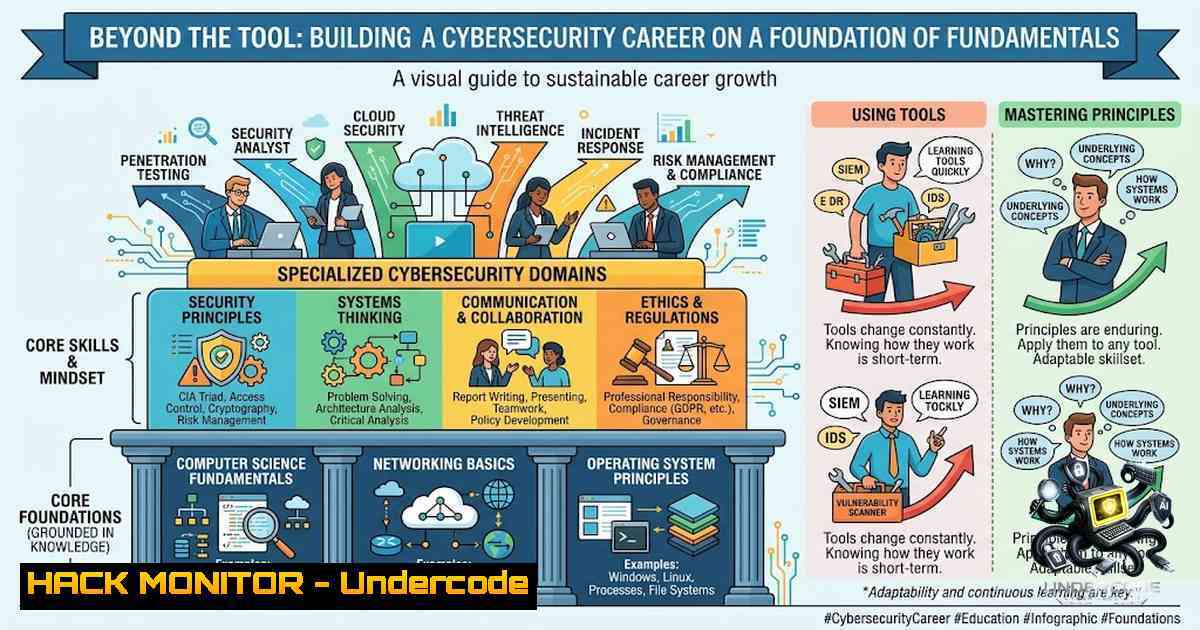
Introduction:
The cybersecurity field is often misrepresented as a collection of flashy hacking tools and exploit databases, leading many newcomers to download Kali Linux and immediately seek out targets. However, true mastery in security comes not from knowing how to run a script, but from understanding the underlying systems, networks, and protocols that the script manipulates. This article provides a structured roadmap for building a career based on deep technical knowledge, ensuring that your expertise remains relevant even as tools evolve and threats change.
Learning Objectives & Secrets:
- Objective 1: Master the core principles of computing (processes, memory, file systems) to understand the attack surface of any application or network.
- Objective 2 Secret Tip: Prioritize understanding “why” over “how” regarding Linux commands; knowing the purpose of a process or permission structure is more valuable than memorizing switches.
- Objective 3 Secret Tip: Approach OWASP Top 10 vulnerabilities by building and breaking them, rather than just reading descriptions, to grasp the root cause of security flaws.
You Should Know:
1. Operating System Fundamentals & Command Line Proficiency
Cybersecurity is impossible without a solid grasp of how hardware communicates with software. Understanding processes, memory allocation, and file system permissions is critical for identifying anomalies like privilege escalation or malware persistence. For instance, knowing the difference between a User ID (UID) and an Effective User ID (EUID) is essential to understanding how privilege escalation exploits like Dirty Cow function. On Windows, mastering the concept of Access Control Lists (ACLs) and the Security Account Manager (SAM) is vital for defense. Instead of memorizing every command, focus on the architecture; for example, realize that `ps aux` on Linux simply queries the `/proc` filesystem to display process information.
Step‑by‑step guide to verifying system state:
- Linux: To audit active processes and their permissions, use `ps auxf` to view a hierarchical tree.
- Linux: Check a user’s file permissions with `ls -la` and understand the output (e.g.,
-rwxr-xr-x). - Linux: To view your current user permissions and groups, run
id. - Windows: Use the Command Prompt or PowerShell to check file permissions with
icacls "C:\path\to\file". - Windows: To see running processes and their associated services, use
tasklist /svc.
Understanding these commands allows you to manually verify a system’s security posture without relying on automated scanners.
2. Networking: The Language of Communication
You cannot secure a system if you don’t know how it talks to the outside world. A strong grasp of the OSI model, specifically Layers 3 (Network), 4 (Transport), and 7 (Application), is non-1egotiable. Understanding TCP handshakes, UDP statelessness, and how DNS resolves names to IP addresses allows you to analyze attack patterns like DDoS, spoofing, and MITM. For example, knowing that HTTPS uses TLS over TCP port 443 helps you understand where to inspect traffic or configure firewalls.
Step‑by‑step guide for networking reconnaissance and configuration:
- Linux (Network Scan): Use `nmap -sV -p- 192.168.1.1` to scan a target IP for open ports and service versions.
- Linux (Traffic Analysis): Use `tcpdump -i eth0 -1` to capture live packets and observe protocol behavior.
- Linux (DNS Lookup): Verify domain resolution with `dig example.com` to understand the query and response structure.
- Windows (Networking): Use `tracert google.com` to map the network route, and `nslookup` to query DNS records.
- Firewall Rule: To block a specific IP on Linux, use
sudo iptables -A INPUT -s 10.0.0.5 -j DROP. On Windows, use `New-1etFirewallRule -DisplayName “BlockIP” -Direction Inbound -RemoteAddress 10.0.0.5 -Action Block` in PowerShell.
These commands form the foundation of network troubleshooting and security monitoring.
3. Web Fundamentals and HTTP Protocol Deep Dive
Modern attacks target web applications. Understanding the structure of an HTTP request (Headers, Cookies, GET/POST parameters) and the nature of stateless sessions is crucial. Knowledge of authentication tokens and session management allows you to spot vulnerabilities like session fixation or CSRF. It is essential to move beyond simple “port 80” knowledge and understand the entire request lifecycle.
Step‑by‑step guide for web traffic analysis and exploitation:
- Intercepting Traffic: Use a proxy tool like Burp Suite or OWASP ZAP. Configure your browser to use the proxy (e.g., localhost:8080).
- Analyzing Requests: In Burp Suite, go to the “Proxy” tab and examine the HTTP history. Look for “Cookies” and “Authorization” headers.
- Modifying Requests: Use the “Repeater” tool to resend a captured request with modified parameters (e.g., changing a price value or an `id` parameter to test for IDOR).
- Command Line (Linux): Test API endpoints directly with
curl -X GET "http://api.example.com/users/1" -H "Authorization: Bearer token123" -v. Use the `-v` flag to see the full HTTP exchange. - Command Line (Windows): Use `Invoke-WebRequest -Uri “http://api.example.com/users/1” -Headers @{“Authorization”=”Bearer token123”}` in PowerShell to achieve the same.
Understanding these tools allows you to manually fuzz and test applications for logic flaws that automated scanners miss.
4. Core Security Principles: CIA and Access Control
A career in security is built upon the CIA triad—Confidentiality, Integrity, and Availability. However, the most common practical failing in security is the confusion between Authentication (Who you are) and Authorization (What you can do). A misconfiguration here is a critical vulnerability. For example, a system might authenticate a user correctly but fail to authorize them, allowing access to admin resources (Insecure Direct Object Reference).
Step‑by‑step guide for verifying authentication/authorization:
- Testing for IDOR: Log in as a low-privileged user (e.g., “user1”).
- Identify Resource: Find a URL pattern like `https://site.com/profile?user_id=100`.
- Modify Parameter: Change the ID to another user’s (e.g.,
user_id=101). - Analyze Response: If the system returns data for user 101, it is vulnerable.
- Linux Configuration (File Auth): Check user authorization on a Linux file system by ensuring sensitive files (e.g.,
/etc/shadow) have strict permissions (e.g.,-rw-). - Windows Configuration: Use `icacls` to set stringent permissions on folders containing sensitive data to limit access to only specific security groups.
5. Hands-on Practice: CTFs and Vulnerable Environments
Theory solidifies into skill only through practice. Intentionally vulnerable applications like DVWA (Damn Vulnerable Web Application), WebGoat, or vulnerable VMs like Metasploitable provide a legal sandbox. The secret to CTFs (Capture The Flag) is not the tool, but the methodology: Reconnaissance, Scanning, Enumeration, Exploitation, and Privilege Escalation. Building a lab at home allows you to break and fix systems without legal repercussions, cementing the defender’s mindset.
Step‑by‑step guide to setting up a home lab:
- Hypervisor: Install VirtualBox or VMware on your host machine.
- Target Machine: Download a pre-configured VM like Metasploitable 2 or a Kali Linux ISO.
- Networking: Ensure the VM network is set to “NAT Network” or “Host-Only” to isolate it from your main network.
- Attacking Machine: Set up Kali Linux as your attacking machine.
- Scanning: Run `nmap` to find the target IP and open ports.
- Exploitation: Use a script from the Metasploit framework (
msfconsole) to exploit the vulnerability found (e.g.,exploit/unix/ftp/vsftpd_234_backdoor). - Resolution: Patch the vulnerability and re-test your defenses, creating a continuous learning feedback loop.
What Undercode Say:
- Key Takeaway 1: The proliferation of automated tools has created a generation of “script kiddies” who can launch attacks but cannot mitigate them. The market places a premium on professionals who can reverse-engineer problems, a skill honed by understanding systems, not tools.
- Key Takeaway 2: The roadmap is fundamentally about shifting from a “hacker” mentality to a “security engineer” mentality. A hacker breaks a lock, but an engineer designs a lock that can’t be broken—or at least knows exactly how to detect when someone is trying to pick it.
- Analysis: The emphasis on “understanding” over “memorizing” correctly reflects the rapid obsolescence of specific exploits. As zero-day vulnerabilities are patched, the foundational knowledge of memory allocation, process hierarchy, and TCP/IP remains the bedrock for both offensive penetration testing and defensive SOC analysis. This roadmap essentially creates a “T-shaped” professional—broad knowledge across the stack with deep expertise in one area, making them adaptable to shifts in the threat landscape.
Prediction:
- +1 As automation and AI become more prevalent in security, the demand for “fundamentalists” will grow. Companies will have their automated detection tools but will lack the human operators who can validate true positives and understand the root cause of anomalies.
- -1 The barrier to entry in cybersecurity will appear to be lowered by AI-powered tools, causing a flood of unqualified practitioners who rely on AI for analysis. This will lead to an increase in successful security breaches due to fundamental misconfigurations that AI fails to detect.
- +1 The shift towards cloud-1ative technologies and microservices will create a massive opportunity for those who understand networking (service-to-service communication), OS fundamentals (container security), and Linux—making the fundamentals roadmap more relevant than ever.
▶️ Related Video (84% Match):
🎯Let’s Practice For Free:
🎓 Live Courses & Certifications:
Join Undercode Academy for Verified Certifications
🚀 Request a Custom Project:
Secure, high-velocity infrastructure and disruptive technological engineering. Contact our engineering team for high-tier development and proprietary systems:
[email protected]
💎 Smart Architecture | 🛡️ Secure by Design | ⭐ Trusted by Thousands
IT/Security Reporter URL:
Reported By: https://lnkd.in/p/efyt2uCz – Hackers Feeds
Extra Hub: Undercode MoN
Basic Verification: Pass ✅


