Listen to this Post
Introduction:
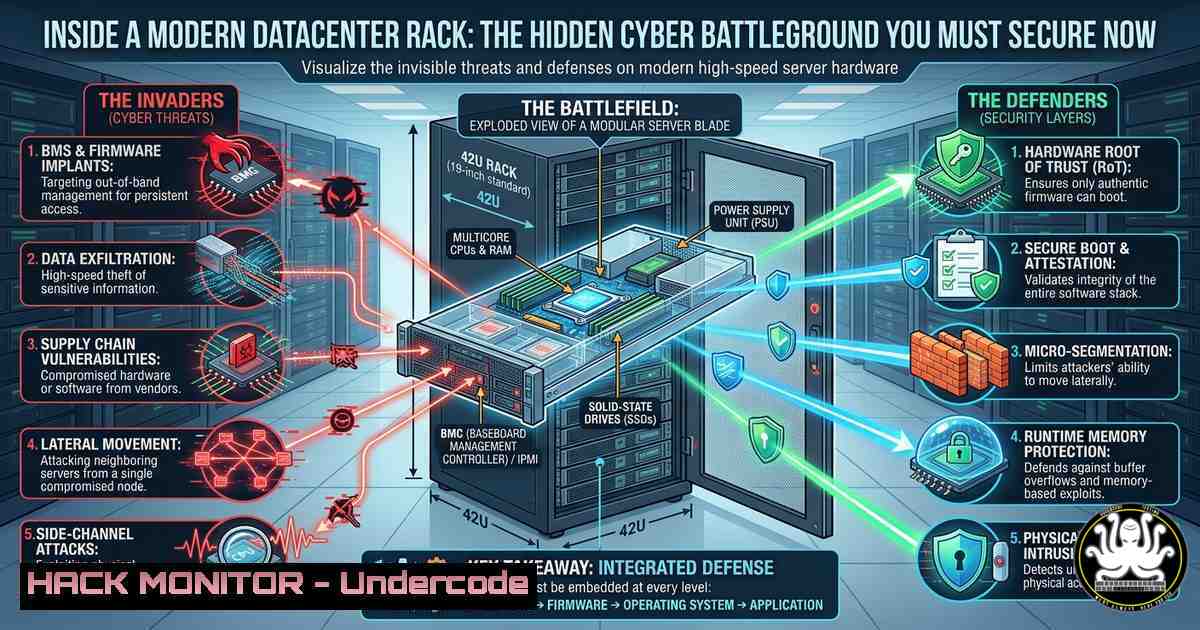
A modern datacenter rack is far more than metal and cables—it is the nerve center of enterprise IT, where switching, security, storage, and monitoring converge. Yet every patch panel, firewall, and server blade also introduces attack surfaces that adversaries actively probe. Understanding rack architecture is essential for network engineers and security professionals, because a misconfigured aggregation switch or an overlooked PDU can become the foothold for a data breach.
Learning Objectives:
- Identify critical components inside a datacenter rack and their security implications.
- Apply hardening commands on Cisco switches, FortiGate firewalls, and Linux-based monitoring appliances.
- Implement physical and logical controls to mitigate vulnerabilities in cabling, power, and network segmentation.
You Should Know:
1. Hardening Edge Routers and Next-Generation Firewalls
The edge router and NGFW are your first line of defense. Misconfigured ACLs or outdated firmware can expose internal VLANs to the internet. Below are verified commands to lock down a Cisco edge router and a FortiGate firewall.
Step‑by‑step guide – Cisco Router ACLs:
- SSH into the router and enter global configuration mode.
access-list 101 deny ip any any log ! Log all denied traffic
access-list 101 permit tcp any host 203.0.113.1 eq 443
interface GigabitEthernet0/0/0
ip access-group 101 in
- Enable CoPP (Control Plane Policing) to protect the CPU.
control-plane
service-policy input COPP-POLICY
- Save configuration: `write memory`
Step‑by‑step guide – FortiGate CLI hardening:
- Disable unnecessary admin access and enforce HTTPS only.
config system global
set admin-https-redirect enable
set admin-port 443
set admin-restrict-local disable
end
config system interface
edit "wan1"
set allowaccess https
end
- Set up a strict local-in policy to block SSH brute force.
config firewall local-in-policy
edit 1
set intf "wan1"
set srcaddr "all"
set dstaddr "all"
set action deny
set service "SSH"
set schedule "always"
next
end
- Securing Core & Aggregation Switches with Port Security and VLAN Segmentation
Switches are the most targeted devices for MAC flooding and VLAN hopping. Implement port security and correct trunk configurations.
Step‑by‑step guide – Cisco Catalyst port security:
- On access ports, limit MAC addresses and disable on violation.
interface GigabitEthernet0/1
switchport mode access
switchport port-security
switchport port-security maximum 2
switchport port-security violation shutdown
switchport port-security mac-address sticky
- Prevent VLAN hopping by turning off Dynamic Trunking Protocol (DTP).
interface GigabitEthernet0/2
switchport mode access
switchport nonegotiate
- For trunk ports, explicitly allow only needed VLANs.
interface GigabitEthernet0/24
switchport trunk allowed vlan 10,20,30
switchport trunk native vlan 999 ! unused native VLAN
Windows command to check switch connectivity (via SNMP):
Get-Service -Name SNMP | Set-Service -StartupType Automatic
 Then use snmpwalk from Linux to query switch ports
- Network Monitoring Appliance – Tcpdump, Zeek, and SNMP Hardening
A monitoring appliance (e.g., a Linux box running Zeek or ELK) sees all traffic. It must be hardened to avoid becoming a pivot point.
Step‑by‑step guide – Set up encrypted SNMPv3 on Ubuntu:
sudo apt install snmpd snmp
sudo nano /etc/snmp/snmpd.conf
Add:
rouser authPrivUser priv
createUser authPrivUser SHA "authPass123" AES "encryptPass456"
Restart: `sudo systemctl restart snmpd`
Capture suspicious traffic with tcpdump:
sudo tcpdump -i eth0 -nn -s 1500 -C 100 -G 3600 -W 24 -w capture_%Y%m%d_%H%M%S.pcap 'not port 22'
This rotates files every hour, keeps 24 hours, excludes SSH noise.
Install Zeek for deep packet inspection:
echo 'deb http://download.zeek.org/apt/ubuntu/ focal main' | sudo tee /etc/apt/sources.list.d/zeek.list
curl -s https://download.zeek.org/zeek-apt-key.asc | sudo apt-key add -
sudo apt update && sudo apt install zeek
sudo zeekctl deploy
- Storage Array & Tape Backup – Mitigating Ransomware via Immutable Snapshots
Backup infrastructure is a prime ransomware target. Hardening storage arrays and tape devices prevents deletion of recovery points.
Step‑by‑step guide – Linux commands for immutable S3‑compatible storage (e.g., MinIO):
– Install MinIO server and enable object locking.
wget https://dl.min.io/server/minio/release/linux-amd64/minio
chmod +x minio
export MINIO_ROOT_USER=backupadmin
export MINIO_ROOT_PASSWORD=strongpass
./minio server /data --console-address ":9001"
– Set bucket retention policy (immutable for 7 days):
mc ilm rule add myminio/backup-bucket --default-retention "7d" --mode GOVERNANCE
Windows tape backup security (Veritas NetBackup):
- Restrict tape drive access via device manager → tape drives → properties → security → remove Everyone, add only backup service account.
- API Security for Load Balancers and Cloud Hybrid Racks
Modern datacenters often expose APIs on load balancers (e.g., F5, HAProxy) for automation. Unauthenticated API endpoints leak configuration.
Step‑by‑step guide – HAProxy with API authentication and rate limiting:
– Edit /etc/haproxy/haproxy.cfg:
frontend stats_api
bind :8080
stats uri /stats
stats auth admin:securepassword
http-request deny if { src -f /etc/haproxy/blacklist.lst }
stick-table type ip size 100k expire 30s store http_req_rate(10s)
http-request track-sc0 src
http-request deny deny_status 429 if { sc_http_req_rate(0) gt 20 }
– Reload: `sudo systemctl restart haproxy`
Curl test for API endpoint exposure:
curl -X GET http://loadbalancer.internal:8080/stats -u admin:securepassword
curl -X POST http://loadbalancer.internal:8080/v1/disable-server -d '{"server":"web1"}'
If the second command works without auth, you have a critical API security gap.
- Power Redundancy and PDU Hardening (Cybersecurity for UPS & PDUs)
Smart PDUs and UPS units often run embedded Linux with default credentials. Attackers can remotely cut power.
Step‑by‑step guide – Hardening APC PDU via SSH:
- Default IP often 192.168.0.100. Change credentials immediately.
ssh [email protected]
After login:
user -a admin -p "NewStrongPass" -a Administrator
user -d apc
- Disable telnet and HTTP, keep only SSH.
network -s SSH -e enable
network -s HTTP -e disable
network -s TELNET -e disable
- For UPS monitoring with Network UPS Tools (NUT) on Linux:
sudo apt install nut
sudo nano /etc/nut/ups.conf
Add: [bash] driver = usbhid-ups port = auto
sudo upsd -u root
sudo upslog myups localhost
7. Wireless Controller Hardening (Even in Datacenter Racks)
Wireless controllers manage APs. If compromised, attackers can inject rogue APs into the corporate network.
Step‑by‑step guide – Cisco WLC (via CLI or web):
– Enforce EAP‑TLS instead of PSK for datacenter management networks.
– Disable broadcast SSID for management VLANs.
– Configure CPU ACL to allow only specific management hosts to the WLC.
config acl cpu create MGMT-ACL
config acl cpu rule add MGMT-ACL 1 permit source-ip 10.10.10.0 255.255.255.0 destination-ip any
config acl cpu rule add MGMT-ACL 2 deny source-ip any destination-ip any
config acl cpu bind MGMT-ACL
– Monitor for deauth attacks using Wireshark:
tshark -i eth0 -Y "wlan.fc.type_subtype == 12" -T fields -e wlan.sa -e radiotap.dbm_antsignal
What Undercode Say:
- Key Takeaway 1: A well-organized datacenter rack is not just a physical asset—it is a layered security boundary. Each component from the UPS to the tape library must be hardened with role‑specific access controls and immutable backup policies.
- Key Takeaway 2: Automation and API exposure in load balancers, PDUs, and cloud hybrid setups create new vectors. Standard SNMPv3, local‑in policies on firewalls, and rate‑limiting on API endpoints are non‑negotiable controls that most teams overlook.
Analysis (approx. 10 lines): The post highlights fiber/copper patch panels, switches, firewalls, routers, load balancers, wireless controllers, servers, storage, UPS, PDUs, and monitoring appliances. Each device runs its own OS (Cisco IOS, FortiOS, Linux, proprietary embedded). The security blind spot is cross‑device consistency—e.g., an engineer hardens the edge router but leaves the PDU with default credentials. Attackers scan for IoT‑like power devices inside datacenters. Furthermore, the “tape backup” is often air‑gapped, but if the backup server’s API is exposed, ransomware can encrypt backup catalogs. The provided commands for immutable S3 buckets, HAProxy rate limiting, and switch port security directly address these gaps. Training courses like CCNA (security chapters) and FortiGate NSE4 cover some of these, but real‑world rack hardening requires cross‑vendor scripting (Ansible, Python) to enforce policies across PDUs, switches, and firewalls simultaneously.
Prediction:
Within the next 12–18 months, we will see a major breach originating from a compromised PDU or tape library API in a “hyper‑converged” rack. Vendors will rush to add zero‑trust device authentication (e.g., X.509 certificates for PDUs and UPS units), and frameworks like NIST SP 800‑82 will expand to cover physical datacenter rack components as critical cyber assets. Manual hardening (as shown above) will be replaced by Infrastructure‑as‑Code for rack devices, with automated vulnerability scans against SNMPv3, local‑in policies, and switchport security configurations. Network engineers who master both cable management and API security will become the most sought‑after hybrid professionals.
▶️ Related Video (82% Match):
🎯Let’s Practice For Free:
IT/Security Reporter URL:
Reported By: Sayed Hamza – Hackers Feeds
Extra Hub: Undercode MoN
Basic Verification: Pass ✅


