Listen to this Post
Introduction
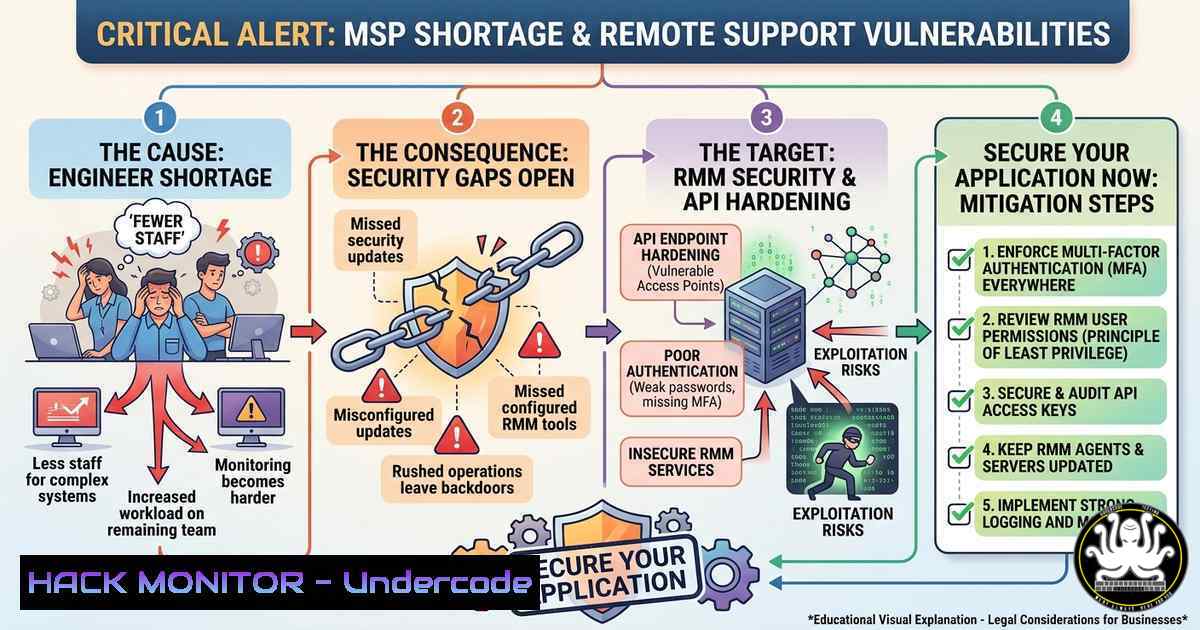
The surge in remote technical support engineer roles for Managed Service Providers (MSPs) has created a high-stakes environment where misconfigured RMM tools, unpatched Windows Servers, and lax API security can lead to devastating supply-chain breaches. With immediate joiners being hired within 24 hours, attackers are actively targeting job application portals and MSP infrastructures—as evidenced by the third-party form link `https://form.svhrt.com/699ad927dbd6ffb8308aa7c4` embedded in the comments, which requires rigorous security vetting before any data submission.
Learning Objectives
- Secure MSP RMM Deployments – Harden Kaseya, Datto, ConnectWise, and Ninja against common privilege escalation vectors.
- Implement API & Cloud Observability – Apply Redis caching, Kafka debugging, and AWS CloudWatch monitoring to prevent data leaks.
- Master Incident Response & Patch Management – Use ITIL-aligned workflows with ServiceNow and Autotask to mitigate zero-day vulnerabilities.
You Should Know
- Securing RMM Tools in MSP Environments (Kaseya, Datto, ConnectWise)
Remote Monitoring and Management (RMM) agents are a prime target for lateral movement. Attackers who compromise an RMM console can deploy ransomware to hundreds of endpoints within minutes. Below are essential hardening steps.
Step‑by‑Step Hardening Guide (Windows Server + RMM Agent)
 Run as Administrator on the RMM server
 1. Restrict RMM agent installation to signed binaries only
Set-ExecutionPolicy -ExecutionPolicy AllSigned -Scope LocalMachine

<ol>
<li>Enable detailed PowerShell logging for agent scripts
New-ItemProperty -Path "HKLM:\SOFTWARE\Policies\Microsoft\Windows\PowerShell\ScriptBlockLogging" -Name "EnableScriptBlockLogging" -Value 1 -PropertyType DWord -Force</p></li>
<li><p>Block outbound RMM traffic except to known static IPs (example: Datto)
New-NetFirewallRule -DisplayName "RMM-Outbound-Whitelist" -Direction Outbound -RemoteAddress 192.0.2.0/24 -Protocol TCP -Action Allow
New-NetFirewallRule -DisplayName "Block-Other-RMM-Outbound" -Direction Outbound -Action Block</p></li>
<li><p>Enforce MFA for all RMM web consoles (outside PowerShell – configure in product)
Linux Agent Hardening (for cross‑platform MSPs)
 Verify RMM agent binary integrity
sha256sum /opt/rmm-agent/agent.bin | grep -i "expected-hash-from-vendor"

Restrict agent execution via AppArmor
sudo aa-genprof /opt/rmm-agent/rmm-daemon
Verification: Use `Test-NetConnection -Port 443 -ComputerName your-rmm-server` to confirm whitelist rules. Regular audits of agent logs (/var/log/rmm-agent.log or C:\ProgramData\RMM\logs) can reveal unauthorized command execution.
2. Hardening Windows Server & M365 Backup Administration
The job requires backup setup and Microsoft 365 migration. Misconfigured backups lead to irreversible data loss and are a common vector for double‑extortion ransomware.
Immutable Backup Configuration (Windows Server + Azure Blob)
 Create immutable backup policy using Azure CLI (install first)
az backup vault create --name "MSPBackupVault" --resource-group "RG-Backup" --location "eastus"

Enable soft delete and immutability
az backup vault backup-properties set --name "MSPBackupVault" --resource-group "RG-Backup" --soft-delete-feature-state "Enable" --immutability-state "Locked"

Schedule Windows Server Backup with retention lock
wbadmin enable backup -addTarget:\backupserver\share -schedule:22:00 -include:C:,D: -systemState -quiet
M365 Email Migration Security (Prevent Legacy Auth Exploits)
 Connect to Exchange Online (install ExchangeOnlineManagement first)
Connect-ExchangeOnline -UserPrincipalName [email protected]

Block basic authentication across all tenants
Set-OrganizationConfig -BasicAuthBlockOAuthApps $true -BasicAuthBlockAutoDiscover $true

Enforce modern authentication for migration endpoints
Get-OrganizationConfig | fl oauth,basic
Step‑by‑Step for Backup Recovery Drill
- Perform a test restore of a single mailbox using
New-MailboxRestoreRequest. - Validate backup encryption by attempting to read backup files from an unprivileged account (should fail).
- Implement the 3‑2‑1 rule: three copies, two media, one offsite (e.g., Azure Archive tier).
-
API Security & Performance Tuning (Spring Boot, Redis, Kafka)
Vaibhav’s profile highlights REST API troubleshooting, Redis caching, and Kafka event debugging. Attackers target APIs with injection, broken object level authorization (BOLA), and excessive data exposure.
Securing Spring Boot REST APIs (with Redis Rate Limiting)
// Add dependency: spring-boot-starter-data-redis, bucket4j-core
import org.springframework.beans.factory.annotation.Autowired;
import org.springframework.data.redis.core.RedisTemplate;
import io.github.bucket4j.Bucket;
import io.github.bucket4j.RedisBucketProxy;

@RestController
public class ApiController {
@Autowired
private RedisTemplate<String, String> redisTemplate;

@PostMapping("/secure-endpoint")
public ResponseEntity<?> handleRequest(@RequestHeader("API-Key") String apiKey) {
// 1. Validate API key against HMAC stored in Redis
String storedHash = redisTemplate.opsForValue().get("apikey:" + apiKey);
if (storedHash == null) return ResponseEntity.status(401).body("Invalid key");

// 2. Apply Redis‑backed rate limiting (100 req/min per key)
Bucket bucket = RedisBucketProxy.builder()
.withKey("rate:" + apiKey)
.withRedisTemplate(redisTemplate)
.build();
if (bucket.tryConsume(1)) {
return ResponseEntity.ok("Processed");
} else {
return ResponseEntity.status(429).body("Too many requests");
}
}
}
Kafka Event Debugging & Hardening
 On Linux Kafka broker – enable TLS encryption and ACLs
 Generate server keystore and truststore (using keytool)
keytool -keystore server.keystore.jks -alias localhost -validity 365 -genkey -keyalg RSA

Configure server.properties to require SSL
echo "ssl.keystore.location=/var/private/server.keystore.jks" >> config/server.properties
echo "ssl.client.auth=required" >> config/server.properties

Prevent replay attacks by enabling idempotent producer
 In producer config: enable.idempotence=true, acks=all
Query Optimization to Mitigate SQL Injection & DoS
Vaibhav improved API performance by 30-35% – use parameterized queries and Redis caching:
-- Vulnerable example (never use)
SELECT  FROM users WHERE username = ' + userInput + ';

-- Secure with prepared statement (Java + Spring Data JPA)
@Query("SELECT u FROM User u WHERE u.username = :username")
User findByUsername(@Param("username") String username);
- Cloud Monitoring & Hardening with Grafana, Kibana, AWS CloudWatch
The job demands proficiency in these observability tools. Unsecured dashboards leak sensitive metadata (EC2 internal IPs, database credentials, API keys).
Step‑by‑Step: Secure Grafana Dashboard (Reverse Proxy + Basic Auth)
 On Linux (Ubuntu) – install Grafana and Nginx
sudo apt update && sudo apt install grafana nginx apache2-utils

Create a .htpasswd file for extra HTTP authentication
sudo htpasswd -c /etc/nginx/.htpasswd monitoring_user

Configure Nginx as reverse proxy with SSL
cat <<EOF | sudo tee /etc/nginx/sites-available/grafana
server {
listen 443 ssl;
server_name grafana.msp.local;
ssl_certificate /etc/ssl/certs/grafana.crt;
ssl_certificate_key /etc/ssl/private/grafana.key;
location / {
proxy_pass http://localhost:3000;
auth_basic "Restricted";
auth_basic_user_file /etc/nginx/.htpasswd;
}
}
EOF
AWS CloudWatch Hardening (Prevent Log Manipulation)
 Install AWS CLI and configure with least-privilege IAM role
aws configure set region us-east-1

Create a log group with encryption using KMS
aws logs create-log-group --log-group-name /msp/security-audit
aws logs associate-kms-key --log-group-name /msp/security-audit --kms-key-id arn:aws:kms:us-east-1:123456789012:key/abcd1234

Enable log metric filter for unauthorized API calls
aws logs put-metric-filter --log-group-name /msp/security-audit --filter-name "UnauthorizedAttempts" --filter-pattern "{ ($.errorCode = \"AccessDenied\") }" --metric-transformations metricName=UnauthorizedCount,metricNamespace=MSP/Security,metricValue=1
Kibana Security (Role‑Based Access Control)
- Disable anonymous access in
elasticsearch.yml:xpack.security.enabled: true. - Create roles limiting index patterns (e.g., allow only `winlogbeat-` for L2 engineers).
- Use TLS for all Elasticsearch transport traffic to prevent sniffing.
5. Patch Management Automation & Vulnerability Mitigation
The job description explicitly requires patch management. Unpatched vulnerabilities in Windows Server or third‑party apps are how Emotet and other malware enter MSP networks.
Automated Patching with PowerShell (Using PSWindowsUpdate)
 Install the module on each Windows Server
Install-Module PSWindowsUpdate -Force

Approve and install only security updates with a reboot window
Get-WUInstall -MicrosoftUpdate -AcceptAll -AutoReboot -Category "Security Updates" -ScheduleJob (Get-Date).AddHours(2)

Log all patch actions to a centralized Syslog server
$log = Get-WUHistory | Select-Object Date, , Result
$log | ConvertTo-Json | Out-File "C:\Logs\patch_audit.json"
 Then forward using nxlog or Winlogbeat
Linux Patch Automation (Unattended Upgrades with Security Only)
 On Ubuntu/Debian
sudo apt install unattended-upgrades apt-listchanges
sudo dpkg-reconfigure --priority=low unattended-upgrades

Configure to apply only security updates (edit /etc/apt/apt.conf.d/50unattended-upgrades)
Unattended-Upgrade::Allowed-Origins {
"${distro_id}:${distro_codename}-security";
};
Unattended-Upgrade::Automatic-Reboot "true";
Unattended-Upgrade::Automatic-Reboot-Time "03:00";
Vulnerability Scanning Command (Using built‑in tools)
- Windows: `Get-HotFix | Where-Object {$_.InstalledOn -gt (Get-Date).AddDays(-30)}` – shows recent patches.
- Linux: `grep ” installed ” /var/log/dpkg.log` or
yum history list updates.
- Remote Work Security: BYOD & VPN Hardening for MSP Engineers
The role requires “bring your own laptop” and stable internet. This introduces endpoint risks – a compromised personal device can pivot into client environments.
Windows BYOD Hardening Script (Run on engineer’s machine)
 Disable SMBv1, LLMNR, and NetBIOS (prevents relay attacks)
Disable-WindowsOptionalFeature -Online -FeatureName "SMB1Protocol" -Remove
Set-ItemProperty -Path "HKLM:\SOFTWARE\Policies\Microsoft\Windows\LLMNR" -Name "EnableLLMNR" -Value 0
Set-ItemProperty -Path "HKLM:\SYSTEM\CurrentControlSet\Services\NetBT\Parameters" -Name "NodeType" -Value 2

Force VPN split‑tunneling off (all traffic through corporate VPN)
Set-VpnConnection -Name "MSP-VPN" -SplitTunneling $false

Enable Windows Defender Application Guard for Edge/Chrome
Add-WindowsCapability -Online -Name "Browser.ApplicationGuard~~~~0.0.1.0"
Step‑by‑Step: Set up an Always‑On VPN with Certificate Authentication (Windows Server)
1. Deploy a Routing and Remote Access (RRAS) server with NPS.
2. Issue machine certificates via AD CS (or Intune for BYOD).
3. Configure VPN profile using PowerShell:
Add-VpnConnection -Name "MSP-Secure" -ServerAddress "vpn.msp.local" -TunnelType "Ikev2" -AuthenticationMethod "MachineCertificate" -RememberCredential $false -SplitTunneling $false -Force
- Incident Management & ITIL Compliance (ServiceNow + Autotask)
Handling RCA and SLA‑driven support requires secure ticketing workflows. Attackers often use fake tickets to phish support engineers.
ServiceNow Security Configuration (Mitigating Ticket‑Based Phishing)
// In ServiceNow – Client Script to validate ticket origins
function onSubmit() {
var emailDomain = g_form.getValue('contact_email');
if (emailDomain.indexOf('@trusted-msp.com') == -1 && emailDomain.indexOf('@client.com') == -1) {
g_form.addErrorMessage('Untrusted email domain – request blocked');
return false;
}
// Check for malicious macros in attachments (using sys_attachment)
var attachments = new GlideRecord('sys_attachment');
attachments.addQuery('table_sys_id', g_form.getUniqueValue());
attachments.query();
while(attachments.next()) {
if(attachments.file_name.indexOf('.vbs') > -1 || attachments.file_name.indexOf('.ps1') > -1) {
g_form.addErrorMessage('Executable attachment not allowed');
return false;
}
}
return true;
}
Autotask PSA Security – Enable API key rotation every 90 days and restrict API access to known IP addresses:
 Example using curl to rotate Autotask API key (after generating in UI)
curl -X PUT "https://webservices.autotask.net/AT Services/API/Query" -H "ApiKey: old-key" -d "{'action':'rotate_key'}"
What Undercode Say
- Key Takeaway 1: The embedded form URL (`https://form.svhrt.com/…`) must be treated as an untrusted third‑party endpoint. Applicants should never submit sensitive data like CTC or notice period without verifying the domain’s SSL certificate and checking for clipboard hijacking scripts.
- Key Takeaway 2: MSPs hiring immediately (“Today Interview, Tomorrow Joining”) are at elevated risk of insider threats. Background checks and automated IAM provisioning (e.g., via Azure AD Just‑In‑Time access) are critical but often skipped under time pressure.
Analysis (Undercode): The job market for remote L2‑L3 engineers reveals a dangerous gap between required technical skills (RMM, M365, patch management) and security hygiene. The rush to onboard candidates within 24 hours bypasses standard security training and device compliance checks. Combined with the bring‑your‑own‑laptop policy, this creates a perfect storm for supply‑chain compromises – a single engineer’s unpatched personal machine can expose dozens of MSP clients. The lack of mention of any security certifications (e.g., CompTIA Security+, CISM) or zero‑trust architecture in the job description further indicates that many MSPs prioritize speed over security. Threat actors will increasingly weaponize fake job posts and form‑based application portals (like the svhrt.com link) to harvest PII and credentials.
Expected Output
Introduction: (already provided above)
What Undercode Say: (provided above)
Prediction: Within the next 12–18 months, we will see a wave of ransomware attacks traced back to compromised MSP support engineers hired through expedited, low‑vetting processes. Attackers will automate the scanning of job boards for “immediate joiners” and deploy fake application forms that mimic legitimate HR portals (leveraging domains like .svhrt.com). Consequently, cybersecurity insurance carriers will begin mandating rigorous technical assessments – including live RMM hardening simulations and API security drills – before covering any MSP that hires remote staff. The industry will shift toward decentralized identity verification (e.g., verifiable credentials) and mandatory month‑long security onboarding, even for “urgent” roles. Moreover, open‑source tools for automated patch compliance and RMM configuration auditing will emerge as standard requirements in job postings, fundamentally changing the L2‑L3 support engineer skill set.
▶️ Related Video (68% Match):
🎯Let’s Practice For Free:
IT/Security Reporter URL:
Reported By: Akash Nagpal – Hackers Feeds
Extra Hub: Undercode MoN
Basic Verification: Pass ✅


