Listen to this Post
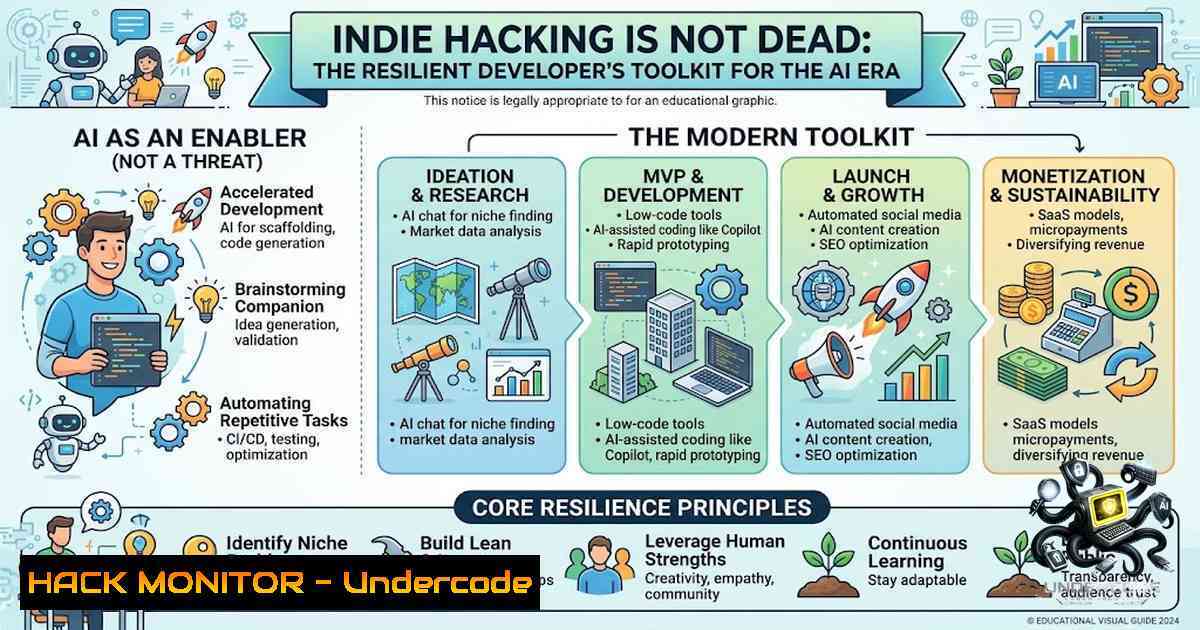
Introduction:
The recent discourse questioning the viability of indie hacking in an era dominated by artificial intelligence has sparked considerable debate within the developer community. However, the act of building and shipping software independently is not only alive but thriving, driven by a unique blend of agility, resourcefulness, and a deep understanding of modern cloud and security tooling. This article deconstructs the modern indie hacker’s workflow, focusing on the technical infrastructure and security practices that enable rapid, resilient development from anywhere, transforming perceived limitations into a competitive advantage.
Learning Objectives & Secrets:
- Objective 1: Master Cloud-1ative CI/CD Pipelines. Learn to implement automated deployment strategies that allow you to ship features with minimal infrastructure overhead, even on unstable network connections.
- Objective 2: Implement Edge Security and Resiliency. Discover the secret tips for configuring VPNs, failover networks, and local development environments that protect your code and data when working from public or unreliable Wi-Fi.
- Objective 3: Optimize Power and Resource Management. Uncover the secrets to efficient local development, including using lightweight containers and API mocking to reduce battery drain and maintain productivity with limited resources.
You Should Know:
- The Resilient Development Environment: Cloud-Based IDE and State Management
The post highlights a critical reality: working from a beach with spotty Wi-Fi is a test of your development environment’s resilience. To achieve this, modern indie hackers are shifting from local-heavy setups to cloud-based development environments or leveraging robust state management tools that allow for seamless switching between online and offline modes.
Step‑by‑step guide to setting up a resilient environment:
- Evaluate Your Options: Choose between a cloud-based IDE (like Gitpod, GitHub Codespaces) or a local setup with strong synchronization. For cloud IDEs, your entire workspace is ephemeral, requiring all state to be stored in a version control system (VCS) and on cloud storage.
- Implement Remote State Storage: For Infrastructure as Code (IaC) and stateful applications, store your state files in a remote backend (e.g., AWS S3, Terraform Cloud). This ensures that a lost connection doesn’t corrupt your infrastructure state.
- Local Caching and Mocking: For times when your internet drops, implement API mocking for your microservices or third-party dependencies.
- Linux/macOS Command: `npx prism mock -p 4010 ./openapi.yaml` (This mocks an API based on an OpenAPI specification).
- Windows Command (PowerShell): `npx prism mock -p 4010 .\openapi.yaml`
– Automated Reconnection and Retry Logic: Configure your deployment tools (e.g.,kubectl,aws cli) to have exponential backoff and retry mechanisms for network failures.
- Securing the Unstable Edge: VPN and Zero-Trust Networking
Working from a public cafe or a location with questionable Wi-Fi exposes your development traffic to significant security risks. A core tenet of modern development is adopting a zero-trust security model, ensuring that your connection is encrypted and authenticated regardless of the network’s integrity.
Step‑by‑step guide to securing your connection:
- Deploy a Personal VPN: Set up a WireGuard or OpenVPN server on a cheap cloud VPS. This creates an encrypted tunnel for all your traffic. Alternatively, use a commercial VPN with a kill switch feature.
- Linux Command to start WireGuard: `sudo wg-quick up wg0`
– Implement a Zero-Trust Proxy: Use tools like Teleport or Tailscale to achieve “zero-trust” networking. These tools allow you to access your cloud infrastructure without exposing any public ports, relying on identity-based authentication instead. - Tailscale Installation (Linux): `curl -fsSL https://tailscale.com/install.sh | sh`
– Tailscale Installation (Windows): Download the installer from the official website and run it. It creates a private peer-to-peer network. - Secure API Authentication: When connecting to your production or staging APIs, never rely solely on network security. Use short-lived tokens (e.g., JWT with a 15-minute expiry) or API keys. Store these securely, never in your codebase.
- Linux Command to generate a secure API key: `openssl rand -base64 32`
– PowerShell equivalent: `[bash]::ToBase64String([System.Security.Cryptography.RandomNumberGenerator]::GetBytes(32))`
– Regularly Rotate Secrets: Implement a process to rotate your API keys and credentials weekly. This is a core practice of cloud hardening, ensuring that even if a key is compromised, its window of usefulness is minimal.
3. Cloud Hardening for the Solo Developer
Indie hackers often run a lean infrastructure, making cloud hardening a non-1egotiable practice. Misconfigurations are a primary entry point for attackers. The goal is to apply the principle of least privilege across all cloud resources.
Step‑by‑step guide to hardening your cloud environment:
- Audit Identity and Access Management (IAM): Conduct a thorough review of all IAM roles and policies. Ensure no user or service has more permissions than necessary.
- AWS CLI Command to list all IAM users: `aws iam list-users`
– Enable Comprehensive Logging: Activate services like AWS CloudTrail or Azure Monitor to log all API activity in your cloud environment. - AWS CLI to create a trail: `aws cloudtrail create-trail –1ame IndieHackerTrail –s3-bucket-1ame your-logs-bucket`
– Validate the Trail: `aws cloudtrail get-trail-status –1ame IndieHackerTrail`
– Implement Security Groups and Network ACLs: Configure your cloud firewalls to restrict inbound and outbound traffic. Only allow the specific ports and IPs (e.g., your personal VPN IP) that are absolutely necessary. - Example AWS CLI to revoke a publicly open security group rule: `aws ec2 revoke-security-group-ingress –group-id sg-12345678 –protocol tcp –port 22 –cidr 0.0.0.0/0` (This is a critical step for securing SSH access).
- Vulnerability Scanning: Integrate a vulnerability scanner into your CI/CD pipeline to automatically scan dependencies for known CVEs before deployment.
4. Agility in Feature Development and Deployment
Shipping a feature from a beach cafe isn’t just a testament to personal grit; it’s a showcase of a streamlined development pipeline. This agility relies on containers, container orchestration, and automated monitoring.
Step‑by‑step guide to an agile deployment process:
- Containerize Your Application: Use Docker to create a consistent environment from development to production.
- Create a Dockerfile: This file defines your application’s environment.
- Build an Image: `docker build -t my-app:latest .`
– Test Locally: `docker run -p 8080:80 my-app:latest`
– Use a Package Manager for Dependencies: Keep your dependencies up-to-date to avoid security vulnerabilities. - Node.js (
npm) Command: `npm update`
– Python (pip) Command: `pip install –upgrade package-1ame`
– Implement CI/CD: Use a service like GitHub Actions to automatically build, test, and deploy your container to a cloud provider (e.g., AWS ECS, Google Cloud Run, or Azure Container Apps) whenever you push to the main branch. - Monitoring and Observability: Set up application performance monitoring (APM) and log aggregation to know immediately if your shipped feature is performing as expected.
- Simulating a Cloud Vulnerability Exploit (For Educational Use)
Understanding how an attack works is crucial for defense. In a controlled test environment, one can simulate the exploitation of a common cloud misconfiguration.
Step‑by‑step guide (for penetration testing only):
- Setup a Testing Environment: Create a separate, non-production environment in your cloud provider. Never test on production systems.
- Simulate an S3 Bucket Misconfiguration: Publicly expose an S3 bucket by disabling the “Block public access” settings.
- Use a tool like AWS CLI or Boto3 to attempt to list and download objects from the public bucket.
- Command to list objects from an S3 bucket: `aws s3 ls s3://public-bucket-1ame/ –1o-sign-request`
– Command to download a file: `aws s3 cp s3://public-bucket-1ame/sensitive-file.txt . –1o-sign-request`
– Analyze the Breach: Use the results to understand the catastrophic data leak that can occur. Then, immediately apply the mitigation steps from the “Cloud Hardening” section. - Set Up Alerts: Configure CloudWatch Alarms or other monitoring tools to trigger when a publicly accessible resource is identified or when anomalous download patterns occur.
6. Power Management and System Monitoring
When running on 14% battery, every system process counts. Efficient resource management is key to maximizing work time.
– Monitor System Resources: Use system tools to identify and kill resource-hogging processes.
– Linux Command: `top -o %CPU` (Sorts processes by CPU usage). `kill -9 [bash]` to force stop a process.
– Windows Command (PowerShell): `Get-Process | Sort-Object CPU -Descending` to list processes by CPU usage. `Stop-Process -Id [bash]` to stop one.
– Throttle Background Processes: Disable unnecessary background services like automatic updates, Docker indexing, or heavy file-syncing tools.
7. Future-Proofing Your API Security
API security is paramount, and indie hackers must implement best practices to prevent data breaches.
– Rate Limiting: Implement rate limiting to prevent abuse and denial-of-service attacks.
– Input Validation: Use allowlists to validate all inputs to your API. Never trust user-supplied data.
– Use a Web Application Firewall (WAF): Employ a WAF to filter and monitor HTTP traffic between your web application and the internet.
What Undercode Say:
- Key Takeaway 1: The indie hacker ethos is not dead; it is evolving. Success in this landscape is predicated on technical excellence, not just idea generation. The ability to leverage advanced cloud and security tooling is what separates the casual builder from the resilient product shipper.
- Key Takeaway 2: Security, resilience, and agility are not constraints but foundational elements of the modern development cycle. By integrating these principles into the earliest stages of project design, an indie hacker can create systems that are robust enough to be developed from anywhere, secure enough to protect user data, and fast enough to outpace larger, more bureaucratic organizations. The real threat isn’t the AI, but the developer who fails to adapt.
Prediction:
- +1 The democratization of cloud and AI tools will lead to a new “golden age” of indie hacking, characterized by hyper-1iche applications delivered with enterprise-grade security and resilience at a fraction of the cost.
- -1 The ease of deployment will also lower the barrier for malicious actors, leading to a surge in automated attacks against misconfigured cloud accounts, making security a primary differentiator for successful indie ventures.
- +1 We will see a rise in “developer-first” security solutions that are designed for the resource-constrained solo builder, making practices like zero-trust networking and automated vulnerability scanning the new standard.
▶️ Related Video (82% Match):
🎯Let’s Practice For Free:
🎓 Live Courses & Certifications:
Join Undercode Academy for Verified Certifications
🚀 Request a Custom Project:
Secure, high-velocity infrastructure and disruptive technological engineering. Contact our engineering team for high-tier development and proprietary systems:
[email protected]
💎 Smart Architecture | 🛡️ Secure by Design | ⭐ Trusted by Thousands
IT/Security Reporter URL:
Reported By: https://lnkd.in/p/ezTMk6uB – Hackers Feeds
Extra Hub: Undercode MoN
Basic Verification: Pass ✅


