Listen to this Post
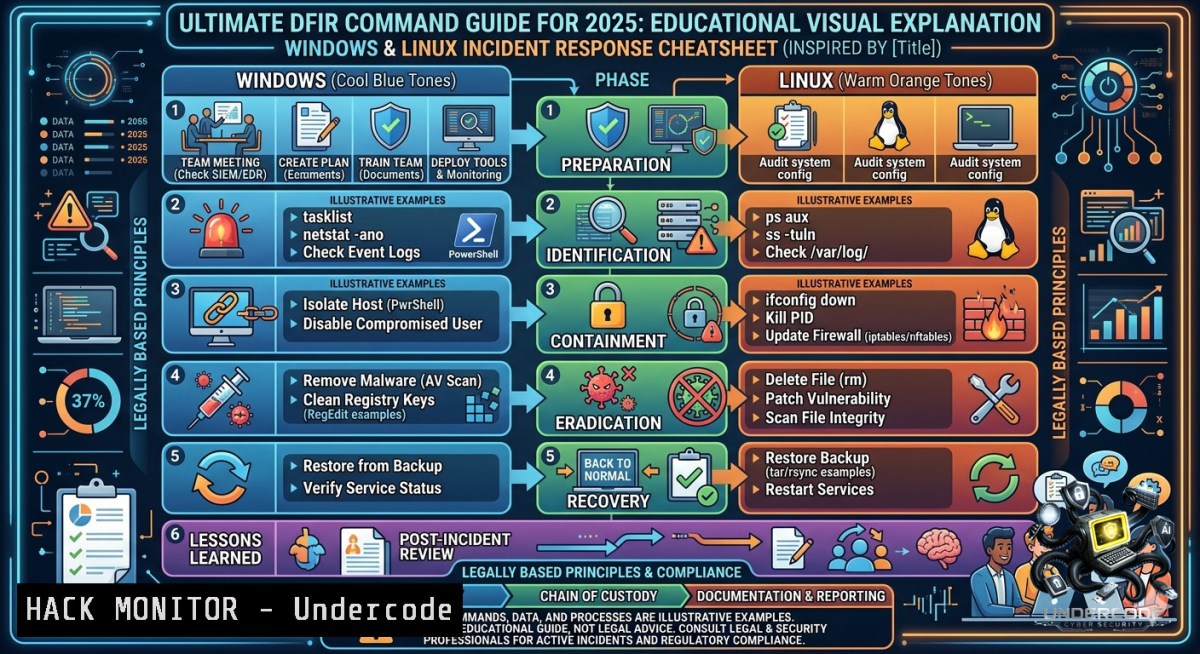
Introduction:
Incident Response (IR) is the systematic process of detecting, investigating, and mitigating security breaches before they escalate into full-blown data disasters. For cybersecurity professionals, having a ready-to-use cheatsheet of Linux and Windows commands is critical to quickly triage compromised systems, preserve digital evidence, and contain threats. This article delivers a hands-on, platform-agnostic IR guide covering user accounts, processes, network artifacts, and logs—essential knowledge for every Blue Team member.
Learning Objectives:
- Execute live forensic commands on both Linux and Windows to identify malicious user accounts, unusual processes, and hidden persistence mechanisms.
- Analyze network connections, open ports, and firewall rules to detect command-and-control (C2) traffic and lateral movement.
- Collect and interpret system logs, scheduled tasks, and file permissions to reconstruct the timeline of an attack.
You Should Know:
- User Account Triage: Spotting Backdoors and Privilege Escalation
Attackers often create hidden or cloned accounts to maintain access. On Linux, begin by inspecting `/etc/passwd` for new UID 0 entries or unusual shells. Use `passwd -S` to check password status and `grep ‘:0:’ /etc/passwd` to find privileged users. Also run `find / -1ouser -o -1ogroup` to reveal orphaned files that may indicate deleted malicious accounts.
Step‑by‑step guide (Linux):
– `cat /etc/passwd | grep -E “sh$”` – show accounts with login shells.
– `sudo lastlog` – review last login times for every user.
– `sudo grep “Accepted password” /var/log/auth.log` – detect successful logins from unexpected IPs.
On Windows, use command line or PowerShell:
– `net user` – list local users.
– `net localgroup administrators` – check admin group membership.
– `wmic useraccount get name,sid,status` – find disabled or hidden accounts.
– PowerShell: `Get-LocalUser | Where-Object {$_.Enabled -eq $true}`
2. Process and Service Forensics: Uncovering Malware and Rootkits
Malicious processes often masquerade as legitimate system services. On Linux, run `ps auxf` to see process trees, and `top -c` for real‑time CPU/memory anomalies. Check for processes with no binary on disk: `ls -l /proc//exe 2>/dev/null | grep -v ” -> “` . List all system services with `service –status-all` and inspect cron jobs: `crontab -l` and ls -la /etc/cron.
Step‑by‑step guide (Linux):
– `ps -eo pid,ppid,cmd,pcpu,pmem –sort=-pcpu | head -20` – top 20 CPU‑consuming processes.
– `systemctl list-units –type=service –state=running` – list active systemd services.
– `cat /etc/crontab` and `crontab -u root -l` – review scheduled tasks.
On Windows, use Task Manager GUI or command line:
– `tasklist /v /fo csv` – verbose process list.
– `Get-Process | Sort-Object CPU -Descending | Select-Object -First 20` in PowerShell.
– Services: `sc query state= all | findstr /i “SERVICE_NAME”` or Get-Service | Where-Object {$_.Status -eq "Running"}.
– Scheduled tasks: `schtasks /query /fo LIST /v` – look for tasks running as SYSTEM or with suspicious names.
- Network Connections and Open Ports: Detecting C2 Beaconing
Rapid identification of unexpected outbound connections can stop data exfiltration. On Linux, use `netstat -tulpn` to list listening ports and active connections. `ss -tunap` is faster. Check ARP cache (arp -a) for ARP poisoning. Use `lsof -i` to see which processes own each socket.
Step‑by‑step guide (Linux):
– `sudo netstat -antp | grep ESTABLISHED | awk ‘{print $5}’ | cut -d: -f1 | sort | uniq -c` – count established connections per remote IP.
– `iptables -L -1 -v` – examine firewall rules (look for unexpected ACCEPT or DROP).
– `tcpdump -i eth0 -c 100 -1n` – capture live traffic (if network monitoring is needed).
On Windows, use `netstat -anob` to see process IDs and associated executables. For more detail:
– `Get-1etTCPConnection -State Established | Select-Object LocalAddress, LocalPort, RemoteAddress, RemotePort, OwningProcess` (PowerShell).
– Firewall: `netsh advfirewall show allprofiles` and netsh advfirewall firewall show rule name=all.
– Active sessions: `net session` (if file sharing enabled).
- File System and Permission Anomalies: Finding Webshells and Ransomware Artifacts
Attackers drop malicious scripts or alter file timestamps. On Linux, find recently modified files: `find / -type f -mtime -1 -ls 2>/dev/null` (last 24 hours). Search for world‑writable files: find / -perm -2 -type f 2>/dev/null. Unusual SUID binaries: find / -perm -4000 -type f 2>/dev/null.
Step‑by‑step guide (Linux):
– `find /home -1ame “.php” -o -1ame “.jsp” -o -1ame “.py” -mtime -2` – look for web shells in user directories.
– `stat
– `ls -la /tmp` – many malware families use `/tmp` for staging.
On Windows, use `forfiles` or PowerShell:
– `forfiles /P C:\ /S /M . /D -1 /C “cmd /c echo @file @fdate @ftime”` – files modified in last day.
– `Get-ChildItem -Recurse -File | Where-Object {$_.LastWriteTime -gt (Get-Date).AddDays(-1)} | Select FullName, LastWriteTime`
– Check startup folders: shell:startup, shell:common startup, and registry run keys: HKLM\SOFTWARE\Microsoft\Windows\CurrentVersion\Run.
- Log Analysis and Event Tracing: Rebuilding the Attack Timeline
Logs are the investigator’s best friend. On Linux, parse authentication logs: grep "Failed password" /var/log/auth.log | awk '{print $1,$2,$3,$9,$11}'. Use `last -20` for recent successful logins. History files: `cat ~/.bash_history` (but attackers may wipe them; check `~/.bash_logout` or PROMPT_COMMAND).
Step‑by‑step guide (Linux):
– `journalctl -xe -p err –since “2 hours ago”` – systemd journal errors.
– `ausearch -m USER_LOGIN -ts recent` – if auditd is configured.
– `grep -r “wget\|curl\|nc\|bash -i” /var/log/` – spot command‑line downloaders.
On Windows, use Event Viewer or `wevtutil`:
– `wevtutil qe Security /c:100 /f:text /rd:true /q:”[System[(EventID=4624)]]”` – last 100 successful logins.
– PowerShell: `Get-WinEvent -FilterHashtable @{LogName=’Security’; ID=4624,4625} -MaxEvents 50 | Format-List`
– Check PowerShell logs: `Get-WinEvent -LogName “Windows PowerShell” | Where-Object {$_.Message -match “DownloadString|Invoke-Expression”}`
6. Persistence Mechanisms: Scheduled Tasks, Cron, and WMI
Advanced threats use scheduled tasks for reboot persistence. On Linux, review user crontabs: for user in $(cut -f1 -d: /etc/passwd); do crontab -u $user -l 2>/dev/null; done. Check systemd timers: systemctl list-timers --all. Also inspect `/etc/rc.local` and /etc/systemd/system/.
Step‑by‑step guide (Linux):
– `ls -la /etc/cron.d /etc/cron.daily /etc/cron.weekly /etc/cron.monthly` – search all cron directories.
– `grep -r “nohup\|screen\|tmux” /etc/init.d/` – detect launchers.
On Windows, schtasks and WMI are common. Use:
– `schtasks /query /fo LIST /v | findstr “TaskName\|Run As\|Task To Run”`
– `Get-WmiObject -Class StandardConsumerBinding -1amespace root\subscription` – check WMI permanent event subscriptions (advanced persistence).
– Startup registry: `reg query HKLM\SOFTWARE\Microsoft\Windows\CurrentVersion\Run` and same for HKCU.
- Network Shares and Active Sessions: Mapping Lateral Movement
Determine which shares are exposed and who is connected. On Linux, check mounted shares: `mount | grep cifs` and open file handles: lsof | grep -E "REG|DIR". Active SMB sessions: smbstatus.
Step‑by‑step guide (Linux):
– `netstat -tunap | grep :445` – SMB connections.
– `showmount -e localhost` – if NFS is used.
On Windows, use `net share` to list shares, `net use` to see connected clients, and `net session` for active sessions (requires admin rights). PowerShell alternative:
– `Get-SmbShare | Select Name, Path`
– `Get-SmbOpenFile` – see which files are currently open by remote users.
What Undercode Say:
- Key Takeaway 1: Speed and order matter during incident response. Always capture volatile data first (network connections, running processes, logged-in users) before powering off or collecting disk images. A single reboot can destroy evidence of memory-resident malware.
- Key Takeaway 2: Attackers rarely leave obvious signs—they delete logs, alter timestamps, and inject into legitimate processes. Combining cross‑platform tools (e.g., `lsof` on Linux, `Handle` on Windows) with integrity checking (e.g., `sha256sum` of critical binaries) drastically improves detection rates.
- Analysis: The provided cheatsheet structure (user accounts → processes → services → scheduled tasks → files → logs → network → firewall → shares) mirrors the SANS IR model (Preparation, Identification, Containment, Eradication, Recovery). However, modern IR also demands threat hunting using EDR telemetry and YARA rules. The real value lies in automating these commands via incident response playbooks (e.g., using `psremoting` on Windows or `ansible` on Linux) to reduce mean time to respond (MTTR). Additionally, understanding `$MFT` timestamps on Windows and `ext4` journal on Linux can reconstruct actions even after log deletion. The growing use of AI‑driven SOC platforms will soon automate much of this manual triage, but hands‑on command‑line skills remain the last line of defense when networks are isolated.
Prediction:
+1 Increased adoption of SOAR (Security Orchestration, Automation, and Response) will embed these IR commands into automated playbooks, reducing detection‑to‑response time from hours to seconds.
-P As attackers adopt fileless and memory‑only malware (e.g., using `powershell` or `python` in‑memory), traditional file‑based detection from this cheatsheet becomes less effective, requiring live memory forensics (e.g., volatility) and kernel‑level monitoring.
-1 Cloud and container environments (Kubernetes, AWS Lambda) do not rely on traditional OS commands; IR professionals will need to shift from host‑level cheatsheets to cloud‑native logging (CloudTrail, GuardDuty) and ephemeral forensic sidecars.
▶️ Related Video (82% Match):
🎯Let’s Practice For Free:
🎓 Live Courses & Certifications:
Join Undercode Academy for Verified Certifications
🚀 Request a Custom Project:
Secure, high-velocity infrastructure and disruptive technological engineering. Contact our engineering team for high-tier development and proprietary systems:
[email protected]
💎 Smart Architecture | 🛡️ Secure by Design | ⭐ Trusted by Thousands
IT/Security Reporter URL:
Reported By: Incident Response – Hackers Feeds
Extra Hub: Undercode MoN
Basic Verification: Pass ✅


