Listen to this Post
Introduction:
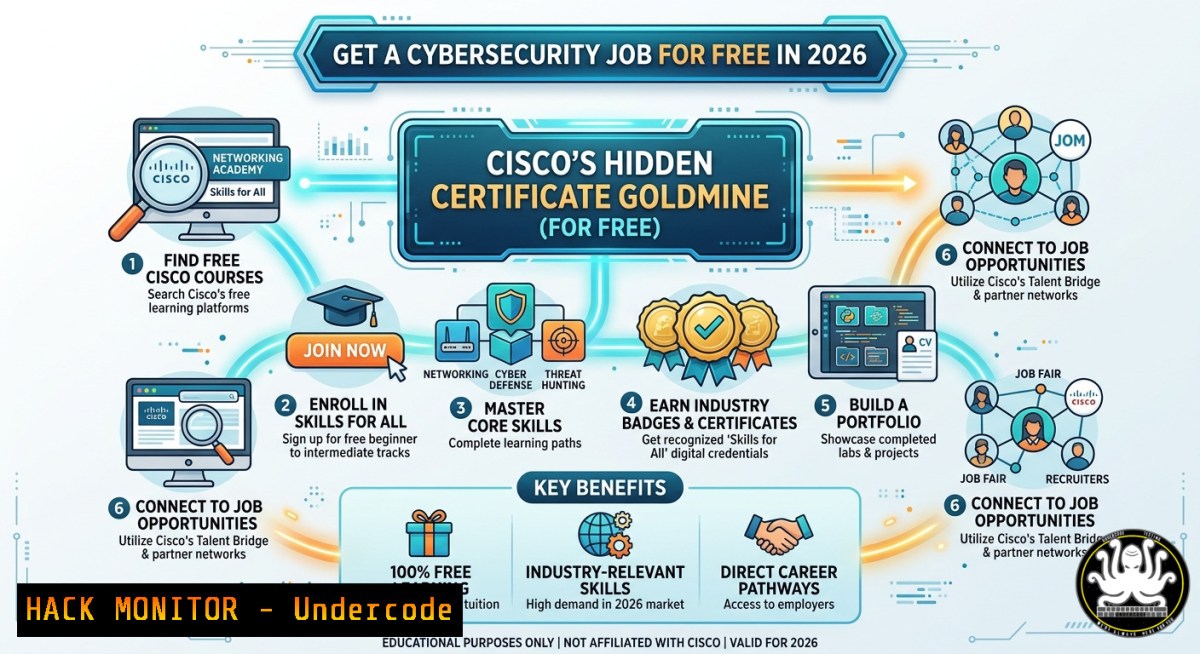
Cybersecurity careers demand proven skills, but paid certifications often block motivated learners. Cisco Networking Academy now offers a full pathway of free courses—from CCNA foundations to CyberOps—complete with verifiable badges and certificates. This article extracts every direct enrollment link and pairs them with hands-on Linux, Windows, and cloud hardening labs to accelerate your red/blue team readiness.
Learning Objectives:
- Enroll in Cisco’s high-value free courses (DevNet, CCNA, Network Security, CyberOps) using the provided direct links.
- Apply course concepts through practical CLI commands, firewall rules, and API security tests on Windows/Linux.
- Build an exploit-mitigation and network defense lab using open-source tools aligned with Cisco’s NDG lab environment.
You Should Know:
- Enroll & Navigate Cisco NetAcad – No Credit Card Required
Start by creating a free Cisco NetAcad account. Use the direct links from the post:
- DevNet Associate – https://lnkd.in/dxYPjSd7
- CCNA: Intro to Networks – https://lnkd.in/ddzKWfmU
- Switching, Wireless & Routing – https://lnkd.in/dqthhYGC
- Enterprise Networking & Automation – https://lnkd.in/dYMsZ-EM
- Network Security – https://lnkd.in/dUUiwkE9
- CyberOps Associate + NDG Labs – https://lnkd.in/dncDe_Ux
- Intro to Cybersecurity – https://lnkd.in/dk8vR2NY
- Cyber Threat Management – https://lnkd.in/dvWJQMNB
- Endpoint Security – https://lnkd.in/dF9y2YkM
- Network Defense – https://lnkd.in/dnEXPrt9
Step‑by‑step:
- Click any link → register with email (use a real one to receive badges).
- Complete the first module quiz → unlock the next module.
- Finish all modules → download your certificate and claim the Credly badge.
- For CyberOps, also access NDG Linux labs (browser‑based virtual machines).
-
Hands‑On Lab Setup – Linux CLI for CyberOps & NDG
CyberOps requires basic Linux. Launch NDG lab from the CyberOps course and run these commands to simulate a security analyst workstation:
 Update system and install network tools
sudo apt update && sudo apt install tcpdump wireshark nmap net-tools -y

Check active connections (analyst view)
ss -tunap | grep ESTABLISHED

Capture 50 packets for analysis
sudo tcpdump -i eth0 -c 50 -w capture.pcap

Verify integrity of system binaries (Tripwire‑like)
sudo apt install debsums
debsums -c
Step‑by‑step:
- Open NDG lab terminal (provided inside CyberOps course).
- Run `ip a` to identify your interface (usually
eth0). - Execute the tcpdump command → generate some web traffic from the lab browser.
- Analyze with `wireshark capture.pcap` or
tcpdump -r capture.pcap. -
Network Hardening – Windows Firewall & Cisco ACL Simulation
From the Network Defense and CCNA Security modules, practice access control on a Windows machine (or Linux iptables).
Windows (PowerShell as Admin):
 Block all inbound ICMP (ping)
New-NetFirewallRule -DisplayName "Block ICMP" -Protocol ICMPv4 -Direction Inbound -Action Block

Allow only SSH from specific subnet (192.168.1.0/24)
New-NetFirewallRule -DisplayName "Allow SSH" -Direction Inbound -Protocol TCP -LocalPort 22 -RemoteAddress 192.168.1.0/24 -Action Allow

Log dropped packets for analysis
Set-NetFirewallProfile -All -LogFileName C:\FirewallLogs\pfirewall.log -LogDroppedPackets True
Linux iptables equivalent (learned in Network Security course):
sudo iptables -A INPUT -p icmp --icmp-type echo-request -j DROP
sudo iptables -A INPUT -p tcp --dport 22 -s 192.168.1.0/24 -j ACCEPT
sudo iptables -A INPUT -j LOG --log-prefix "DROPPED: "
Step‑by‑step:
- On a test VM, run the Windows or Linux commands.
- From another machine, try to ping → should fail.
- Check logs: `Get-Content C:\Windows\System32\LogFiles\Firewall\pfirewall.log` (Windows) or `sudo dmesg | grep DROPPED` (Linux).
4. API Security Testing (DevNet Associate Hands‑On)
DevNet Associate covers REST APIs, authentication, and common flaws. Use `curl` and a free test API (JSONPlaceholder or a lab from Cisco DevNet Sandbox).
 Test a vulnerable endpoint (no auth required)
curl -X GET https://jsonplaceholder.typicode.com/users/1

Simulate a JWT brute‑force (educational only – use own lab)
 First, decode a token without verification
echo "eyJhbGciOiJIUzI1NiIsInR5cCI6IkpXVCJ9.eyJzdWIiOiIxMjMiLCJyb2xlIjoidXNlciJ9.signature" | cut -d"." -f2 | base64 -d

Rate‑limit testing (detect missing throttling)
for i in {1..100}; do curl -s -o /dev/null -w "%{http_code}\n" https://your-devnet-lab/api/login; done | sort | uniq -c
Step‑by‑step:
1. Deploy a free Cisco DevNet Sandbox (always-on).
- Use Postman or `curl` to send requests with missing API keys → observe 401/403.
- Implement a simple Python script that adds `Authorization: Bearer
` after a login POST request. -
Endpoint Security Hardening – Windows & Linux Scripts
From the Endpoint Security course, apply host‑based mitigations.
Windows (PowerShell):
 Disable LLMNR (prevents spoofing)
Set-ItemProperty -Path "HKLM:\Software\Policies\Microsoft\Windows NT\DNSClient" -Name "EnableMulticast" -Value 0

Enable Windows Defender real‑time protection
Set-MpPreference -DisableRealtimeMonitoring $false

List all startup items (malware persistence check)
Get-CimInstance -ClassName Win32_StartupCommand
Linux (systemd hardening):
 Restrict core dumps (prevents info leaks)
echo " hard core 0" >> /etc/security/limits.conf

Audit SUID binaries (privilege escalation risk)
find / -perm -4000 -type f 2>/dev/null > suid_list.txt

Set immutable flag on critical config
sudo chattr +i /etc/shadow
Step‑by‑step:
- Run the Windows commands in an admin PowerShell.
- For Linux, test the SUID find → compare with a known secure baseline.
- Attempt to delete `/etc/shadow` after `chattr +i` → operation not permitted.
-
Cloud Hardening – Applying Cisco’s Enterprise Automation Concepts
Enterprise Networking & Automation modules introduce DevOps security. Translate that to AWS cloud hardening with the AWS CLI.
 Install AWS CLI (Linux/macOS/WSL)
curl "https://awscli.amazonaws.com/awscli-exe-linux-x86_64.zip" -o "awscliv2.zip"
unzip awscliv2.zip && sudo ./aws/install

List all security groups (look for 0.0.0.0/0)
aws ec2 describe-security-groups --query 'SecurityGroups[].IpPermissions[?IpRanges[?CidrIp==<code>0.0.0.0/0</code>]]'

Enforce S3 bucket private ACL
aws s3api put-bucket-acl --bucket your-bucket --acl private
Step‑by‑step:
- Set up a free AWS trial (or use Cisco Modeling Labs).
- Run the security group query → remove any open `0.0.0.0/0` except for specific services.
- Enable CloudTrail logging:
aws cloudtrail create-trail --name security-trail --s3-bucket-name your-bucket. -
Vulnerability Exploitation & Mitigation – Nmap & Snort Rules
Network Security and Cyber Threat Management cover scanning and IDS. Practice on a lab VM (e.g., Metasploitable).
 Stealth SYN scan from Kali/Ubuntu
sudo nmap -sS -p- -T4 192.168.1.100

Detect open SMB (port 445) – common ransomware vector
nmap -p 445 --script smb-vuln- 192.168.1.100

Write a custom Snort rule (from CyberOps) to alert on SMB exploit attempts
echo 'alert tcp $HOME_NET any -> $EXTERNAL_NET 445 (msg:"SMB Exploit Attempt"; flow:to_server,established; sid:1000001; rev:1;)' >> /etc/snort/rules/local.rules
Step‑by‑step:
- Run Nmap scan against a target you own (or NDG lab’s victim VM).
- Review open ports → patch vulnerable services using
sudo apt upgrade. - Reload Snort: `sudo snort -A console -q -c /etc/snort/snort.conf -i eth0` and trigger a scan again → see alerts.
What Undercode Say:
- Key Takeaway 1: Cisco’s free courses are not just marketing—they include hands-on NDG labs, industry-recognized badges, and direct articulation to CCNA/CyberOps paid exams. The links above skip paywalls.
- Key Takeaway 2: To truly retain the material, you must combine the theory with the CLI commands and hardening steps shown here. Passive video watching won’t prepare you for a SOC interview.
Analysis (10 lines):
The cybersecurity skills gap persists, but barriers to entry are artificially high. Cisco’s decision to offer complete certificate-bearing courses—without a credit card—democratizes access. However, many learners collect badges without lab practice. By embedding realistic Linux/Windows commands (firewall rules, API fuzzing, Snort signatures) alongside each course, this article transforms passive enrollment into active skill building. The NDG lab integration is particularly valuable for CyberOps, as it mirrors enterprise SIEM environments. For hiring managers, a candidate who can explain both NetAcad concepts and run `tcpdump` or `auditctl` stands out. The missing piece is structured mentorship; Cisco should add live question forums. Nonetheless, this 2026 initiative rivals free offerings from Microsoft Learn and AWS Skill Builder.
Prediction:
By 2027, free certification badges from Cisco, Microsoft, and Google will replace traditional résumé screening for junior roles. HR bots will prioritize candidates with verified Credly badges from hands‑on labs. Simultaneously, threat actors will exploit the same free courses to learn defensive postures, forcing Cisco to add anti‑abuse telemetry. Expect a rise in “portfolio‑based hiring” where applicants submit a GitHub repo containing their NetAcad lab outputs, Snort rules, and firewall scripts. The true winner: self‑starters who blend Cisco’s free theory with the kind of command‑line muscle memory detailed above.
▶️ Related Video (80% Match):
🎯Let’s Practice For Free:
IT/Security Reporter URL:
Reported By: Dharamveer Prasad – Hackers Feeds
Extra Hub: Undercode MoN
Basic Verification: Pass ✅
🎓 Live Courses & Certifications:
Join Undercode Academy for Verified Certifications
🚀 Request a Custom Project:
Secure, high-velocity infrastructure and disruptive technological engineering. Contact our engineering team for high-tier development and proprietary systems:
[email protected]


