
Listen to this Post
Introduction
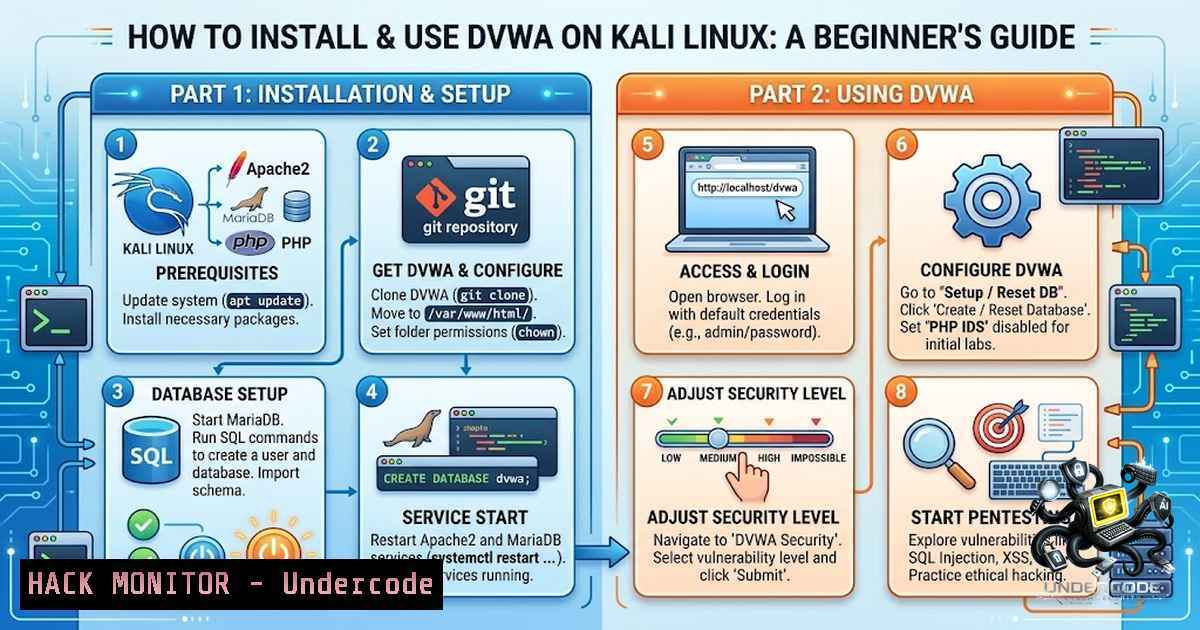
For anyone entering the fields of cybersecurity, ethical hacking, or web application penetration testing, establishing a safe and controlled environment for practice is one of the most effective ways to develop practical skills. The Damn Vulnerable Web Application (DVWA) is a deliberately insecure PHP/MySQL web application designed specifically for this purpose, allowing security professionals to test their skills and tools in a legal, sandboxed environment. This article provides a comprehensive, step-by-step guide on setting up DVWA on Kali Linux, configuring it for various security levels, and beginning to practice with some of the most common web vulnerabilities.
Learning Objectives & Secrets
- Objective 1: Master the Core Installation Process – Learn the two primary methods for installing DVWA on Kali Linux: the simplified `apt` package method and the more flexible manual installation from the official GitHub repository. This ensures you can set up your lab quickly and understand the underlying components.
-
Objective 2 Secret Tip: Understand the “Impossible” Level – While practicing exploitation is key, the true learning secret lies in the “Impossible” security level. By examining the secure code, you gain invaluable insight into how to properly defend against the very vulnerabilities you are exploiting.
-
Objective 3 Secret Tip: Integrate Your Tools – DVWA is not just a standalone lab; it’s a target for your pentesting toolkit. The secret to effective practice is to use DVWA in conjunction with tools like
sqlmap,Hydra, and `Burp Suite` to automate and deepen your exploitation techniques, bridging the gap between theory and real-world application.
You Should Know
- Kali Linux Package Installation (The Quick Start Method)
The fastest way to get DVWA running on Kali Linux is by using the built-in package manager. This method handles all dependencies automatically, making it ideal for beginners.
- Step 1: Open a terminal and update your package lists to ensure you have the latest information: `sudo apt update`
– Step 2: Install the DVWA package. This command will also install all required dependencies like Apache2, MariaDB, and PHP: `sudo apt install dvwa -y`
– Step 3: Once the installation is complete, you can start the DVWA service. The DVWA package on Kali uses its own isolated nginx server: `sudo dvwa-start`
– Step 4: After a few moments, open your web browser and navigate to the local URL provided in the terminal output, typically `http://127.0.0.1:42001`. - Step 5: Log in with the default credentials: Username:
admin, Password:password. You can then click the “Create / Reset Database” button to initialize the application.
2. Manual Installation from GitHub (The Flexible Method)
For those who want more control or a deeper understanding of the setup, manually installing DVWA from its official GitHub repository is the preferred method. This approach is also more aligned with how you might deploy other web applications.
- Step 1: Ensure your system is up-to-date to avoid common installation errors: `sudo apt update && sudo apt upgrade -y`
– Step 2: Install the LAMP (Linux, Apache, MySQL, PHP) stack and other necessary tools: `sudo apt install apache2 mariadb-server php php-mysqli php-gd php-curl php-xml php-mbstring git unzip -y`
– Step 3: Start and enable the Apache and MariaDB services: `sudo systemctl start apache2 && sudo systemctl enable apache2` and `sudo systemctl start mariadb && sudo systemctl enable mariadb`
– Step 4: Navigate to the web root directory and clone the DVWA repository:cd /var/www/html sudo rm index.html sudo git clone https://github.com/digininja/DVWA.git
- Step 5: Set the correct permissions for the DVWA directory: `sudo chown -R www-data:www-data DVWA` and `sudo chmod -R 755 DVWA`
– Step 6: Configure the database. Log in to MariaDB and create a database and user for DVWA:sudo mysql CREATE DATABASE dvwa; CREATE USER 'dvwauser'@'localhost' IDENTIFIED BY 'p@ssw0rd'; GRANT ALL PRIVILEGES ON dvwa. TO 'dvwauser'@'localhost'; FLUSH PRIVILEGES; EXIT;
- Step 7: Configure DVWA. Copy the sample configuration file and edit it with your database credentials:
cd /var/www/html/DVWA/config
sudo cp config.inc.php.dist config.inc.php
sudo nano config.inc.php
Update the `$_DVWA[ ‘db_password’ ]` to `’p@ssw0rd’` (or the password you set). Save and exit the file.
- Step 8: Configure PHP to allow remote file includes, which is necessary for some DVWA modules:
sudo nano /etc/php//apache2/php.ini
Find and change `allow_url_include = Off` to
allow_url_include = On. Save and exit. - Step 9: Make the necessary directories writable: `sudo chmod -R 777 /var/www/html/DVWA/hackable/uploads/`
– Step 10: Restart Apache to apply all changes: `sudo systemctl restart apache2`
– Step 11: Open your browser and navigate tohttp://localhost/DVWA`. Click the "Create / Reset Database" button, then log in withadmin/password`.
3. Docker/Podman Installation (The Isolated Method)
For a completely isolated and easily disposable environment, using containers is an excellent modern approach. Kali Linux ships with Podman by default.
- Step 1: Pull and run the DVWA container: `sudo podman run -d –1ame dvwa -p 8080:80 docker.io/vulnerables/web-dvwa`
– Step 2: Verify the container is running: `sudo podman ps`
– Step 3: Open your browser and navigate to `http://localhost:8080`. Follow the on-screen instructions to set up the database and log in.
4. Configuring DVWA Security Levels
DVWA’s core educational feature is its configurable security levels: Low, Medium, High, and Impossible. These levels change the code’s vulnerability, allowing you to practice both exploitation and secure coding.
- Step 1: After logging in, click on “DVWA Security” in the left sidebar.
- Step 2: Select the desired security level from the dropdown menu and click “Submit.”
- Step 3: Start with the “Low” security level, which has no input sanitization, making it easy to learn the basic attack vectors. As you master each vulnerability, increase the level to test your skills against more robust defenses.
5. Exploiting Common Vulnerabilities: Hands-On Practice
With your lab set up, you can now practice on real-world vulnerability classes in a safe environment.
- SQL Injection (SQLi): Navigate to the “SQL Injection” module. Enter `1′ OR ‘1’=’1` into the User ID field. If the application is vulnerable, it will return all user records from the database, demonstrating a classic SQL injection flaw.
- Command Injection: Navigate to the “Command Injection” module. Enter `127.0.0.1; whoami` into the IP address field. The application will ping the address and then execute the `whoami` command, showing the current user context.
- Cross-Site Scripting (XSS): Navigate to the “XSS (Reflected)” module. Enter `` into the “What’s your name?” field and click submit. A pop-up will appear, demonstrating that the application is reflecting unsanitized user input back to the browser.
What Undercode Say:
- Key Takeaway 1: A local pentesting lab like DVWA is the single most important tool for a beginner to bridge the gap between theoretical knowledge and practical hacking skills. It provides a legal and safe environment to make mistakes and learn from them.
- Key Takeaway 2: The real value of DVWA is not just in breaking the “Low” security level, but in understanding why the code is vulnerable and how to fix it. This is the foundation of becoming a skilled security professional, not just a script kiddie.
- The core philosophy of effective cybersecurity training is “practice, fail, learn, repeat.” DVWA epitomizes this cycle. By intentionally breaking an application and then studying its secure counterpart (the “Impossible” level), a learner develops a dual perspective: the attacker’s mindset and the defender’s strategy. This holistic understanding is what separates true security experts from those who simply run automated tools. The journey from “Low” to “Impossible” is a microcosm of the entire security field—a continuous loop of attack and defense that sharpens one’s instincts and technical prowess. Always remember, the goal is not just to hack, but to understand how to protect.
Prediction:
- +1 The accessibility of tools like DVWA will continue to democratize cybersecurity education, allowing a new generation of self-taught professionals to enter the field with practical, hands-on experience. This will help address the global shortage of qualified security talent.
- +1 As web applications become more complex, platforms like DVWA will evolve to include modern vulnerabilities (e.g., API security flaws, graphQL injection), ensuring that training remains relevant to the current threat landscape.
- -1 The ease of setting up vulnerable labs may lead to an increase in “script kiddies” who understand how to use tools but lack a deep understanding of the underlying principles, potentially leading to more unskilled and reckless actors in the cybersecurity space. However, this is a manageable risk that proper education and mentorship can mitigate.
▶️ Related Video (72% Match):
🎯Let’s Practice For Free:
🎓 Live Courses & Certifications:
Join Undercode Academy for Verified Certifications
🚀 Request a Custom Project:
Secure, high-velocity infrastructure and disruptive technological engineering. Contact our engineering team for high-tier development and proprietary systems:
[email protected]
💎 Smart Architecture | 🛡️ Secure by Design | ⭐ Trusted by Thousands
IT/Security Reporter URL:
Reported By: https://lnkd.in/p/eZnrpMSt – Hackers Feeds
Extra Hub: Undercode MoN
Basic Verification: Pass ✅


