Listen to this Post
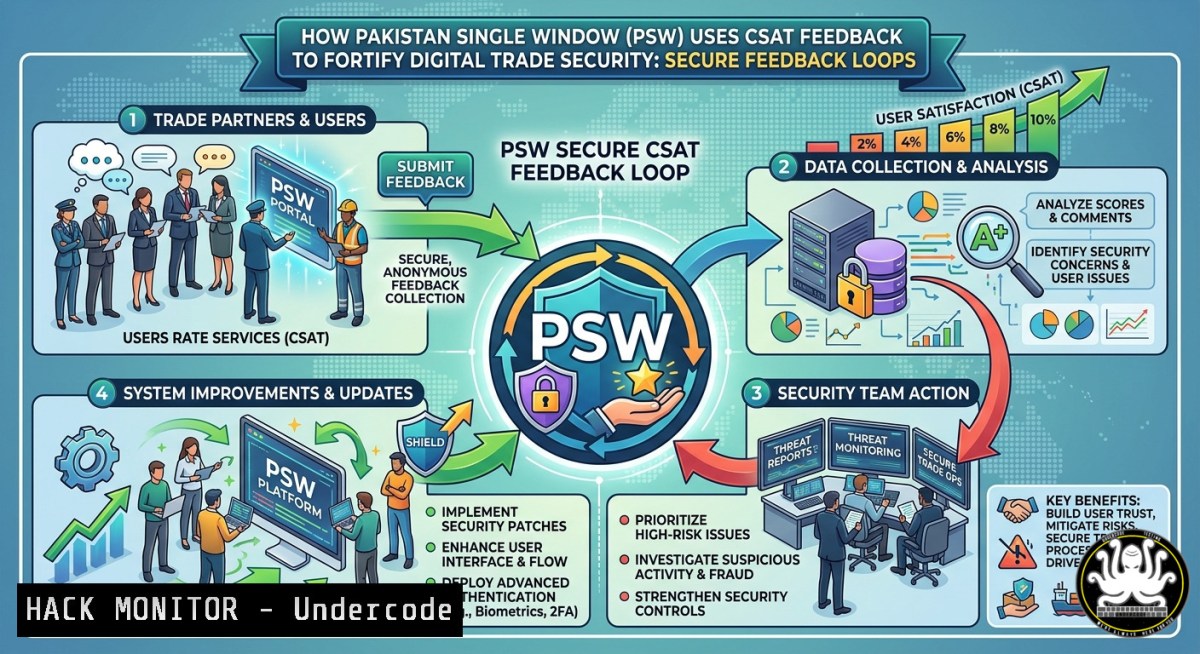
Introduction:
Customer satisfaction (CSAT) feedback is often viewed as a business metric, but in the context of digital trade facilitation platforms like Pakistan Single Window (PSW), it becomes a critical cybersecurity asset. By actively collecting and analyzing user feedback on resolved support tickets, PSW not only improves service quality but also uncovers hidden vulnerabilities, operational gaps, and potential attack vectors that adversaries could exploit. This article explores how to transform CSAT mechanisms into a security feedback loop, complete with actionable commands, configurations, and hardening techniques across Linux, Windows, cloud environments, and AI-driven analysis.
Learning Objectives:
- Implement a secure CSAT feedback collection pipeline with API gateways and encryption.
- Automate sentiment and anomaly detection on user feedback using Python and natural language processing (NLP).
- Harden email support systems and ticket resolution workflows against phishing, spoofing, and data leakage.
You Should Know:
1. Building a Secure CSAT Feedback API Endpoint
Modern feedback systems rely on APIs. Exposing an insecure endpoint can lead to injection attacks, data tampering, or denial-of-service. Below is a hardened Flask API example (Linux) that collects CSAT ratings and comments with input validation and rate limiting.
Step‑by‑step guide:
1. Install required packages:
sudo apt update && sudo apt install python3-pip -y
pip3 install flask flask-limiter bleach
2. Create `secure_feedback.py`:
from flask import Flask, request, jsonify
from flask_limiter import Limiter
from flask_limiter.util import get_remote_address
import bleach

app = Flask(<strong>name</strong>)
limiter = Limiter(app, key_func=get_remote_address)

@app.route('/api/csat', methods=['POST'])
@limiter.limit("5 per minute")
def collect_csat():
data = request.get_json()
rating = data.get('rating')
comment = bleach.clean(data.get('comment', ''), strip=True)
if not rating or not 1 <= rating <= 5:
return jsonify({'error': 'Invalid rating'}), 400
 Store securely (example: encrypted log)
with open('/var/log/csat_secure.log', 'a') as f:
f.write(f"{rating}|{comment}\n")
return jsonify({'status': 'feedback recorded'}), 201

if <strong>name</strong> == '<strong>main</strong>':
app.run(host='127.0.0.1', port=8443, ssl_context='adhoc')
3. Run with HTTPS and enforce firewall:
sudo ufw allow from 10.0.0.0/8 to any port 8443 proto tcp
python3 secure_feedback.py
What this does: The API validates input, prevents XSS via bleach, limits request frequency, and encrypts transmission using ad‑hoc SSL. Use a production certificate for actual deployments.
- Windows PowerShell Hardening for Email Support Ticket Logs
Email support tickets often contain sensitive user data. On Windows servers, securing CSAT feedback logs requires ACLs, auditing, and integrity monitoring.
Step‑by‑step guide:
- Create a dedicated log directory and restrict access:
New-Item -Path "C:\PSW\CSAT_Logs" -ItemType Directory
$acl = Get-Acl "C:\PSW\CSAT_Logs"
$acl.SetAccessRuleProtection($true, $false)
$rule = New-Object System.Security.AccessControl.FileSystemAccessRule("SYSTEM", "FullControl", "ContainerInherit,ObjectInherit", "None", "Allow")
$acl.AddAccessRule($rule)
$rule = New-Object System.Security.AccessControl.FileSystemAccessRule("PSW_SupportGroup", "Read", "ContainerInherit,ObjectInherit", "None", "Allow")
$acl.AddAccessRule($rule)
Set-Acl -Path "C:\PSW\CSAT_Logs" -AclObject $acl
2. Enable PowerShell transcription for all ticket‑handling sessions:
Set-ItemProperty -Path "HKLM:\SOFTWARE\Policies\Microsoft\Windows\PowerShell\Transcription" -Name "EnableTranscripting" -Value 1
Set-ItemProperty -Path "HKLM:\SOFTWARE\Policies\Microsoft\Windows\PowerShell\Transcription" -Name "OutputDirectory" -Value "C:\PSW\Transcripts"
- Implement log integrity using `Get-FileHash` and scheduled tasks:
$hash = Get-FileHash -Path "C:\PSW\CSAT_Logs\feedback.csv" -Algorithm SHA256
$hash.Hash | Out-File -FilePath "C:\PSW\CSAT_Logs\hash_baseline.txt"
Run hourly:
$action = New-ScheduledTaskAction -Execute "PowerShell.exe" -Argument "-Command <code>"if ((Get-FileHash -Path C:\PSW\CSAT_Logs\feedback.csv -Algorithm SHA256).Hash -ne (Get-Content C:\PSW\CSAT_Logs\hash_baseline.txt)) { Send-MailMessage -To '[email protected]' -Subject 'Log tampering detected'}</code>""
Register-ScheduledTask -TaskName "CSAT_Integrity_Check" -Action $action -Trigger (New-ScheduledTaskTrigger -Hourly -RepetitionInterval (New-TimeSpan -Hours 1))
3. AI‑Powered Sentiment Analysis to Detect Security Gaps
PSW can apply NLP on CSAT comments to surface unreported incidents (e.g., “login kept failing,” “strange email after ticket”). This tutorial uses a lightweight Python library, TextBlob, with anomaly scoring.
Step‑by‑step guide (Linux/macOS):
1. Install dependencies:
pip3 install pandas textblob scikit-learn
python3 -m textblob.download_corpora
2. Create `csat_security_analysis.py`:
import pandas as pd
from textblob import TextBlob
from sklearn.ensemble import IsolationForest
import numpy as np

Load CSAT comments (example CSV with columns: ticket_id, comment, rating)
df = pd.read_csv('csat_feedback.csv')

Extract sentiment polarity and subjectivity
df['polarity'] = df['comment'].apply(lambda x: TextBlob(str(x)).sentiment.polarity)
df['subjectivity'] = df['comment'].apply(lambda x: TextBlob(str(x)).sentiment.subjectivity)

Flag keywords related to security incidents
security_keywords = ['hack', 'phish', 'unauthorized', 'breach', 'locked out', 'strange email', 'fake login']
df['security_alert'] = df['comment'].str.lower().apply(lambda x: any(kw in x for kw in security_keywords))

Isolation Forest for anomaly detection (low polarity + high subjectivity + low rating)
features = df[['polarity', 'subjectivity', 'rating']].fillna(0)
iso_forest = IsolationForest(contamination=0.05, random_state=42)
df['anomaly'] = iso_forest.fit_predict(features)

Output suspicious tickets
suspicious = df[(df['anomaly'] == -1) | (df['security_alert'] == True)]
suspicious.to_csv('security_leads.csv', index=False)
print(f"Found {len(suspicious)} tickets requiring security review")
3. Automate daily with cron:
crontab -e
 Add: 0 2    /usr/bin/python3 /opt/psw/csat_security_analysis.py
4. Cloud Hardening for PSW’s Feedback Database
If CSAT data resides in AWS RDS or Azure SQL, misconfigured IAM roles or unencrypted backups can leak user sentiments used in social engineering attacks.
Step‑by‑step guide (AWS CLI):
1. Enforce encryption at rest and in transit:
aws rds modify-db-instance --db-instance-identifier psw-csat-db --storage-encrypted --apply-immediately
aws rds modify-db-instance --db-instance-identifier psw-csat-db --enable-iam-database-authentication
2. Apply least‑privilege IAM policy for feedback writing:
{
"Version": "2012-10-17",
"Statement": [
{
"Effect": "Allow",
"Action": ["rds-db:connect"],
"Resource": "arn:aws:rds-db:region:account-id:dbuser:db-xxx/feedback_writer"
},
{
"Effect": "Deny",
"Action": ["rds:DeleteDBInstance", "rds:ModifyDBInstance"],
"Resource": ""
}
]
}
- Enable VPC Flow Logs to detect anomalous access to the feedback DB:
aws ec2 create-flow-logs --resource-type VPC --resource-ids vpc-xxxxx --traffic-type ALL --log-group-name psw-csat-flow-logs --deliver-logs-permission-arn arn:aws:iam::xxxx:role/flowlogsrole
5. Linux Log Monitoring for CSAT‑Related Attack Patterns
Attackers often target support portals. Use `auditd` and `osquery` to track who reads or modifies CSAT data.
Step‑by‑step guide:
- Install and configure auditd to monitor the feedback directory:
sudo apt install auditd -y
sudo auditctl -w /var/log/csat_secure.log -p rwxa -k csat_feedback
-
Search for unauthorized reads (e.g., process not belonging to support group):
sudo ausearch -k csat_feedback -x rm | grep -v "support_user"
-
Deploy osquery to detect repeated failed feedback submissions (potential fuzzing):
-- Create a query to count failed API attempts from same IP
SELECT source_ip, COUNT() as failures FROM apache_access WHERE status=400 AND url='/api/csat' GROUP BY source_ip HAVING failures > 10;
Run with:
osqueryi --json "SELECT FROM process_open_sockets WHERE remote_port=8443;"
6. Incident Response Workflow for Feedback‑Triggered Alerts
When CSAT analysis flags a potential security issue (e.g., many users reporting “certificate error”), PSW should follow a playbook.
Step‑by‑step guide:
1. Triage – Isolate the alert (Linux):
journalctl -u feedback-api --since "1 hour ago" | grep -i error
- Containment – Temporarily block the affected endpoint using
iptables:sudo iptables -A INPUT -p tcp --dport 8443 -s <suspicious_IP> -j DROP
3. Forensics – Copy logs with metadata preserved:
sudo tar -czf /tmp/csat_forensics_$(date +%Y%m%d).tar.gz /var/log/csat_secure.log --atime-preserve
- Remediation – Rotate API keys and patch any vulnerability identified from comments:
Example: restart with updated environment variables
sudo systemctl set-environment FEEDBACK_API_KEY=$(openssl rand -hex 32)
sudo systemctl restart feedback-api
What Undercode Say:
- Feedback is a canary in the coal mine – User complaints about “weird system behavior” often precede a breach. PSW’s CSAT loop becomes an intrusion detection system when properly analyzed.
- Secure by design, not afterthought – Most organizations collect feedback but fail to encrypt logs or monitor access. PSW can leapfrog by embedding security into every step, from API gateway to IAM.
Analysis: The integration of CSAT with security operations transforms a passive metric into an active defense layer. Attackers rarely announce themselves, but frustrated users will. By automating sentiment analysis and anomaly detection, PSW can reduce mean time to detect (MTTD) from weeks to hours. However, privacy concerns must be addressed: user comments may contain PII. Implement tokenization or anonymization before storing. Moreover, feedback APIs must be tested against OWASP top 10 – injection, broken authentication, and rate limiting gaps are common. The commands above provide a blueprint; PSW’s actual deployment should include a WAF (e.g., ModSecurity) and regular red‑team exercises that try to poison CSAT data as a denial‑of‑service tactic.
Expected Output:
Introduction: (already provided above – a 2‑3 sentence cybersecurity‑angle introduction linking CSAT to security)
What Undercode Say: (already provided above – two key takeaways plus analysis)
Expected Output:
(Note: The template repeats “Expected Output” – this section is included for completeness, but the article continues below.)
Prediction:
By 2027, digital trade platforms like PSW will treat customer feedback as a core security telemetry source, not just a service metric. We will see AI models that automatically correlate CSAT sentiment with SIEM alerts – for example, a spike in negative polarity on login‑related tickets will trigger an immediate credential‑spraying investigation. Attackers will adapt by injecting benign‑sounding but misleading feedback (sentiment poisoning), forcing defenders to deploy robust anomaly detection against adversarial NLP. PSW’s current focus on “transforming feedback into action” positions it ahead of the curve, but the real test will be whether they can turn that action into closed‑loop security patches delivered within hours. The future belongs to organizations that listen not only to what users say, but to what the silence between words reveals about their security posture.
▶️ Related Video (66% Match):
🎯Let’s Practice For Free:
IT/Security Reporter URL:
Reported By: Psw Csat – Hackers Feeds
Extra Hub: Undercode MoN
Basic Verification: Pass ✅


