Listen to this Post
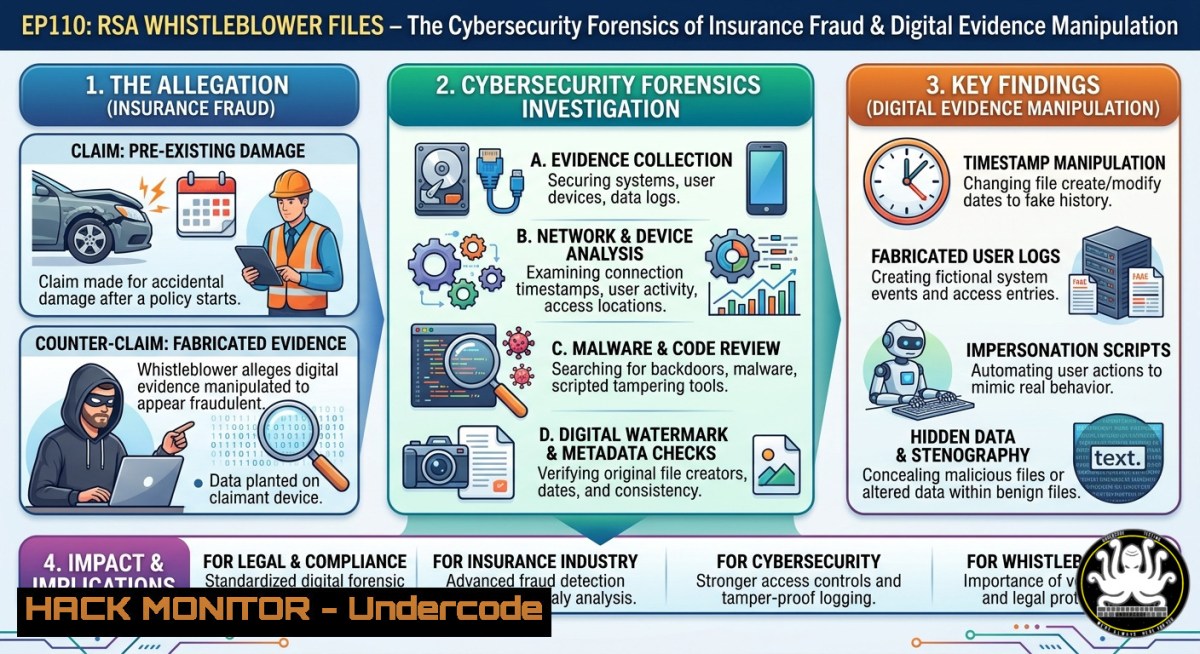
Introduction
Insurance claim disputes increasingly hinge on digital evidence—emails, timestamps, metadata, and forensic artifacts. When an insurer fabricates reports or selectively omits critical data, the ability to audit, preserve, and present digital evidence becomes a cybersecurity battlefield. This article extracts technical lessons from a real-world whistleblower submission against a major insurer, translating legal manipulation tactics into actionable IT, AI, and cloud security training for defenders, auditors, and policyholders.
Learning Objectives
- Identify how attackers (including adversarial insurers) manipulate logs, metadata, and digital reports to fabricate conclusions.
- Apply Linux and Windows forensic commands to capture, hash, and timestamp evidence for legal or compliance submissions.
- Implement API security and cloud hardening techniques to protect personal claim data from unauthorized modification or deletion.
You Should Know
- Digital Forensics for Claim Evidence – Preserving the Immutable Audit Trail
Extended version:
The whistleblower’s submission revealed that the insurer produced “independent reports” contradicting each other, with no verifiable chain of custody. In cybersecurity terms, this is evidence tampering. To fight back, you must treat every policy document, email, and portal screenshot as a digital artifact. Below are commands and tutorials to create a court‑defensible evidence package.
Step‑by‑step guide – Linux / macOS (using standard tools):
 1. Create a case directory and set immutable attributes
mkdir ~/insurance_case_EP110
cd ~/insurance_case_EP110

<ol>
<li>Capture metadata of all relevant files (emails, PDFs, screenshots)
find /path/to/evidence -type f -exec stat {} \; > metadata_manifest.txt</p></li>
<li><p>Generate SHA‑256 hashes for every file (tamper‑proof fingerprint)
find /path/to/evidence -type f -exec sha256sum {} \; > hashes_sha256.txt</p></li>
<li><p>Sign the hash file with GPG to prove creation time
gpg --clearsign hashes_sha256.txt</p></li>
<li><p>Create a immutable archive (tar + gpg) and write to write‑once media
tar czf evidence_$(date +%Y%m%d).tgz /path/to/evidence
gpg --symmetric --cipher-algo AES256 evidence_.tgz
Burn to CD‑R or store on a dedicated USB with hardware write‑lock
Step‑by‑step guide – Windows (PowerShell with administrative privileges):
 1. Create evidence directory and set auditing
New-Item -Path "C:\Insurance_EP110" -ItemType Directory
$evidencePath = "C:\Insurance_EP110"

<ol>
<li>Compute SHA‑256 hashes for all files recursively
Get-ChildItem -Path $evidencePath -Recurse | Get-FileHash -Algorithm SHA256 | Export-Csv -Path hashes_sha256.csv -NoTypeInformation</p></li>
<li><p>Export file system timestamps (creation, last write, last access)
Get-ChildItem -Path $evidencePath -Recurse | Select-Object FullName, CreationTime, LastWriteTime, LastAccessTime | Export-Csv -Path metadata_timestamps.csv</p></li>
<li><p>Enable Object Access auditing (requires admin) – log who reads/modifies files
auditpol /set /subcategory:"File System" /success:enable /failure:enable</p></li>
<li><p>Use built-in cipher /w to securely wipe any previous copies of evidence (prevents recovery)
cipher /w:C:\Insurance_EP110
Tutorial – Using timestamping services (free / low‑cost):
Services like OpenTimestamps or ProofMode create blockchain‑anchored proofs. For Linux: pip install opentimestamps-client && ots stamp evidence.pdf. For Windows, use the GUI or PowerShell wrapper. The resulting `.ots` file proves the file existed before a given date, defeating backdating attacks.
- API Security and Cloud Hardening – Defending Against Portal Manipulation
Step‑by‑step guide – Securing your insurer’s customer portal session:
Insurers often host claim documents on cloud storage (AWS S3, Azure Blob). If an adversary (insider or external) gains access, they can alter or delete evidence. Implement these controls as a policyholder:
 Linux – Monitor API calls to the insurer’s portal using mitmproxy
mitmproxy --mode transparent --showhost -w insurance_traffic.flow
 Filter for S3 presigned URLs or document upload endpoints
 Look for unexpected DELETE or PUT requests on your claim files
 Windows – Use Fiddler Classic or Burp Suite Community to intercept HTTPS traffic
 Set up proxy, install trusted root cert, review requests to .myinsurer.com
 Export session: File -> Export Sessions -> All Sessions -> as HAR
Cloud hardening tutorial for insurers (but relevant for any cloud storage):
- Enable S3 Object Lock (if you control the bucket) to prevent deletion for a fixed retention period.
- Configure bucket policies to deny `s3:DeleteObject` unless MFA is present.
- Enable CloudTrail data events to log every object‑level API call – then feed logs to a SIEM.
- For Azure Blob: enable immutable storage with time‑based retention policies.
API security checklist for personal data:
- Use strong, unique passwords + TOTP 2FA on the insurer’s portal (even if not required).
- After uploading any evidence, download it again and compare hashes: `curl -s -o redownload.pdf “https://api.insurer.com/docs/claim123” && sha256sum redownload.pdf`
– If the hash changes without your action, that is a forensic red flag.
- AI‑Driven Anomaly Detection for Insurance Reports – Spotting Fabricated Conclusions
Step‑by‑step guide – Using LLMs and NLP to audit independent expert reports:
The whistleblower noted that “every report cited came from an independent source. Every one of them goes against the insurer.” This pattern – unanimous contradiction of the payer – is statistically suspicious. Use AI to detect internal inconsistencies or boilerplate language:
 Python script using open‑source models (no API key required)
import requests
from sentence_transformers import SentenceTransformer, util

model = SentenceTransformer('all-MiniLM-L6-v2')
reports = ["report1.pdf_text", "report2.pdf_text", "report3.pdf_text"]
embeddings = model.encode(reports)

Compute similarity matrix – unusually high similarity suggests copy‑paste or collusion
similarities = util.cos_sim(embeddings, embeddings)
print("Similarity matrix:\n", similarities)

Use a local LLM (Ollama + llama3) to flag contradictions
 "List all factual claims in this report and mark if contradicted by other reports"
For non‑coders, use Microsoft Copilot (with commercial data protection) or Claude.ai to upload PDFs and ask: “Compare the methodology sections of these three reports. Do they share identical phrasing? Highlight any sentences that appear in two or more reports.”
Tutorial – Extracting timestamps and author metadata from PDFs (Linux):
 Install exiftool
sudo apt install exiftool
for f in .pdf; do
echo "=== $f ===" >> metadata_all.txt
exiftool -CreateDate -ModifyDate -MetadataDate -Creator -Producer "$f" >> metadata_all.txt
done

Look for mismatches: A report supposedly written in 2024 but PDF metadata shows 2025 creator tool version.
- Vulnerability Exploitation & Mitigation – How Insurers Leverage Insecure Communication Channels
Step‑by‑step guide – Testing your own digital communication with the insurer:
The post mentions “fabricate complaints and other dirty things.” Attackers often exploit email as an unauthenticated channel. Mitigate by:
- Enabling TLS‑RPT and MTA‑STS on your own domain (if you run one) to enforce encryption.
- Requesting a secure upload portal rather than email attachments.
- Using ProtonMail or similar encrypted email for all dispute correspondence.
Command to verify if the insurer’s email server supports STARTTLS (Linux):
swaks --to [email protected] --server mx.insurer.com --port 25 --tls
 If output shows "TLS succeeded" but certificate is self‑signed or mismatched, record it.
Windows (PowerShell) – Check email headers for spoofing:
 After receiving an email from the insurer, view full headers in Outlook (File -> Properties)
 Or download .eml and run:
(Get-Content email.eml) -match "^Received:|^From:|^Authentication-Results:"
 Look for "spf=fail", "dkim=neutral", "dmarc=fail"
5. Training Courses & Certifications for Insurance Cybersecurity
Recommended free / low‑cost training:
| Course | Provider | Relevance |
|–|-||
| Digital Forensics Essentials (DFE) | EC‑Council (free with verification) | Evidence collection, hashing, chain of custody |
| SEC301: Introduction to Cybersecurity | SANS (audit free, cert paid) | Core IT security concepts |
| AWS Cloud Security for Beginners | AWS Skill Builder (free) | S3 object lock, CloudTrail |
| API Security Fundamentals | APISec University (free) | JWT, OAuth, rate limiting |
| Linux Command Line for Forensics | TryHackMe (room: “Linux Forensics”) | Hands‑on with grep, awk, `xxd` |
For AI literacy: Google’s “Generative AI for Developers” (free) and DeepLearning.AI’s “ChatGPT Prompt Engineering for Developers” (free).
What Undercode Say
- Key Takeaway 1: Every insurance dispute is a digital forensics case. Without provable hashes, timestamps, and access logs, your evidence can be silently altered or dismissed.
- Key Takeaway 2: Insurers’ cloud portals are attack surfaces. API calls that delete or modify uploaded documents should be auditable by the policyholder – and if they aren’t, that is a systemic vulnerability.
Analysis (10 lines):
The whistleblower’s account reveals a pattern of “selective use of evidence” – a classic cybersecurity failure in data governance. In mature organizations, every change to a claim record triggers an immutable audit log. The fact that multiple independent reports uniformly contradicted the insurer suggests either deliberate cherry‑picking or a coordinated attempt to manufacture consensus. From a threat modeling perspective, the policyholder is the victim of an insider‑like adversary (the insurer’s claims department) that has write access to the data store. The recommended mitigations include mandatory object locking, third‑party timestamping, and cryptographic signing of all outgoing reports. Training courses on digital forensics and API security should be mandatory for claims adjusters, not just IT staff. Until then, individuals must adopt the mindset of a forensic analyst: hash everything, timestamp everything, and never trust the portal as the source of truth without independent verification.
Prediction
Within 18 months, we will see the first class‑action lawsuit where plaintiffs successfully subpoena cloud access logs (S3 CloudTrail, Azure Monitor) to prove an insurer deleted or modified claim evidence after submission. This will trigger a regulatory shift: insurance portals will be required to implement immutable audit trails and cryptographically sign every uploaded document. AI models will routinely scan “independent expert reports” for collusion patterns, and whistleblower platforms like EP110 will standardize forensic evidence packages as part of their submission templates. Cybersecurity professionals will find a new specialty: insurance evidence forensics, bridging DFIR (digital forensics and incident response) and regulatory compliance. The era of “process over truth” in claims handling is ending – not because of goodwill, but because verifiable digital fingerprints leave nowhere to hide.
🎯Let’s Practice For Free:
IT/Security Reporter URL:
Reported By: Artur Nadolny – Hackers Feeds
Extra Hub: Undercode MoN
Basic Verification: Pass ✅


