
Listen to this Post
Introduction:
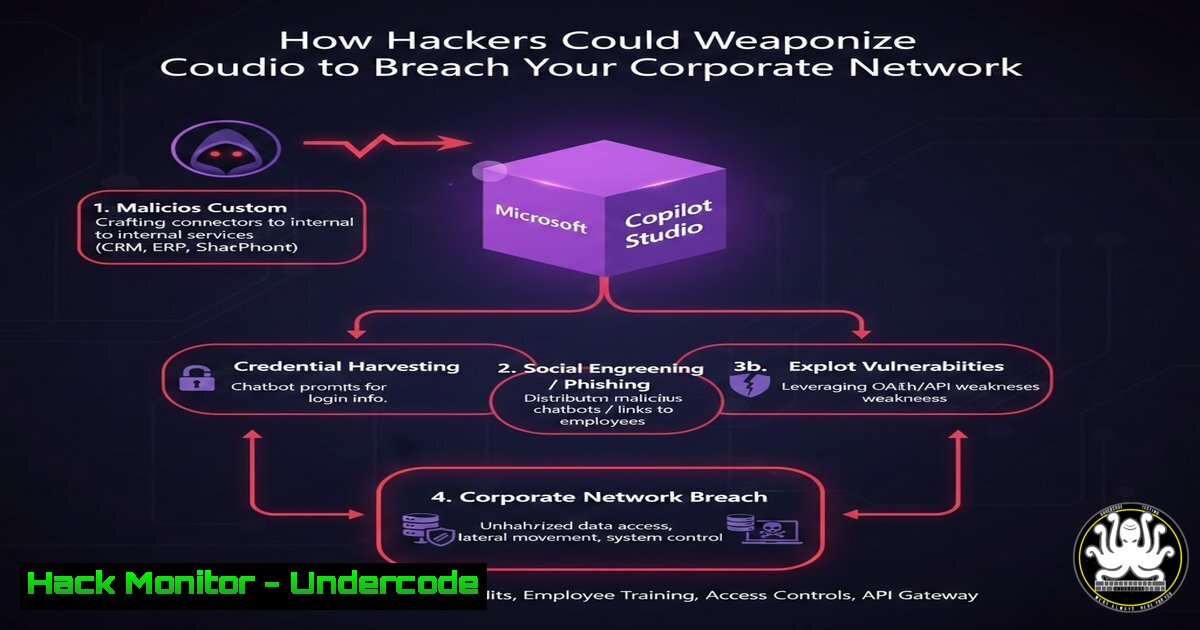
The line between productivity and peril has never been thinner. A recent demonstration by Matthew Devaney showed how to use Microsoft Copilot Studio to generate a PowerPoint deck with a simple prompt. While this showcases the power of Low-Code/No-Code (LCNC) AI agents, for a cybersecurity expert, this functionality raises immediate red flags. If an employee can ask an agent to build a presentation, an attacker who compromises that agent—or tricks an employee into using a malicious one—could just as easily ask it to enumerate Active Directory, exfiltrate SharePoint data, or deploy a macro-laden file. We must analyze the security posture of these AI agents not as productivity tools, but as potential lateral movement vectors within your cloud tenant.
Learning Objectives:
- Understand the attack surface of Low-Code AI agents like Copilot Studio.
- Learn how to enumerate and extract sensitive data using maliciously crafted Power Platform connectors.
- Identify misconfigurations in Dataverse and SharePoint that allow agent privilege escalation.
- Implement defensive measures, including Data Loss Prevention (DLP) policies and audit logging.
You Should Know:
- The Anatomy of a Malicious Agent: From Presentation to Payload
The original post highlights generating a PowerPoint file. In a red team scenario, we extend this. An attacker with access to Copilot Studio (via compromised credentials or a rogue insider) can create an agent that does not just build decks, but harvests data.
Step‑by‑step guide (Red Team / Awareness):
- Access the Environment: Navigate to `https://make.powerautomate.com` or the Copilot Studio portal.
- Create a New Agent: Select “Create a new agent” and give it a benign name (e.g., “Q4 Report Assistant”).
- Add a Malicious Connector: Under “Topics” or “Actions,” add a new action. Search for and add the “HTTP with Azure AD” connector. This allows the agent to make authenticated requests using the current user’s context.
- Enumerate Users: Configure the action to hit the Microsoft Graph API endpoint: `https://graph.microsoft.com/v1.0/users`. Select “GET” method.
– Why this works: The agent inherits the permissions of the user running the conversation. If the user can read the directory, the agent can too.
5. Format the Output: Instruct the agent to take the JSON response and format it into a table or, as per the original post, generate a PowerPoint file listing all usernames, job titles, and email addresses.
6. Exfiltration Vector: Instead of just displaying the file, the agent could be instructed to email it to an external attacker-controlled address using the “Outlook 365” connector.
2. Enumerating Dataverse and SharePoint via Natural Language
If the agent is connected to company data sources (Dataverse, SharePoint, SQL), the attacker does not need to know complex API calls. They can simply ask in plain English.
Step‑by‑step guide (Data Harvesting):
- Identify Data Sources: In the agent’s settings, review the “Knowledge” sources. If the agent has been granted access to specific SharePoint sites or Dataverse tables, note these.
- Craft the Prompt (Defender View): Instead of a technical query, the user asks: “Show me all documents in the ‘Finance’ SharePoint site that contain the word ‘budget’.”
– The Process: The agent uses its built-in AI to translate this into a SharePoint Search API call.
3. Extract Sensitive Content: The agent can then retrieve the content. For example:
– “Read the first 10 rows of the ‘EmployeeSalary’ table in Dataverse and summarize the total.”
4. Export to Malicious Format: As demonstrated, the agent can package this data.
– Linux/macOS Equivalent Command (Monitoring): To simulate what an agent might pull, an admin can check logs using jq. If you export the audit logs, you can filter for Graph API activity.
 Assuming you have extracted audit logs to a file 'audit.json'
cat audit.json | jq '.[] | select(.Operation == "Get user.") | {User: .UserId, Target: .ObjectId, Time: .CreationTime}'
3. Abusing Power Automate Flows for Persistent Access
Behind every Copilot Studio agent is often a Power Automate flow. These flows run with high privilege (the creator’s credentials or a service account) and can be triggered by the agent.
Step‑by‑step guide (Persistence & Escalation):
- Locate the Backend Flow: When an agent performs an action, check the “Connections” tab. There will be associated Power Automate flows.
- Modify the Flow (Post-Compromise): If an attacker gains editor access to the environment, they can open the parent flow.
- Insert Malicious Step: Between the trigger and the response, add a new step.
– Windows Command (Conceptual – API Call): The flow uses HTTP actions. An attacker can add an action to POST a new user to Azure AD, provided the service account has permissions.
– Example API Call within Flow:
– Method: `POST`
– URI: `https://graph.microsoft.com/v1.0/users`
– Body:
{
"accountEnabled": true,
"displayName": "Backup Admin",
"mailNickname": "backupadmin",
"userPrincipalName": "[email protected]",
"passwordProfile": {
"forceChangePasswordNextSignIn": true,
"password": "xW8vP!3sT"
}
}
4. Cover Tracks: The flow continues to function normally, returning the PowerPoint presentation to the original user, unaware of the background task.
4. Security Misconfigurations in Agent Authentication
The biggest risk is “action delegation.” By default, the agent acts as the user. This is Zero Trust failure.
Step‑by‑step guide (Defensive Audit):
1. Check Authentication Settings:
- Navigate to the Copilot Studio agent.
- Go to Settings > Security > Authentication.
- Red Flag: If it is set to “Authenticate with Microsoft” (and not a specific service principal), the agent has the same access as the user.
2. Review Connection References:
- Go to
make.powerapps.com. - Select Solutions > Default Solution.
- Find “Connection References” linked to the agent.
- Red Flag: If the connection uses a user’s credentials (“Made by
") rather than an application user, it breaks if that user leaves, or it provides unintended access.</li>
</ul>

<ol>
<li>Monitoring with Kusto Query Language (KQL) in Microsoft 365 Defender
To detect malicious agent activity, security teams must hunt in the unified audit log.</li>
</ol>

<h2 style="color: yellow;">Step‑by‑step guide (Detection Engineering):</h2>

<ol>
<li>Access Advanced Hunting: Go to Microsoft 365 Defender > Hunting > Advanced Hunting.</li>
<li>Query for Copilot Activity: Look for events where a user or service principal interacts with Copilot or Graph API on behalf of an agent.
[bash]
// Detect Graph API calls potentially made by Copilot Studio
CloudAppEvents
| where Timestamp > ago(1d)
| where Application == "Microsoft Graph"
| where ActionType in ("List users", "List sites", "Get file")
| extend UserAgent = parse_json(RawEventData).UserAgent
| where UserAgent contains "PowerApps" or UserAgent contains "CopilotStudio" // Agents often identify themselves
| project Timestamp, AccountDisplayName, IPAddress, ActionType, RawEventData
3. Query for Data Exfiltration:
// Detect large downloads triggered by an automation context
CloudAppEvents
| where Timestamp > ago(1h)
| where Application == "Microsoft SharePoint Online"
| where ActionType == "FileDownloaded"
| where isnotempty(AccountUpn)
| where AccountUpn endswith "@company.com" // Internal user
| where RawEventData contains "app://" // Often indicates an app/agent making the call
| summarize DownloadCount = count(), TotalSize = sum(parse_json(RawEventData).FileSize) by AccountUpn, ClientIP
| where DownloadCount > 50 // Threshold for unusual bulk download
- Hardening the Environment with DLP and Defender for Cloud Apps
Prevention is better than detection. We must restrict what these agents can touch.
Step‑by‑step guide (Defensive Hardening):
1. Create a DLP Policy:
- Go to Power Platform Admin Center > Data policies > New Policy.
- Name it “Block Unauthorized Exfiltration”.
- In the Connectors tab, classify connectors:
- Blocked: Put HTTP connectors, personal messaging apps (Telegram, Slack), and external storage (Box, Dropbox) in the “Blocked” group. This prevents agents from sending data out.
- Business Data Only: Place SharePoint, OneDrive, and Dataverse in this group.
2. Configure Defender for Cloud Apps Anomaly Detection:
- In Microsoft Defender, go to Cloud Apps > Policies > Policy management.
- Create a new Activity policy.
- Filter: Activity object = “File”. Activity type = “Download file”.
- Source: Set “User agent tag” equals “Microsoft Power Automate” or “Microsoft Copilot Studio”.
- Alert: Trigger an alert if more than 5 files are downloaded in 5 minutes from these agents.
What Undercode Say:
- Key Takeaway 1: Identity is the new perimeter, but the agent is the new proxy. Copilot Studio agents are not just chatbots; they are authenticated execution environments. If an identity is compromised, the agent becomes a weapon. If the agent is misconfigured, it leaks data. Security teams must treat these agents as first-class principals in their Zero Trust architecture, auditing their actions as rigorously as they audit human users.
-
Key Takeaway 2: Low-Code does not mean Low-Risk. The ease of creating an agent that generates a PowerPoint masks the complexity of the underlying permissions. The “HTTP with Azure AD” connector is effectively a reverse shell into Graph API, wrapped in a friendly UI. Traditional network monitoring (firewalls, IPS) is blind to these attacks because they occur over TLS 1.2/1.3 using legitimate Office 365 IP ranges. The only way to catch this is via API-level logging and behavior analytics. We are entering an era where defending the cloud requires us to think like an AI, anticipating the malicious interpretations of benign prompts.
Prediction:
Within the next 18 months, we will see the first major corporate breach directly attributed to a maliciously configured Low-Code agent. The attack vector will likely be social engineering—an employee is tricked into chatting with a “HR Benefits Agent” that actually harvests their NTLM hash or requests MFA approval. As Generative AI merges with robotic process automation (RPA), the speed at which an attacker can move from initial access to data exfiltration will accelerate from hours to minutes, forcing security operations centers (SOCs) to develop automated response playbooks specifically for rogue AI agents. The future of hacking isn’t writing exploit code; it’s writing the perfect prompt.
▶️ Related Video (86% Match):
🎯Let’s Practice For Free:
IT/Security Reporter URL:
Reported By: Matthew Devaney – Hackers Feeds
Extra Hub: Undercode MoN
Basic Verification: Pass ✅


