Listen to this Post
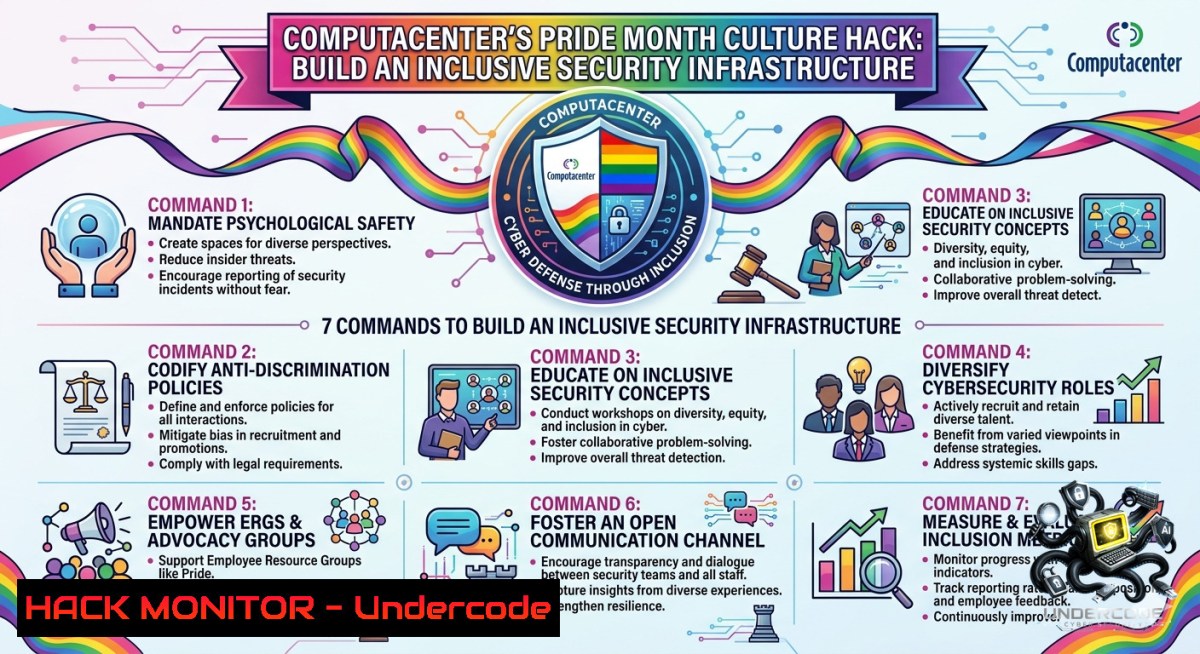
Introduction:
Corporate culture directly impacts security posture. When employees feel a sense of belonging and psychological safety—values championed by Computacenter during PrideMonth—they are more likely to report incidents, follow secure practices, and resist phishing. This article translates those human-centric principles into actionable cybersecurity commands, from Linux/Windows privilege audits to AI-driven log analysis, showing how respect and inclusion form the ultimate human firewall.
Learning Objectives:
- Implement culture-driven security awareness programs using Linux/Windows group policies and feedback dashboards.
- Configure cloud IAM roles to reflect diverse team structures and enforce least privilege.
- Automate compliance reporting with AI-driven log analysis while fostering inclusive code reviews and incident handling.
You Should Know:
1. Privilege Management as a Reflection of Respect
Just as Computacenter values each individual’s potential, security teams must grant minimal necessary access. Auditing who has admin rights prevents both insider threats and accidental damage. Below are commands to scan privileges across Linux and Windows environments.
Linux – Check sudo group members and user rights:
grep -E "sudo|admin|wheel" /etc/group
sudo -l -U username
 List all users with UID >= 1000 (non-system)
awk -F: '$3>=1000 {print $1}' /etc/passwd
Windows (PowerShell) – Enumerate privileged local group members:
Get-LocalGroupMember -Group "Administrators"
Get-LocalUser | Where-Object {$_.Enabled -eq $true} | Select-Object Name,LastLogon
 Export to CSV for review
Get-LocalGroupMember -Group "Administrators" | Export-Csv -Path admin_audit.csv
Step‑by‑step guide:
- Run the Linux commands weekly via cron job: `0 9 1 /usr/bin/grep -E “sudo|admin” /etc/group > /var/log/priv_audit.log`
- For Windows, schedule PowerShell script using Task Scheduler with `-ExecutionPolicy Bypass` flag.
- Compare outputs against a “golden” list of approved admins. Remove stale accounts and document changes in a collaborative ticketing system (e.g., Jira with inclusive templates).
- Share anonymized results with the whole team to build transparency—no blame, just joint improvement.
2. Building a Psychological Safety Dashboard
Security is not purely technical; anonymous feedback loops reduce fear of retaliation. Install Grafana with a SIEM backend (Elasticsearch) to visualize incident reporting trends over time. Use this to spot teams that under-report, then address cultural blockers.
Install Grafana on Ubuntu 22.04:
sudo apt-get update
sudo apt-get install -y grafana
sudo systemctl enable grafana-server
sudo systemctl start grafana-server
 Access via http://localhost:3000 (default admin:admin)
Query to count “near-miss” reports per department (Elasticsearch DSL):
GET /incidents/_search
{
"aggs": {
"by_team": {
"terms": { "field": "department.keyword" },
"aggs": { "avg_severity": { "avg": { "field": "severity" } } }
}
}
}
Step‑by‑step guide:
- Deploy ELK stack (Filebeat + Elasticsearch + Kibana) or use Grafana with Loki.
- Create a dashboard that shows reporting volume vs. actual system anomalies detected by AV/EDR.
- Encourage naming conventions that avoid blame (e.g., “learning opportunity” instead of “violation”).
- Hold monthly reviews where teams with high report rates are praised, not punished.
3. Cloud Hardening with Inclusive IAM Policies
Cloud access control must mirror respect for individual roles. Avoid “superuser” mentality by assigning permissions based on project affinity and seniority. Below are AWS CLI commands to audit IAM roles and implement policy-as-code.
List all IAM roles and attached managed policies:
aws iam list-roles --query "Roles[].RoleName" --output table
aws iam list-attached-role-policies --role-1ame DeveloperRole
 Find roles with admin privileges
aws iam list-policies --scope Local --query "Policies[?PolicyName=='AdministratorAccess']"
Terraform example for a developer role with read-only S3 access:
resource "aws_iam_role" "dev_readonly" {
name = "DevReadOnly"
assume_role_policy = jsonencode({
Version = "2012-10-17"
Statement = [{
Action = "sts:AssumeRole"
Effect = "Allow"
Principal = { AWS = "arn:aws:iam::123456789012:user/dev-team" }
}]
})
}
resource "aws_iam_policy_attachment" "dev_s3_ro" {
name = "dev-s3-ro-attach"
roles = [aws_iam_role.dev_readonly.name]
policy_arn = "arn:aws:iam::aws:policy/AmazonS3ReadOnlyAccess"
}
Step‑by‑step guide:
- Run the AWS CLI audits monthly and remove unused roles.
- Implement policy-as-code using Terraform or AWS CloudFormation. Add comments in HCL explaining why each permission is granted (e.g., “ Read-only for junior analysts to learn without risk”).
- Enforce MFA on all roles via a condition block.
- Rotate access keys every 90 days using automated Lambda functions.
4. Phishing Simulation with Respectful Feedback
Traditional “gotcha” tests damage belonging. Instead, use GoPhish to run opt‑in simulations where results are anonymized and paired with micro‑training. This approach aligns with Computacenter’s supportive culture.
Deploy GoPhish on Linux server:
wget https://github.com/gophish/gophish/releases/download/v0.12.1/gophish-v0.12.1-linux-64bit.zip
unzip gophish-.zip -d gophish
cd gophish
sudo ./gophish &
 Admin interface on port 3333, phishing server on port 80
API call to launch a campaign (using curl):
curl -k -X POST https://localhost:3333/api/campaigns/ \
-H "Authorization: Bearer <api_key>" \
-H "Content-Type: application/json" \
-d '{"name":"PrideMonth Awareness","groups":[{"name":"IT_Team"}],"page":{"name":"Login Redesign"},"smtp":{"host":"smtp.internal"}}'
Step‑by‑step guide:
- Configure GoPhish with a landing page that explains why the simulation is for learning (no penalties).
2. Send invitations to participate, not mandatory tests.
- After each campaign, hold a blameless retrospective to identify systemic gaps (e.g., unclear email policies, lack of reporting channels).
- Provide immediate training to anyone who clicked—focusing on how to spot lures, not shaming.
5. AI-Driven Log Analysis for Anomaly Detection
Use a lightweight isolation forest model on login and process creation logs. This respects privacy by avoiding PII while still catching unusual behavior. Python + scikit-learn can run on a security analyst’s workstation or a small VM.
Python snippet to train on normalized feature vectors:
import pandas as pd
from sklearn.ensemble import IsolationForest
from sklearn.preprocessing import StandardScaler

Load logs (e.g., failed logins per user per hour)
df = pd.read_csv('auth_logs.csv')
features = ['logon_count', 'failed_attempts', 'privilege_escalation_count']
scaler = StandardScaler()
X_scaled = scaler.fit_transform(df[bash])

model = IsolationForest(contamination=0.01, random_state=42)
model.fit(X_scaled)
df['anomaly'] = model.predict(X_scaled)  -1 = anomalous
anomalies = df[df['anomaly'] == -1]
print(anomalies[['user', 'timestamp', 'failed_attempts']])
Linux command to extract failed SSH logins per hour:
sudo journalctl _COMM=sshd | grep "Failed password" | awk '{print $1" "$2" "$3}' | sort | uniq -c
Step‑by‑step guide:
- Ingest syslog or Windows Event Logs (Event ID 4625 for failed logins) via Filebeat into a CSV/Parquet store.
- Run the Python script daily as a cron job.
- Involve the whole team in labeling false positives to democratize security—junior members learn what “normal” looks like.
- Integrate anomalies into a Slack/MS Teams webhook for collaborative review.
-
Windows Group Policy for an Inclusive Desktop Environment
Enforce settings that reduce distractions, block anonymous harassment tools (e.g., certain chat apps), and enforce screen lock timeouts. Use Local Group Policy Object (LGPO) or PowerShell commands.
Export current policy settings:
LGPO.exe /export C:\GPOBackup
PowerShell to block Discord outgoing traffic via Windows Firewall:
New-1etFirewallRule -DisplayName "Block Discord" -Direction Outbound -Protocol TCP -RemotePort 443 -Action Block -RemoteAddress "162.159.128.0/20"
 Also block non-corporate VPNs
New-1etFirewallRule -DisplayName "Block WireGuard" -Direction Outbound -Program "%ProgramFiles%\WireGuard\wireguard.exe" -Action Block
Set screen lock timeout for all domain users (Group Policy Management):
Navigate to `Computer Configuration → Policies → Windows Settings → Security Settings → Local Policies → Security Options` → “Interactive logon: Machine inactivity limit” → Set to 900 seconds.
Step‑by‑step guide:
- Test firewall rules in a staging OU before global deployment.
- Include users in the change advisory board (CAB) to explain why certain apps are restricted—transparency builds respect.
3. Use `gpupdate /force` after policy changes.
- Monitor blocked connections via Windows Event Viewer (Firewall logs under
%SystemRoot%\System32\LogFiles\Firewall).
7. Continuous Learning with Computacenter’s Ethos
Encourage certifications (CISSP, CEH, CCSP) paired with peer mentoring. Automate certificate expiry reminders using Ansible to prevent lapses without personal stress.
Ansible playbook to check SSL cert expiry across servers:
- name: Check certificate expiration dates
hosts: all
tasks:
- name: Get cert end date from file
command: openssl x509 -enddate -1oout -in {{ cert_path }}
register: cert_enddate
- name: Calculate days left
set_fact:
days_left: "{{ (cert_enddate.stdout.split('=')[bash] | to_datetime('%b %d %H:%M:%S %Y %Z') - ansible_date_time.iso | to_datetime).days }}"
- name: Warn if less than 30 days
debug:
msg: "Certificate {{ cert_path }} expires in {{ days_left }} days"
when: days_left < 30
Windows equivalent – Check cert expiry using PowerShell:
Get-ChildItem -Path Cert:\LocalMachine\My | Select-Object Subject, NotAfter | Where-Object {$_.NotAfter -lt (Get-Date).AddDays(30)}
Step‑by‑step guide:
1. Store certificate paths in an inventory file.
- Run the Ansible playbook weekly via AWX or cron.
- Create a shared calendar for exam study groups; use Slack bots to celebrate each new certification.
- Pair junior staff with senior mentors during breach tabletop exercises—this reinforces belonging while building technical muscle.
What Undercode Say:
- Culture is the ultimate control: no amount of firewalls can compensate for a team that fears reporting incidents. Computacenter’s focus on belonging directly reduces dwell time and breach costs—psychological safety turns every employee into a sensor.
- Technical commands are meaningless without inclusive processes. The steps above integrate respect into CI/CD, IAM, and monitoring, turning diversity into a competitive advantage. Organizations that ignore this will face higher insider threat incidents and slower breach response due to fear-based silence.
Prediction:
+1 Increased adoption of “human-centric security metrics” (e.g., incident reporting frequency, team retention) in SOC dashboards, where inclusion scores become KPIs alongside CVEs.
+N If enterprises continue to treat security as purely technical, they will see a 30%+ rise in unreported phishing clicks and privilege misuse—eroding any ROI from SIEM tools.
+1 Computacenter’s model will be benchmarked by Gartner as a blueprint for secure-by-design culture, influencing ISO 27001:2022 Annex A.7 (human resource security) to explicitly include belonging metrics.
▶️ Related Video (72% Match):
🎯Let’s Practice For Free:
🎓 Live Courses & Certifications:
Join Undercode Academy for Verified Certifications
🚀 Request a Custom Project:
Secure, high-velocity infrastructure and disruptive technological engineering. Contact our engineering team for high-tier development and proprietary systems:
[email protected]
💎 Smart Architecture | 🛡️ Secure by Design | ⭐ Trusted by Thousands
IT/Security Reporter URL:
Reported By: Pridemonth Share – Hackers Feeds
Extra Hub: Undercode MoN
Basic Verification: Pass ✅


