Listen to this Post
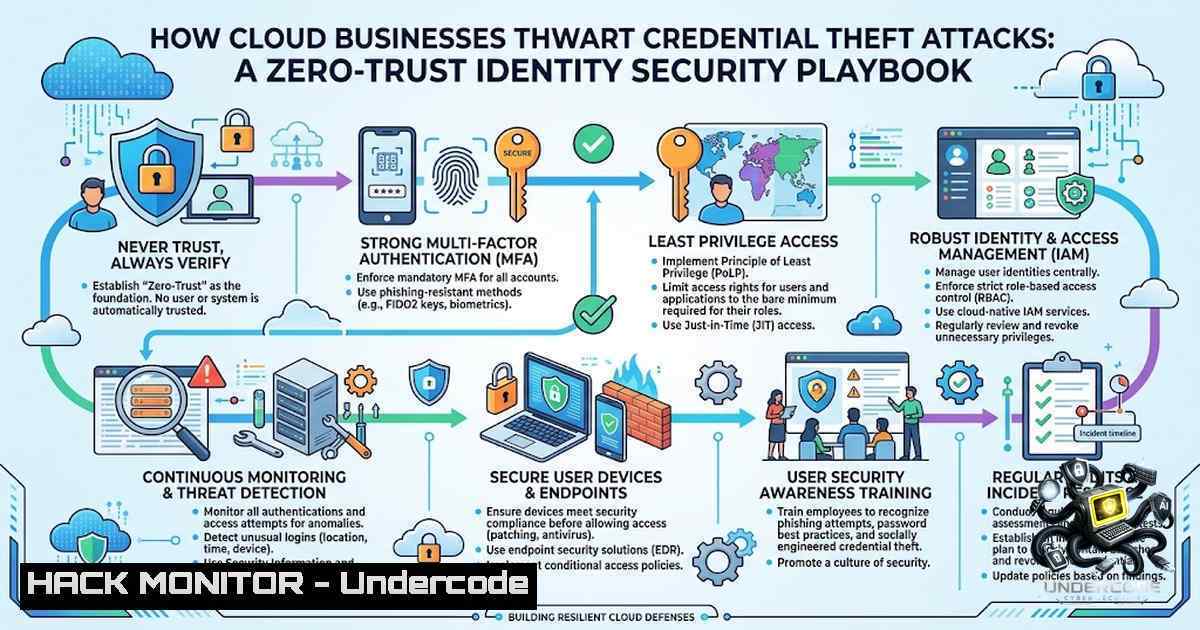
Introduction:
As businesses accelerate their migration to cloud environments, cybercriminals are increasingly shifting their attention from infrastructure vulnerabilities to one of the weakest links in the security chain: user credentials. Stolen usernames, passwords, session tokens and authentication cookies provide attackers with legitimate-looking access to cloud resources, allowing them to bypass traditional perimeter defenses. Compromised credentials are now the leading cause of cloud breaches, making identity the most critical attack surface in modern cloud environments.
Learning Objectives & Secrets:
- Objective 1: Implement Phishing-Resistant MFA – Move beyond passwords and SMS-based authentication. Adopt FIDO2/WebAuthn hardware security keys and passkeys. Microsoft will make passkeys the default authentication experience in Entra ID beginning September 1, 2026, retiring SMS and voice MFA. This single step can block the vast majority of credential-based attacks.
-
Objective 2 Secret Tip: Replace Static Credentials with Short-Lived Tokens – Long-lived credentials that never expire are a primary vulnerability. Datadog’s 2025 State of Cloud Security report found that 59% of AWS IAM users, 55% of Google Cloud service accounts, and 40% of Microsoft Entra ID applications had access keys older than one year. Replace static access keys with IAM roles, managed identities, and workload identity federation. Use AWS SSO, Azure Managed Identities, or GCP Workload Identity to eliminate long-term secrets entirely.
-
Objective 3 Secret Tip: Enforce Device-Based Verification – Credentials alone should never be sufficient for cloud access. Zero Trust network and cloud access solutions enforce device-based verification—access requires valid credentials, an approved device, and connection through a secure broker. Even if credentials are phished, attackers cannot access resources without possession of the user’s trusted device.
You Should Know:
- Strengthen Identity at the Source with Conditional Access
The first line of defense is strong authentication paired with intelligent access policies. Cloud businesses should enforce conditional access policies that consider device health, geographic location, risk level, and unusual login behavior. Passwords should never be reused across services, and privileged accounts require separate credentials from ordinary user accounts.
Step-by-Step Implementation:
AWS: Create a conditional access policy using IAM and AWS Organizations. Enforce MFA for all IAM users and roles:
 Create an IAM policy requiring MFA
aws iam create-policy --policy-1ame RequireMFA \
--policy-document '{
"Version": "2012-10-17",
"Statement": [{
"Effect": "Deny",
"Action": "",
"Resource": "",
"Condition": {
"BoolIfExists": {"aws:MultiFactorAuthPresent": "false"}
}
}]
}'

Attach to all users or groups
aws iam attach-group-policy --group-1ame Developers \
--policy-arn arn:aws:iam::<account-id>:policy/RequireMFA
Azure/Microsoft Entra ID: Configure Conditional Access policies via the Entra admin center:
 Connect to Microsoft Graph
Connect-MgGraph -Scopes "Policy.ReadWrite.ConditionalAccess"

Create a Conditional Access policy requiring MFA for all cloud apps
New-MgIdentityConditionalAccessPolicy -DisplayName "Require MFA for All Cloud Apps" `
-State "enabled" `
-GrantControls @{
Operator = "OR"
BuiltInControls = @("mfa")
}
Google Cloud: Enforce organization-wide MFA policies:
 Set organization policy requiring MFA
gcloud resource-manager org-policies set-policy policy.yaml --organization=ORG_ID

List all users without MFA enabled
gcloud iam list-users --organization=ORG_ID --filter="mfaEnabled:false"
2. Implement Least-Privilege Access and Just-in-Time Privilege Elevation
The next objective is limiting what an attacker can do with stolen credentials. Cloud organizations should adopt least-privilege access, granting users and applications only the permissions they actually require. Privileged access should be temporary, with just-in-time (JIT) elevation and additional authentication for sensitive actions.
Step-by-Step Implementation:
AWS IAM Least Privilege with Terraform:
 main.tf - IAM role with least privilege
resource "aws_iam_role" "app_role" {
name = "app-role"
assume_role_policy = jsonencode({
Version = "2012-10-17"
Statement = [{
Effect = "Allow"
Principal = { Service = "ec2.amazonaws.com" }
Action = "sts:AssumeRole"
}]
})
}

Attach only necessary permissions
resource "aws_iam_role_policy" "app_policy" {
name = "app-policy"
role = aws_iam_role.app_role.id
policy = jsonencode({
Version = "2012-10-17"
Statement = [
{
Effect = "Allow"
Action = [
"s3:GetObject",
"s3:ListBucket"
]
Resource = [
"arn:aws:s3:::my-app-bucket",
"arn:aws:s3:::my-app-bucket/"
]
}
]
})
}
Azure Privileged Identity Management (PIM): Enable JIT access for administrative roles:
 Activate a role assignment with time-bound access
$activation = @{
principalId = "user-object-id"
roleDefinitionId = "role-definition-id"
justInTimeAccess = @{
activationDuration = "PT2H"
justification = "Incident response - temporary access"
}
}
GCP IAM with conditions:
 Create a service account with conditional IAM binding
gcloud projects add-iam-policy-binding PROJECT_ID \
--member="serviceAccount:SA_NAME@PROJECT_ID.iam.gserviceaccount.com" \
--role="roles/storage.objectViewer" \
--condition="expression=request.time < timestamp('2026-12-31T23:59:59Z'),title=temporary_access"
- Minimize the Value of Stolen Credentials with Short-Lived Tokens
Service accounts deserve particular attention—long-lived access keys become valuable targets for attackers. Replace static credentials with short-lived tokens and managed identities wherever supported.
Step-by-Step Implementation:
AWS – Replace static keys with IAM roles:
 Create an IAM role for EC2 instances instead of using access keys
aws iam create-role --role-1ame EC2AppRole \
--assume-role-policy-document '{
"Version": "2012-10-17",
"Statement": [{
"Effect": "Allow",
"Principal": {"Service": "ec2.amazonaws.com"},
"Action": "sts:AssumeRole"
}]
}'

Attach policy to the role (not to individual users)
aws iam attach-role-policy --role-1ame EC2AppRole \
--policy-arn arn:aws:iam::aws:policy/AmazonS3ReadOnlyAccess
Azure – Use Managed Identities:
 Enable system-assigned managed identity for Azure VM
az vm identity assign --1ame MyVM --resource-group MyRG

Grant the managed identity access to Key Vault
az keyvault set-policy --1ame MyKeyVault \
--object-id $(az vm identity show --1ame MyVM --resource-group MyRG --query principalId -o tsv) \
--secret-permissions get list
GCP – Workload Identity Federation (no service account keys):
 Create a workload identity pool
gcloud iam workload-identity-pools create my-pool \
--location=global --description="Workload identity pool"

Create a provider (e.g., GitHub Actions)
gcloud iam workload-identity-pools providers create-oidc github-provider \
--location=global --workload-identity-pool=my-pool \
--issuer-uri="https://token.actions.githubusercontent.com"

Allow GitHub repo to impersonate the service account
gcloud iam service-accounts add-iam-policy-binding SA_NAME@PROJECT_ID.iam.gserviceaccount.com \
--member="principalSet://iam.googleapis.com/projects/PROJECT_NUMBER/locations/global/workloadIdentityPools/my-pool/attribute.repository/owner/repo" \
--role="roles/iam.workloadIdentityUser"
4. Secure Secrets Management and Eliminate Hard-Coded Credentials
Access keys should never be hard-coded in source code, configuration files, or public repositories. Instead, use secrets management services with automated rotation.
Step-by-Step Implementation:
AWS Secrets Manager:
 Store a secret
aws secretsmanager create-secret --1ame MyDatabaseSecret \
--secret-string '{"username":"admin","password":"securepassword"}'

Rotate secret automatically
aws secretsmanager rotate-secret --secret-id MyDatabaseSecret \
--rotation-rules '{"AutomaticallyAfterDays":30}'

Retrieve secret in application (Python)
 import boto3; client.get_secret_value(SecretId='MyDatabaseSecret')
Azure Key Vault:
 Store a secret
az keyvault secret set --vault-1ame MyKeyVault \
--1ame DatabasePassword --value "securepassword"

Enable auto-rotation
az keyvault secret set-attributes --vault-1ame MyKeyVault \
--1ame DatabasePassword --expires $(date -d "+90 days" +%Y-%m-%d)
Kubernetes – Use External Secrets Operator (avoid storing secrets in etcd):
 ExternalSecret.yaml - syncs from AWS Secrets Manager to Kubernetes
apiVersion: external-secrets.io/v1beta1
kind: ExternalSecret
metadata:
name: database-secret
spec:
refreshInterval: 1h
secretStoreRef:
name: aws-secretstore
kind: SecretStore
target:
name: db-credentials
data:
- secretKey: password
remoteRef:
key: MyDatabaseSecret
property: password
5. Detect Suspicious Identity Activity Continuously
Credential theft is most damaging when attackers can operate undetected. Cloud businesses should continuously monitor authentication events, privilege changes, impossible-travel scenarios, unusual API activity, and access to sensitive resources.
Step-by-Step Implementation:
AWS GuardDuty and CloudTrail:
 Enable GuardDuty for threat detection
aws guardduty create-detector --enable

Enable CloudTrail for API auditing
aws cloudtrail create-trail --1ame SecurityTrail \
--s3-bucket-1ame security-logs-bucket \
--is-multi-region-trail

Monitor for suspicious credential usage
aws cloudtrail lookup-events --lookup-attributes AttributeKey=EventName,AttributeValue=GetObject \
--start-time "2026-08-01T00:00:00Z"
Azure Microsoft Defender for Cloud:
 Enable Defender for Cloud
az security pricing create --1ame VirtualMachines --tier standard

Configure continuous export of security alerts
az security setting create --1ame ExportAlertsAndRecommendations \
--setting-kind DataExportSettings --enabled true
GCP Security Command Center:
 Enable Security Command Center Premium
gcloud scc settings update --organization=ORG_ID --enable-premium

Query for credential-related findings
gcloud scc findings list ORGANIZATION_ID --filter='category="PERSISTENT_CREDENTIALS"'
6. Build a Security-Conscious Workforce
Technology alone cannot eliminate credential theft. Employees remain frequent targets of convincing phishing campaigns and social engineering. Regular security awareness training should teach employees how modern credential attacks work, how to recognize suspicious authentication requests, and how to report potential compromises quickly. Organizations should also test their defenses through controlled phishing simulations and incident-response exercises.
What Undercode Say:
- Key Takeaway 1: Credential theft is now the leading cause of cloud breaches—attackers are exploiting identities, not infrastructure. Phishing-resistant MFA, least-privilege access, and short-lived credentials form the foundation of any effective cloud identity security strategy.
-
Key Takeaway 2: Zero Trust isn’t just a buzzword—it’s an operational necessity. Device-based verification, continuous monitoring, and treating every access request as potentially hostile dramatically reduces the impact of stolen credentials. Organizations must assume credentials will eventually be compromised and design environments accordingly.
Analysis: The shift from infrastructure to identity as the primary attack vector represents a fundamental change in cloud security. With 81% of interactive intrusions now occurring without malware, traditional endpoint protection is insufficient. The rise of AI-powered phishing, credential-harvesting malware, and sophisticated adversary-in-the-middle attacks means that even well-trained employees can be deceived. Cloud businesses must adopt a layered, identity-first security strategy that combines phishing-resistant authentication, least-privilege access, continuous monitoring, and the assumption of breach. The data is clear: organizations implementing data perimeters and centralized multi-account management are better positioned to withstand credential-based attacks.
Prediction:
- +1 Organizations that adopt phishing-resistant MFA (FIDO2/passkeys) will see credential theft incidents drop by over 80% within 12 months, as these authentication methods eliminate the most common attack vectors.
-
+1 The cloud identity security market will consolidate around Identity Threat Detection and Response (ITDR) platforms that integrate CIEM, CNAPP, and automated incident response—reducing the complexity of managing fragmented identity security tools.
-
-1 AI-powered credential theft will accelerate in 2026–2027, with attackers using generative AI to create hyper-personalized phishing campaigns, craft convincing deepfake authentication requests, and automate credential harvesting at scale. Traditional security awareness training alone will no longer suffice.
-
-1 Organizations that fail to replace long-lived static credentials with short-lived tokens and managed identities will face increasing breach risks. With 59% of AWS IAM users still using access keys older than one year, a significant portion of the cloud ecosystem remains dangerously exposed.
-
+1 The move toward mandatory MFA across major cloud providers (Google Cloud, Azure) will drive widespread adoption of phishing-resistant authentication, raising the baseline security posture for the entire industry.
▶️ Related Video (82% Match):
https://www.youtube.com/watch?v=8Ws8cP6jaM4
🎯Let’s Practice For Free:
🎓 Live Courses & Certifications:
Join Undercode Academy for Verified Certifications
🚀 Request a Custom Project:
Secure, high-velocity infrastructure and disruptive technological engineering. Contact our engineering team for high-tier development and proprietary systems:
[email protected]
💎 Smart Architecture | 🛡️ Secure by Design | ⭐ Trusted by Thousands
IT/Security Reporter URL:
Reported By: https://lnkd.in/p/egkPAj37 – Hackers Feeds
Extra Hub: Undercode MoN
Basic Verification: Pass ✅


