Listen to this Post
Introduction:
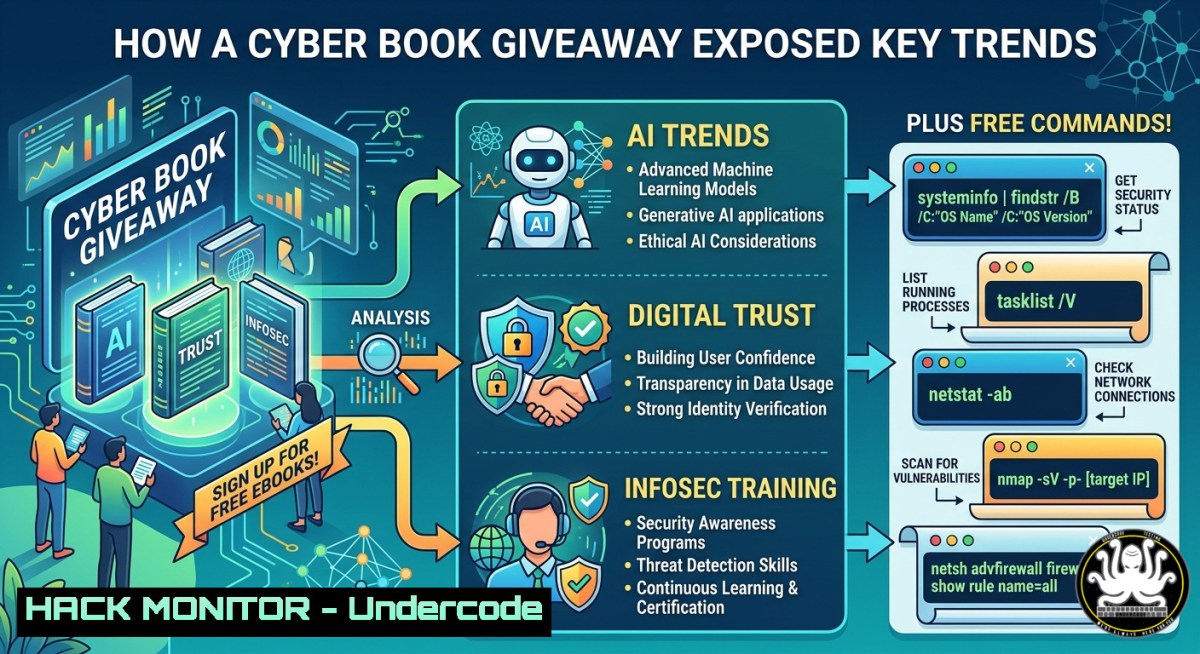
The intersection of social sciences, techno-philosophy, and information warfare is no longer academic theory—it’s the frontline of modern cybersecurity. A recent LinkedIn contest promoting Pierre Dewez’s forthcoming book highlights a critical shift: security leaders now demand cross-disciplinary knowledge that blends legal frameworks, behavioral economics, and hands-on IT exploits. This article extracts actionable training pathways, verified commands, and cloud-hardening tactics from the very themes that book champions, turning a simple giveaway into a masterclass.
Learning Objectives:
- Implement Linux/Windows reconnaissance commands to map digital trust boundaries in your own environment.
- Apply API security and cloud hardening techniques derived from modern information sciences.
- Leverage community-driven knowledge sharing as a force multiplier for incident response and threat hunting.
You Should Know:
- Digital Trust Reconnaissance: Mapping Your Attack Surface Like an Information Scientist
Start by understanding what “digital trust” truly means: the measurable confidence that data, users, and systems behave as expected. The book’s cross-disciplinary approach demands technical validation.
Step‑by‑step guide (Linux / macOS):
- Enumerate open ports and running services (trust boundaries)
sudo nmap -sS -p- -T4 192.168.1.0/24 -oA trust_scan
- Check SSL/TLS certificate trust (expiry, issuer, weak ciphers)
openssl s_client -connect yourdomain.com:443 -tls1_2 | openssl x509 -noout -text
3. Validate DNS records for spoofing risks
dig +short yourdomain.com
dig +short _dmarc.yourdomain.com TXT
Step‑by‑step guide (Windows PowerShell):
Port scan using Test-NetConnection
1..1024 | ForEach-Object { Test-NetConnection -ComputerName 192.168.1.10 -Port $_ -WarningAction SilentlyContinue } | Where-Object { $_.TcpTestSucceeded }
Check certificate chain trust
Get-ChildItem -Path Cert:\LocalMachine\Root | Where-Object { $_.NotAfter -lt (Get-Date).AddDays(30) }
What this does: Identifies misconfigured trust anchors, stale certificates, and unexpected open services—foundational steps before any compliance audit or threat model update.
- Hardening Cloud Identity & API Security (From Techno-Philosophy to Reality)
The book’s “non‑utopist techno‑philosophy” aligns perfectly with zero trust: never trust, always verify. Here’s how to apply it to APIs and IAM.
Step‑by‑step guide – AWS CLI hardening:
List all IAM users with no MFA (critical trust violation)
aws iam list-users –query “Users[?MFADevices==\`0\`].UserName” –output table
Enforce short‑lived API tokens (maximum 1 hour)
aws sts get-session-token –duration-seconds 3600
Rotate access keys older than 90 days
aws iam list-access-keys –user-name $USER | jq -r ‘.AccessKeyMetadata[] | select(.CreateDate < (now – 7776000) | .AccessKeyId)’
Step‑by‑step guide – API security with OWASP ZAP (community tool):
Install ZAP (Linux)
sudo apt update && sudo apt install zaproxy -y
Quick API scan with authentication
zap-api-scan.py -t https://api.target.com/v3/swagger.json -f openapi -r api_report.html
Manual check: Always validate that API keys are rotated every 30 days and never hardcoded in frontend code (use environment secrets).
- Vulnerability Exploitation & Mitigation – The Human‑Tech Interface
The giveaway comments mention “la cybersécurité grandit lorsqu’elle se partage” (security grows when shared). This is the perfect lens for understanding how attackers exploit both code and psychology.
Step‑by‑step – Simulate a basic XSS (educational lab only):
Linux: Set up a local vulnerable page (DVWA or custom)
echo “” > xss_lab.html
Then open in browser and inject:
Mitigation – Content Security Policy (CSP) header:
Add to Nginx config
add_header Content-Security-Policy “default-src ‘self’; script-src ‘self’ https://trusted-cdn.com”;
Windows IIS – via PowerShell
Add-WebConfigurationProperty -Filter “system.webServer/httpProtocol/customHeaders” -Name “.” -Value @{name=”Content-Security-Policy”;value=”default-src ‘self'”} -PSPath IIS:\
Why this matters: The book’s social sciences angle reminds us that attackers use “likes, comments, and tags” (as seen in the contest) to build trust before delivering payloads. Always validate external links even from known contacts.
- Linux Forensics & Log Analysis for Post‑Incident Learning
With 58 certifications like Tony Moukbel (mentioned in the post), you need hands‑on forensics techniques. Use these commands to reconstruct an attack timeline.
Step‑by‑step – systemd journal and auth log triage:
Check failed SSH attempts (brute force indicators)
sudo journalctl _SYSTEMD_UNIT=sshd.service | grep “Failed password” | awk ‘{print $11}’ | sort | uniq -c | sort -nr
Examine user account modifications (persistence)
sudo grep “useradd\|usermod\|passwd” /var/log/auth.log
List recently created setuid binaries (privilege escalation traces)
sudo find / -perm -4000 -type f -ctime -7 2>/dev/null
Windows equivalent (Event Viewer PowerShell):
Get-WinEvent -LogName Security | Where-Object { $_.Id -in 4720,4722,4724 } | Format-Table TimeCreated, Message -AutoSize
Interpretation: A sudden spike in failed logins combined with new user accounts often signals an active intrusion. The book’s “information sciences” approach would correlate these logs with human behavior patterns (e.g., login attempts from unusual geographies).
5. AI‑Driven Threat Hunting with Open Source Tools
The post’s mention of “AI Engineering” and “Programming & Electronics Dev” calls for practical AI security. Use YARA + machine learning models to hunt for novel malware.
Step‑by‑step – Deploy yara‑rules and use AI similarity scoring:
Clone community rules
git clone https://github.com/Yara-Rules/rules.git
cd rules
Run yara on suspicious directory
yara -r ./malware_index.yar /path/to/untrusted/files/
For AI‑assisted detection, use Loki (simple IOC scanner)
sudo apt install python3-pip
git clone https://github.com/Neo23x0/Loki.git
cd Loki
python3 loki.py -p /target/directory –noprocscan
Pro tip: Combine Loki output with a local LLM (e.g., ollama + llama3) to summarize anomalous patterns in plain English—exactly the “techno‑philosophy” bridge the book describes.
What Undercode Say:
- Digital trust is no longer just technical—it’s legal, social, and philosophical. The Linux commands for certificate validation and DNS hardening are your first line of defense.
- Community contests like this book giveaway are perfect mirrors of real attack vectors (likes, tags, external YouTube links). Always treat shared URLs with suspicion and verify via URL scanners like VirusTotal before clicking.
- The shift toward cross‑disciplinary training (law + code + psychology) is inevitable. Automate your API security checks and log audits, but never ignore the human element—exploits like XSS succeed because developers trust user input.
Prediction:
Within 18 months, corporate security training will abandon siloed “IT security” modules for integrated courses that blend behavioral economics, cloud hardening labs (AWS IAM, Azure AD), and Linux forensics. The book being given away here will become a template for how CISOs teach board members: not with fear, but with verifiable commands and shared knowledge. Expect a rise in “trust audit” roles that combine the output of nmap, openssl, and social graph analysis—exactly the convergence this LinkedIn contest celebrated.
▶️ Related Video (70% Match):
🎯Let’s Practice For Free:
IT/Security Reporter URL:
Reported By: Yohann Bauzil – Hackers Feeds
Extra Hub: Undercode MoN
Basic Verification: Pass ✅


