Listen to this Post
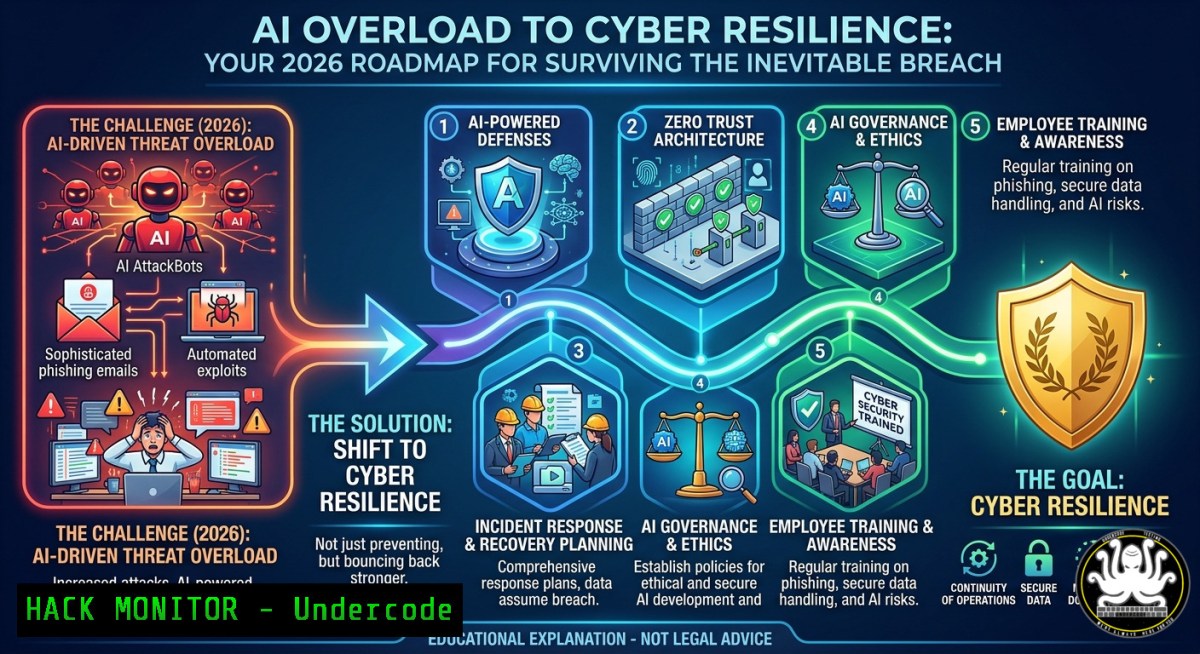
Introduction:
As artificial intelligence accelerates information overload, organizations face a dangerous paradox – more data leads to decision paralysis, not better security. Cyber resilience shifts the focus from preventing every attack to building systems that survive and recover when controls fail, a concept championed by events like the 2026 Cyber Resilience Awareness Day hosted by ISSA and sponsored by High Value Target (riskvector.eu).
Learning Objectives:
- Implement automated incident response workflows that bypass human “freeze” during AI-driven attacks
- Harden cloud and API infrastructure against AI-generated evasion techniques using open‑source tools
- Design measurable cyber resilience metrics that turn awareness into continuous action
You Should Know:
- Breaking the Freeze: Incident Response Playbooks with Real‑Time AI Triage
This section provides a step‑by‑step guide to building a lightweight SOAR (Security Orchestration, Automation, and Response) environment using TheHive and Cortex. The goal is to automate initial triage so analysts don’t stall under alert fatigue.
Step‑by‑step guide:
- Install TheHive and Cortex on Ubuntu 22.04 (Linux):
wget -qO- https://raw.githubusercontent.com/TheHive-Project/TheHive/master/install.sh | sudo bash
sudo systemctl start thehive cortex
- Configure analyzers – enable VirusTotal, AbuseIPDB, and AI-driven anomaly detectors:
sudo cortex-cli analyzer list sudo cortex-cli analyzer update VirusTotal_3_0 --config '{"key":"YOUR_API_KEY"}' - Create a response playbook – for phishing alerts, automatically isolate host via CrowdStrike or open-source Osquery:
Isolate Linux host using iptables and logs
sudo iptables -A INPUT -s <suspicious_IP> -j DROP
sudo journalctl -u sshd --since "5 minutes ago" >> /var/log/incident.log
- Windows equivalent – use PowerShell to block IP and collect evidence:
New-NetFirewallRule -DisplayName "BlockSuspiciousIP" -Direction Inbound -RemoteAddress 192.168.1.100 -Action Block
Get-WinEvent -FilterHashtable @{LogName='Security'; ID=4625} | Export-Csv -Path C:\IR\failed_logins.csv
2. Building Resilient Cloud Hardening Against AI‑Generated Attacks
AI can now craft unique exploit chains that bypass signature‑based controls. Cloud hardening must enforce least privilege at runtime.
Step‑by‑step guide:
- Run Prowler (open‑source AWS CSPM) to discover misconfigurations that AI might exploit:
git clone https://github.com/prowler-cloud/prowler
cd prowler
./prowler -M csv -F report.csv
- Remediate high‑risk findings – e.g., disable public S3 buckets and enforce bucket policies:
aws s3api put-bucket-acl --bucket your-bucket --acl private
aws s3api put-bucket-policy --bucket your-bucket --policy file://deny_public.json
- For Azure, use ScoutSuite and enforce just‑in‑time VM access:
az vm run-command invoke -g MyRG -n MyVM --command-id RunPowerShellScript --scripts "Set-NetFirewallRule -DisplayName 'RDP' -Action Block"
- Automate continuous scanning with a cron job or GitHub Action that triggers Prowler daily and sends alerts to Slack.
-
Windows and Linux Forensic Triage for Rapid Recovery
When systems are compromised, speed determines resilience. This step‑by‑step approach collects forensic artifacts without advanced tools.
Step‑by‑step guide:
- Linux – capture running processes, network connections, and scheduled tasks:
ps auxf > /tmp/processes.txt
ss -tulnp > /tmp/connections.txt
crontab -l > /tmp/crontabs.txt
2. Check for rootkits with rkhunter:
sudo rkhunter --check --skip-keypress > /tmp/rkhunter.log
3. Windows – use Sysinternals Autoruns and Process Explorer (download from live.sysinternals.com):
Invoke-WebRequest -Uri "https://live.sysinternals.com/autoruns.exe" -OutFile "C:\tools\autoruns.exe"
C:\tools\autoruns.exe /accepteula /a /c /nobanner > C:\IR\autoruns.csv
4. Extract Windows event logs for lateral movement (event ID 4624, 4625, 4672):
Get-WinEvent -FilterHashtable @{LogName='Security'; ID=4624,4625,4672} | Format-Table TimeCreated, Id, Message -AutoSize
- API Security in the Age of AI‑Powered Botnets
AI agents can reverse engineer API schemas and launch low‑and‑slow credential stuffing. Mitigate with rate limiting and anomaly detection.
Step‑by‑step guide:
- Deploy ModSecurity with OWASP CRS (Core Rule Set) on your reverse proxy (Nginx example):
sudo apt install libmodsecurity3 nginx-module-modsecurity
sudo git clone https://github.com/coreruleset/coreruleset /etc/nginx/modsecurity/crs
sudo cp /etc/nginx/modsecurity/crs/crs-setup.conf.example /etc/nginx/modsecurity/crs/crs-setup.conf
- Configure Nginx to block suspicious API patterns – add to
nginx.conf:location /api/ { modsecurity on; modsecurity_rules_file /etc/nginx/modsecurity/main.conf; limit_req zone=apizone burst=20 nodelay; } - Test your API against AI‑generated fuzzing using Postman or Burp Suite Intruder:
Using ffuf (fuzz faster)
ffuf -u https://yourapi.com/endpoint/FUZZ -w wordlist.txt -rate 100
- Implement API response anonymization to prevent AI from learning internal structure – mask stack traces and internal error codes.
-
Mitigating AI‑Fueled Phishing with Zero Trust and User Training
Generative AI crafts perfect spear‑phishing emails. Resilience requires technical controls plus simulated training.
Step‑by‑step guide:
- Enforce DMARC, SPF, and DKIM to prevent email spoofing:
Linux – add TXT record via DNS (example with dig)
dig TXT _dmarc.yourdomain.com
Expected: "v=DMARC1; p=reject; rua=mailto:[email protected]"
- Deploy an open‑source phishing simulation platform (Phishing Frenzy or Gophish):
docker run -d -p 3333:3333 --name gophish socialengineering/gophish
Access https://localhost:3333, create a campaign using AI-generated templates
- Train staff with just‑in‑time prompts – when a user clicks a malicious link, automatically redirect to a training page using Squid proxy rules:
Squid ACL to redirect known malicious domains
acl bad_domains dstdomain "/etc/squid/badlist.txt"
deny_info ERR_BLOCKED bad_domains
4. Monitor for AI‑generated domain names using dnstwist:
dnstwist yourdomain.com --format csv > typosquatting.csv
- Cyber Resilience Drills: Automated Breach Simulation with MITRE ATT&CK
Proactive “freeze‑breaking” drills simulate realistic AI‑driven adversary behavior using open‑source emulation platforms.
Step‑by‑step guide:
1. Install Caldera (MITRE’s autonomous adversary emulation):
git clone https://github.com/mitre/caldera.git
cd caldera
pip install -r requirements.txt
python server.py
2. Run the “AI Evasion” profile – agents that mimic machine learning model poisoning and data exfiltration:
curl -X POST http://localhost:8888/api/v2/operations -H "KEY: ADMIN" -d '{"name":"AI_Evasion","adversary_id":"6","planner_id":"1"}'
3. For Windows endpoints, deploy Caldera agent via PowerShell:
Invoke-WebRequest -Uri "http://caldera-server:8888/file/download" -OutFile "$env:tmp\sandcat.go"
Start-Process -FilePath "$env:tmp\sandcat.go"
4. Measure response time – track how long before your SOC detects and contains the simulated breach. Aim for < 15 minutes.
- From Awareness to Action: Building a Cyber Resilience Dashboard
You cannot improve what you do not measure. Build a real‑time resilience scorecard using ELK stack.
Step‑by‑step guide:
- Ingest security logs – Windows Event Logs, Linux auditd, and firewall logs into Elasticsearch:
Linux – install Filebeat
curl -L -O https://artifacts.elastic.co/downloads/beats/filebeat/filebeat-8.x-amd64.deb
sudo dpkg -i filebeat-8.x-amd64.deb
sudo filebeat modules enable system
2. Create Kibana visualizations for key resilience metrics:
- Mean Time to Detect (MTTD) from alert creation to first analyst interaction
- Mean Time to Recover (MTTR) from breach to restored business function
- Percentage of incidents resolved without manual escalation
- Automate a resilience score with a weekly Python script that queries Elasticsearch and posts to Slack:
import requests score = (100 - (failed_logins_last_week 0.1) - (unpatched_cves 2)) requests.post("https://hooks.slack.com/...", json={"text": f"Resilience Score: {score}/100"}) - Share results at community events like ISSA’s Cyber Resilience Awareness Day – encourage benchmarking against peers.
What Undercode Say:
- Key Takeaway 1: Information overload from AI is not a technical problem but a human decision problem – resilience requires automated playbooks that bypass analysis paralysis.
- Key Takeaway 2: Free community events like the 2026 Cyber Resilience Awareness Day (riskvector.eu) are critical for moving from isolated fixes to systemic, shared resilience maturity.
The tools and commands above – from TheHive to Caldera – prove that affordable, open‑source cyber resilience is achievable today. Organizations that wait for perfect AI defenses will freeze; those that build survivable, practicing teams will thrive. The largest threat is not the AI itself, but the stagnation it induces in unprepared defenders.
Prediction:
By 2027, AI‑driven offensive capabilities will force the retirement of traditional “prevent‑only” security models. Cyber resilience will become a regulatory requirement, and platforms that integrate automated simulation, real‑time metric dashboards, and community‑shared threat intelligence (as pioneered by ISSA chapters) will dominate the market. Organizations that do not run regular breach drills similar to fire drills will face insurance disqualification and public breach disclosure penalties. The line between IT operations and security will blur, with every engineer trained in basic resilience triage using the exact commands outlined above.
▶️ Related Video (82% Match):
🎯Let’s Practice For Free:
IT/Security Reporter URL:
Reported By: Calintech Save – Hackers Feeds
Extra Hub: Undercode MoN
Basic Verification: Pass ✅


