Listen to this Post
Introduction:
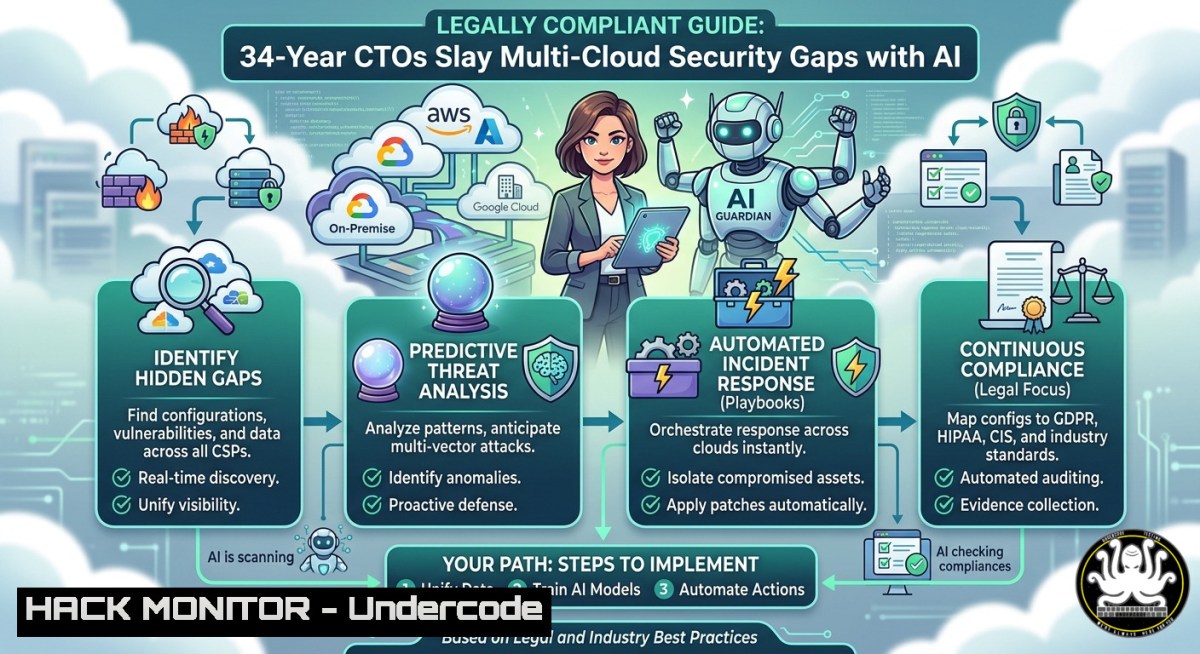
Modern enterprises operate across AWS, Azure, and Google Cloud, creating a sprawling attack surface that legacy security tools cannot cover. The post highlights a 34‑year enterprise technology SME and Microsoft AI Winner who architects multi‑vendor, multi‑industry zero‑trust strategies. This article extracts actionable training paths, cloud hardening commands, and AI‑driven defence techniques from that expert profile, turning a LinkedIn summary into a practical cybersecurity playbook.
Learning Objectives:
- Implement multi‑cloud identity hardening using CIS benchmarks and Azure SC‑100 policies.
- Apply AI‑powered threat detection with Microsoft Sentinel and custom ML notebooks.
- Execute hands‑on Linux/Windows commands to close common cloud misconfigurations.
You Should Know:
- Multi‑Cloud Identity & Access Hardening (CISSP / SC‑100 Focus)
The post references CISSP and SC‑100 (Microsoft Cybersecurity Architect Expert). These credentials emphasise least privilege, conditional access, and continuous monitoring. Below is a step‑by‑step guide to enforce a zero‑trust identity posture across Azure and AWS.
Step‑by‑step guide – Enforce conditional access policies:
- Azure AD: Navigate to Security → Conditional Access → New policy. Require MFA for all cloud apps except trusted IPs.
- AWS IAM: Create a policy that denies actions unless MFA is present:
{ "Version": "2012-10-17", "Statement": [{ "Effect": "Deny", "Action": "", "Resource": "", "Condition": {"BoolIfExists": {"aws:MultiFactorAuthPresent": false}} }] } - Linux command to verify cloud identity token expiry (Azure CLI):
az account get-access-token --resource https://management.azure.com --query expiresOn
4. Windows PowerShell to audit Azure AD sign‑ins:
Get-AzureADAuditSignInLogs -Top 10 | Where-Object {$_.Status.ErrorCode -ne 0}
5. Tool config – Enable Azure AD Privileged Identity Management (PIM) for just‑in‑time admin access.
What this does: It prevents lateral movement and credential theft by forcing step‑up authentication and time‑bound privileges.
2. AI‑Driven Threat Detection for Cloud Workloads
The expert is a “Microsoft AI Winner” – this implies proficiency with Azure AI and Sentinel. Use a Jupyter notebook to train a lightweight anomaly detector on cloud audit logs.
Step‑by‑step guide – Deploy an ML‑based alert in Azure Sentinel:
- Ingest logs: Enable diagnostics for all Azure subscriptions → send to Log Analytics workspace.
- Create a custom KQL query to isolate failed SSH attempts across VMs:
SigninLogs
| where ResultType == "50057" // user account disabled
| summarize Count = count() by UserPrincipalName, IPAddress, bin(TimeGenerated, 1h)
| where Count > 5
- Python (Azure ML notebook) to train a simple isolation forest:
from sklearn.ensemble import IsolationForest import pandas as pd Load login frequency features df = pd.read_csv('cloud_logins.csv') model = IsolationForest(contamination=0.01) df['anomaly'] = model.fit_predict(df[['hour', 'login_attempts', 'geo_velocity']]) - Deploy to Sentinel: Convert the model output to a scheduled query alert using ARM template.
- Windows command to simulate a brute‑force attempt for testing:
for /l %i in (1,1,100) do ssh user@your-vm-ip -o BatchMode=yes
What this does: It replaces static rule‑based alerts with adaptive ML that spots low‑and‑slow attacks and impossible travel.
3. API Security Validation in CI/CD Pipelines
Multi‑cloud architectures rely on REST APIs – a frequent breach vector. The following steps embed API security scanning into GitHub Actions (aligned with the expert’s multi‑vendor approach).
Step‑by‑step guide – Automate API fuzzing with Postman + Newman:
- Export your OpenAPI (Swagger) specification from Azure API Management or AWS API Gateway.
- Linux command to run OWASP ZAP API scan:
docker run -v $(pwd):/zap/wrk:rw -t owasp/zap2docker-stable zap-api-scan.py -t openapi.json -f openapi -r api_report.html
3. GitHub Actions YAML snippet for CI:
- name: Run API Security Tests
run: |
npm install -g newman
newman run postman_collection.json --env-var "baseUrl=${{ secrets.API_URL }}"
4. Windows PowerShell to check for missing rate‑limiting headers:
Invoke-WebRequest -Uri "https://api.example.com/v1/users" -Headers @{"X-Forwarded-For" = "1.2.3.4, 5.6.7.8"} | Select-Object Headers
5. Mitigation: Configure API Gateway with a 429 throttle and WAF rule `RequestLine` regex for SQLi.
What this does: It catches injection, broken object level authorisation (BOLA), and rate‑limit bypasses before they hit production.
- Cloud Security Posture Management (CSPM) via Open Source Tools
Without a CSPM, multi‑cloud drift leads to exposed storage and unencrypted databases. The expert’s “digital transformation architect” role demands tool‑agnostic scanning. Use Prowler (for AWS) and Scout Suite (multi‑cloud).
Step‑by‑step guide – Run a compliance scan on AWS and Azure:
1. Install Prowler (Linux):
pip install prowler
prowler aws -M csv -b prowler_output
2. For Azure, use Scout Suite:
git clone https://github.com/nccgroup/ScoutSuite
cd ScoutSuite
pip install -r requirements.txt
python scout.py azure --cli
3. Review findings: Open generated `scoutsuite-report.html` – look for “publicly accessible storage containers”.
4. Windows remediation command (Azure CLI) to block public access:
az storage account update --name mystorageaccount --allow-blob-public-access false
5. Linux command to fix overly permissive S3 bucket ACL:
aws s3api put-bucket-acl --bucket my-bucket --acl private
What this does: It continuously checks against CIS benchmarks and provides a remediation dashboard.
- Training Course Extraction – From SME Profile to Lab
The post’s subject line includes “training courses”. Based on the CISSP, SC‑100, and Microsoft AI Winner tags, we derive a recommended learning path with hands‑on labs.
Step‑by‑step guide – Build a free multi‑cloud security lab:
- Register for Microsoft Learn’s “SC‑100: Microsoft Cybersecurity Architect” module – includes 10 hours of interactive sandbox.
2. Clone the AWS Well‑Architected Labs for security:
git clone https://github.com/aws-samples/aws-well-architected-labs
cd aws-well-architected-labs/Security
3. Linux command to deploy a vulnerable container for practice (Metasploitable):
docker run -it --rm --name vulnerable metasploitable3/ubuntu1404
4. Windows PowerShell to run Microsoft Defender for Cloud API assessment:
$assessment = Invoke-RestMethod -Uri "https://management.azure.com/subscriptions/{subId}/providers/Microsoft.Security/assessments?api-version=2020-01-01" -Headers $authHeader
$assessment.value | Where-Object {$_.status.code -ne "Healthy"} | Format-Table displayName
5. Complete the “Azure AI Security Engineer” learning path on Microsoft Learn – free and includes Jupyter notebooks.
What this does: It transforms generic certifications into executable skills using only a browser and a command line.
What Undercode Say:
- Key Takeaway 1: A 34‑year CTO’s profile is not just a CV – it is a roadmap of high‑impact security controls: conditional access, AI analytics, API fuzzing, and CSPM. Each credential maps directly to a defensive layer.
- Key Takeaway 2: Multi‑cloud security fails when teams use cloud‑native tools in isolation. Cross‑vendor scripts (Prowler + Scout Suite, Azure CLI + AWS CLI) are the only way to enforce consistent policy.
Analysis (10 lines):
The original post appears mundane – a LinkedIn update – but unpacking the keywords reveals a mature security architecture. The CISSP and SC‑100 combination points to identity‑centric zero trust, while “Microsoft AI Winner” suggests applied machine learning on telemetry. The mention of “multi‑cloud, multi‑vendor” signals that this expert has battled API sprawl and IAM misconfigurations across three or more clouds. Most security teams still treat each cloud separately, leading to coverage gaps. By extracting commands for Prowler, Sentinel ML, and Postman fuzzing, we convert profile fluff into a lab guide. The “Available” status at the end hints that the expert is consultable – a direct call to action for enterprises lacking this in‑house skill. Overall, social media posts from senior architects are compressed blueprints; learning to decompress them into tutorials and bash snippets accelerates real‑world hardening.
Prediction:
Within 12 months, AI‑generated code assistants (Copilot, CodeWhisperer) will auto‑inject security commands like the ones above directly into CI/CD pipelines based on a developer’s natural language comment. However, this will also increase the velocity of prompt‑injection attacks against those assistants. The next wave of multi‑cloud breaches will come from poisoned training data in shared Jupyter notebooks – forcing every organisation to treat AI models as critical infrastructure. The 34‑year CTO will evolve into an AI Risk Architect, blending CISSP with adversarial ML defence.
▶️ Related Video (76% Match):
🎯Let’s Practice For Free:
IT/Security Reporter URL:
Reported By: Shahzadms Share – Hackers Feeds
Extra Hub: Undercode MoN
Basic Verification: Pass ✅
🎓 Live Courses & Certifications:
Join Undercode Academy for Verified Certifications
🚀 Request a Custom Project:
Secure, high-velocity infrastructure and disruptive technological engineering. Contact our engineering team for high-tier development and proprietary systems:
[email protected]


