Listen to this Post
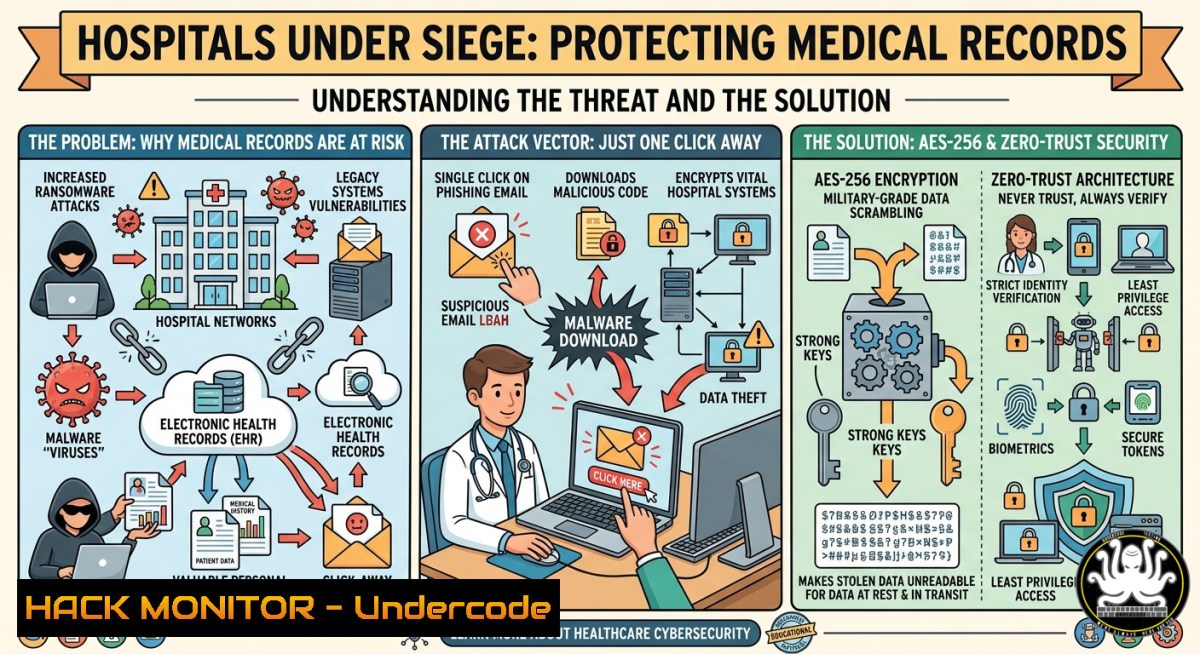
Introduction:
Healthcare data is no longer confined to a single database; it traverses fragmented systems, external partners, and hybrid clouds, creating a sprawling attack surface. Without consistent encryption, access control, and auditability at every hop, patient records, diagnostic images, and billing data are vulnerable to interception, ransomware, and insider threats. This article provides a technical deep dive into implementing military-grade encryption and zero-trust controls to secure medical data in motion and at rest.
Learning Objectives:
- Implement AES-256 encryption for data at rest using OpenSSL, BitLocker, and LUKS across Linux and Windows environments.
- Configure TLS 1.3 for data in transit on Nginx and Apache, including cipher suite hardening and protocol verification.
- Deploy FIPS 140-3 validated cryptographic modules on RHEL and Windows Server to meet compliance mandates.
- Establish key lifecycle management with HashiCorp Vault and Azure Key Vault, including rotation and revocation.
- Enforce zero-trust access policies using micro-segmentation and attribute-based access control (ABAC).
- Generate tamper-proof audit trails via Linux auditd, Windows Event Forwarding, and SIEM integration.
You Should Know:
- Securing Data at Rest with AES-256 on Linux and Windows
Data at rest includes files, disk volumes, and backups. AES-256 is the gold standard, but implementation varies by OS. Below are verified commands for encrypting a file and a full partition.
Linux (OpenSSL & LUKS):
Encrypt a single file:
 Encrypt (output in base64)
openssl enc -aes-256-cbc -salt -pbkdf2 -in patient_record.txt -out patient_record.enc -base64
 Decrypt
openssl enc -aes-256-cbc -d -pbkdf2 -in patient_record.enc -out patient_record.txt -base64
Encrypt a disk partition with LUKS2 (AES-256-XTS):
sudo cryptsetup luksFormat --type luks2 --cipher aes-xts-plain64 --key-size 512 /dev/sdb1
sudo cryptsetup open /dev/sdb1 encrypted_volume
sudo mkfs.ext4 /dev/mapper/encrypted_volume
sudo mount /dev/mapper/encrypted_volume /mnt/secure
Windows (BitLocker & PowerShell):
Enable BitLocker on a drive using AES-256:
Manage-bde -on C: -EncryptionMethod AES256 -UsedSpaceOnly
Manage-bde -protectors -add C: -RecoveryPassword
Encrypt a file with PowerShell (using .NET):
$plain = "Sensitive patient data"
$secure = ConvertTo-SecureString $plain -AsPlainText -Force
$encrypted = ConvertFrom-SecureString -SecureString $secure -Key (1..32)
$encrypted | Out-File -FilePath "C:\secure\data.enc"
Step‑by‑step guide:
- Identify sensitive data locations (shared drives, laptops, cloud sync folders).
- For Linux servers, apply LUKS encryption to /home and /var partitions during installation.
- For Windows workstations, enforce BitLocker via Group Policy with AES-256 and TPM + PIN protectors.
- Test decryption recovery using stored keys in a Hardware Security Module (HSM) or offline backup.
2. Enforcing TLS 1.3 for Data in Transit
TLS 1.3 removes outdated ciphers and forces perfect forward secrecy. Healthcare APIs, EHR portals, and HL7/FHIR endpoints must use it.
Nginx configuration (Linux):
server {
listen 443 ssl http2;
ssl_protocols TLSv1.3;
ssl_ciphers TLS_AES_256_GCM_SHA384:TLS_CHACHA20_POLY1305_SHA256;
ssl_early_data off;
ssl_certificate /etc/ssl/certs/hospital.crt;
ssl_certificate_key /etc/ssl/private/hospital.key;
}
Verify TLS 1.3 support:
openssl s_client -connect hospital.example.com:443 -tls1_3
Windows IIS (using PowerShell):
Enable TLS 1.3 in registry (Windows Server 2022+):
New-ItemProperty -Path "HKLM:\SYSTEM\CurrentControlSet\Control\SecurityProviders\SCHANNEL\Protocols\TLS 1.3\Server" -Name "Enabled" -Value 1 -PropertyType "DWORD"
New-ItemProperty -Path "HKLM:\SYSTEM\CurrentControlSet\Control\SecurityProviders\SCHANNEL\Protocols\TLS 1.3\Server" -Name "DisabledByDefault" -Value 0 -PropertyType "DWORD"
Step‑by‑step guide:
- Audit current TLS versions using `testssl.sh` or
nmap --script ssl-enum-ciphers. - Upgrade web servers to Nginx 1.15+ or Apache 2.4.36+.
- Disable TLS 1.0/1.1 at the load balancer and application level.
- Implement HSTS (
Strict-Transport-Securityheader) with preload.
3. Implementing FIPS 140-3 Validated Cryptography
FIPS 140-3 compliance requires using only validated cryptographic modules. Healthcare orgs handling US federal data must comply.
RHEL 9 / CentOS 9:
Enable FIPS mode during installation or after:
sudo fips-mode-setup --enable
sudo reboot
 Verify
cat /proc/sys/crypto/fips_enabled  Should output 1
Windows Server 2022:
Use Group Policy: Computer Configuration → Windows Settings → Security Settings → Local Policies → Security Options → “System cryptography: Use FIPS compliant algorithms for encryption, hashing, and signing” → Enabled.
Step‑by‑step guide:
- Check if your application (database, web server) has FIPS‑validated modules (e.g., OpenSSL 3.0 FIPS provider).
- For Linux, compile OpenSSL with `enable-fips` and load the provider:
openssl fipsinstall -out /etc/ssl/fipsmodule.cnf -module /usr/lib64/openssl/fips.so
export OPENSSL_CONF=/etc/ssl/fipsmodule.cnf
- Test with `openssl md5 testfile` – should fail because MD5 is not FIPS-allowed.
4. Zero-Trust Access Enforcement for Healthcare Data
Zero trust means never trust, always verify. Implement attribute-based access control (ABAC) with dynamic policies.
Using Open Policy Agent (OPA) with Linux:
Policy example (patient_data.rego):
package hospital.medical_records
default allow = false
allow {
input.user.role == "doctor"
input.user.department == input.record.department
input.request.method == "GET"
input.user.clearance_level >= input.record.sensitivity
}
Windows (PowerShell JEA – Just Enough Administration):
Create a role capability file:
New-PSRoleCapabilityFile -Path .\DoctorRole.psrc -VisibleCmdlets @{ Name='Get-PatientRecord' }
Register-PSSessionConfiguration -Name "MedicalRecords" -RoleCapabilityDefinition @{ DoctorRole = 'DoctorRole' } -RunAsCredential (Get-Credential)
Step‑by‑step guide:
- Map data flows: EHR → lab system → billing → external researcher.
- Deploy micro-segmentation using Azure Firewall or AWS Security Groups per data type.
- Enforce mutual TLS (mTLS) between internal services.
- Use continuous monitoring: every access request must re-authenticate using short-lived tokens (e.g., 15-minute JWTs).
- Tamper-Proof Audit Trails with Linux Auditd and Windows Event Logging
Audit trails must be immutable to detect breaches and prove compliance (HIPAA §164.312(b)).
Linux auditd configuration:
Monitor reads/writes to `/var/lib/mysql/hospital/`:
sudo auditctl -w /var/lib/mysql/hospital/ -p rwxa -k patient_data_access
Forward logs to remote SIEM (rsyslog):
 /etc/rsyslog.conf - add
. @@secure-siem.hospital.local:514
Windows Advanced Audit:
Enable auditing via `auditpol`:
auditpol /set /subcategory:"File System" /success:enable /failure:enable
auditpol /set /subcategory:"Registry" /success:enable /failure:enable
Forward events to SIEM using Windows Event Forwarding (WEF) with HTTPS.
Step‑by‑step guide:
- Define a baseline of what to audit: patient record reads, modifications, exports, and failed logins.
- Configure log integrity – hash logs every 5 minutes and store hashes on a blockchain or immutable storage.
- Use tools like `osquery` to detect tampering: `SELECT FROM file WHERE path LIKE ‘/var/log/audit/%’ AND inode_changes > 0;`
– Integrate with SIEM (Splunk, ELK) to trigger alerts for “mass export” events or after-hours access.
What Undercode Say:
- Key Takeaway 1: Healthcare encryption fails when applied only to databases – every file transfer, API call, and backup needs AES-256 and TLS 1.3 with proper key management.
- Key Takeaway 2: Compliance alone does not equal security; zero-trust micro-segmentation and tamper-proof audit trails transform reactive audits into proactive breach detection.
Analysis: The post highlights a critical truth: data in motion is the new perimeter. Traditional encryption at rest ignores the 70% of healthcare data that leaves the primary EHR daily. By combining FIPS 140-3 validation for government compliance, LUKS/BitLocker for endpoints, and real-time audit forwarding, organizations can stop ransomware lateral movement and insider snooping. However, key rotation remains the weakest link – automated lifecycle management (e.g., HashiCorp Vault with AWS KMS) must replace manual spreadsheets. The provided commands for auditd and OPA show how open-source tools can achieve enterprise-grade protection without proprietary costs, but misconfiguring TLS 1.3 cipher suites (e.g., allowing TLS_AES_128_GCM_SHA256) could still pass compliance while being cryptographically weaker for long-term patient data.
Prediction:
Within 24 months, healthcare ransomware will shift from encrypting files to exfiltrating decrypted data-in-transit, exploiting hybrid cloud TLS termination points. Consequently, regulatory bodies (HHS OCR) will mandate TLS 1.3 exclusively and disallow TLS 1.2 by 2027. AI-driven audit log analysis will become standard, using behavioral baselines to detect anomalous data flows (e.g., a nurse querying 500 MRI images at 3 AM). Organizations that fail to implement automated key rotation and FIPS-validated modules will face both data breach lawsuits and loss of federal funding. The future will see “encryption transparency” ledgers – similar to Certificate Transparency – for every patient data access event, enforced via smart contracts on permissioned blockchains.
▶️ Related Video (66% Match):
🎯Let’s Practice For Free:
IT/Security Reporter URL:
Reported By: Yildizokan Best – Hackers Feeds
Extra Hub: Undercode MoN
Basic Verification: Pass ✅


