Listen to this Post
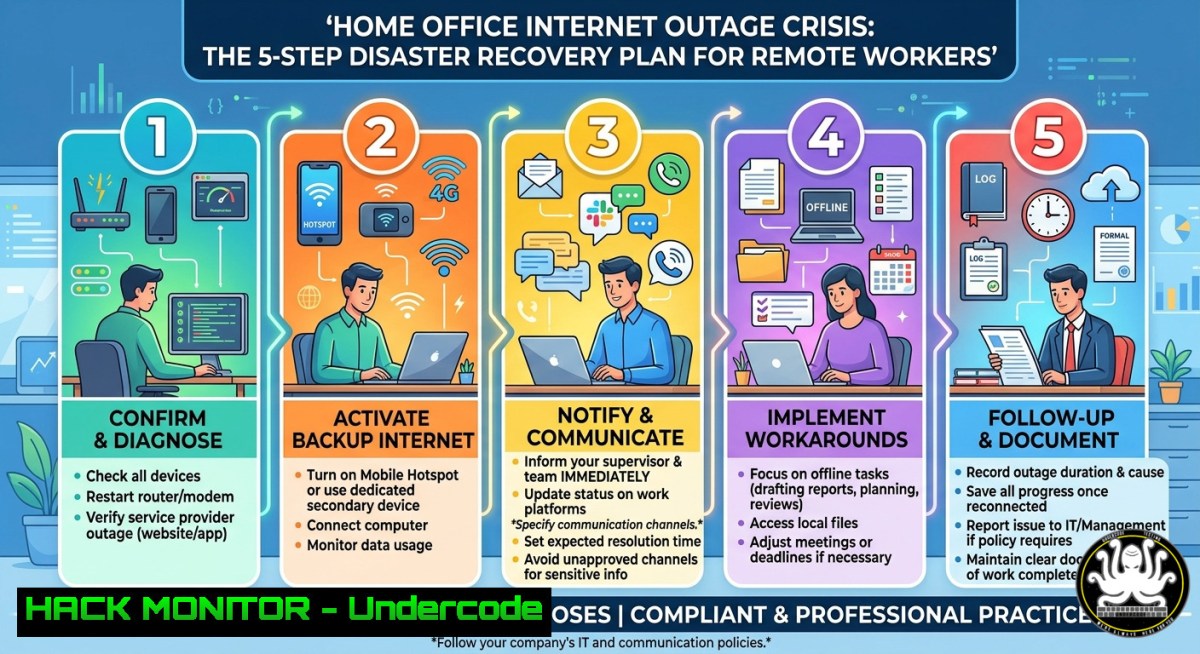
Introduction:
When your home WLAN fails during a critical workday, the immediate question isn’t just legal liability—it’s technical survival. Remote workers increasingly face a “gray zone” where employer expectations and personal network responsibility collide. This article provides a cybersecurity-hardened, multi-layered connectivity framework to ensure business continuity, covering backup WAN architectures, automated failover configurations, and forensic logging to protect your professional accountability.
Learning Objectives:
- Implement a zero-trust, redundant internet architecture using 5G failover and multi-WAN routing
- Configure automated connection monitoring with PowerShell and Bash scripts for instant outage detection
- Deploy encrypted hotspot tethering with split-tunneling VPN to maintain security during ISP failures
You Should Know:
- Multi-WAN Failover: Building a Carrier-Grade Backup Connection at Home
The LinkedIn discussion highlighted pragmatic solutions—mobile hotspots, multi-WAN setups, and even 5G Deco units. But a true professional setup requires automated failover with minimal packet loss. Below is a step-by-step guide to configure a primary DSL/cable connection with a cellular backup using OpenWrt or pfSense.
Step-by-step guide – Linux (OpenWrt) Multi-WAN with mwan3:
- Install mwan3: `opkg update && opkg install mwan3 luci-app-mwan3`
2. Configure interfaces: Edit `/etc/config/network` – add cellular interface (e.g., `wwan0` with qmi protocol) - Set interface metrics: `option metric ’10’` for primary, `option metric ’20’` for backup
- Define mwan3 policies: `/etc/config/mwan3` – create `balanced` policy with `wan (weight 2)` and `cellular (weight 1)`
5. Add failover rule: `option dest_ip ‘0.0.0.0/0’` and `option use_policy ‘balanced’`
6. Test failover: `ifdown wan` and verify `ip route show` – traffic should reroute via cellular within 3 seconds
Step-by-step guide – Windows PowerShell WAN Monitoring & Hotspot Auto-Switch:
 WAN connectivity monitor with automated hotspot tethering
$primaryGateway = "192.168.1.1"
$hotspotInterface = "Wi-Fi"  Your phone's hotspot SSID
while ($true) {
if (-not (Test-Connection $primaryGateway -Count 1 -Quiet)) {
Write-Warning "Primary WAN down – switching to hotspot"
netsh wlan connect name="MyPhoneHotspot"
Start-Sleep -Seconds 10
 Log outage for HR evidence
Add-Content -Path "$env:USERPROFILE\outage_log.csv" -Value "$(Get-Date -Format 'yyyy-MM-dd HH:mm:ss'),OUTAGE,FAILOVER_ACTIVATED"
}
Start-Sleep -Seconds 30
}
Schedule this as a background job: `Register-ScheduledJob -Name “WANWatchdog” -ScriptBlock { … } -Trigger (New-JobTrigger -Once -At (Get-Date))`
2. Zero-Trust Hotspot Tethering: Securing Your 5G Fallback
As commenters noted, a €10 unlimited data plan solves availability—but it introduces new risks: cellular networks are vulnerable to IMSI catching, fake cell towers, and DNS spoofing. Always encrypt your hotspot traffic with a VPN kill switch.
Step-by-step guide – Windows: Always-On VPN for cellular interfaces
1. Install WireGuard: Download from wireguard.com – create a tunnel to your corporate firewall or trusted VPS
2. Force all traffic through VPN: In WireGuard config, set `AllowedIPs = 0.0.0.0/0` and `Table = off`
3. Apply firewall rule to block non-VPN traffic on hotspot interface:
 Block all outbound except via WireGuard interface
New-NetFirewallRule -DisplayName "BlockNonVPN_Hotspot" -Direction Outbound -Action Block -RemoteAddress "0.0.0.0/0" -InterfaceAlias "Wi-Fi"
New-NetFirewallRule -DisplayName "AllowWireGuard" -Direction Outbound -Action Allow -RemoteAddress "0.0.0.0/0" -LocalPort 51820 -Protocol UDP
4. On Linux (Android tethering + iptables):
 Route all tethered traffic through VPN tunnel (tun0)
sudo iptables -t nat -A POSTROUTING -o tun0 -j MASQUERADE
sudo iptables -A FORWARD -i usb0 -o tun0 -j ACCEPT
sudo iptables -A FORWARD -i tun0 -o usb0 -m state --state ESTABLISHED,RELATED -j ACCEPT
- Automated Outage Documentation for Legal & HR Protection
Multiple LinkedIn commenters (Dr. Timo Schöber, Florian Lenz) correctly noted that labor law places the burden of proof on the employee. You must prove the outage was unavoidable and that you acted diligently. Implement logging.
Step-by-step guide – Linux: Systemd service to log WAN interruptions
Create `/etc/systemd/system/wan-monitor.service`:
[bash]
Description=WAN Connectivity Logger
After=network.target

[bash]
ExecStart=/usr/local/bin/wan_logger.sh
Restart=always

[bash]
WantedBy=multi-user.target
Script `/usr/local/bin/wan_logger.sh`:
!/bin/bash
while true; do
if ! ping -c 1 -W 2 8.8.8.8 > /dev/null; then
echo "$(date '+%Y-%m-%d %H:%M:%S') WAN DOWN - ISP failure detected" >> /var/log/wan_failures.log
 Optional: send syslog to corporate SIEM
logger -t "WANmonitor" "Critical: Internet outage - switching to backup"
fi
sleep 60
done
Enable and start: `systemctl enable wan-monitor && systemctl start wan-monitor`
Windows Event Log integration:
Create a custom Event Viewer log: `wevtutil new-log /l:Application “HomeOfficeConnectivity”`
Then trigger event on disconnect: `if (-not (Test-Connection 8.8.8.8 -Quiet)) { Write-EventLog -LogName “HomeOfficeConnectivity” -Source “WANCheck” -EventId 1001 -EntryType Warning -Message “Primary internet failed” }`
4. Cloud Hardening: Offline-First Collaboration for Unstable Connections
When WLAN fails, cloud-dependent tools (Teams, Zoom, M365) break. Implement offline-first architecture using local caches and sync queues.
Step-by-step guide – Configuring Outlook & OneDrive for offline resilience:
1. Outlook: Enable Cached Exchange Mode – `File > Account Settings > Account Settings > Change > Use Cached Exchange Mode` – set slider to “All” (12 months)
2. OneDrive: Force manual sync on metered connections – `Reg ADD “HKCU\Software\Microsoft\OneDrive\Settings” /v “DisableMeteredNetworkSync” /t REG_DWORD /d 0` – then when hotspot is active, toggle “Metered connection” in Windows Settings > Network & Internet > Wi-Fi >
 > Set as metered
3. Git for code/文档: Configure local mirrors with `git config --global core.autocrlf true` and use `git fetch --all` intermittently; implement `git worktree` for offline branching

<ol>
<li>API Security During Failover: Preventing Credential Leakage via Cellular</li>
</ol>

Switching to a mobile hotspot changes your network egress IP and DNS resolvers. This can trigger corporate zero-trust alerts or expose API keys if your VPN fails. Hardening steps:

Step-by-step guide – Enforce DNS over TLS (DoT) on all interfaces:
- Windows: `netsh dns add encryption server=1.1.1.1 dohtemplate=https://cloudflare-dns.com/dns-query` – then `netsh dns show encryption<code>to verify
- Linux (systemd-resolved):
<h2 style="color: yellow;"></code>sudo resolvedctl dns set wwan0 1.1.1.1<code></h2>
<h2 style="color: yellow;"></code>sudo resolvedctl dnsovertls set wwan0 yes`</h2>
`sudo resolvedctl default-route set wwan0 false` (prevent DNS hijacking)

<h2 style="color: yellow;">API key rotation on network change:</h2>

Script to detect interface change and rotate secrets automatically:
[bash]
 Detect new public IP and trigger vault re-authentication
old_ip=$(cat /tmp/last_public_ip 2>/dev/null)
new_ip=$(curl -s ifconfig.me)
if [ "$old_ip" != "$new_ip" ]; then
echo "$new_ip" > /tmp/last_public_ip
 Revoke old session token (example for AWS)
aws sts revoke-session --session-name "$AWS_SESSION_NAME"
 Request new credentials with MFA
aws sts get-session-token --serial-number arn:aws:iam::123456789012:mfa/user --token-code $(oathtool --totp -b YOUR_SECRET)
fi
- WLAN Vulnerability Exploitation & Mitigation (For IT Admins)
Home office routers are often outdated. An attacker could intentionally cause WLAN outages (deauth attacks, KRACK, beacon flooding) to trigger a failover to unsecured hotspots. Defend against this.
Detection – Linux (aireplay-ng deauth detection):
`sudo tcpdump -i wlan0 -e -s 0 -c 100 ‘wlan type mgt subtype deauth’` – if >10 deauth frames per minute from non-AP MAC, you’re under attack.
Mitigation – Router hardening:
- Disable WPS and 802.11w (Management Frame Protection) – set to “Required” if supported
- Enable BSSID whitelisting: `iw dev wlan0 set bssid XX:XX:XX:XX:XX:XX` (Linux station mode)
- Use EAP-TLS instead of PSK – deploy client certificates to prevent rogue AP impersonation
Windows mitigation for deauth:
`netsh wlan set allowexplicitcreds deauth=disable` and `netsh wlan set blockperiod 3600` (block offending APs for 1 hour)
What Undercode Say:
- Resilience is compliance: Automated failover logs prove due diligence, shifting legal risk from employee to uncontrollable ISP force majeure.
- Security doesn’t pause for outages: Hotspot fallback without VPN + DoT exposes corporate data to cellular MITM—encrypt everything, always.
- Offline-first architecture is the new backup: Your cloud SLA means nothing when the last mile dies; local caches and sync queues are non-negotiable.
The LinkedIn debate framed WLAN failure as a legal gray zone. Technically, it’s a solvable engineering problem. With a €10 5G SIM, a $50 OpenWrt router, and the scripts above, you can achieve 99.95% uptime while generating forensic evidence of your diligence. The real risk isn’t the outage—it’s being the remote worker who doesn’t have a Plan B when the boss asks, “Why weren’t you online?”
Prediction:
By 2027, enterprise VPNs will integrate dual-WAN failover as a standard clause in remote work contracts, and cellular backup subscriptions will be expensed as mandatory IT equipment. Simultaneously, courts will begin recognizing automated connectivity logs as admissible evidence, shifting liability from employees to ISPs—except in cases where employees failed to deploy commercially reasonable failover measures (like the 5G hotspot for €10/month). The “gray zone” will become black and white: either you have demonstrable redundancy, or you bear the financial risk of the outage.
▶️ Related Video (70% Match):
🎯Let’s Practice For Free:
IT/Security Reporter URL:
Reported By: Angelo Jahn – Hackers Feeds
Extra Hub: Undercode MoN
Basic Verification: Pass ✅


