Listen to this Post
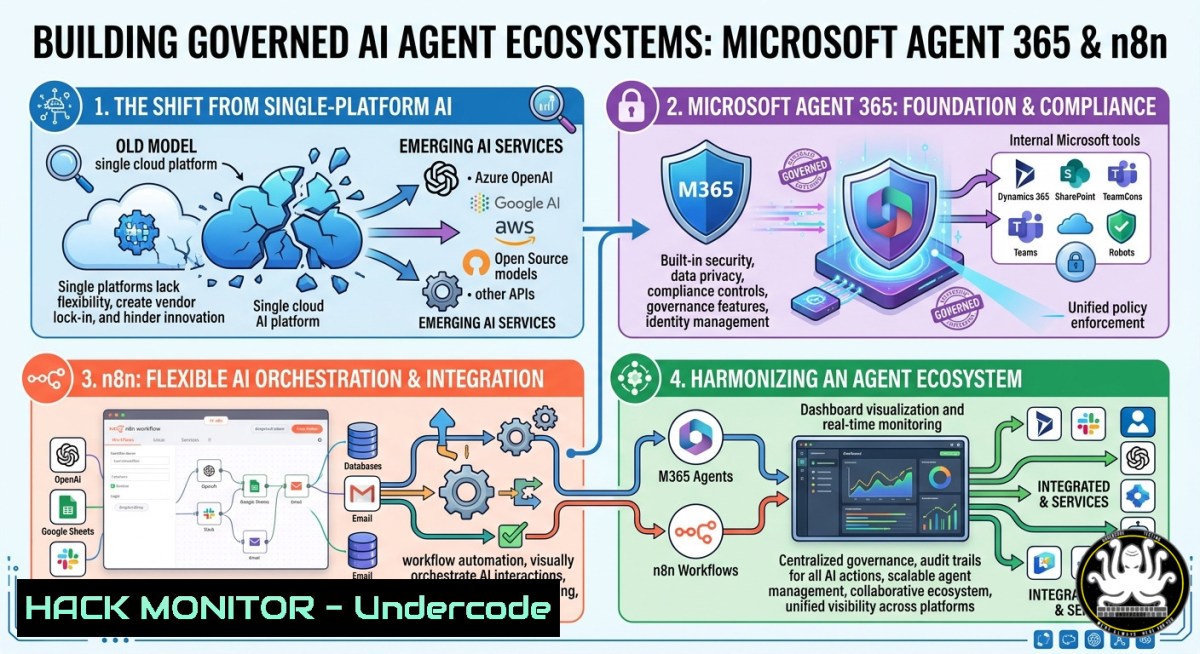
Introduction:
The era of betting on a single AI platform to rule enterprise workflows is officially over. Microsoft’s launch of Agent 365, with n8n as a day-one integration partner, signals a strategic shift toward orchestrated, multi‑tool ecosystems – where Microsoft handles identity, governance, and monitoring, while n8n orchestrates agents across any stack. For cybersecurity and IT professionals, this means rethinking how we secure, monitor, and scale AI agents across hybrid environments without locking into a single vendor.
Learning Objectives:
- Understand the architecture of Microsoft Agent 365 and its collaborative role with n8n for enterprise AI orchestration.
- Implement governed AI agents using n8n workflows integrated with Microsoft Entra ID and Graph API.
- Apply security hardening techniques, including credential management, API access controls, and activity logging for agent‑based systems.
You Should Know:
- Setting Up n8n with Microsoft Entra ID for Governance
Microsoft Agent 365 relies on Entra ID (formerly Azure AD) as the control plane for agent governance. n8n becomes a governed orchestrator by registering as an enterprise application in Entra ID. This step ensures every agent action is visible, auditable, and subject to conditional access policies.
Step‑by‑step guide:
- In Azure portal, navigate to Entra ID > App registrations > New registration. Name it “n8n‑Agent‑Orchestrator” and set redirect URI to `http://localhost:5678/oauth2-credential/callback` (or your n8n domain).
- Note the Application (client) ID and generate a client secret.
- Under API permissions, add Microsoft Graph delegated permissions:
openid,profile,User.Read, `Mail.Send` (or scopes your agents need). Grant admin consent. - In n8n, create an OAuth2 credential: use Entra ID’s `authorization_url` (
https://login.microsoftonline.com/{tenant}/oauth2/v2.0/authorize`) and `token_url` (https://login.microsoftonline.com/{tenant}/oauth2/v2.0/token`). Paste your client ID and secret. - To enforce governance, enable Conditional Access policies in Entra ID that require compliant devices or MFA when n8n agents access Microsoft data.
Linux command to test token retrieval:
curl -X POST https://login.microsoftonline.com/{TENANT_ID}/oauth2/v2.0/token \
-d "client_id={CLIENT_ID}" \
-d "client_secret={SECRET}" \
-d "scope=https://graph.microsoft.com/.default" \
-d "grant_type=client_credentials"
2. Orchestrating AI Agents via n8n Workflows
n8n acts as the central nervous system, connecting reasoning models (e.g., Claude AI, OpenAI) with enterprise data sources (SharePoint, SQL, Teams). Agent 365 monitors these orchestrations, but you must design workflows with error handling and idempotency.
Step‑by‑step guide:
- Install n8n (self‑hosted recommended for security) using Docker:
docker run -d --name n8n -p 5678:5678 -v n8n_data:/home/node/.n8n n8nio/n8n
- Create a new workflow. Add a Webhook trigger to receive user queries. Add an HTTP Request node to call Claude API (or GPT‑4) – store the API key as a credential, never in plain text.
- Add a Microsoft Graph node to fetch user context or send emails. Select the OAuth2 credential created earlier.
- Use If and Wait nodes to implement retry logic and approval steps. For production, enable Queue Mode in n8n to handle backpressure.
- Once tested, register the workflow as an “agent” in Microsoft Agent 365 by exposing the webhook URL in your Entra ID dashboard under “Enterprise applications” > “n8n‑Orchestrator” > “Single sign‑on” (use SAML or OIDC).
Windows PowerShell command to query Graph API via n8n webhook:
Invoke-RestMethod -Uri "http://localhost:5678/webhook/your-trigger" -Method Post -Body '{"query":"send IT support email"}' -ContentType "application/json"
- Securing API Credentials and Implementing Zero‑Trust for Agent Communications
With multi‑agent ecosystems, leaked credentials or unverified API calls become critical attack vectors. n8n’s built‑in credential store can be hardened, and all agent‑to‑agent traffic must be encrypted and authenticated.
Step‑by‑step guide:
- Replace hardcoded secrets in n8n with environment variables or external secrets (e.g., HashiCorp Vault). For Docker, pass variables:
docker run -e N8N_ENCRYPTION_KEY="randomly_generated_32_char" -e MY_API_KEY="value" n8nio/n8n
- Enable TLS for n8n’s web interface and webhooks. Use Let’s Encrypt with Nginx reverse proxy:
sudo apt install nginx certbot -y
sudo certbot --nginx -d n8n.yourdomain.com
- Implement API security: For each n8n webhook, generate a static API key as a query parameter or header. Validate it in a Code node before proceeding:
if ($input.headers['x-api-key'] !== process.env.WEBHOOK_API_KEY) { throw new Error('Unauthorized'); } - In Entra ID, enforce Conditional Access to block n8n agent calls from untrusted IPs or non‑compliant devices.
- Monitoring and Logging Agent Activities with Microsoft Security Tools
Visibility into what agents do, when, and with which data is non‑negotiable. Microsoft Agent 365 integrates with Sentinel and Log Analytics, but you must configure n8n to emit structured logs.
Step‑by‑step guide:
- In n8n, enable Audit Logs (Settings → Audit Logs → export to HTTP endpoint). Send logs to an Azure Log Analytics workspace using an HTTP Data Collector API.
- Generate a Log Analytics workspace ID and primary key from Azure portal. Use an n8n HTTP Request node with:
POST https://{workspace-id}.ods.opinsights.azure.com/api/logs?api-version=2016-04-01 Headers: Authorization: SharedKey {workspace-id}:{key} Body: [ { "event":"agent_execution", "workflow":"IT_Support", "user":"agent", "result":"success" } ] - Query logs in Azure Monitor:
traces | where message contains "n8n" | project timestamp, customDimensions. Set alerts for failed agent authentications or unusual workflow frequencies. - For Windows environments, forward n8n logs using NXLog or Azure Monitor Agent:
Install-PackageProvider -Name NuGet -Force
Install-Module -Name Az.Monitor -Force
Add-AzLogAnalyticsWorkspace -ResourceGroupName "rg" -WorkspaceName "law-n8n"
- Extending Capabilities: Claude AI + Microsoft Graph + n8n Integration
A practical enterprise scenario: an IT support agent that reads emails, summarizes using Claude, and creates Teams tasks. This combines reasoning with Microsoft’s governance layer.
Step‑by‑step guide:
- Get Claude API access (Anthropic). In n8n, create a Generic Credential with API key.
- Build workflow: Microsoft Graph (trigger on incoming email via webhook subscription) → HTTP Request to Claude (`https://api.anthropic.com/v1/messages`) with prompt: “Summarize this email and extract action items” → Microsoft Graph (create a planner task or Teams chat message).
- For retrieval‑augmented generation (RAG), add a Vector Store node (e.g., Pinecone or Qdrant) with company policy documents. Use an Embeddings node before calling Claude.
- To harden this pipeline, add content filtering and input validation – reject emails containing malicious scripts or oversized payloads.
- Test with a sample email:
curl -X POST http://localhost:5678/webhook/email-trigger \
-H "Content-Type: application/json" \
-d '{"from":"[email protected]","body":"Need password reset for my laptop"}'
- Linux & Windows Commands for Deployment and Hardening
Beyond workflows, the underlying infrastructure must be secured. Apply these commands to harden your n8n deployment.
Linux (Ubuntu/Debian) – firewall & automatic updates:
sudo ufw allow 5678/tcp comment 'n8n webhook'
sudo ufw enable
sudo apt install unattended-upgrades -y
sudo dpkg-reconfigure --priority=low unattended-upgrades
Windows – restrict n8n to localhost and use IIS reverse proxy:
 Run n8n locally (no external binding)
n8n start --host=127.0.0.1

In IIS, install ARR and URL Rewrite, create a rule to forward traffic from port 443 to 5678 with request filtering
Add-WebConfigurationProperty -Filter "system.webServer/rewrite/globalRules" -Name "." -Value @{
name='n8nProxy';
patternSyntax='Wildcard';
stopProcessing='True';
match={url=''};
action={type='Rewrite'; url='http://127.0.0.1:5678/{R:0}'}
}
Hardening n8n configuration (Linux):
 Set encryption key and disable public workflow sharing
export N8N_ENCRYPTION_KEY=$(openssl rand -hex 16)
export N8N_USER_MANAGEMENT_DISABLED=false
export N8N_PUBLIC_WORKFLOW_SHARING_DISABLED=true
7. Mitigating Common Vulnerabilities in Agent‑Based Systems
Agent ecosystems introduce new risks: prompt injection, excessive API permissions, and log forging. Microsoft Agent 365 and n8n can mitigate these with proper controls.
Step‑by‑step guide:
- Prevent prompt injection in Claude or GPT nodes: Validate and sanitize user input by stripping special characters and limiting length. Use an n8n Code node with regex:
let safeInput = $input.item.json.user_query.replace(/[^a-zA-Z0-9 .,?!]/g, '');
if (safeInput.length > 1000) safeInput = safeInput.substring(0,1000);
- Enforce least privilege for Microsoft Graph permissions: Do not use `.default` scope. Instead, request only `Mail.Read` and `Tasks.ReadWrite` – no
Directory.Read.All. Rotate client secrets every 90 days automatically via Azure Automation. - Audit n8n for CVE‑2025‑xxxx (hypothetical): Regularly scan Docker images with Trivy:
trivy image n8nio/n8n:latest --severity HIGH,CRITICAL
- Monitor for anomalous agent behavior – e.g., an agent that sends 1000 emails in 1 minute. Use n8n’s Rate Limiting node (e.g., max 10 executions per hour per user) and configure Microsoft Sentinel to alert on such spikes.
What Undercode Say:
- The single‑platform AI vendor lock‑in is over. Microsoft’s move to embrace n8n as a launch partner for Agent 365 validates that governance and orchestration must be decoupled. Security teams should prepare for heterogeneous AI stacks, with Entra ID as the identity boundary and n8n as the untrusted orchestrator.
- Governance is the new perimeter. Traditional network controls fail against agents that call APIs across clouds. Implement zero‑trust for every agent action – audit logs, conditional access, and API‑level least privilege are not optional. The integration described (n8n + Entra ID) provides a blueprint, but requires careful hardening to avoid credential leakage and prompt injection attacks.
Prediction:
Within 18 months, most Fortune 500 companies will adopt an orchestration‑first AI architecture similar to Microsoft Agent 365 + n8n. This will trigger a wave of security products focused on agent discovery, behavioral analysis, and cross‑platform policy enforcement. We predict a surge in CVEs targeting n8n workflow misconfigurations and Entra ID over‑permissioned apps. The role of “AI Security Architect” will become standard, combining skills in API security, identity management, and automation orchestration. Enterprises that fail to implement granular governance will face data breaches originating from compromised agent workflows – not from direct human error.
▶️ Related Video (74% Match):
🎯Let’s Practice For Free:
IT/Security Reporter URL:
Reported By: Ani Allen – Hackers Feeds
Extra Hub: Undercode MoN
Basic Verification: Pass ✅


