Listen to this Post
Introduction:
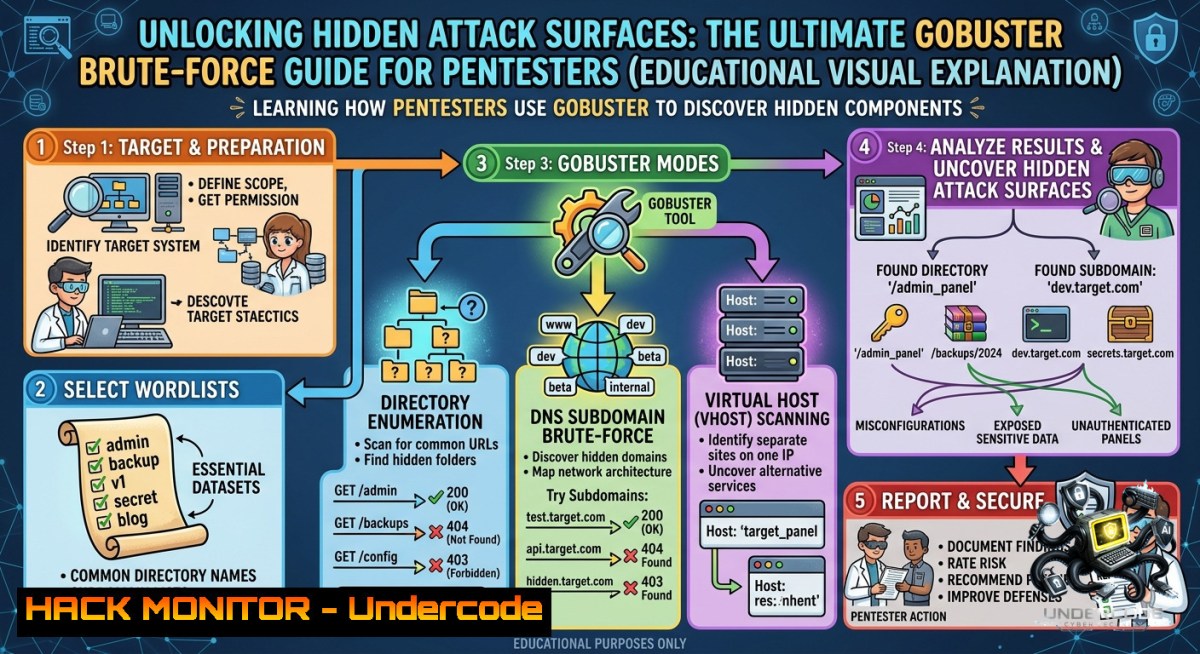
Web directory enumeration is a cornerstone of modern reconnaissance, allowing penetration testers to uncover hidden files, backup paths, and administrative panels that would otherwise remain invisible to traditional crawlers. Gobuster, a high‑performance brute‑forcing tool written in Go, excels at discovering these “hidden attack surfaces” by systematically testing thousands of potential URLs and subdomains.
Learning Objectives:
- Master Gobuster’s directory, file extension, and DNS enumeration modes to identify unlinked resources.
- Apply advanced filtering, concurrency tuning, and authentication handling (cookies, custom user‑agents) for stealthy and efficient scans.
- Learn to interpret results, remediate common misconfigurations, and integrate Gobuster into professional penetration testing workflows.
You Should Know
1. Basic Directory Enumeration – Uncovering Hidden Paths
Gobuster’s directory mode sends HTTP requests for each word in a wordlist and reports any response that differs from a 404 (Not Found). This simple but powerful technique reveals admin portals, backup directories, version‑controlled folders, and more.
Step‑by‑step guide:
1. Install Gobuster (Kali Linux):
`sudo apt update && sudo apt install gobuster -y`
Windows: Download the latest binary from GitHub and add to PATH, or use `go install github.com/OJ/gobuster/v3@latest` with Go installed.
2. Prepare a wordlist – The classic `common.txt` (SecLists) is a great start.
wget https://raw.githubusercontent.com/danielmiessler/SecLists/master/Discovery/Web-Content/common.txt`

3. Launch a basic scan against a target (e.g., DVWA at `http://192.168.1.12`):

`gobuster dir -u http://192.168.1.12 -w common.txt
Output shows discovered paths (e.g., /config, /backup, /admin) along with HTTP status codes (200, 301, 403).
4. Expand URLs using the `-e` flag to see full paths:
`gobuster dir -u http://192.168.1.12 -w common.txt -e`
5. Save results to a file for later analysis:
`gobuster dir -u http://192.168.1.12 -w common.txt -o results.txt`
What this does: Gobuster sends a GET request for each line in the wordlist. If the response code is not 404 (and not filtered by -b), it prints the discovered entry. Use `-s` to only show specific status codes like 200, 301, 403.
2. Enumerating File Extensions – Finding Sensitive Files
Many developers hide sensitive data inside files such as .bak, .sql, .log, or .old. Adding file extensions to the scan drastically increases coverage.
Step‑by‑step guide:
- Use the `-x` flag to append multiple extensions. Gobuster will test each word with each extension appended.
`gobuster dir -u http://192.168.1.12 -w common.txt -x .bak,.sql,.old,.log,.txt`
2. Combine with full URL output for clarity:
`gobuster dir -u http://192.168.1.12 -w common.txt -x .php,.asp -e`
3. Example output might reveal /config.php.bak, /backup.sql, or /debug.log.
4. Why this matters: Attackers often find hard‑coded credentials, database dumps, or stack traces in these files, leading to full system compromise.
Linux/Windows note: The command syntax is identical across platforms. Ensure your wordlist paths use appropriate slashes (/ on Linux/macOS, `\` on Windows or use quotes).
- Handling Authenticated Scans – Cookies and Custom User‑Agent
Many modern applications require session cookies to access protected directories. Gobuster lets you pass cookies and custom headers to mimic authenticated users.
Step‑by‑step guide:
- Capture a valid session cookie using browser developer tools (e.g.,
PHPSESSID=abc123).
2. Pass the cookie with the `-c` flag:
`gobuster dir -u http://192.168.1.12/dvwa/ -w common.txt -c “PHPSESSID=abc123; security=low”`
3. Set a custom User‑Agent to avoid detection by default bot signatures:
`gobuster dir -u http://192.168.1.12 -w common.txt -a “Mozilla/5.0 (Windows NT 10.0; Win64; x64) AppleWebKit/537.36″`
4. For more stealth, use the `–random-user-agent` flag to rotate agents:
`gobuster dir -u http://192.168.1.12 -w common.txt –random-user-agent`
5. Combine with cookies and custom headers using the `-H` flag (repeatable):
`gobuster dir -u http://192.168.1.12 -w common.txt -H “X-Forwarded-For: 127.0.0.1” -c “session=xyz”`
Pro tip: Use Burp Suite or OWASP ZAP to intercept a legitimate request and copy all relevant headers, then paste them into a Gobuster command.
4. Performance Tuning and Concurrency Control
Gobuster is extremely fast by default, but you may need to throttle requests to avoid overwhelming the target (or your own bandwidth) and to evade rate‑limiting.
Step‑by‑step guide:
- Adjust concurrency with the `-t` flag (default is 10). Lower values (e.g.,
-t 5) reduce load; higher values (e.g.,-t 50) increase speed:
`gobuster dir -u http://192.168.1.12 -w common.txt -t 20`
2. Set a custom timeout for slow servers using `–timeout` (default 10 seconds):
`gobuster dir -u http://192.168.1.12 -w common.txt –timeout 5s`
3. Suppress status code output with `-q` for silent running (only results):
`gobuster dir -u http://192.168.1.12 -w common.txt -q`
4. Handle SSL certificate errors (self‑signed) with `-k` (skip TLS verification):
`gobuster dir -u https://192.168.1.12 -w common.txt -k`
5. Use a proxy to route traffic through Burp or Tor:
`gobuster dir -u http://192.168.1.12 -w common.txt –proxy http://127.0.0.1:8080`
What to watch: High concurrency can trigger WAF blocks or crash unstable applications. Always start with moderate threads and increase gradually.
- Filtering Results – Whitelist, Blacklist, and Length Hiding
Servers often return many false positives (e.g., custom 404 pages that return 200). Gobuster provides powerful filters to clean output.
Step‑by‑step guide:
- Whitelist specific status codes with `-s` (only show 200, 204, 301, etc.):
`gobuster dir -u http://192.168.1.12 -w common.txt -s “200,204,301,302”`
2. Blacklist status codes you want to ignore using `-b` (default is 404):
`gobuster dir -u http://192.168.1.12 -w common.txt -b “404,403”`
(403 can be interesting; sometimes a 403 reveals a hidden directory even without access) - Hide results based on response length – extremely useful when many false 200s return the same length. First run a scan and note the length of a known false positive, then use `-l` (or `–hide-length` in newer versions):
`gobuster dir -u http://192.168.1.12 -w common.txt -l`
Alternatively, use `–hide-length` with specific lengths: `–hide-length 1234`
- Disable URL canonicalization with `–1o-canonical-headers` to avoid automatic encoding (useful for APIs expecting raw slashes):
`gobuster dir -u http://192.168.1.12 -w common.txt –1o-canonical-headers`Example: If every non‑existent path returns a 200 with a 5 KB “custom error page”, filter out that length to reveal actual valid directories.
-
DNS Subdomain Brute‑Forcing – Expanding the Attack Surface
Beyond directory enumeration, Gobuster’s DNS mode discovers subdomains that may host separate applications, APIs, or staging environments.
Step‑by‑step guide:
- Switch to DNS mode using `gobuster dns` instead of
dir.
2. Provide a domain and a subdomain wordlist:
`gobuster dns -d example.com -w subdomains-top1million-5000.txt`
- Add the `-i` flag to show IP addresses of resolved subdomains:
`gobuster dns -d example.com -w subdomains.txt -i`
- For faster results, use `-t` to increase concurrency (e.g.,
-t 50). - Example output:
Found: admin.example.com [104.18.32.10],Found: dev-api.example.com [172.67.150.5].
Why this matters: Subdomains are often less secure than the main domain, exposing forgotten admin panels, development versions, or cloud storage buckets. Combine DNS enumeration with directory scanning on discovered subdomains for maximum coverage.
7. Automating Gobuster in Scripts and Pipelines
Penetration testers often integrate Gobuster into larger reconnaissance workflows. Here’s a simple bash script that runs directory and DNS scans sequentially, saving output for reports.
Step‑by‑step guide (Linux):
!/bin/bash
TARGET="http://192.168.1.12"
WORDLIST="/usr/share/wordlists/dirb/common.txt"
OUTPUT_DIR="gobuster_results"

mkdir -p $OUTPUT_DIR

echo "[] Running directory enumeration..."
gobuster dir -u $TARGET -w $WORDLIST -t 30 -s "200,204,301,302" -o $OUTPUT_DIR/dirs.txt

echo "[] Running file extension scan..."
gobuster dir -u $TARGET -w $WORDLIST -x .bak,.sql,.old,.log -t 20 -o $OUTPUT_DIR/ext_files.txt

echo "[] DNS subdomain brute‑force (if domain known)..."
 gobuster dns -d example.com -w subdomains.txt -o $OUTPUT_DIR/subdomains.txt

echo "[] Scan complete. Results saved to $OUTPUT_DIR/"
For Windows (PowerShell): Similar logic, but call `gobuster.exe` and use -o C:\results\output.txt. Schedule with Task Scheduler or integrate into CI/CD pipelines using tools like Jenkins.
What Undercode Say:
Key Takeaway 1:
Gobuster is not just a directory brute‑forcer – its true power lies in the combination of flags (-x, -c, -s, -b, -l, --random-user-agent) that allow testers to evade defenses, filter noise, and uncover endpoints that other scanners (like Nikto or Dirb) often miss due to performance or flexibility constraints.
Key Takeaway 2:
Proper wordlist selection and result validation are as important as the tool itself. Blindly trusting Gobuster’s output without filtering status codes and response lengths leads to false positives. Always verify discovered paths manually or via a second tool (e.g., curl, Burp) before reporting.
Analysis (~10 lines):
The provided post highlights Gobuster as a hidden attack surface finder, emphasizing brute‑force over crawling – a critical distinction. Crawlers only find linked resources; brute‑forcers find everything that exists but isn’t referenced. In modern web apps, developers often leave backup files (.old, .bak), debugging endpoints (/debug, /phpinfo), or admin portals (/cpanel, /webadmin) unlinked. Gobuster excels at exposing these. However, its effectiveness depends entirely on wordlist quality and timing. Using SecLists’ medium or large wordlists instead of default common.txt increases discovery at the cost of speed. Attackers abuse this, so defenders must run similar scans proactively. The step‑by‑step commands provided (cookies, random user‑agents, proxy routing) demonstrate how advanced users mimic legitimate traffic. Moreover, the DNS mode expands enumeration to subdomains – often the weakest link in an organization’s perimeter. For API security, use Gobuster with API‑specific wordlists (e.g., /v1/users, /v2/admin) to find undocumented endpoints. Cloud hardening requires scanning storage bucket subdomains (e.g., bucket-1ame.s3.amazonaws.com). In short, mastering Gobuster’s flags turns a basic brute‑forcer into a surgical reconnaissance tool.
Prediction:
- +1 As web applications grow more complex (SPAs, microservices, serverless), the number of hidden endpoints will increase. Gobuster’s active development and Go‑based concurrency will keep it ahead of slower tools, making it the go‑to choice for red teams and bug bounty hunters over the next 2–3 years.
- -1 Defensive AI/ML systems are evolving to detect brute‑force patterns even with random user‑agents and delays. By 2026, we may see widespread WAFs that automatically throttle or block any scanner that triggers >100 errors per minute, forcing attackers to adopt distributed, low‑and‑slow enumeration – reducing Gobuster’s effectiveness out‑of‑the‑box without custom proxy rotation.
- -1 Organizations that rely solely on DAST scanners without performing manual Gobuster‑style enumeration will remain vulnerable. The post highlights that “unprotected endpoints = easy entry” – yet many SOCs ignore directory brute‑force detection logs. Unless defenders integrate tools like Gobuster into their own CI/CD security pipelines, the asymmetry between attacker speed and defender response will widen.
▶️ Related Video (88% Match):
🎯Let’s Practice For Free:
🎓 Live Courses & Certifications:
Join Undercode Academy for Verified Certifications
🚀 Request a Custom Project:
Secure, high-velocity infrastructure and disruptive technological engineering. Contact our engineering team for high-tier development and proprietary systems:
[email protected]
💎 Smart Architecture | 🛡️ Secure by Design | ⭐ Trusted by Thousands
IT/Security Reporter URL:
Reported By: Gobuster Tool – Hackers Feeds
Extra Hub: Undercode MoN
Basic Verification: Pass ✅


