Listen to this Post
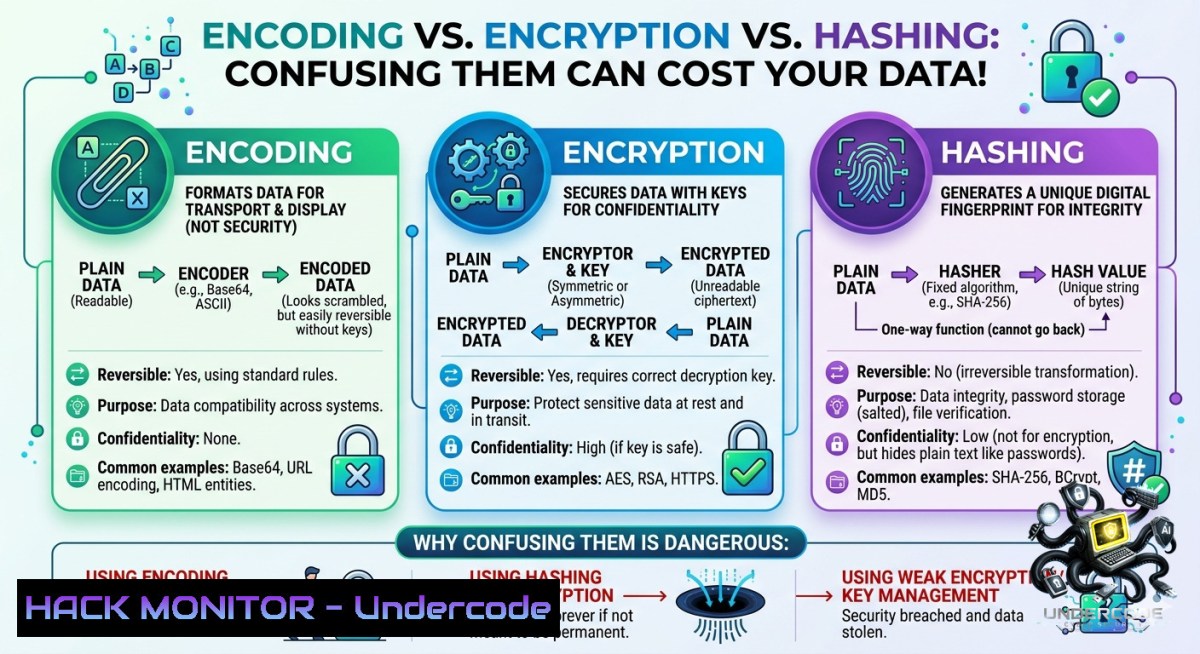
Introduction:
In cybersecurity, confusion between encoding, encryption, and hashing leads to catastrophic data breaches and compliance failures. Encoding prioritizes usability, encryption ensures confidentiality, and hashing guarantees integrity—using the wrong one at the wrong time exposes sensitive information to attackers.
Learning Objectives:
- Differentiate encoding, encryption, and hashing with real-world attack scenarios
- Implement correct cryptographic techniques using Linux/Windows command-line tools
- Harden authentication systems by avoiding weak hashing and improper key management
You Should Know:
- Encoding Is Not Security – Attackers Revert It Instantly
Encoding transforms data for system compatibility (Base64, URL encoding, Hex). It uses no key and provides zero confidentiality. Many developers mistakenly “hide” passwords with Base64 – trivial to decode.
Step‑by‑step guide to demonstrate and exploit weak encoding:
Linux/macOS:
 Encode a secret to Base64
echo "MySecretPassword123" | base64
 Output: TXlTZWNyZXRQYXNzd29yZDEyMwo=

Decode it back – no key required
echo "TXlTZWNyZXRQYXNzd29yZDEyMwo=" | base64 -d
 Output: MySecretPassword123
Windows (PowerShell):
 Encode to Base64
 Decode
URL encoding abuse:
 Encode a malicious payload
curl -G --data-urlencode "query=SELECT  FROM users" "http://vulnerable-site.com/search"
 Attacker can modify encoded parameters without breaking syntax
How attackers exploit: They decode any encoded string found in source code, API responses, or cookies. Never rely on encoding for secrecy – use encryption.
- Encryption Works Only If You Protect the Key
Encryption uses a key to scramble data (AES, RSA). Without the correct key, data remains unreadable. However, hardcoded keys, weak key exchange, and improper modes (ECB) lead to full compromise.
Step‑by‑step guide to correct encryption and common pitfalls:
Symmetric encryption with AES-256 (Linux/OpenSSL):
 Encrypt a file (requires a passphrase)
openssl enc -aes-256-cbc -salt -in secret.txt -out secret.enc -k "StrongP@ssw0rd!"

Decrypt
openssl enc -aes-256-cbc -d -in secret.enc -out secret.txt -k "StrongP@ssw0rd!"
Asymmetric encryption with RSA (generating and using keys):
 Generate private key
openssl genrsa -out private.pem 2048

Extract public key
openssl rsa -in private.pem -pubout -out public.pem

Encrypt a message with public key
echo "Confidential API key" | openssl rsautl -encrypt -pubin -inkey public.pem -out message.enc

Decrypt with private key
openssl rsautl -decrypt -inkey private.pem -in message.enc
Windows (using .NET / PowerShell):
 Protect a string using DPAPI (tied to current user)
$secure = ConvertTo-SecureString "API_Secret_Key" -AsPlainText -Force
$encrypted = ConvertFrom-SecureString $secure
 Decrypt
$decrypted = [Runtime.InteropServices.Marshal]::PtrToStringAuto([Runtime.InteropServices.Marshal]::SecureStringToBSTR((ConvertTo-SecureString $encrypted)))
Cloud hardening tip: Store encryption keys in a dedicated KMS (AWS KMS, Azure Key Vault, HashiCorp Vault). Never commit keys to Git – use environment variables or secrets managers.
- Hashing Is One-Way – But Salting Is Mandatory
Hashing (SHA-256, bcrypt) converts any input into a fixed-length digest. It cannot be reversed. However, unsalted hashes allow rainbow table attacks. MD5 and SHA-1 are broken – never use them.
Step‑by‑step guide to secure password hashing:
Linux:
 Generate SHA-256 hash (unsalted – weak!)
echo -1 "Password123" | sha256sum
 Output: 6ca13d52ca70c883e0f0bb101e425a89e8624de51db2d2392593af6a84118090

Simulate a rainbow table lookup (attacker precomputed hash)
 Attacker finds "Password123" by searching that hash online.

Proper method: use `mkpasswd` with salt (Linux)
mkpasswd -m sha-512 "Password123" -S "randomsalt"
 Output: $6$randomsalt$3z... (hash includes salt)
Windows (PowerShell with proper salting):
 Weak unsalted SHA256
$hash = (Get-FileHash -Algorithm SHA256 -InputStream ([System.IO.MemoryStream]::new([Text.Encoding]::UTF8.GetBytes("Password123")))).Hash

Proper salted hash using .NET
$salt = [bash]::ToBase64String([System.Security.Cryptography.RandomNumberGenerator]::GetBytes(16))
$pbkdf2 = New-Object System.Security.Cryptography.Rfc2898DeriveBytes("Password123", [bash]::FromBase64String($salt), 10000)
$hash = [bash]::ToBase64String($pbkdf2.GetBytes(32))
Write-Output "Salt: $salt`nHash: $hash"
Mitigation of weak hashing (finding MD5 in use):
 Find all MD5 hashes in a Linux system's shadow file (historical)
sudo cat /etc/shadow | grep '$1$'  $1$ indicates MD5
 Migrate to yescrypt or SHA-512 by changing password policy
API security note: When storing API keys or webhook secrets, hash them with a random salt before database insertion. Never log plaintext secrets.
- Hybrid Attacks: When Encoding, Encryption, and Hashing Are Combined
Real-world protocols (JWT, TLS, SSH) mix all three. Attackers target the weakest component. For example, JWT tokens are Base64URL‑encoded (encoding) + signed with a hash (HMAC) or encrypted (JWE).
Step‑by‑step guide to attack and fix a misconfigured JWT:
Extract and decode a JWT (Linux):
 JWT example: header.payload.signature
jwt="eyJhbGciOiJIUzI1NiIsInR5cCI6IkpXVCJ9.eyJ1c2VyIjoiYWRtaW4iLCJleHAiOjE5MDAwMDAwMDB9.signature"

Decode the payload (Base64URL encoding – no decryption!)
echo $jwt | cut -d"." -f2 | base64 -d 2>/dev/null
 Output: {"user":"admin","exp":1900000000}
Vulnerability: “alg”:”none” attack – if algorithm is set to none, signature is ignored.
 Python script to exploit (requires no key)
import jwt
token = jwt.encode({"user":"admin"}, algorithm="none", key=None)
 Send this token to bypass authentication
Fix: Enforce strong algorithms (HS256, RS256) and validate signature properly.
- Cloud Hardening: Encrypting Data at Rest and in Transit
Cloud storage (S3, Azure Blob) often defaults to server‑side encryption with AWS-managed keys. But misconfigured bucket permissions + disabled encryption = data leak.
Step‑by‑step guide to enforce encryption using CLI tools:
AWS CLI – enforce bucket encryption:
 Check if encryption is enabled
aws s3api get-bucket-encryption --bucket my-secure-bucket

Enable AES-256 server-side encryption
aws s3api put-bucket-encryption --bucket my-secure-bucket --server-side-encryption-configuration '{
"Rules": [
{"ApplyServerSideEncryptionByDefault": {"SSEAlgorithm": "AES256"}}
]
}'

Block public ACLs and enforce TLS for transport
aws s3api put-public-access-block --bucket my-secure-bucket --public-access-block-configuration "BlockPublicAcls=true,IgnorePublicAcls=true,BlockPublicPolicy=true,RestrictPublicBuckets=true"
Azure CLI – enforce HTTPS only:
az storage account update --1ame mystorageaccount --resource-group myrg --https-only true
az storage container policy create --1ame secure-container --account-1ame mystorageaccount --permission r --start 2024-01-01 --expiry 2025-01-01
Check for weak transport (Linux):
 Test if a server allows TLS 1.0 (broken)
openssl s_client -connect example.com:443 -tls1
 Disable weak protocols in Nginx: ssl_protocols TLSv1.2 TLSv1.3;
What Undercode Say:
- Encoding is for compatibility, not confidentiality – attackers reverse it in seconds.
- Encryption without key management is theater; use KMS and rotate keys regularly.
- Hashing without salting is dangerous – rainbow tables crack unsalted SHA-256 in hours.
-
Analysis: The fundamental confusion between these three concepts routinely appears in penetration testing reports. Developers encode passwords and call it “encrypted.” Systems store unsalted MD5 hashes of user credentials. API keys are transmitted via URL‑encoding over HTTP. Each mistake is preventable with basic cryptographic hygiene. Organizations must enforce code review rules that flag uses of Base64 for secrecy, block MD5/SHA-1 in CI pipelines, and mandate automated scanning for hardcoded keys. Training courses like Ethical Hackers Academy’s “Cryptography for Developers” bridge this gap, but real change requires shifting left – embedding security checks into IDE plugins and pre-commit hooks.
Prediction:
-1 By 2026, AI‑generated code will amplify encoding‑vs‑encryption mistakes as LLMs produce plausible but insecure snippets using Base64 “encryption,” leading to a surge in data exposure incidents.
+1 Adoption of passkeys and hardware security modules will reduce password‑related hashing errors, but legacy systems still running MD5 will remain prime targets for account takeover.
-1 Attackers will increasingly target misconfigured cloud KMS permissions, using valid encryption keys stolen from logs or CI/CD variables to decrypt entire database dumps.
+1 New compliance frameworks (e.g., EU Cyber Resilience Act) will mandate clear separation of encoding, encryption, and hashing in software bills of materials, driving demand for automated validation tools.
▶️ Related Video (82% Match):
🎯Let’s Practice For Free:
🎓 Live Courses & Certifications:
Join Undercode Academy for Verified Certifications
🚀 Request a Custom Project:
Secure, high-velocity infrastructure and disruptive technological engineering. Contact our engineering team for high-tier development and proprietary systems:
[email protected]
💎 Smart Architecture | 🛡️ Secure by Design | ⭐ Trusted by Thousands
IT/Security Reporter URL:
Reported By: Cybersecurity Encryption – Hackers Feeds
Extra Hub: Undercode MoN
Basic Verification: Pass ✅


