Listen to this Post
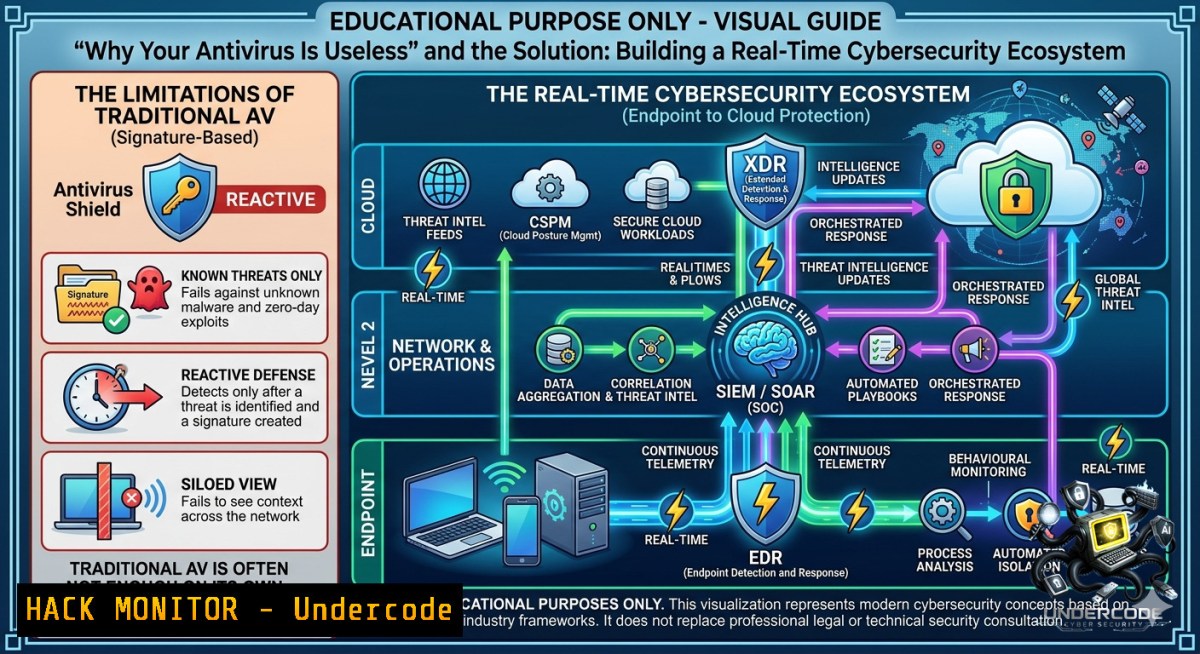
Introduction:
Modern cyber threats have rendered standalone antivirus solutions obsolete. Today’s digital battlefield requires a multilayered, integrated security ecosystem where endpoint protection, network monitoring, identity management, and threat intelligence work in concert to detect, prevent, and respond to attacks. This article breaks down the essential layers of a mature security stack and provides hands-on commands, configurations, and testing methodologies to implement them effectively.
Learning Objectives:
- Understand the 11 critical layers of a modern cybersecurity architecture and how they interconnect.
- Apply practical Linux and Windows commands to harden endpoints, networks, identities, and cloud assets.
- Implement vulnerability scanning, SIEM log correlation, and incident response workflows using real-world tools.
You Should Know:
1. Endpoint Security Hardening Beyond Antivirus
Endpoint security now includes EDR (Endpoint Detection and Response) that monitors behavioral anomalies, not just signature-based malware detection. Below are commands to assess and harden endpoints on both Linux and Windows.
Step‑by‑step guide – Windows Defender & Process Auditing:
- Check Defender real‑time protection status:
`Get-MpComputerStatus | Select-Object RealTimeProtectionEnabled`
- Run a full offline scan:
`Start-MpScan -ScanType FullScan -OfflineScan`
- Enable PowerShell script block logging for threat hunting:
`Set-ItemProperty -Path “HKLM:\SOFTWARE\Policies\Microsoft\Windows\PowerShell\ScriptBlockLogging” -1ame “EnableScriptBlockLogging” -Value 1`
Step‑by‑step guide – Linux endpoint monitoring with osquery:
- Install osquery to query system state like a database:
`sudo apt install osquery` (Debian) or `sudo yum install osquery` (RHEL) - Launch osqueryi and run:
`SELECT pid, name, cmdline FROM processes WHERE name LIKE ‘%malware%’;`
– Schedule file integrity monitoring:
`SELECT FROM file WHERE path LIKE ‘/etc/%%’ AND directory NOT LIKE ‘/etc/certificates’;`
2. Network Security & Firewall Segmentation
Network security layers control east-west traffic and inspect north-south flows. Proper firewall rules and segmentation can contain a breach.
Step‑by‑step guide – Linux iptables micro‑segmentation:
- Block all inbound except SSH from a trusted subnet (10.0.0.0/24):
`iptables -A INPUT -s 10.0.0.0/24 -p tcp –dport 22 -j ACCEPT`
`iptables -A INPUT -j DROP`
- Log dropped packets for SIEM ingestion:
`iptables -A INPUT -j LOG –log-prefix “DROP: ” –log-level 4`
– Save rules persistently:
`sudo apt install iptables-persistent && sudo netfilter-persistent save`
Step‑by‑step guide – Windows Defender Firewall with Advanced Security:
– Block all outbound traffic except to approved IPs:
`New-1etFirewallRule -DisplayName “Block Outbound All” -Direction Outbound -Action Block`
– Allow only DNS and HTTPS outbound:
`New-1etFirewallRule -DisplayName “Allow DNS” -Direction Outbound -Protocol UDP -RemotePort 53 -Action Allow`
`New-1etFirewallRule -DisplayName “Allow HTTPS” -Direction Outbound -Protocol TCP -RemotePort 443 -Action Allow`
– Monitor firewall logs: `Wevtutil qe Microsoft-Windows-WindowsFirewallWithAdvancedSecurity/Firewall /f:text`
3. SIEM & Log Centralization for Attack Detection
SIEM platforms correlate alerts from endpoints, networks, and identities. Without centralized logs, detection is blind.
Step‑by‑step guide – Setting up a lightweight ELK stack for log aggregation:
– Install Elasticsearch, Logstash, Kibana (ELK) on Ubuntu:
`wget -qO – https://artifacts.elastic.co/GPG-KEY-elasticsearch | sudo apt-key add -`
`sudo apt install elasticsearch logstash kibana`
- Configure Logstash to receive Windows Event Logs via Winlogbeat:
On Windows, install Winlogbeat and edit `winlogbeat.yml`:
winlogbeat.event_logs:
- name: Security
- name: System
output.logstash:
hosts: ["your_ELK_IP:5044"]
– Start services: `sudo systemctl start elasticsearch logstash kibana` (Linux) and `Start-Service winlogbeat` (Windows PowerShell as admin)
– Query failed logins in Kibana: `event.code: 4625` (Windows) or `sshd: “Failed password”` (Linux)
4. Vulnerability Management with Automated Scanning
Unpatched systems remain the 1 breach vector. Weekly vulnerability scans using open-source tools can reduce risk significantly.
Step‑by‑step guide – Using nmap and vulners script for vulnerability discovery:
– Install nmap and the vulners script:
`sudo apt install nmap`
`sudo nmap –script-updatedb`
- Scan for missing patches on a Windows host:
`nmap -sV –script vulners –script-args mincvss=7.0 target-ip`
- For authenticated scans (requires credentials):
`nmap -p 445 –script smb-vuln-ms17-010 –script-args smbuser=admin,smbpass=pass target-ip`
- Automate weekly scanning with cron:
`0 2 1 root nmap -sV –script vulners 192.168.1.0/24 -oA /var/log/vuln_scan_$(date +\%Y\%m\%d)`
- Identity & Access Management (IAM) – The New Perimeter
Compromised credentials now cause more breaches than malware. Implementing MFA and least privilege is mandatory.
Step‑by‑step guide – Enforcing MFA on Linux with Google Authenticator PAM:
– Install Google Authenticator PAM:
`sudo apt install libpam-google-authenticator`
- Run the setup for a user: `google-authenticator` (scan the QR code with an authenticator app)
- Edit `/etc/pam.d/sshd` and add:
`auth required pam_google_authenticator.so`
- In
/etc/ssh/sshd_config, set:
`ChallengeResponseAuthentication yes`
`AuthenticationMethods publickey,keyboard-interactive`
- Restart SSH: `sudo systemctl restart sshd`
Step‑by‑step guide – Least privilege on Windows using PowerShell:
- Remove local admin rights for all users except a break‑glass account:
`Get-LocalGroupMember -Group “Administrators” | Where-Object Name -1otlike “breakglass” | Remove-LocalGroupMember -Group “Administrators”`
– Enforce JIT (Just‑In‑Time) access via PIM (requires Azure AD P2):
`Add-AzureADDirectoryRoleMember -ObjectId “” -RefObjectId ““`
- Audit privilege escalations: `Get-WinEvent -FilterHashtable @{LogName=’Security’;ID=4672}`
6. Cloud Security Hardening (AWS Example)
Misconfigured cloud storage is a top data leak source. Implementing posture management and least‑privilege IAM roles is critical.
Step‑by‑step guide – Securing an S3 bucket with bucket policies and access logging:
– Create a bucket with public access blocked:
`aws s3api create-bucket –bucket my-secure-bucket –region us-east-1`
`aws s3api put-public-access-block –bucket my-secure-bucket –public-access-block-configuration BlockPublicAcls=true,IgnorePublicAcls=true,BlockPublicPolicy=true,RestrictPublicBuckets=true`
- Enable server access logging (send logs to a separate log bucket):
`aws s3api put-bucket-logging –bucket my-secure-bucket –bucket-logging-status file://logging.json`
- Enforce encryption at rest using KMS:
`aws s3api put-bucket-encryption –bucket my-secure-bucket –server-side-encryption-configuration ‘{“Rules”:[{“ApplyServerSideEncryptionByDefault”:{“SSEAlgorithm”:”aws:kms”}}]}’`
- Scan for open S3 buckets:
`aws s3 ls | while read bucket; do aws s3api get-bucket-acl –bucket $bucket | grep -i “AllUsers” && echo “$bucket is public!”; done`
7. Incident Response & Data Protection (DLP)
When a breach occurs, fast detection and automated response reduce damage. Protecting the data itself – via encryption and DLP – shrinks impact.
Step‑by‑step guide – Linux incident response data collection:
- Capture running processes, network connections, and file hashes:
`ps auxwf > ps_output.txt`
`ss -tulpn > netstat_output.txt`
`find / -type f -exec sha256sum {} \; > file_hashes.txt 2>/dev/null`
– Use `auditd` to monitor sensitive file access (e.g., /etc/shadow):
`auditctl -w /etc/shadow -p wa -k shadow_monitor`
Search logs: `ausearch -k shadow_monitor`
- Encrypt sensitive data before exfiltration:
`gpg –symmetric –cipher-algo AES256 secrets.txt` (decrypt withgpg --decrypt secrets.txt.gpg)
Step‑by‑step guide – Windows DLP and BitLocker encryption:
- Enable BitLocker on C: drive (requires TPM):
`Manage-bde -on C: -RecoveryPassword -UsedSpaceOnly`
- Backup recovery key to AD: `Manage-bde -protectors -add C: -recoverypassword -adbackup`
– Use Windows Information Protection (WIP) to prevent copy/paste from corporate to personal apps:
`New-WIPPolicy -1ame “Corp DLP” -Enforcement AllowOverride -AllowedApps @(“\\server\share\app.exe”)`
`Set-WIPPolicy -ID -IsActive $true`
What Undercode Say:
- Key Takeaway 1: More tools do not equal more security. Without visibility, prioritization, and skilled analysts, even a $10M stack fails. Start with logging and vulnerability management – they deliver the highest ROI.
- Key Takeaway 2: Identity is the new perimeter. MFA and least privilege are non‑negotiable, yet many organizations still rely on single passwords. Combine IAM with continuous monitoring (e.g., impossible travel alerts) to stop credential‑based attacks.
Analysis: The post rightly emphasizes that cybersecurity is an operational ecosystem, not a product. Many companies underestimate the importance of threat intelligence and continuous testing (penetration testing). In my experience, SIEM platforms are often deployed but not tuned – resulting in alert fatigue and missed detections. Similarly, cloud misconfigurations persist because security teams lack hands‑on IAM and policy skills. The commands provided above bridge that gap by offering actionable hardening steps for each layer. Finally, data loss prevention (DLP) remains the most underestimated category – protecting data at rest and in transit, combined with encryption, reduces breach liability even when perimeters fail.
Prediction:
- +1 Adoption of AI‑driven SOC automation (SOAR) will reduce mean time to respond (MTTR) from hours to seconds, making layered security truly real‑time.
- -1 As organizations stack more tools, the complexity tax will grow – leading to misconfigurations and blind spots unless unified data models (e.g., OCSF) become mandatory.
- +1 Cloud native security (CSPM, CWPP) will converge with endpoint and network layers, enabling single‑console visibility across hybrid environments by 2026.
- -1 Ransomware groups will increasingly target identity systems (AD, Okta) and backup repositories, bypassing traditional endpoint controls – forcing a shift toward immutable backups and continuous authentication.
▶️ Related Video (80% Match):
🎯Let’s Practice For Free:
🎓 Live Courses & Certifications:
Join Undercode Academy for Verified Certifications
🚀 Request a Custom Project:
Secure, high-velocity infrastructure and disruptive technological engineering. Contact our engineering team for high-tier development and proprietary systems:
[email protected]
💎 Smart Architecture | 🛡️ Secure by Design | ⭐ Trusted by Thousands
IT/Security Reporter URL:
Reported By: Yildizokan Cybersecurity – Hackers Feeds
Extra Hub: Undercode MoN
Basic Verification: Pass ✅


