
Listen to this Post
Introduction:
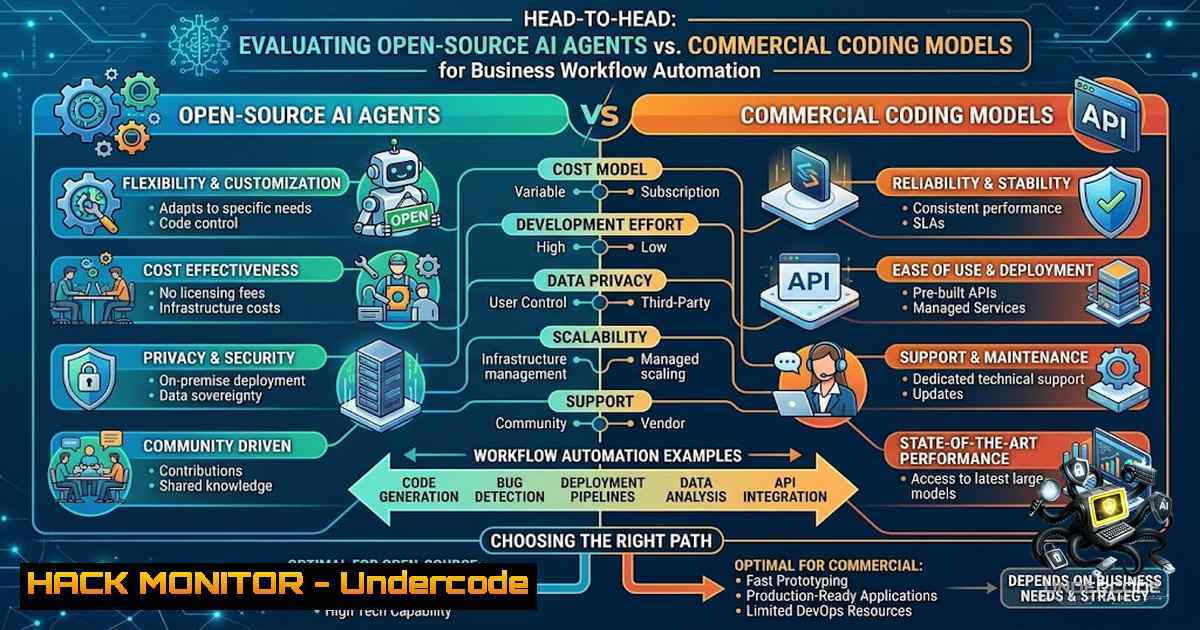
The rapid proliferation of AI agents has created a critical decision point for businesses: should they rely on cost-effective, open-source frameworks running on minimal infrastructure, or invest in premium, purpose-built commercial solutions? This evaluation presents a comparative analysis between a self-hosted, open-source AI agent (Hermes) operating on a $5 VPS and a high-end commercial alternative, Grok Bot, across a spectrum of business operations from lead generation to complex software development. The findings challenge the assumption that higher cost guarantees superior performance, revealing a nuanced landscape where workflow complexity dictates the optimal tool selection.
Learning Objectives & Secrets:
- Objective 1: Master the deployment and configuration of open-source AI agents on low-cost infrastructure to automate critical business operations such as cold email sequencing, content creation, and data analysis without recurring licensing fees.
- Objective 2 (Secret Tip): Learn to package entire knowledge bases, task definitions, and API integrations into a single compressed file for seamless migration and instant deployment of specialized sub-agents across different platforms, ensuring operational continuity and rapid scaling.
- Objective 3 (Secret Tip): Discover how to leverage open-source bridges to integrate disparate AI models—such as using a free Claude Code bridge to invoke a commercial coding model—creating a hybrid workflow that capitalizes on the strengths of both ecosystems without vendor lock-in.
You Should Know:
- Deploying a Self-Hosted AI Agent Ecosystem on a $5 VPS (Linux)
The foundation of a cost-effective AI operations strategy is a lightweight, self-hosted agent. Using a Debian/Ubuntu VPS, you can install and run sophisticated agents like those from the Auto-GPT or BabyAGI lineages, or custom Python-based orchestrators like the one described (Hermes). This setup handles scheduled tasks, API polling, and response generation.
Step‑by‑step guide:
- Provision VPS: Acquire a low-tier VPS (e.g., DigitalOcean, Linode) with at least 2GB RAM. Access via SSH:
ssh root@your_vps_ip. - Update System & Install Dependencies: Run
apt update && apt upgrade -y, then install Python, pip, Git, and screen:apt install python3 python3-pip git screen -y. - Clone Agent Repository: Retrieve the agent framework: `git clone https://github.com/your-org/hermes-agent.git` (replace with actual repo). Navigate into the directory: `cd hermes-agent`.
- Install Python Dependencies: Use
pip3 install -r requirements.txt. This typically includes libraries for API calls (requests), natural language processing (transformers, openai), and scheduling (schedule). - Configure Environment: Create a `.env` file with `nano .env` and populate with necessary API keys for services like OpenAI, Apify, Supabase, and email platforms.
- Launch Agent in Persistent Screen: Start a screen session:
screen -S hermes. Execute the main script:python3 main.py --mode operations. Detach withCtrl+A, D. The agent will now run autonomously, handling defined workflows like checking emails and generating responses.
- Packaging and Migrating Complete Agent Knowledge Bases (Windows & Linux)
To replicate an agent’s behavior or test a new platform, you must consolidate all its logic, context, and integrations. This involves creating a comprehensive archive of the agent’s working directory, including its prompts, skill modules, and credentials.
Step‑by‑step guide (Linux):
- Navigate to Agent Directory:
cd /path/to/hermes-agent. - Create Compressed Archive:
zip -r hermes_full_package.zip . -x ".git" ".venv" "__pycache__/". This compresses all files while excluding version control and Python cache to save space. - Transfer Archive: Use `scp hermes_full_package.zip user@remote_server:/path/to/destination` to move it for testing on another machine like a Mac Mini.
Step‑by‑step guide (Windows):
- Open PowerShell, navigate to the agent folder:
cd C:\hermes-agent. - Use the built-in Compress-Archive cmdlet:
Compress-Archive -Path -DestinationPath hermes_full_package.zip -CompressionLevel Optimal -Exclude .git, .venv, __pycache__. - This creates a portable package that can be loaded into another system’s AI agent interface to instantly spawn sub-agents.
3. Orchestrating Sub-Agent Spawning and Cloud VM Allocation
Upon ingesting a packaged agent, modern AI platforms can automatically analyze the contents and spawn specialized sub-agents, each provisioned with its own dedicated cloud computing environment. This is akin to Kubernetes pod creation but orchestrated by AI.
Verification & Security Considerations:
- Monitoring Resource Usage: Use `htop` on Linux to monitor CPU and memory usage of each sub-agent process. On Windows, use Task Manager or `Get-Process` in PowerShell to ensure no single sub-agent consumes excessive resources.
- Cloud Hardening: If the platform allocates VMs, ensure they are secured. Use `ufw` to restrict ports: `ufw allow 22/tcp` (SSH), `ufw allow 80/tcp` (HTTP), `ufw allow 443/tcp` (HTTPS). Deny all others:
ufw default deny incoming. On Windows, configure Windows Defender Firewall to block all inbound connections except for necessary services. - API Key Isolation: Never hardcode API keys. Use environment variables or secrets managers (e.g., HashiCorp Vault, Azure Key Vault). On Linux, use
export APIFY_API_KEY="your_key". On Windows, use `$env:APIFY_API_KEY=”your_key”` in PowerShell.
- Securely Connecting Plugins via OAuth and API Key Integration
Connecting external services like Apify (data scraping), Supabase (database), Hyros (analytics), and X (social media) requires careful management of secrets to prevent data breaches. These integrations allow the AI agent to fetch data, store results, and post outputs.
Step‑by‑step security checklist:
- API Key Rotation: Use `openssl rand -hex 32` on Linux to generate a strong, random API key for custom integrations. On Windows, use `[System.Convert]::ToBase64String([System.Text.Encoding]::UTF8.GetBytes([System.Guid]::NewGuid().ToString()))` in PowerShell.
- OAuth 2.0 Flows: Where possible, prefer OAuth 2.0 over static API keys. For example, connecting to X requires setting up a callback URL and handling the authorization code grant. Ensure the redirect URI is exactly as registered.
- Environment Variables Best Practice: Store all secrets in a `.env` file that is never committed to version control. Use `source .env` to load them. For production, consider using a secrets management service.
- Network Security: Ensure that your VPS’s firewall restricts outbound traffic to only the necessary domains (e.g.,
api.openai.com,api.apify.com). Use `iptables` or `ufw` to limit egress, though this may be complex on simple setups.
- Benchmarking AI Model Performance: Grok Build vs. Codex
The evaluation highlighted a significant performance gap in coding tasks. To benchmark AI models effectively, you need a consistent, reproducible test harness. This involves defining a standard problem, setting a time limit, and measuring pass rates of generated solutions against a test suite.
Step‑by‑step benchmarking procedure:
- Define Benchmark Task: Choose a set of coding problems (e.g., from LeetCode, or custom internal tasks) that represent typical coding challenges.
- Prepare a Test Harness: Write a script (in Python, Bash, or JavaScript) that executes the model, captures its output, compiles/runs the code, and validates results against expected outputs.
- Run Grok Build: Using the xAI CLI or API, send the prompt. For Grok with the Claude Code bridge, use a command like `claude –model grok-build “write a function to solve X”` from the terminal.
- Run Codex: Use the OpenAI CLI or API:
openai api completions.create -m codex -p "write a function to solve X". - Collect Metrics: Record the time taken from submission to final output and the number of test cases passed. Use Linux `time` command for precise timing: `time python3 run_benchmark.py grok` and
time python3 run_benchmark.py codex. - Analyze Output: The results showed Grok completing in 12:53 with 45 passes versus Codex’s ~30 minutes with 33 passes, indicating superior speed and accuracy for this task.
- Integrating Grok Build with Claude Code via the Free Bridge (Linux/Mac)
To leverage the powerful Grok coding model without abandoning the existing Claude Code workflow, you can install the xAI-provided bridge. This allows the use of slash commands like `/grok` directly within the Claude Code terminal environment.
Step‑by‑step installation:
- Clone xAI GitHub Repository: `git clone https://github.com/xai-org/claude-code-bridge.git`.
– Navigate and Install: `cd claude-code-bridge && pip install -e .`. - Set Environment Variables: Export your Grok API key: `export GROK_API_KEY=”your_grok_key”` and ensure your Claude Code environment is configured.
- Usage: Within your Claude Code terminal, type `claude` to start the session. Then use `/grok your prompt here` to send the prompt to the Grok Build model instead of the default Claude model. This allows seamless switching between models for different tasks.
- Optimizing Performance: On a Mac Mini or Linux system, monitor resource usage with `top` or
htop. For faster token processing, ensure a stable internet connection and consider using GPU acceleration if available on the host machine.
7. Mitigating Data Exfiltration Risks in Multi-Agent Systems
When multiple sub-agents operate with access to different APIs and data sources, the risk of unintended data exfiltration increases. Implementing robust logging and content filtering is crucial.
Step‑by‑step mitigation:
- Implement Content Scanning: Use open-source tools like `ClamAV` on Linux to scan output files for sensitive data patterns (e.g., Social Security Numbers, credit card numbers). Install: `apt install clamav` and update definitions:
freshclam. Scan files:clamscan /path/to/agent/output. - Network-Level Monitoring: Use `tcpdump` to monitor outbound connections from the VPS:
tcpdump -i eth0 -w outbound_traffic.pcap. Analyze with Wireshark to ensure agents are not connecting to unauthorized IPs. - Log Aggregation: Set up a central logging system (e.g., ELK Stack) to collect logs from all sub-agents. On Linux, configure `rsyslog` to forward logs. On Windows, use Event Forwarding.
- Regular Audits: Perform regular code reviews of the agent’s skill definitions and API call logic to ensure no malicious or overly permissive functions exist. Use `grep` to search for dangerous commands like `eval()` in Python code:
grep -r "eval(" /path/to/agent.
What Undercode Say:
Key Takeaway 1: The myth that commercial AI solutions universally outperform open-source alternatives is debunked. For complex, contextual business workflows requiring nuanced scheduling and task execution, a finely tuned open-source agent running on minimal infrastructure can deliver superior performance.
Key Takeaway 2: The strategic integration of multiple AI models via open-source bridges provides a competitive advantage. By using a free connector to route coding tasks to a specialized model (Grok), users can achieve higher performance and lower costs without overhauling their existing toolchain.
Analysis: This case underscores a critical principle in AI adoption: match the tool to the task. The operational agent excels in diverse, unstructured tasks due to its customized skill set and context management. Conversely, the commercial model’s superiority in coding benchmarks highlights the value of specialized training. The most effective strategy is not a single platform but a hybrid architecture, where a core orchestrator delegates specialized sub-tasks to the best-suited AI, leveraging open-source bridges to maintain cost efficiency and flexibility. This approach minimizes vendor lock-in and allows organizations to adapt quickly to technological advancements. The experiment also validates that with proper engineering, low-cost infrastructure can compete with high-end commercial offerings, democratizing access to advanced automation.
Prediction:
- +1 The proliferation of AI agent bridges will lead to a modular AI ecosystem, where businesses can mix and match best-of-breed models for specific tasks, reducing costs and improving performance.
- -1 This fragmentation could increase the attack surface as integrations multiply, making robust API key management and sub-agent isolation mandatory for organizational security.
- +1 Open-source agent frameworks will see a surge in adoption and development, as they prove to be competitive, transparent, and cost-effective for core business operations.
- -1 The ease of deploying many sub-agents may lead to “AI sprawl,” where oversight is lost, potentially leading to compliance violations and data processing missteps.
- +1 The benchmark gap in coding performance indicates that specialized models will likely continue to outperform generalists, driving more businesses to adopt a multi-model strategy.
▶️ Related Video (82% Match):
🎯Let’s Practice For Free:
🎓 Live Courses & Certifications:
Join Undercode Academy for Verified Certifications
🚀 Request a Custom Project:
Secure, high-velocity infrastructure and disruptive technological engineering. Contact our engineering team for high-tier development and proprietary systems:
[email protected]
💎 Smart Architecture | 🛡️ Secure by Design | ⭐ Trusted by Thousands
IT/Security Reporter URL:
Reported By: https://lnkd.in/p/eNApSEgs – Hackers Feeds
Extra Hub: Undercode MoN
Basic Verification: Pass ✅


