
Listen to this Post
Introduction:
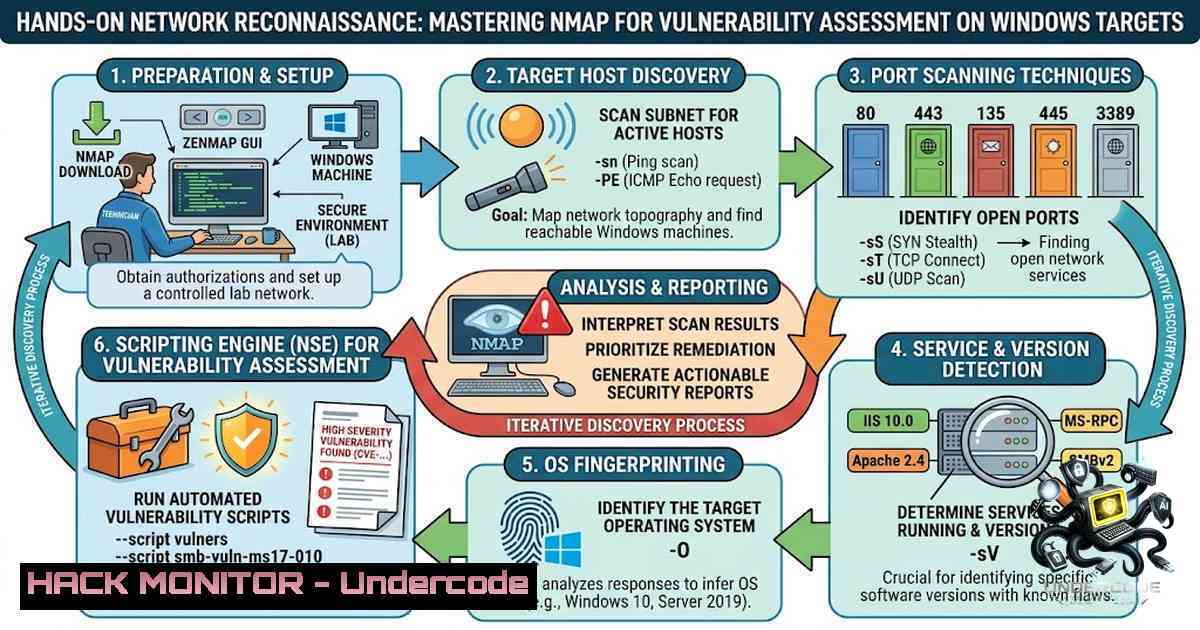
In the ever-evolving landscape of cybersecurity, understanding the attacker’s methodology is paramount for building resilient defenses. The foundational practice of network reconnaissance, specifically port scanning and service enumeration, remains a critical skill for any security professional. This article explores a practical ethical hacking workflow, utilizing Nmap on Linux to profile a Windows target, uncovering misconfigurations, and reinforcing the importance of proactive patch management in preventing common attack vectors.
Learning Objectives & Secrets:
- Objective 1: Master Network Scanning with Nmap. You will learn to utilize Nmap to perform comprehensive scans, identifying open ports and live hosts. A secret tip is to use `-sS` (SYN scan) for a faster and stealthier scan, while `-sV` is crucial for determining the exact service versions, which is vital for vulnerability mapping.
- Objective 2: Enumerate Service Versions and OS Fingerprinting. Moving beyond simple port discovery, you will discover how to extract detailed service banners and operating system details. Secret tip: always run an `-O` flag to enable OS detection, but combine it with `-A` (Aggressive scan) for a more comprehensive set of information, including traceroute and script scanning.
- Objective 3: Identify Attack Vectors via Misconfigurations. The core objective is to translate raw scan data into actionable intelligence. By identifying outdated service versions and default configurations, you can pinpoint potential entry points. A pro tip is to leverage Nmap’s scripting engine (NSE) with `–script=vuln` to automatically check for known vulnerabilities associated with the detected services.
You Should Know:
1. Setting Up Your Environment for Ethical Hacking
Before performing any reconnaissance, it is crucial to have a legal and isolated testing environment. Platforms like TryHackMe or HackTheBox provide safe, virtual labs for practice. For this guide, we assume you have a Kali Linux (or any Linux distro with Nmap installed) attacker machine and a target Windows virtual machine (such as Windows Server 2008/2012). Ensure both are on the same network segment or have network connectivity.
- Step-by-Step Guide: Executing a Basic and Service Version Scan
The first step is discovering live hosts and open ports. Let’s break down the command used for service enumeration:nmap -sV <target-ip>.
- What it does: The `-sV` flag instructs Nmap to probe open ports to determine the service/version information.
- How to use it: Replace `
` with the actual IP of your target (e.g., nmap -sV 192.168.1.100). - Command Example:
nmap -sV -p- -T4 192.168.1.100. Here, `-p-` scans all 65535 ports, and `-T4` speeds up the scan for a faster result. - Windows Equivalent: While Nmap is the primary tool on Linux, Windows users can install Nmap via Zenmap (GUI) or the Windows binary. The command syntax is identical in the command prompt.
3. Interpreting Results: Identifying Critical Services (SMB, RDP)
In the referenced post, open ports like 445 (SMB) and 3389 (RDP) were discovered on a Windows Server. This is highly significant.
- Port 445 (SMB): This is a high-risk port. Older Windows versions are vulnerable to exploits like EternalBlue (MS17-010). An attacker discovering this should immediately note the version.
- Command for SMB Enumeration:
nmap --script=smb-vuln -p 445 <target-ip>. This runs a suite of scripts to check for critical SMB vulnerabilities. - Port 3389 (RDP): Remote Desktop Protocol is another common entry point. Weak passwords or the BlueKeep vulnerability (CVE-2019-0708) can be exploited here.
- Command for RDP:
nmap --script=rdp-vuln-ms12-020 -p 3389 <target-ip>.
4. Going Deeper: OS Detection and Aggressive Scanning
To gain a comprehensive view, use the aggressive scan option.
- Command: `nmap -A -O
`
– Step-by-step:
- Enable OS Detection: The `-O` flag attempts to determine the operating system based on TCP/IP stack fingerprints.
- Enable Aggressive Mode: `-A` enables OS detection (
-O), version detection (-sV), script scanning (-sC), and traceroute. This is a powerhouse command for initial reconnaissance. - Analysis: The output will show a guess of the OS (e.g., Windows Server 2008 R2). This confirms the target environment and helps predict legacy vulnerabilities.
5. Vulnerability Assessment and Mitigation Strategies
Based on the scan results, the next step is to assess the risk.
- Vulnerability Mapping: Take the service names and versions (e.g., SMBv1, RDP) and search for known exploits in databases like Exploit-DB or the National Vulnerability Database (NVD).
- Mitigation:
- Patch Management: The primary defense is applying the latest security patches. For the vulnerabilities mentioned, Microsoft has released updates.
- System Hardening: Disable unnecessary services. If SMB is not required on a public server, block it at the firewall.
- Configuration Review: Enforce strong password policies and enable Network Level Authentication (NLA) for RDP to block a significant number of brute-force attacks.
6. Practical Commands for Deeper Exploration
If the SMB port is open, you can attempt to enumerate shares.
- Enumeration using smbclient (Linux): `smbclient -L //
-1` (Attempts to list shares anonymously). - Using Nmap Scripts:
nmap --script=smb-enum-shares -p 445 <target-ip>. - For RDP: A common tool like `xfreerdp` or `rdesktop` on Linux can be used to test connectivity, but never without authorization.
- Windows Command (Admin): `netstat -an | findstr 3389` to check if RDP is listening on the Windows host itself.
7. The Importance of Continuous Learning in Cybersecurity
The journey into cybersecurity is never-ending. Like the author of the referenced post, blending AI and ML knowledge with security fundamentals creates a powerful skillset for the future of DevSecOps. Building resilient systems requires understanding the attack surface, which is exactly what this reconnaissance exercise provides.
What Undercode Say:
- Key Takeaway 1: The core of ethical hacking lies in thinking like an attacker. Using Nmap is the starting point, but the real value is in the interpretation of results, connecting open ports to potential exploits and misconfigurations.
- Key Takeaway 2: Proactive defense is always better than reactive incident response. Regularly performing internal vulnerability assessments and applying system hardening configurations (like disabling SMBv1 and enabling NLA for RDP) are non-1egotiable best practices for system administrators.
- Analysis: This learning experience highlights a crucial gap in many organizations where legacy systems are left unpatched. The analysis of the scan reveals that the attacker doesn’t need advanced zero-day exploits; they simply need to find an organization that hasn’t applied basic security updates. By integrating this practical, hands-on knowledge, the author is building a strong foundation to build secure AI/ML systems, a field where data integrity and system availability are paramount.
Prediction:
- +1 As AI/ML adoption grows, the cybersecurity skills gap will widen, making hands-on training and continuous learning in these areas increasingly critical for career advancement.
- -1 The proliferation of “beginner-friendly” hacking tools lowers the barrier to entry, leading to a rise in automated attacks targeting common misconfigurations like those found on SMB and RDP services.
▶️ Related Video (86% Match):
🎯Let’s Practice For Free:
🎓 Live Courses & Certifications:
Join Undercode Academy for Verified Certifications
🚀 Request a Custom Project:
Secure, high-velocity infrastructure and disruptive technological engineering. Contact our engineering team for high-tier development and proprietary systems:
[email protected]
💎 Smart Architecture | 🛡️ Secure by Design | ⭐ Trusted by Thousands
IT/Security Reporter URL:
Reported By: https://lnkd.in/p/e7qjwhPq – Hackers Feeds
Extra Hub: Undercode MoN
Basic Verification: Pass ✅


