
Listen to this Post
Introduction:
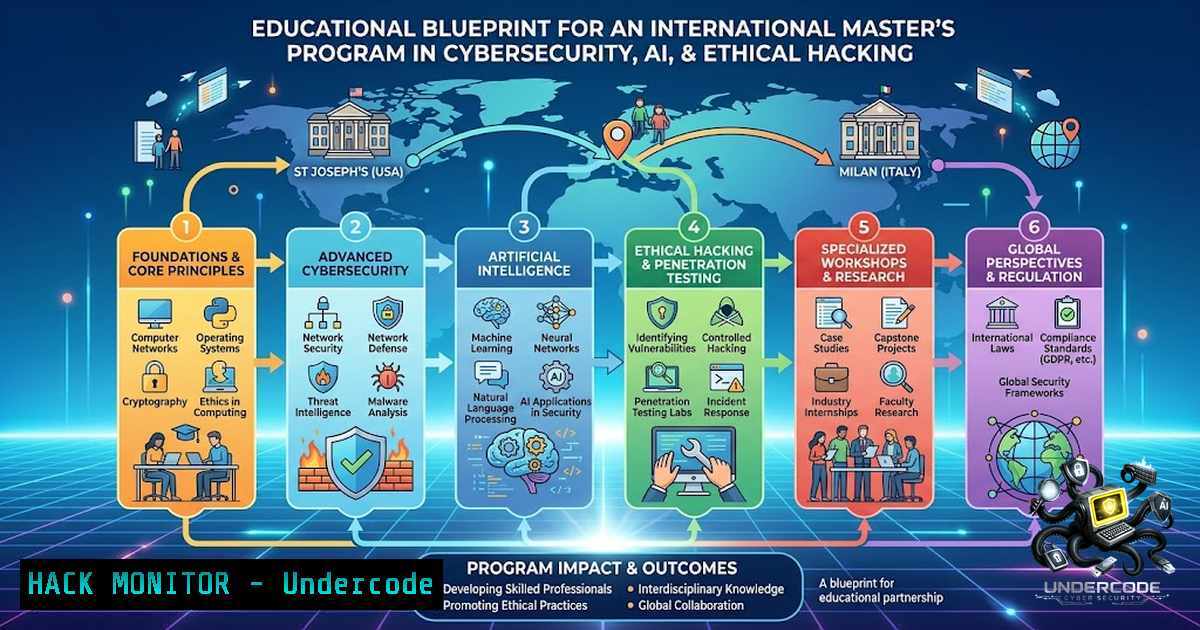
The global cybersecurity landscape is evolving at an unprecedented pace, driven by the proliferation of AI-driven attacks and the increasing complexity of digital infrastructures. For aspiring professionals, the path to mastering these domains often requires a blend of rigorous academic training and hands-on technical exposure. The inspiring journey of Daniel Maria Prakash, a St. Joseph’s College of Engineering alumnus now pursuing advanced studies in Cybersecurity and AI & Ethical Hacking at the University of Milan, underscores the critical importance of a structured, global approach to education in these fields. This article translates that journey into a technical roadmap, providing a step-by-step guide to building a foundational skillset in cybersecurity, from setting up your own virtual lab to understanding the nuances of international academic choices and the practical application of ethical hacking tools.
Learning Objectives & Secrets:
- Objective 1: Establish a Foundational Home Lab for Security Testing. Before you can defend networks, you must understand how they are attacked. You will learn to set up a virtualized environment using VMware or VirtualBox, isolating vulnerable machines (like Metasploitable or Windows 7) from your host network to practice penetration testing safely.
- Objective 2: Mastering the Art of OSINT and Reconnaissance. A key secret tip is that 80% of successful breaches start with information publicly available. You will learn to leverage tools like `theHarvester` and `Shodan` to gather intelligence on a target, a crucial first step in both offensive and defensive security.
- Objective 3: Navigating International Academic Pathways with a Technical Edge. The secret to a successful study-abroad application in this field is aligning your technical projects with your Statement of Purpose. This guide will show you how to document and present your home-lab projects as tangible evidence of your skills to international universities.
You Should Know:
- Setting Up Your First Cybersecurity Virtual Lab (The “Digital Atelier”)
Before diving into complex code and attack vectors, you need a safe, isolated environment to experiment. This is the equivalent of a painter’s canvas. This setup is crucial for the “AI & Ethical Hacking” modules you will encounter in advanced master’s programs.
Step-by-Step Guide:
- Install a Hypervisor: Download and install VMware Workstation Player (Free) or Oracle VirtualBox (Open Source) on your Windows or Linux host machine.
- Download a Target VM: Obtain a pre-configured vulnerable virtual machine. The most common is Metasploitable 2 (an intentionally insecure Ubuntu Linux server) or Damn Vulnerable Web Application (DVWA).
- Download an Attack VM: Kali Linux is the industry-standard penetration testing distribution. Download the pre-built VM image for your chosen hypervisor.
4. Configure Network Isolation:
In VirtualBox, go to `File > Preferences > Network` and create a new NAT Network (e.g., NatNetwork). This allows your VMs to communicate with each other but provides a layer of isolation from your physical home network.
For VMware, use the VMnet configuration to create a custom Host-Only or NAT network.
5. Power On and Identify: Start both VMs. Log into Kali (username: kali, password: kali) and Metasploitable (username: msfadmin, password: msfadmin). Run the `ifconfig` command in both terminals to find their IP addresses on the same subnet (e.g., 192.168.xx.xx). This is your safe playground for the exercises below.
- Command-Line Reconnaissance: The Power of `nmap` and `netdiscover`
Your master’s program will heavily emphasize network security. The ability to map a network is a non-1egotiable skill. This is where you start your “attack” phase, which is essentially a systematic scan to understand the environment.
Step-by-Step Guide:
- Discovery: First, find all live hosts on your isolated network using
netdiscover.
Command (Kali Linux): `sudo netdiscover -r 192.168.xx.0/24` (Replace `xx` with the third octet of your VM’s network). - Port Scanning: This is the core of reconnaissance. Run a comprehensive TCP SYN scan on the target VM.
Command (Kali Linux): `nmap -sS -A -T4 -p-` (Replace ` ` with the IP of your Metasploitable machine).
What this does: `-sS` performs a stealth SYN scan, `-A` enables OS and version detection, `-T4` speeds up the scan, and `-p-` scans all 65535 ports. - Banner Grabbing: Manually check specific services to see what software is running.
Command: `nc -v21` (e.g., for FTP) or ssh -v <Target_IP>. -
Web Application Security: Exploiting a Common Vulnerability (SQL Injection)
AI in cybersecurity often involves pattern recognition, but the fundamental threats remain. SQL Injection (SQLi) is a classic and devastating web vulnerability. Universities like the University of Milan focus heavily on secure coding practices, and understanding this is paramount.
Step-by-Step Guide:
- Access DVWA: On your Kali machine, open Firefox and navigate to the IP address of your Metasploitable or a DVWA container (e.g.,
http://<Target_IP>/dvwa/). Log in with default credentials (admin/password). - Set Security Level: On the left panel, click “DVWA Security” and set the level to Low to start.
- Navigate to SQL Injection: Click on “SQL Injection” in the left panel.
- Inject a Basic Payload: In the “User ID” text box, enter: `1′ OR ‘1’=’1`
The “Secret”: The application likely uses a raw SQL query likeSELECT FROM users WHERE user_id = '$id';. Your input breaks out of the string context, turning the query intoSELECT FROM users WHERE user_id = '1' OR '1'='1';, which returns all users. - Advanced Payload (Union Query): To extract data from other tables, enter:
`1′ UNION SELECT user, password FROM users; — -`
The “Secret”: This attempts to merge the results of the first query with a select statement pulling usernames and passwords from the database’s user table. -
Windows Security Hardening: Basic PowerShell Commands for Defense
While your master’s may lean into ethical hacking, a strong defender is more valuable. Many breaches start with misconfigured endpoints. Here are essential Windows commands you must know.
Step-by-Step Guide:
1. List All Users: Open PowerShell as Administrator.
Command: `Get-LocalUser`
- Check Firewall Status: You must ensure the Windows Defender Firewall is enabled.
Command: `Get-1etFirewallProfile | Format-Table Name, Enabled`
- Manage a Windows Service: Learn to stop and disable a potentially vulnerable service like the Print Spooler (a common attack vector).
Command: `Stop-Service Spooler`
Command: `Set-Service Spooler -StartupType Disabled`
- Audit Permissions on a Folder: Check who has access to sensitive directories.
Command: `icacls C:\SensitiveData`
- AI and the Future of Hacking: Understanding Machine Learning for Anomaly Detection
Your third master’s program in AI & Ethical Hacking will likely cover how machine learning is used to detect threats. A simple practical exercise is using a Python script to model data for anomaly detection—a core concept of AI-driven security.
Step-by-Step Guide:
- Python Installation: Ensure Python is installed on your Kali or Windows machine.
- Create a Simple Dataset: Use the `pandas` library to create a mock dataset of network traffic bytes.
Code Snippet:
import pandas as pd
import numpy as np
 Generate random traffic data
data = {'bytes_sent': np.random.randint(100, 1000, 100)}
df = pd.DataFrame(data)
 Introduce an anomaly
df.loc[bash] = [bash]  Unusually high traffic
print(df.describe())
3. Calculate Z-Score (Anomaly Detection): The “secret” is using statistics to find what’s “normal.”
Code Snippet:
from scipy import stats
df['zscore'] = np.abs(stats.zscore(df['bytes_sent']))
anomalies = df[df['zscore'] > 2.5]
print(f"Potential Anomalies: \n{anomalies}")
What this does: This script identifies data points that deviate significantly from the mean. In an AI-driven SOC, this is how alerts are generated.
What Undercode Say:
- Key Takeaway 1: The foundation of any successful cybersecurity career is a practical, hands-on environment. Setting up a home lab is not optional; it is the only way to internalize theoretical concepts like network mapping and vulnerability exploitation. Daniel’s success is a testament to the transformative power of applied skills, not just rote learning.
- Key Takeaway 2: The global cybersecurity market is a meritocracy that values demonstrable skills. While academic credentials are vital, they are often a gateway. The real edge comes from projects, CTF competitions, and a clear, documented portfolio of your technical work, which can set you apart in international applications.
Prediction:
- +1: The convergence of AI with ethical hacking will create a new class of “AI Security Engineers” by 2028. These roles will focus on securing AI models themselves (Adversarial AI) and using AI to orchestrate complex, automated incident responses.
- +1: As cloud adoption continues, the demand for cybersecurity professionals with cloud-specific certifications (AWS Security, Azure Security) will outpace supply, making them highly lucrative specializations for international students.
- -1: The democratization of AI-powered hacking tools will lower the barrier to entry for cybercriminals, leading to a surge in sophisticated, automated, and harder-to-detect attacks like polymorphic malware and AI-driven phishing, which will challenge the traditional defense mechanisms taught in foundational courses.
▶️ Related Video (76% Match):
🎯Let’s Practice For Free:
🎓 Live Courses & Certifications:
Join Undercode Academy for Verified Certifications
🚀 Request a Custom Project:
Secure, high-velocity infrastructure and disruptive technological engineering. Contact our engineering team for high-tier development and proprietary systems:
[email protected]
💎 Smart Architecture | 🛡️ Secure by Design | ⭐ Trusted by Thousands
IT/Security Reporter URL:
Reported By: https://lnkd.in/p/eX7BE–P – Hackers Feeds
Extra Hub: Undercode MoN
Basic Verification: Pass ✅


