Listen to this Post
Introduction
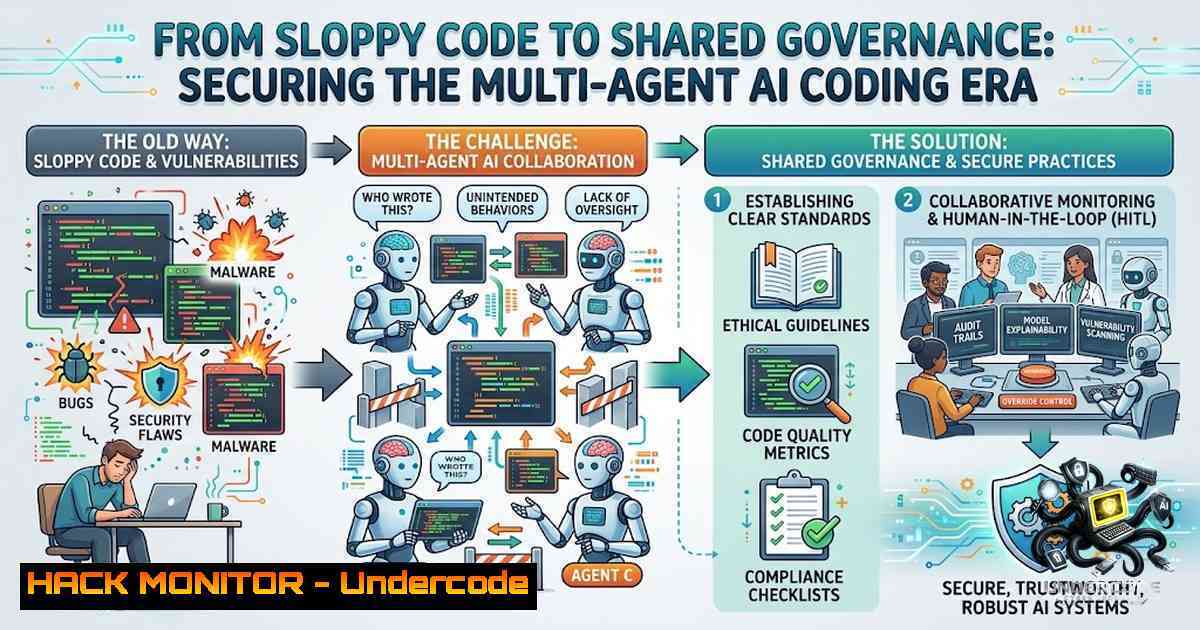
The software development landscape is undergoing a seismic shift. Developers no longer work with a single coding assistant; they juggle multiple AI agents—Claude Code, Codex, Cursor, and custom-built tools—each operating in its own siloed environment with its own security model, credential handling, and governance gaps. As one seasoned cybersecurity professional recently warned, if we fail to enforce strict code security and quality rules across these AI agents, we risk regressing to the chaos of 2001, when automated hacking tools could bring down networks at scale. The solution lies not in abandoning AI, but in building a shared, governed infrastructure layer that enforces the same rigorous security policies we’ve painstakingly developed over decades—before it’s too late.
Learning Objectives
- Understand the security risks introduced by ungoverned, siloed AI coding agents and the “garbage in, garbage out” problem of AI-generated code.
- Master the architecture of Omnigent, Databricks’ open-source meta-harness, and learn how to deploy it for session portability, collaboration, and governance.
- Apply OWASP Top 10 2025 and Agentic AI Security (2026) standards to AI coding workflows using practical tools and commands.
- Implement OS-level sandboxing, secretless credential brokering, and contextual policy enforcement for AI agents.
You Should Know
- The Governance Gap: Why AI Agents Need a Meta-Harness
Each AI coding agent today typically operates inside its own environment. Session history, files, tools, and context remain tied to one developer and one machine. This fragmentation creates a dangerous governance gap: there’s no centralized way to audit what agents did, control what they can access, or cap how much they spend. When one agent writes insecure code or executes a malicious command, the damage stays contained to that session—but when multiple agents collaborate without oversight, the risk multiplies exponentially.
Step‑by‑step guide: Auditing agent activity across your organization
- Inventory your agents: Identify all AI coding tools in use (Claude Code, Codex, Cursor, Copilot, custom agents).
- Check existing governance: Run `npx secure-coding-rules –check` to see if your project already has OWASP security rules applied.
- Audit agent-written code: Use `npx secure-coding-rules –yes` to auto-detect your framework and apply OWASP Top 10 2025 rules across all agent config files.
- Review logs: Centralize agent logs using MLflow tracing: `omnigent run –trace` captures end-to-end session data.
- Establish a policy baseline: Define server-wide rules that apply to every agent session before any developer overrides.
2. Omnigent Architecture: Server, Runner, and Agents
Omnigent, open-sourced by Databricks, sits one level above existing AI tools as a meta-harness. Its architecture consists of three core components:
- Server: The control plane that tracks sessions, policies, tools, skills, history, and generated artifacts.
- Runner: The execution layer that places each agent inside an isolated environment (sandbox) and controls what it can access.
- Agents: The coding assistants themselves—Codex, Claude Code, or custom agents your team builds.
This separation means a session can run on your laptop, inside a managed platform like Databricks, or on infrastructure controlled by your organization—without changing how developers interact with the agent.
Step‑by‑step guide: Deploying Omnigent for your team
1. Install Omnigent:
curl -fsSL https://raw.githubusercontent.com/omnigent-ai/omnigent/main/scripts/install_oss.sh | sh
- Add optional integrations (e.g., Databricks, Modal, E2B sandboxes):
curl -fsSL https://raw.githubusercontent.com/omnigent-ai/omnigent/main/scripts/install_oss.sh | sh -s -- --extra databricks
curl -fsSL https://raw.githubusercontent.com/omnigent-ai/omnigent/main/scripts/install_oss.sh | sh -s -- --extra modal,e2b
-
Configure your agent harness: Edit the Omnigent config to specify which agents to use (Claude Code, Codex, Cursor, etc.).
-
Start a session: Run `omnigent run` to launch a session that follows you from terminal to browser to phone.
-
Share the session: Generate a shareable link so teammates can watch, co-drive, or fork the session.
3. OS-Level Sandboxing: Isolating Agent Execution
One of Omnigent’s most critical security features is mandatory OS-level sandboxing. On Linux, isolation comes from bubblewrap; on macOS, the built-in seatbelt sandbox. The sandbox restricts filesystem and network reach, preventing agents from accessing sensitive system resources or escaping their designated environment. Windows support currently runs in a degraded mode under Windows Job Objects, with filesystem and network isolation absent—so Windows users are directed toward Linux, macOS, or WSL for full protection.
Step‑by‑step guide: Configuring sandbox isolation
1. Verify sandbox status (Linux/macOS):
omnigent sandbox --status
- Set sandbox permissions: Define which directories an agent can read/write:
omnigent sandbox --allow-read /path/to/project --allow-write /path/to/output
-
Enable network restrictions: Block all outbound traffic except to allow-listed hosts:
omnigent sandbox --block-1etwork --allow-host api.internal.com
-
Run an agent in a cloud sandbox (no laptop required):
omnigent run --sandbox modal --image python:3.11
-
Monitor sandbox activity: Check logs for any sandbox escape attempts:
journalctl -u omnigent-sandbox --since "1 hour ago"
-
Secretless Credential Brokering: Keeping Secrets Out of Agents
Traditional AI agents often require access to credentials like GitHub tokens, cloud API keys, or database passwords. But injecting these secrets directly into the agent’s environment creates a massive attack surface. Omnigent solves this with a credential proxy that injects bearer/basic auth for allow-listed hosts—secrets never enter the sandbox.
Step‑by‑step guide: Implementing secretless credential brokering
1. Configure the credential proxy: Edit `~/.omnigent/credential_proxy.yaml`:
allow_hosts:
- github.com
- api.databricks.com
auth_method: bearer
- Add credentials to the proxy (never to the agent):
omnigent credential add --host github.com --token $GITHUB_TOKEN
3. Verify credentials are not exposed:
omnigent credential list --show-masked
4. Run an agent with proxy-enabled egress:
omnigent run --credential-proxy --allow-host github.com
- Audit credential usage: Check logs to see which hosts were accessed and when:
omnigent audit --type credential --since 2026-08-01
5. Contextual Policies: Stateful, Data-Centric Rules
Omnigent’s security design centers on policies—stateful, data-centric rules that check every action (shell commands, file edits, token spend) and either allow it, block it, or pause for human approval. Policies stack across three levels: server-wide (administrator), per-agent (developer), and per-session (user), with stricter session rules checked first. Spend caps and access limits ship as builtins, so a session can carry a hard dollar ceiling.
Step‑by‑step guide: Writing and enforcing contextual policies
- Define a policy in plain language (Omnigent assembles it for you):
omnigent policy create --1ame "production-safety" --rule "block git push if agent downloaded untrusted npm package"
2. Set a spend cap:
omnigent policy create --1ame "cost-limit" --rule "max-spend 50.00 USD per session"
3. Apply policy to a specific agent:
omnigent policy assign --agent claude-code --policy production-safety
4. Test policy enforcement:
omnigent run --dry-run --policy production-safety
5. Monitor policy violations:
omnigent audit --type policy-violation --since 2026-08-01
6. Collaborative Sessions: Share, Co-Drive, and Fork
Omnigent turns private agent sessions into shared workspaces. Teammates can:
- Share: Let a teammate watch the agent work and interact with it in real time.
- Co-drive: Work together inside the same active session and execution environment.
- Fork: Copy the session and continue from the same context on another machine.
The session is no longer tied to one interface—you can start in the terminal, continue in the browser, and return from another device.
Step‑by‑step guide: Enabling secure collaboration
1. Share a session:
omnigent share --session-id <session-id> --expires 3600
2. Join a shared session (as viewer):
omnigent join --link https://omnigent.ai/session/abc123
- Co-drive a session (execute commands on host machine):
omnigent join --link https://omnigent.ai/session/abc123 --mode codrive
4. Fork a session:
omnigent fork --session-id abc123 --1ew-1ame "my-fork"
- Set collaboration policies: Restrict who can join or co-drive:
omnigent policy create --1ame "collab-restrict" --rule "only allow users in @my-org/security-team to co-drive"
7. OWASP Integration: Hardening AI-Generated Code
The OWASP Top 10 2025 introduced new categories critical for AI-generated code, including Supply Chain Failures (A03) and Error Handling (A10). For AI agent systems, the OWASP Agentic AI Security (2026) standard adds ASI01-ASI10 risks specific to autonomous agents. Tools like `secure-coding-rules` and `claude-code-owasp` automate the application of these standards across all your AI coding assistants.
Step‑by‑step guide: Applying OWASP rules to your AI agents
1. Install secure-coding-rules:
npx secure-coding-rules
- Auto-apply OWASP Top 10 2025 rules to all agent configs:
npx secure-coding-rules --yes
3. Install the OWASP skill for Claude Code:
npx degit agamm/claude-code-owasp/.claude/skills/owasp-security .claude/skills/owasp-security
4. Verify OWASP coverage:
npx secure-coding-rules --check
- Review agent-generated code for security issues (Claude Code will auto-activate the OWASP skill):
"Review this code for OWASP Top 10 2025 vulnerabilities"
What Undercode Say
- “Good code in a bouillon makes it a bouillon too” : The quality of AI-generated code is only as good as the security and quality rules imposed on it. If we allow ungoverned agents to pollute our codebases, we dilute decades of security progress.
- “We can’t go back to 2001” : The cybersecurity veteran’s warning is stark—automated hacking at scale was a reality then, and ungoverned AI agents could recreate that chaos on an unprecedented scale. The solution is not to reject AI but to enforce the same strict policies we’ve built over years.
The core message is clear: cooperation is valuable, but only if all code—human-written or AI-generated—abides by the same security and quality rules. Silos and bricks aren’t the enemy; ungraded, ungoverned code is. We need to grade our development environments with security, quality, and secrecy levels, ensuring that every agent, every session, and every line of code meets our highest standards.
Prediction
- +1 Organizations that adopt meta-harness architectures like Omnigent will see a 60-80% reduction in AI-induced security incidents within 18 months, as centralized governance replaces fragmented, per-tool security models.
- +1 The OWASP Agentic AI Security (2026) standard will become the de facto benchmark for AI agent security, driving widespread adoption of tools like `secure-coding-rules` and `claude-code-owasp` across enterprise development teams.
- -1 Teams that fail to implement OS-level sandboxing and secretless credential brokering will experience at least one major credential exposure or supply chain attack originating from an AI agent within the next 12 months.
- -1 The fragmentation of AI coding tools will worsen before it improves, with the average enterprise using 5+ distinct agents by 2027—making governance not just a best practice but an operational necessity.
- +1 Databricks’ open-sourcing of Omnigent will catalyze a new ecosystem of governance tools, similar to how Kubernetes transformed container orchestration, ultimately making AI agent security as routine as code review.
▶️ Related Video (84% Match):
🎯Let’s Practice For Free:
🎓 Live Courses & Certifications:
Join Undercode Academy for Verified Certifications
🚀 Request a Custom Project:
Secure, high-velocity infrastructure and disruptive technological engineering. Contact our engineering team for high-tier development and proprietary systems:
[email protected]
💎 Smart Architecture | 🛡️ Secure by Design | ⭐ Trusted by Thousands
IT/Security Reporter URL:
Reported By: Lenlavens After – Hackers Feeds
Extra Hub: Undercode MoN
Basic Verification: Pass ✅


