
Listen to this Post
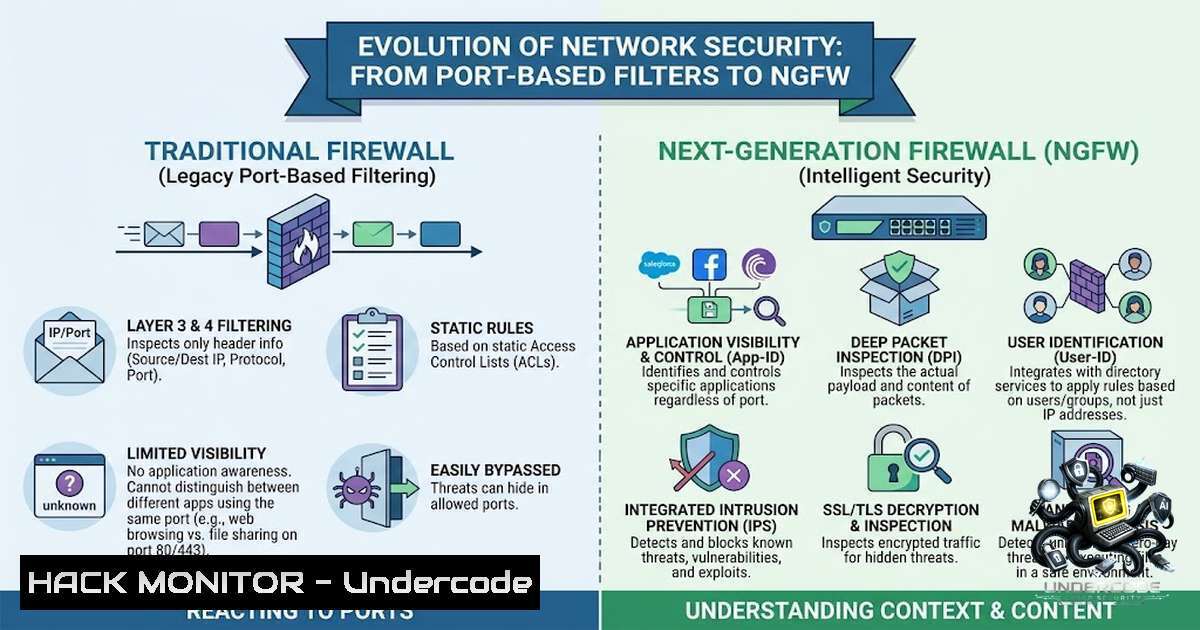
Introduction:
The fundamental shift from traditional firewalls to Next-Generation Firewalls (NGFW) represents one of the most critical evolutions in modern network security. While a traditional firewall operates at Layers 3 and 4, making decisions based solely on IP addresses, ports, and protocols, an NGFW extends this capability to Layer 7, enabling deep packet inspection (DPI), application awareness, and advanced threat detection. This transformation means that security teams can now see not just who is communicating and where they are going, but also what they are doing and whether it is safe—a paradigm shift essential for defending against today’s sophisticated cyber threats.
Learning Objectives & Secrets:
- Objective 1: Master the Core Architectural Differences – Understand the fundamental distinctions between traditional firewalls (IP/port-based) and NGFWs (application-aware with DPI), and learn why this matters for your security posture.
- Objective 2 Secret Tip: Implement Application-Aware Policies – Learn how to configure NGFW rules that identify and control applications regardless of port or protocol, moving beyond simple allow/deny decisions to granular, context-based access control.
- Objective 3 Secret Tip: Integrate Threat Prevention at the Network Edge – Discover how to leverage built-in intrusion prevention systems (IPS), malware detection, and advanced security analytics within your NGFW to stop threats before they enter your network.
You Should Know:
- Understanding the NGFW Advantage: Deep Packet Inspection and Application Awareness
Traditional firewalls are akin to a postal worker reading only the address on an envelope—they know the source and destination but have no idea about the contents. NGFWs, in contrast, are like a skilled inspector who opens the letter, reads its contents, and understands its context. This capability is made possible through Deep Packet Inspection (DPI), which examines the actual data within packets, not just the headers.
Application awareness is the cornerstone of NGFW functionality. While a traditional firewall might allow traffic on port 443 (HTTPS) without knowing if it’s legitimate web traffic or a malicious application tunneling through, an NGFW can distinguish between different applications. This allows security teams to create policies that control access based on the application itself, not just the port it uses.
Step‑by‑Step Guide: Implementing Application-Aware Rules on a FortiGate NGFW
- Access the CLI: Connect to your FortiGate device via SSH or console.
- Enter Configuration Mode: Type `config vdom` and select your VDOM (if applicable), then
edit <vdom>. - Enable NGFW Policy-Based Mode: Run `config system settings` and set
set ngfw-mode policy-based. - Create an Application-Aware Policy: Use `config firewall security-policy` to define a new policy. Specify the source and destination interfaces, then use the `application` parameter to list specific applications (e.g.,
set application "Gmail" "Facebook") rather than just ports. - Set the Action: Define the action as
accept,deny, ormonitor. - Apply and Verify: Commit the changes and use `diagnose firewall policy list` to verify the policy is active.
-
Deploying NGFW in the Cloud: Azure Firewall and Palo Alto VM-Series
As organizations migrate to the cloud, the principles of NGFW remain critical, but the deployment models change. In Microsoft Azure, the native Azure Firewall provides NGFW capabilities, while third-party solutions like the Palo Alto Networks VM-Series offer additional features and integration.
Step‑by‑Step Guide: Creating an Azure Firewall using Azure CLI
- Create a Resource Group:
az group create --1ame Test-FW-RG --location "East US". - Create a Virtual Network and Subnet: Azure Firewall requires a dedicated subnet named
AzureFirewallSubnet. Create it with:az network vnet create --resource-group Test-FW-RG --1ame Test-VNet --address-prefix 10.0.0.0/16 --subnet-1ame AzureFirewallSubnet --subnet-prefix 10.0.1.0/24. - Create the Firewall:
az network firewall create --1ame Test-FW01 --resource-group Test-FW-RG --location "East US". - Configure IP Configuration:
az network firewall ip-config create --firewall-1ame Test-FW01 --1ame FW-IP-Config --public-ip-address <public-ip-1ame> --vnet-1ame Test-VNet --resource-group Test-FW-RG. - Create a Network Rule: For example, to allow SSH, use:
New-AzFirewallPolicyNetworkRule -1ame PermitSSH -Protocol TCP -SourceAddress "10.0.0.0/8" -DestinationAddress "192.168.1.0/24" -DestinationPort "22". - Create an Application Rule: To allow HTTP and HTTPS to a specific FQDN:
New-AzFirewallPolicyApplicationRule -1ame PermitWeb -SourceAddress "10.0.0.0/8" -TargetFqdn ".contoso.com" -Protocol "http:80", "https:443".
3. Linux Firewall Evolution: From iptables to nftables
On Linux systems, the firewall landscape has evolved from the legacy `iptables` to the more modern and efficient nftables. While `iptables` is still widely used, `nftables` offers a simplified syntax, better performance, and improved rule management.
Step‑by‑Step Guide: Configuring a Basic nftables Firewall
- Start and Enable nftables: `sudo systemctl start nftables` and
sudo systemctl enable nftables. - Create an Inet Table: The `inet` family allows rules for both IPv4 and IPv6.
sudo nft add table inet my_firewall. - Add a Base Chain: `sudo nft add chain inet my_firewall input { type filter hook input priority 0; policy drop; }` This creates an input chain with a default drop policy.
- Allow Established Connections: `sudo nft add rule inet my_firewall input ct state established,related accept`
5. Allow SSH: `sudo nft add rule inet my_firewall input tcp dport 22 accept`
6. Allow HTTP and HTTPS: `sudo nft add rule inet my_firewall input tcp dport {80, 443} accept`
7. List Rules to Verify: `sudo nft list ruleset`For those migrating from
iptables, the `iptables-translate` tool can help convert existing rules to `nftables` syntax.
4. Windows Defender Firewall: Advanced Configuration with PowerShell
Windows environments rely on the Windows Defender Firewall, which can be managed effectively through PowerShell for automation and advanced rule creation.
Step‑by‑Step Guide: Managing Windows Firewall with PowerShell
- Enable Firewall Profiles:
Set-1etFirewallProfile -Profile Domain,Public,Private -Enabled True. - Set Default Actions:
Set-1etFirewallProfile -DefaultInboundAction Block -DefaultOutboundAction Allow. - Create an Inbound Rule to Allow a Specific Application:
New-1etFirewallRule -DisplayName "Allow MyApp" -Direction Inbound -Program "C:\Program Files\MyApp\app.exe" -Action Allow. - Create an Inbound Rule to Allow Traffic from a Specific IP Range:
New-1etFirewallRule -DisplayName "Allow HTTPS from HQ" -Direction Inbound -Protocol TCP -LocalPort 443 -RemoteAddress 192.168.1.0/24 -Action Allow. - Block a Specific IP Address:
New-1etFirewallRule -DisplayName "Block Suspicious Host" -Direction Inbound -RemoteAddress 203.0.113.100 -Action Block. - View All Rules: `Get-1etFirewallRule | Where-Object {$_.Enabled -eq “True”}`
- NGFW vs. WAF: Understanding the Layers of Defense
A common point of confusion is the difference between an NGFW and a Web Application Firewall (WAF). While both are crucial security tools, they serve different purposes. An NGFW provides broad, network-wide security, inspecting all types of traffic and offering features like intrusion prevention and malware detection. A WAF, on the other hand, specializes in protecting web applications from application-layer attacks like SQL injection and cross-site scripting (XSS).
Step‑by‑Step Guide: Differentiating and Integrating NGFW and WAF
- Assess Your Infrastructure: Identify if you are protecting a general network (NGFW) or specific web applications (WAF).
- Deploy NGFW at the Network Perimeter: Place your NGFW at the edge of your network to filter all incoming and outgoing traffic based on applications, users, and content.
- Deploy WAF in Front of Web Servers: Position your WAF directly in front of your web applications to inspect HTTP/S traffic for web-specific threats.
- Leverage Both for Defense-in-Depth: Use the NGFW to block broad network threats and the WAF to provide specialized protection for your web applications. This layered approach ensures comprehensive security.
-
Cloud NGFW Best Practices and Zero Trust Integration
In cloud environments, NGFWs play a pivotal role in implementing a Zero Trust architecture. Best practices include deploying NGFWs as an intelligent enforcement point for all traffic, including SaaS, PaaS, and GenAI services. Selective inspection based on risk profiles can optimize performance without compromising security.
Step‑by‑Step Guide: Deploying Cloud NGFW with Intrusion Detection
- Create a Firewall Endpoint: This is the entry point for your Cloud NGFW.
- Define Security Profiles: Create profiles that include intrusion detection and prevention (IDS/IPS) rules.
- Configure Threat Prevention Policies: Set up rules that leverage threat intelligence feeds to block known malicious IPs and domains.
- Enable Geo‑Location Filtering: Block traffic from or to high-risk countries based on your organization’s threat model.
- Monitor and Tune: Regularly review logs and alerts to fine-tune your policies and reduce false positives.
What Undercode Say:
- Key Takeaway 1: The evolution from traditional firewalls to NGFWs is not just an upgrade; it’s a fundamental shift in security philosophy. Traditional firewalls ask “who” and “where,” but NGFWs ask “who,” “where,” “what,” and “is it safe?”—providing the context needed to make intelligent security decisions.
- Key Takeaway 2: NGFWs are the cornerstone of a modern, Zero Trust security architecture. By providing deep packet inspection, application awareness, and integrated threat prevention, they enable organizations to enforce granular, context-aware policies that significantly reduce the attack surface and improve overall security posture.
The transition to NGFW represents a critical step for any organization serious about cybersecurity. While traditional firewalls still have a role in basic network segmentation, they are no longer sufficient to defend against modern threats. NGFWs, whether deployed on-premises, in the cloud, or as a service, provide the visibility and control needed to protect today’s complex, distributed networks. By understanding the differences and implementing the best practices outlined above, security professionals can build a robust defense-in-depth strategy that adapts to the evolving threat landscape.
Prediction:
- +1 The adoption of NGFWs will continue to accelerate as organizations embrace Zero Trust architectures and cloud-first strategies, driving demand for skilled professionals who can deploy and manage these intelligent security platforms.
- +1 Artificial intelligence and machine learning will become increasingly integrated into NGFWs, enabling automated threat detection and response, reducing the burden on security teams, and improving overall security efficacy.
- -1 The complexity of NGFW configuration and management will remain a significant challenge, potentially leading to misconfigurations that create security gaps if organizations do not invest in proper training and automation.
- +1 The integration of NGFWs with other security tools, such as SIEMs and SOAR platforms, will create more cohesive and effective security ecosystems, enabling faster incident response and better threat intelligence sharing.
- -1 As NGFWs become more sophisticated, attackers will develop new evasion techniques specifically designed to bypass deep packet inspection and application awareness, creating an ongoing cat-and-mouse game between defenders and adversaries.
- +1 Cloud-1ative NGFW solutions will gain prominence, offering seamless integration with cloud provider services and enabling security teams to apply consistent policies across hybrid and multi-cloud environments.
- -1 The skills gap in NGFW deployment and management will persist, making it difficult for organizations to fully leverage the capabilities of these advanced security platforms without significant investment in training and talent acquisition.
- +1 The convergence of NGFW and SD-WAN capabilities will simplify branch office security and connectivity, reducing the complexity and cost of securing distributed enterprise networks.
▶️ Related Video (88% Match):
🎯Let’s Practice For Free:
🎓 Live Courses & Certifications:
Join Undercode Academy for Verified Certifications
🚀 Request a Custom Project:
Secure, high-velocity infrastructure and disruptive technological engineering. Contact our engineering team for high-tier development and proprietary systems:
[email protected]
💎 Smart Architecture | 🛡️ Secure by Design | ⭐ Trusted by Thousands
IT/Security Reporter URL:
Reported By: https://lnkd.in/p/e2KNfm6W – Hackers Feeds
Extra Hub: Undercode MoN
Basic Verification: Pass ✅


