Listen to this Post
Introduction:
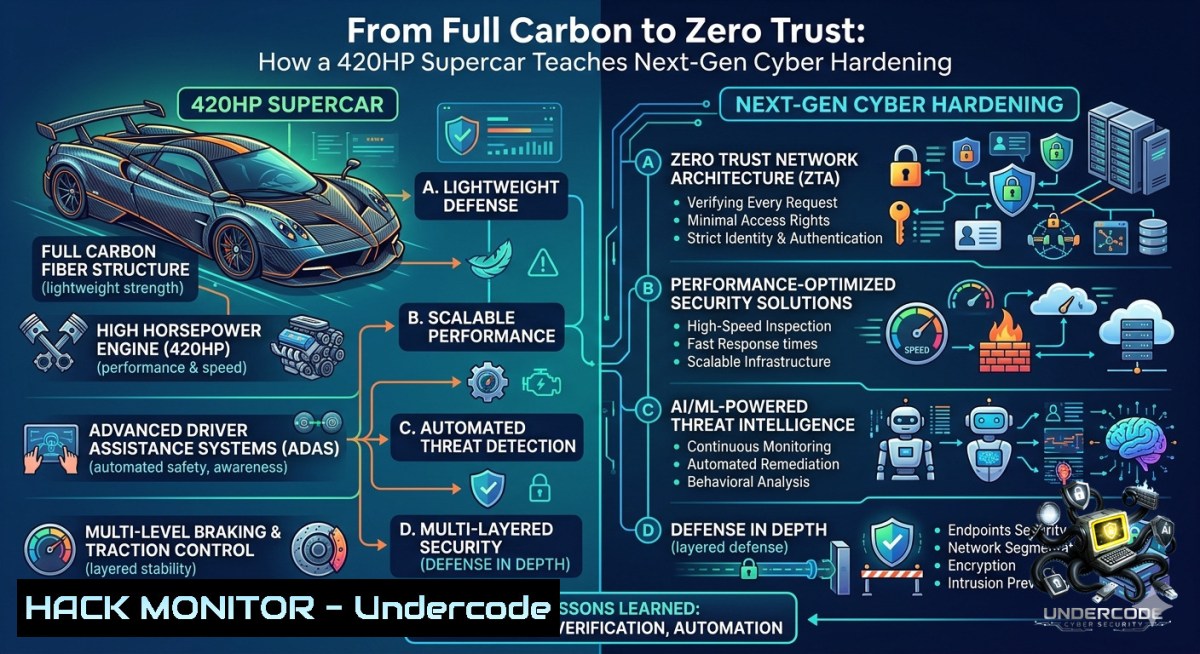
The Dallara Stradale Barchetta achieves its breathtaking performance through three radical design choices: a full‑carbon chassis that strips away every unnecessary gram, a removable roof and windshield that adapt to driving conditions, and a mandatory helmet rule for open‑cockpit safety. In cybersecurity, the same principles apply—minimising attack surface, implementing adaptive security controls, and enforcing mandatory authentication. This article translates supercar engineering into a hardened security blueprint, delivering verified commands, cloud hardening techniques, and AI‑driven threat mitigation for modern defenders.
Learning Objectives:
- Implement attack surface reduction using Linux and Windows native tools, mirroring the “full carbon” mindset.
- Deploy adaptive security layers (removable controls) via API gateways and cloud security groups.
- Enforce mandatory authentication (“helmet rule”) with multi‑factor authentication (MFA) and privileged access management.
- Full Carbon Chassis: Building a Minimal Attack Surface
The Barchetta’s carbon fibre body weighs only 850 kg because every component is essential—non‑critical parts are eliminated. In cybersecurity, your attack surface is the sum of all exposed services, ports, and software. Reducing it drastically lowers the chance of exploitation.
Step‑by‑step guide to strip your system’s “unnecessary weight”:
Linux – Identify and disable unused services:
 List all listening ports and associated services
sudo ss -tulpn

Check for running services (systemd)
systemctl list-units --type=service --state=running

Disable and stop a non‑essential service (e.g., cups, avahi-daemon)
sudo systemctl stop cups
sudo systemctl disable cups

Remove unnecessary packages (e.g., telnet, FTP clients)
sudo apt remove telnet ftp --purge -y  Debian/Ubuntu
sudo yum remove telnet ftp -y  RHEL/CentOS
Windows – Harden with built‑in tools:
 View open ports and processes
netstat -ano | findstr LISTENING

Disable unnecessary Windows features (e.g., SMBv1, PowerShell 2.0)
Disable-WindowsOptionalFeature -Online -FeatureName "SMB1Protocol"
Disable-WindowsOptionalFeature -Online -FeatureName "MicrosoftWindowsPowerShellV2"

Turn off unused services (e.g., Print Spooler if not needed)
Set-Service -1ame Spooler -StartupType Disabled
Stop-Service -1ame Spooler
Tool configuration – use `auditd` (Linux) or Sysmon (Windows) to monitor what remains.
– Install Sysmon with a minimal config: `Sysmon64 -accepteula -i sysmonconfig.xml` (create a config that logs only process creation and network connections).
2. 420HP Engine: Performance Tuning for Threat Detection
A high‑powered engine is useless without precise throttle control. Similarly, your detection stack must be tuned to avoid alert fatigue while catching real threats.
Step‑by‑step guide to build a lightweight IDS/IPS (like Suricata) for high‑throughput environments:
1. Install Suricata on Linux (Ubuntu 22.04):
sudo add-apt-repository ppa:oisf/suricata-stable -y
sudo apt update
sudo apt install suricata -y
- Configure for high performance (use AF_PACKET for inline mode):
Edit `/etc/suricata/suricata.yaml`:
af-packet:
- interface: eth0
cluster-id: 99
cluster-type: cluster_flow
defrag: yes
use-mmap: yes
tpacket-v3: yes
3. Enable emerging threats ruleset and test:
sudo suricata-update
sudo suricata -c /etc/suricata/suricata.yaml -i eth0 --runmode workers
- Windows alternative – Zeek (formerly Bro) in WSL2 or use Sysmon + EventLog forwarding.
For a quick Windows anomaly baseline:
 Enable PowerShell script block logging (captures obfuscated commands)
Set-ItemProperty -Path "HKLM:\SOFTWARE\Policies\Microsoft\Windows\PowerShell\ScriptBlockLogging" -1ame EnableScriptBlockLogging -Value 1
 Forward logs to SIEM via WinRM
wevtutil epl System C:\Logs\system_forward.evtx
3. Removable Roof & Windshield: Adaptive Security Layers
The Barchetta’s roof and windshield are deliberately removable, allowing the driver to choose between a closed cockpit or an open, high‑risk configuration. In security, you need adaptive controls that can be engaged or removed based on context (e.g., user location, device health, threat intelligence).
Step‑by‑step guide for API security with a dynamic gateway (Kong / AWS WAF):
- Deploy a lightweight API gateway (Kong) on Docker:
docker network create kong-1et
docker run -d --1ame kong-database --1etwork=kong-1et -p 5432:5432 -e "POSTGRES_USER=kong" -e "POSTGRES_DB=kong" postgres:13
docker run --rm --1etwork=kong-1et -e "KONG_DATABASE=postgres" -e "KONG_PG_HOST=kong-database" kong:latest kong migrations bootstrap
docker run -d --1ame kong --1etwork=kong-1et -p 8000:8000 -p 8443:8443 -e "KONG_DATABASE=postgres" -e "KONG_PG_HOST=kong-database" -e "KONG_PROXY_ACCESS_LOG=/dev/stdout" -e "KONG_ADMIN_ACCESS_LOG=/dev/stdout" -e "KONG_PROXY_ERROR_LOG=/dev/stderr" -e "KONG_ADMIN_ERROR_LOG=/dev/stderr" -e "KONG_ADMIN_LISTEN=0.0.0.0:8001" kong:latest
-
Add a “removable” rate‑limiting plugin (can be enabled/disabled per route):
curl -i -X POST http://localhost:8001/services/example-service/plugins \
--data "name=rate-limiting" \
--data "config.minute=100" \
--data "config.policy=local"
-
For cloud hardening – use AWS Security Groups as “removable” filters:
Create a security group that allows only temporary IP ranges (e.g., an engineer’s dynamic IP). Automate removal with AWS Lambda that revokes rules after 8 hours.
4. Helmet Requirement: Mandatory Authentication & MFA
When the windshield is off, the driver must wear a helmet. This is non‑negotiable. In cybersecurity, that equivalent is mandatory multi‑factor authentication (MFA) for all privileged and remote access.
Step‑by‑step guide to enforce MFA on Linux (SSH) and Windows (RDP):
Linux – MFA for SSH using Google Authenticator (PAM module):
 Install and configure
sudo apt install libpam-google-authenticator -y
google-authenticator -t -d -f -r 3 -R 30 -w 3  Answer yes to all
 Edit /etc/pam.d/sshd
echo "auth required pam_google_authenticator.so" | sudo tee -a /etc/pam.d/sshd
 Edit /etc/ssh/sshd_config: set ChallengeResponseAuthentication yes
sudo systemctl restart sshd
Windows – Enforce MFA for RDP using Microsoft Authenticator (via NPS extension):
1. Install NPS (Network Policy Server) on a domain controller.
2. Download and install the Azure MFA NPS extension.
3. Configure RAP and CAP to require OTP before granting RDP access.
4. Alternatively, for standalone Windows, use Duo Authentication for Windows Logon.
For API endpoints – require JWT with MFA claim:
 Flask example – validate MFA claim
from functools import wraps
def mfa_required(f):
@wraps(f)
def decorated(args, kwargs):
if not request.headers.get('X-MFA-Verified') == 'true':
return jsonify({"error": "Helmet rule – MFA required"}), 401
return f(args, kwargs)
return decorated
- Aerodynamics for Efficiency: Cloud Hardening & Infrastructure as Code
Aerodynamics make the Barchetta stable at high speeds while reducing drag. Cloud hardening follows the same logic – efficient rules that block threats without slowing down legitimate traffic.
Step‑by‑step guide to harden AWS using automated policies (Terraform example):
1. Block public S3 buckets (prevents data leakage):
resource "aws_s3_bucket_public_access_block" "example" {
bucket = aws_s3_bucket.example.id
block_public_acls = true
block_public_policy = true
ignore_public_acls = true
restrict_public_buckets = true
}
- Enforce IMDSv2 on EC2 (prevents SSRF token theft):
Launch EC2 with metadata options
aws ec2 run-instances --image-id ami-12345678 --instance-type t2.micro \
--metadata-options "HttpEndpoint=enabled,HttpTokens=required"
-
Azure – Just‑In‑Time (JIT) VM access (like a “removable windshield” for management ports):
Enable JIT on a VM via Azure Security Center
Set-AzJitNetworkAccessPolicy -ResourceGroupName "MyRG" -Location "westus" -1ame "MyJITPolicy" -VirtualMachine @{Id="/subscriptions/.../vm1";Ports=@{Number=22;Protocol="TCP";AllowedSourceAddressPrefixes="10.0.0.0/24";MaxRequestAccessDuration="PT3H"}}
6. Track vs. Road: Vulnerability Exploitation & Mitigation
A supercar behaves differently on a racetrack (high‑risk environment) versus public roads (standard conditions). Your infrastructure needs similar segmentation – production (road) and testing (track). Simulate exploits in a sandbox then apply mitigations.
Step‑by‑step guide for vulnerability assessment with Metasploit (track) and hardening (road):
- Set up an isolated lab (e.g., VirtualBox with Kali Linux + an intentionally vulnerable VM like Metasploitable 3).
-
Simulate a credential stuffing attack (Windows RDP brute force):
From Kali – use hydra against your test Windows VM
hydra -l administrator -P /usr/share/wordlists/rockyou.txt rdp://<target-IP>
-
Mitigation – apply Account Lockout Policy on Windows (road config):
Set lockout threshold to 5 attempts
net accounts /lockoutthreshold:5 /lockoutduration:30 /lockoutwindow:30
-
Simulate a Linux kernel exploit (e.g., Dirty Pipe – CVE‑2022‑0847) in the lab:
Use publicly available PoC, then patch withsudo apt update && sudo apt upgrade -y. -
Automated mitigation – use OpenSCAP to apply CIS benchmarks:
sudo apt install libopenscap8 -y
oscap xccdf eval --profile xccdf_org.ssgproject.content_profile_cis --report report.html /usr/share/xml/scap/ssg/content/ssg-ubuntu2004-ds.xml
-
Educational Video & AI in Cybersecurity (What the Post Reminded Us)
The original post states: “Cette vidéo est la mienne, elle est partagée à des fins éducatives et informatives.” That ethos is critical – we must share security knowledge openly while respecting IP. AI can now analyse car telemetry for anomalies; similarly, AI‑powered SIEMs (e.g., Wazuh with ML) detect zero‑day patterns.
Quick AI anomaly detection setup with Wazuh + custom ML script:
1. Install Wazuh manager and agent.
- Use Python with `scikit-learn` to detect outlier login times:
import joblib
from sklearn.ensemble import IsolationForest
Train on normal behavior (e.g., login timestamps)
model = IsolationForest(contamination=0.01)
model.fit(normal_data)
joblib.dump(model, 'login_anomaly.pkl')
- Integrate with Wazuh custom commands to alert when anomaly score exceeds threshold.
What Undercode Say:
- Key Takeaway 1: Minimal attack surface (full carbon) is the single most effective risk reducer – disabled services and blocked ports cannot be exploited.
- Key Takeaway 2: Adaptive, removable controls (like the Barchetta’s roof) must be automated via infrastructure as code – static security fails in dynamic cloud environments.
- Analysis: The Dallara Stradale Barchetta embodies “security by design” – every component either adds performance or is stripped out. In cybersecurity, we often accumulate legacy services and permissive rules, creating digital obesity. The commands and tutorials above show how to audit and trim that fat. Moreover, the mandatory helmet rule translates directly to MFA: it adds friction but prevents catastrophic failure. Future AI‑driven systems will dynamically adjust security layers based on real‑time telemetry, just as the car’s ECU adjusts traction control. However, over‑automation can lead to false positives – the “check engine” light of cybersecurity. Balance is key.
Prediction:
- +1 The adoption of lightweight, immutable infrastructure (containers, serverless) will make attack surface reduction automatic, forcing attackers to focus on supply chain instead of exposed ports.
- -1 As cars become software‑defined (SDVs), the integration of removable components with OTA updates introduces new firmware attack surfaces – expect a rise in physical‑to‑digital exploits targeting CAN buses via tampered roof sensors.
- +1 AI‑powered adaptive authentication (context‑aware MFA) will become standard by 2027, replacing static “helmet” rules with continuous behavioural verification, reducing friction without lowering security.
- -1 The “full carbon” mindset, if applied too aggressively to cloud IAM (e.g., deleting audit logs to reduce storage), will cause incident response failures. Every weight reduction must retain forensic visibility.
▶️ Related Video (80% Match):
🎯Let’s Practice For Free:
🎓 Live Courses & Certifications:
Join Undercode Academy for Verified Certifications
🚀 Request a Custom Project:
Secure, high-velocity infrastructure and disruptive technological engineering. Contact our engineering team for high-tier development and proprietary systems:
[email protected]
💎 Smart Architecture | 🛡️ Secure by Design | ⭐ Trusted by Thousands
IT/Security Reporter URL:
Reported By: Christine Raibaldi – Hackers Feeds
Extra Hub: Undercode MoN
Basic Verification: Pass ✅


