Listen to this Post
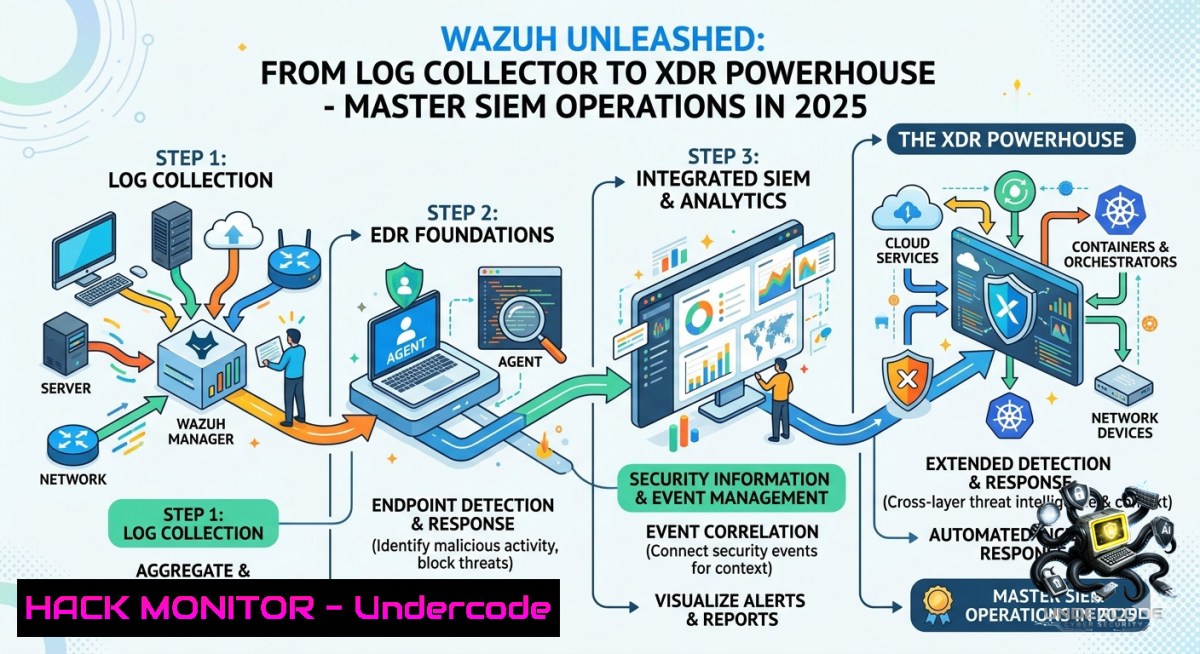
Introduction:
Wazuh has evolved far beyond a simple log collection platform; it now serves as a practical foundation for detection, visibility, and response operations within modern SOC teams. Effective security monitoring isn’t about collecting more alerts—it’s about understanding attacker behavior and responding with full context, leveraging capabilities like MITRE ATT&CK mapping, active response automation, and deep endpoint visibility.
Learning Objectives:
- Deploy and configure Wazuh for comprehensive log analysis, file integrity monitoring, and vulnerability detection across Linux and Windows endpoints.
- Implement active response automation and custom rule correlation to mitigate brute-force attacks and suspicious behavior in real time.
- Integrate Sysmon and leverage MITRE ATT&CK mapping to enhance threat hunting, reduce false positives, and build a mature detection engineering pipeline.
You Should Know
- Deploying Wazuh Agent and Configuring File Integrity Monitoring (FIM)
Start by installing the Wazuh agent on a Linux endpoint. FIM detects unauthorized changes to critical files, a cornerstone for compliance and ransomware detection.
Step‑by‑step guide:
1. Add the Wazhu repository (Ubuntu/Debian):
curl -s https://packages.wazuh.com/key/GPG-KEY-WAZUH | sudo apt-key add -
echo "deb https://packages.wazuh.com/4.x/apt/ stable main" | sudo tee /etc/apt/sources.list.d/wazuh.list
sudo apt update
2. Install the agent:
sudo apt install wazuh-agent
3. Configure FIM by editing /var/ossec/etc/ossec.conf. Add directories to monitor:
<syscheck>
<directories check_all="yes" realtime="yes">/etc,/usr/bin,/var/www</directories>
<ignore>/etc/mtab</ignore>
<frequency>43200</frequency>
</syscheck>
4. Set the manager IP in `/var/ossec/etc/ossec.conf` under <client><server><address>MANAGER_IP</address></server></client>.
5. Start the agent:
sudo systemctl start wazuh-agent
sudo systemctl enable wazuh-agent
6. Verify FIM alerts: On the Wazuh manager, check `/var/ossec/logs/alerts/alerts.json` for `rule.groups` containing syscheck.
Windows equivalent: Use the MSI installer, then edit `C:\Program Files (x86)\ossec-agent\ossec.conf` similarly. Monitor C:\Windows\System32\drivers\etc, C:\Program Files, and registry keys using `
2. Integrating Sysmon for Advanced Endpoint Visibility
Sysmon (System Monitor) enriches Windows event logs with process creation, network connections, and file hash changes. Wazuh can ingest Sysmon logs for deep behavioral analysis.
Step‑by‑step guide:
- Download Sysmon from Microsoft Sysinternals and a recommended configuration (e.g., SwiftOnSecurity’s sysmon-config).
2. Install Sysmon with elevated PowerShell:
.\Sysmon64.exe -accepteula -i sysmonconfig.xml
3. Configure Wazuh agent to read Sysmon events. Edit `ossec.conf` on the Windows agent:
<localfile>
<location>Microsoft-Windows-Sysmon/Operational</location>
<log_format>eventchannel</log_format>
</localfile>
4. Restart Wazuh agent:
Restart-Service -1ame wazuh
5. Create a custom rule on the manager (/var/ossec/etc/rules/local_rules.xml) to detect `wget` or `curl` from unusual parent processes:
<group name="sysmon,sysmon_processCreation,">
<rule id="100010" level="10">
<if_sid>61603</if_sid> <!-- Sysmon event ID 1 -->
<field name="win.eventdata.image" type="pcre2">(?i)\\(wget|curl).exe$</field>
<field name="win.eventdata.parentImage" type="pcre2">(?i)\\(powershell|cmd|winword|excel).exe</field>
<description>Suspicious downloader via wget/curl spawned by Office or shell</description>
<mitre>
<id>T1059.001</id> <!-- Command and Scripting Interpreter -->
<id>T1105</id> <!-- Ingress Tool Transfer -->
</mitre>
<group>attack_command_and_control,attack_ingress_tool_transfer,</group>
</rule>
</group>
3. Brute‑Force Detection and Active Response Automation
Wazuh’s active response can automatically block IPs after repeated failed SSH or RDP login attempts.
Step‑by‑step guide:
- Enable active response in `ossec.conf` on the manager:
<active-response>
<disabled>no</disabled>
<command>firewall-drop</command>
<location>local</location>
<rules_id>5710,5712</rules_id> <!-- SSH brute force rules -->
<timeout>600</timeout>
</active-response>
- Configure firewall‑drop command (pre‑defined in
/var/ossec/etc/decoders/). It uses `iptables` on Linux:Command location: /var/ossec/active-response/bin/firewall-drop.sh Add a temporary block rule iptables -I INPUT -s <offending_IP> -j DROP
3. Test brute‑force detection: Simulate failed SSH attempts:
for i in {1..20}; do ssh fakeuser@<target_IP> -o ConnectTimeout=1; done
4. Verify the alert in Wazuh dashboard: rule 5710 (SSH brute force) triggers, and `active-response` log shows `firewall-drop` executed.
5. For Windows RDP, add custom rule to detect multiple `4625` (logon failure) events within 60 seconds:
<rule id="100020" level="12">
<if_sid>4625</if_sid>
<match>logon type 10</match> <!-- RemoteInteractive -->
<frequency>10</frequency>
<timeframe>60</timeframe>
<description>Possible RDP brute force</description>
</rule>
Then bind it to a Windows‑compatible active response script (e.g., netsh advfirewall).
4. MITRE ATT&CK Mapping and Threat Hunting Queries
Wazuh rules can be tagged with MITRE tactics and techniques, enabling analysts to hunt by attacker behavior rather than by signature alone.
Step‑by‑step guide:
- Review existing MITRE mappings via the Wazuh dashboard → “MITRE ATT&CK” tab. Each triggered alert shows technique IDs.
- Create a custom hunting query using the Wazuh API (replace `IP:55000` with your manager):
curl -k -u <user>:<password> -X GET "https://<manager_IP>:55000/security-events/_search?q=rule.mitre.id:T1059.001" -H "Content-Type: application/json"
This returns all events involving command and scripting interpreter abuse.
- Build a Sigma rule for persistence detection (e.g., new scheduled task created via schtasks) and convert it to Wazuh rule format using
sigmac. - Example Wazuh rule for scheduled task creation (T1053.005):
<rule id="100030" level="8">
<if_sid>60053</if_sid> <!-- Sysmon event ID 13 (RegistryEvent) -->
<field name="win.eventdata.targetObject" type="pcre2">(?i)\\Microsoft\\Windows NT\\CurrentVersion\\Schedule\\TaskCache\\Tasks\{</field>
<description>New scheduled task created remotely or via script</description>
<mitre>
<id>T1053.005</id>
<tactic>TA0003</tactic> <!-- Persistence -->
</mitre>
</rule>
5. Vulnerability Detection Using Wazuh’s Built‑in Scanner
Wazuh integrates with the National Vulnerability Database (NVD) to identify missing patches and vulnerable packages.
Step‑by‑step guide:
1. Enable vulnerability detection on the manager’s `/var/ossec/etc/ossec.conf`:
<vulnerability-detector>
<enabled>yes</enabled>
<interval>12h</interval>
<feed name="ubuntu-focal">
<enabled>yes</enabled>
<update_interval>1h</update_interval>
</feed>
<feed name="windows">
<enabled>yes</enabled>
<update_interval>1h</update_interval>
</feed>
</vulnerability-detector>
2. Restart the manager:
sudo systemctl restart wazuh-manager
3. Check vulnerability alerts in the dashboard under “Vulnerability Scanner” or query the API:
curl -k -u <user>:<password> "https://<manager_IP>:55000/vulnerabilities?pretty"
4. Remediate by updating the affected package on a Linux endpoint:
apt list --upgradable  Ubuntu/Debian
sudo apt upgrade -y <vulnerable_package>
For Windows, use `wmic qfe list` or PowerShell `Get-HotFix` to verify patches.
5. Automate remediation with active response – create a custom script that triggers an API call to your patch management system when a critical CVE appears.
6. Custom Rule Correlation to Reduce False Positives
Instead of relying on single alerts, correlate multiple low‑confidence events (e.g., failed logins + new service creation) into a high‑severity incident.
Step‑by‑step guide:
- Create a compound rule in `local_rules.xml` that fires only when two conditions occur within 5 minutes:
<group name="correlation,">
<rule id="100040" level="15" frequency="2" timeframe="300">
<if_matched_sid>5710,100020</if_matched_sid> <!-- SSH brute force + custom RDP failure -->
<same_source_ip />
<description>Multiple brute force vectors from same IP</description>
<mitre>
<id>T1110</id> <!-- Brute Force -->
</mitre>
</rule>
</group>
- Test by simulating SSH failures and RDP failures from the same source IP. Wait for the correlation alert.
- Use rule filtering to exclude known benign software – add `
61603 (?i)c\\:\\program files\\legit_software no_full_log ` to ignore those events. - Monitor `alerts.json` to continuously tune rules. Example grep command:
tail -f /var/ossec/logs/alerts/alerts.json | jq 'select(.rule.level >= 10) | {timestamp: .timestamp, rule: .rule.description, src_ip: .data.srcip}'
What Undercode Say:
- Key Takeaway 1: A mature SOC doesn’t rely only on signatures; it correlates identities, endpoints, logs, behavior patterns, threat context, and operational risk to turn telemetry into actionable decisions.
- Key Takeaway 2: Technology alone does not create resilience – operational visibility and response maturity do. Wazuh’s true value emerges when analysts actively map detections to MITRE ATT&CK, automate responses, and continuously refine rules.
Analysis (10 lines):
The post emphasizes that alert volume is meaningless without context and response capability. Many SOC teams drown in noise because they haven’t invested in detection engineering or active response tuning. Wazuh bridges the gap by offering a free, open‑source XDR‑like platform that integrates FIM, Sysmon, vulnerability scanning, and SOAR features. However, the biggest challenge remains the skills shortage – configuring custom correlation, writing Sysmon rules, and mapping to MITRE require hands‑on experience. False positives and alert fatigue persist when rule logic is too broad. The solution lies in iterative tuning: start with high‑fidelity rules (e.g., brute‑force blocking), then gradually add behavioral detections. The guide above provides practical commands and configurations to move from “collecting logs” to proactive threat hunting. Operational maturity is not a product feature – it’s a team discipline.
Prediction:
- -1 Over-reliance on default Wazuh configurations will lead to missed detections (e.g., unmonitored registry keys for persistence), causing false confidence and silent breaches.
- +1 Wazuh’s integration with AI‑driven log analysis (e.g., using OpenAI or local LLMs to summarise alerts) will reduce false positives by 40–60% by 2026, making it a top choice for resource‑constrained SOCs.
- -1 The widening analyst skills gap means that even powerful XDR platforms like Wazuh will be underutilized, leading to “shelfware” and continued reliance on outdated signature‑based tools.
- +1 Community‑driven rule sharing via Wazuh’s new “Ruleset Hub” will accelerate detection engineering, allowing small teams to benefit from collective threat intelligence and MITRE‑mapped correlations.
- +1 As cloud workloads increase, Wazuh’s container and Kubernetes monitoring (via Falco integration) will mature, positioning it as a key player in cloud‑native security by 2027.
▶️ Related Video (80% Match):
🎯Let’s Practice For Free:
🎓 Live Courses & Certifications:
Join Undercode Academy for Verified Certifications
🚀 Request a Custom Project:
Secure, high-velocity infrastructure and disruptive technological engineering. Contact our engineering team for high-tier development and proprietary systems:
[email protected]
💎 Smart Architecture | 🛡️ Secure by Design | ⭐ Trusted by Thousands
IT/Security Reporter URL:
Reported By: Yildiz Yasemin – Hackers Feeds
Extra Hub: Undercode MoN
Basic Verification: Pass ✅


