Listen to this Post
Introduction:
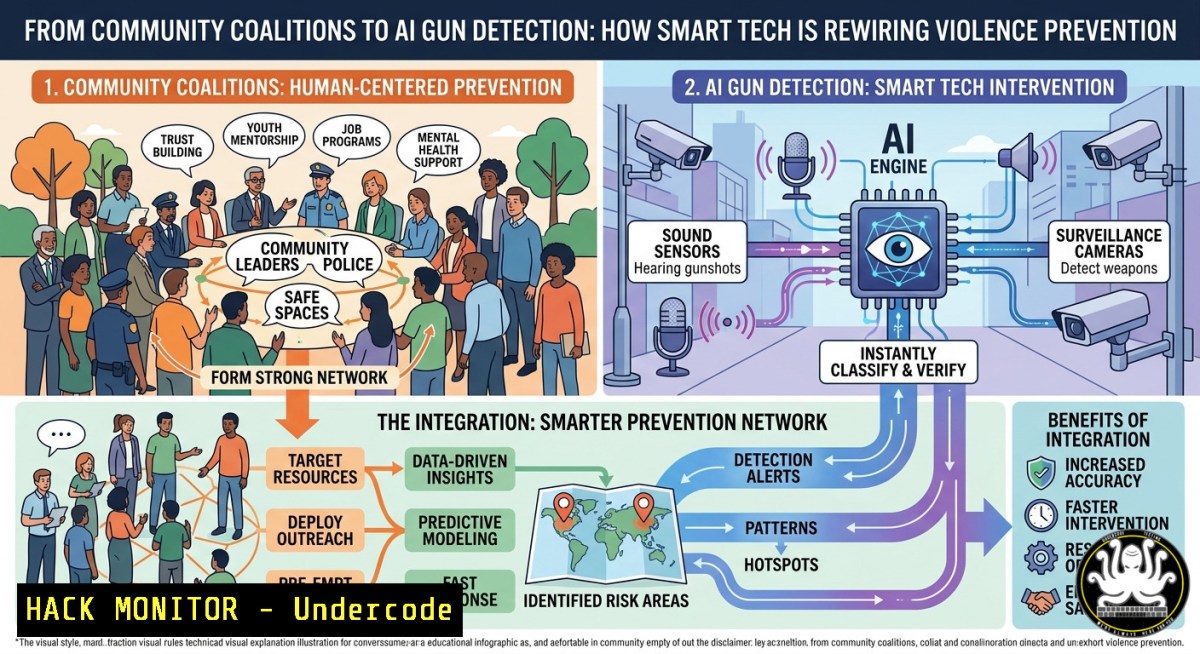
Community-based violence prevention has long relied on human intelligence and grassroots coalitions—neighborhood watch captains, youth mentors, and law enforcement liaisons sharing information in real time. But today, a new layer of technology is converging with these traditional networks: AI-powered gun detection, cloud-based security operations centers, and digital risk intelligence platforms. This article explores how organizations like the Safe Community Initiative (SCI) can augment their civic partnerships with IT and cybersecurity tools, moving from reactive crisis response to proactive, data-driven threat prevention.
Learning Objectives:
- Understand how AI-based gun detection and cloud risk platforms integrate with existing security infrastructure.
- Learn to implement basic digital threat intelligence and vulnerability assessment commands on Linux and Windows.
- Identify opportunities to embed cybersecurity training and IT hardening into community youth programs.
You Should Know:
- AI Gun Detection: From Security Cameras to Real-Time Law Enforcement Alerts
Imagine a community center’s security camera system that doesn’t just record but actively watches for firearms. ZeroEyes, an AI platform founded by Navy SEALs, integrates directly with existing digital cameras. When a gun is detected, images are sent to a U.S.-based operations center staffed by military veterans; if verified, alerts—including visual description, gun type, and last known location—reach law enforcement in as little as three to five seconds. This technology has been deployed in school districts across the country, often funded through state safety grants.
Step‑by‑step guide to understanding how this works and testing similar logic:
1. Simulate image recognition concepts with Python (open-source)
Use a pre-trained object detection model to identify common objects, which mirrors how AI gun detection models are trained.
 Install required libraries (Linux/macOS/Windows with Python)
pip install opencv-python torch torchvision transformers
2. Run a basic object detection script
from transformers import DetrImageProcessor, DetrForObjectDetection
from PIL import Image
processor = DetrImageProcessor.from_pretrained("facebook/detr-resnet-50")
model = DetrForObjectDetection.from_pretrained("facebook/detr-resnet-50")
image = Image.open("security_camera_frame.jpg")
inputs = processor(images=image, return_tensors="pt")
outputs = model(inputs)
 Outputs contain class labels and bounding boxes
3. Interpret the output – look for labels like “handgun” or “rifle” (model-specific). Real-world systems use custom datasets and human verification to avoid false positives.
- Log analysis on Linux – If you manage security camera logs, use grep and awk to filter events.
tail -f /var/log/syslog | grep -i "motion|detect"
-
Windows Event Log monitoring – Use PowerShell to watch for login anomalies or system changes.
Get-WinEvent -LogName Security | Where-Object { $_.Id -eq 4625 } | Format-List -
Cloud-Based Physical and Cybersecurity Convergence (The GSOC Model)
Modern schools and community organizations are building Global Security Operations Centers (GSOCs) that blur the line between physical security and cyber defense. A GSOC gathers data from access control, IoT sensors, alarm systems, and cloud analytics into a single dashboard. However, many districts lack dedicated security analysts; they rely on IT staff who are also responsible for smart boards, network firewalls, and student data privacy. Automated risk analysis platforms can evaluate severity and context in real time, flagging only actionable threats—for example, a cyber breach affecting student data or a weather alert near a field trip location.
Step‑by‑step guide to setting up a basic risk intelligence feed:
- Aggregate logs with Elastic Stack (ELK) on Linux
sudo apt update && sudo apt install elasticsearch kibana logstash
sudo systemctl start elasticsearch kibana logstash
2. Configure Filebeat to send security logs
sudo filebeat modules enable system
sudo filebeat setup --dashboards
3. Create a simple risk dashboard in Kibana – visualize failed logins (cyber) and motion sensor events (physical) on the same timeline.
4. For Windows environments, use Windows Event Forwarding (WEF) to centralize logs.
wecutil qc
wecutil es
- AI as a Multiplier for Gun Violence Data and Intervention
Gun violence is now the leading cause of death for US children and teens, yet CDC statistics are often nearly two years old. Nonprofits and community groups are turning to AI to fill the gap. Tools like Every Shot analyze tens of thousands of news articles in near real time to identify shooting events, while chatbots like Ask Everytown provide accurate information to stakeholders. GeoAI—combining geographic information systems with artificial intelligence—can identify spatial and temporal patterns of violence, highlighting high-risk neighborhoods and even suggesting prescriptive models for intervention.
Step‑by‑step guide to replicating a basic GeoAI workflow:
1. Install Python geopandas and folium for mapping
pip install geopandas folium matplotlib
2. Load a dataset of incident coordinates (simulated or real, if available)
import pandas as pd
import folium
data = pd.read_csv('incidents.csv')  columns: lat, lon, type
m = folium.Map(location=[41.8781, -87.6298], zoom_start=10)
for _, row in data.iterrows():
folium.Marker([row['lat'], row['lon']], popup=row['type']).add_to(m)
m.save('violence_map.html')
3. Use DBSCAN clustering to identify hotspots
from sklearn.cluster import DBSCAN
coords = data[['lat', 'lon']].values
clustering = DBSCAN(eps=0.01, min_samples=5).fit(coords)
data['cluster'] = clustering.labels_
4. Export the results as a CSV for sharing with law enforcement partners – this is essentially a lightweight version of what GeoAI platforms do.
- Cybersecurity Training and IT Hardening for Youth Programs
The same young people participating in violence prevention initiatives are often exposed to cyber risks: phishing, identity theft, sextortion, and online banking fraud. Organizations like Mentoring Youth Through Technology (MYTT) in Harvey, IL, already offer training in network engineering, cybersecurity, and computer hardware. Integrating security awareness into existing programs builds digital resilience and creates pathways to IT careers.
Step‑by‑step guide for a basic cybersecurity awareness workshop:
- Simulate a phishing email test using GoPhish (open source)
On Linux
wget https://github.com/gophish/gophish/releases/download/v0.12.1/gophish-v0.12.1-linux-64bit.zip
unzip gophish-.zip && cd gophish-
./gophish
- Access the web console at https://127.0.0.1:3333 and create a simulated phishing campaign (e.g., fake scholarship offer).
- Teach participants to inspect email headers (Gmail: click three dots → Show original; Outlook: File → Properties → Internet headers).
4. Windows command to check for suspicious processes
Get-Process | Where-Object { $<em>.Path -like "temp" -or $</em>.Description -eq $null }
5. Linux command to list listening ports and associated services
sudo netstat -tulpn | grep LISTEN
6. Discuss password hygiene and multi-factor authentication – demonstrate turning on MFA for a Google or Microsoft account.
5. Hardening Community Center Networks Against Ransomware
Schools and community centers are prime ransomware targets because they have small IT teams, legacy systems, and limited budgets. A single compromised Chromebook logging in at 2 AM or an unusual weekend data transfer could indicate a breach. AI‑powered endpoint detection can automatically isolate compromised devices before damage spreads.
Step‑by‑step guide to basic network hardening:
- Segment the guest Wi-Fi from internal administrative networks (use VLANs on managed switches).
- On Linux (Ubuntu Server), set up a simple firewall with UFW
sudo ufw default deny incoming
sudo ufw default allow outgoing
sudo ufw allow from 192.168.1.0/24 to any port 22  allow SSH only from local LAN
sudo ufw enable
3. On Windows, use Defender Firewall with PowerShell
New-NetFirewallRule -DisplayName "Block All Inbound Except RDP" -Direction Inbound -Action Block
New-NetFirewallRule -DisplayName "Allow RDP" -Direction Inbound -LocalPort 3389 -Protocol TCP -Action Allow
4. Enable automatic updates –
 Linux (Debian/Ubuntu)
sudo apt install unattended-upgrades && sudo dpkg-reconfigure unattended-upgrades
For Windows, use Group Policy or Windows Update settings.
5. Perform a basic vulnerability scan with OpenVAS (Greenbone) –
sudo apt install gvm && sudo gvm-setup
What Undercode Say:
- Key Takeaway 1: The future of violence prevention lies not in choosing between human coalitions and technology, but in layering AI‑driven tools on top of existing relationships. Credible messengers—youth mentors, community leaders—remain essential for trust and acceptability, while AI provides the speed and scale that manual systems cannot match.
- Key Takeaway 2: Every community organization should conduct a basic cybersecurity hygiene audit: segment networks, enforce MFA, centralize logs, and run simulated phishing drills. The cost of a ransomware attack far exceeds the investment in proactive hardening.
Prediction: Within three years, community violence intervention (CVI) programs will routinely employ geo‑spatial AI dashboards and cloud‑based GSOC lite platforms, funded by state grants that explicitly bundle physical security with cyber resilience. The same youth who once only learned conflict de‑escalation will also graduate with entry‑level cybersecurity certifications, turning safe communities into talent pipelines for the digital economy.
▶️ Related Video (80% Match):
🎯Let’s Practice For Free:
IT/Security Reporter URL:
Reported By: Jack Solomon – Hackers Feeds
Extra Hub: Undercode MoN
Basic Verification: Pass ✅
🎓 Live Courses & Certifications:
Join Undercode Academy for Verified Certifications
🚀 Request a Custom Project:
Secure, high-velocity infrastructure and disruptive technological engineering. Contact our engineering team for high-tier development and proprietary systems:
[email protected]


