Listen to this Post
Introduction
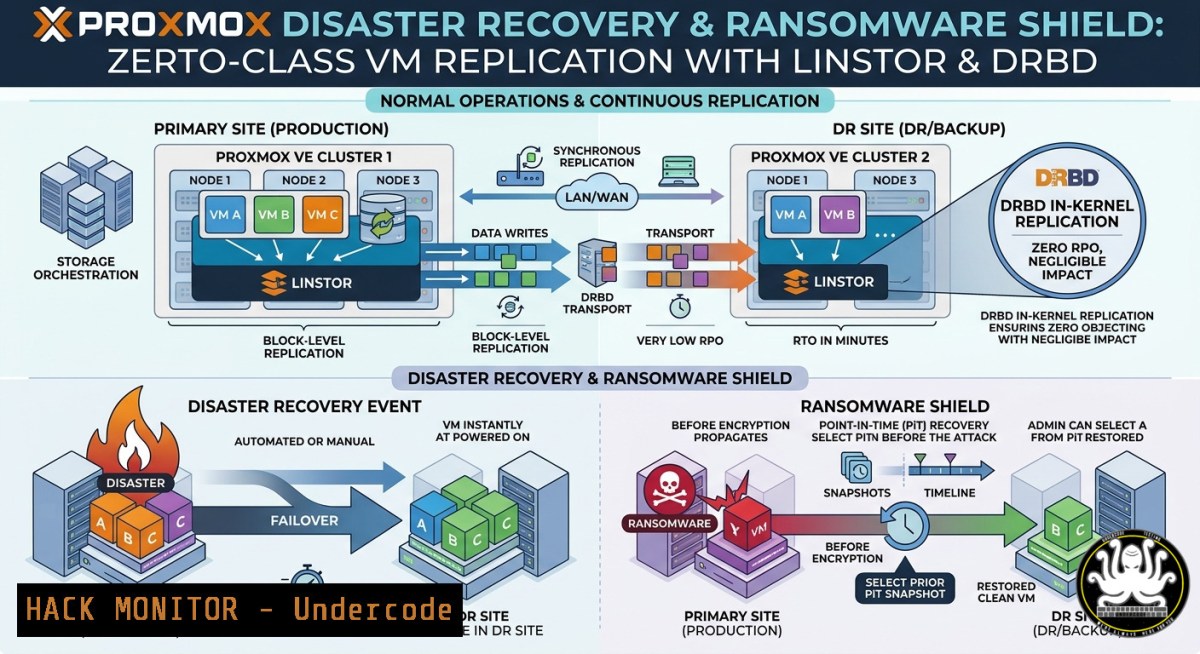
As VMware customers face increasing uncertainty following Broadcom’s acquisition, finding a robust, enterprise-ready alternative for disaster recovery has become a top priority. For organizations leveraging HPE/Zerto site-to-site replication on VMware vSphere, the path to Proxmox VE might seem daunting, but a powerful, integrated solution exists. By combining LinBit’s LinStor software-defined storage, the DRBD asynchronous replication protocol, and hardened backup infrastructure, you can achieve near-Zerto-class replication capabilities. This article explores how to build this architecture, providing IT professionals and system architects with a step-by-step guide to implementing resilient, immutable, and hypervisor-agnostic disaster recovery on Proxmox VE.
Learning Objectives
- Implement Asynchronous Block-Level Replication: Configure DRBD (Protocol A) for site-to-site, asynchronous replication of VM disk images, simulating Zerto’s continuous data protection capabilities.
- Integrate LinStor for Storage Automation: Learn to deploy the LinStor controller and Proxmox plugin to manage replicated DRBD volumes directly from the Proxmox VE GUI.
- Design a Ransomware-Resistant Backup Strategy: Configure the Proxmox Backup Server (PBS) with immutable backups and integrate it with Veeam to ensure an air-gapped, recoverable copy of all data.
You Should Know
1. Build the Foundation: Proxmox & LinStor Prerequisites
Before diving into replication, the environment must meet specific hardware and software requirements. LinBit recommends a “stretched cluster” configuration: two physical sites, each containing a three-node Proxmox VE cluster (6 nodes total). However, for testing or smaller deployments, a two-node cluster with a tie-breaker quorum device is acceptable. Crucial prerequisites include:
- Dedicated high-bandwidth, low-latency network links between sites for DRBD replication traffic.
- All Proxmox hosts should be time-synchronized (NTP) and have the `pve-headers` package installed.
- At least one dedicated storage pool (e.g., LVM-thin) on each node for replicated data.
2. Installing LinStor and the Proxmox Plugin
The core of the solution is LinBit’s software-defined storage (SDS) stack. First, enable the LINBIT repository and install the kernel module and tools.
Step-by-Step Installation Guide
On each Proxmox VE node, execute the following commands:
1. Install Kernel Headers & Add LINBIT Repository
apt update && apt install -y pve-headers-$(uname -r)
wget -O- https://packages.linbit.com/package-signing-pubkey.asc | apt-key add -
PVERS="8"  Set to your Proxmox major version (e.g., 7, 8, 9)
echo "deb http://packages.linbit.com/proxmox/ proxmox-$PVERS drbd-9.0" > /etc/apt/sources.list.d/linbit.list
apt update
2. Install DRBD Kernel Module and LinStor Packages
apt install -y drbd-dkms linstor-proxmox drbd-utils
The `drbd-dkms` package will build the kernel module dynamically, ensuring compatibility with your Proxmox kernel.
- Initialize the LinStor Cluster (Designate one node as primary)
On a single node (e.g., `pve-main-01`), run:
linstor controller start
linstor node create pve-main-01 <IP_ADDRESS>
linstor node create pve-main-02 <IP_ADDRESS>
 Repeat for all nodes in the cluster
- Configure LinStor Storage Pools (Define Disk Pools on Each Node)
linstor storage-pool create lvmthick pve-main-01 data-thinpool /dev/<your_vg>/<thin_pool>
Then, add the LinStor plugin to Proxmox by editing
/etc/pve/storage.cfg:drbd: linstor_storage content images,rootdir controller pve-main-01 resourcegroup pve-rg
Explanation: `drbd: linstor_storage` defines the storage for Proxmox, allowing VM disks to be created as DRBD resources managed by LinStor. The `resourcegroup` parameter ensures automatic placement and replication policies. After a restart of the `pvedaemon` service, the new storage pool will appear in the Proxmox web GUI.
3. Configuring Asynchronous Site-to-Site Replication (Protocol A)
Zerto’s magic lies in its asynchronous, near-continuous replication, minimizing Recovery Point Objectives (RPO). With DRBD, this is achieved using Protocol A. In this mode, a write operation is acknowledged as soon as it is completed on the local disk and placed in the local TCP send buffer, but before the remote node confirms receipt. This trades absolute consistency for high performance and minimal latency impact.
To implement this for disaster recovery across sites:
First, label your nodes by site using LinStor’s auxiliary properties:
linstor node set-property --aux pve-main-01 dc A
linstor node set-property --aux pve-main-04 dc B
Next, create Resource Groups (RG) to enforce replication rules:
linstor resource-group create --storage-pool data-thinpool --place-count 3 dc-a-rg
linstor resource-group create --storage-pool data-thinpool --place-count 3 dc-b-rg
Finally, for cross-site replication, create a new RG that uses Protocol A.
linstor resource-group create --storage-pool data-thinpool --place-count 2 --protocol A cross-site-async-rg
How It Works: When you create a VM on a Proxmox node, you can select the `linstor_storage` target. The disk image is automatically turned into a DRBD device that replicates to other nodes based on the chosen RG. For DR, the `cross-site-async-rg` ensures one replica stays in the primary site while a second is asynchronously streamed to the secondary site, providing an RPO of seconds, not minutes.
- Hardening Backups: Proxmox Backup Server (PBS) Immutable Datastores
Replication alone is not a backup. To defend against ransomware, you must combine LinStor replication with immutable backups using Proxmox Backup Server (PBS). PBS can create a “Fort Knox” for your data: a write-once, read-many (WORM) datastore that even an administrator cannot delete.
Configuring Immutability in PBS
- Install a Dedicated PBS Instance: This should be a separate physical host or VM, ideally off-site or on a different storage array.
- Create a Datastore: In the PBS web UI, navigate to Administration → Datastore → Create. Choose a path (e.g.,
/backup1). - Set Up an Immutable User Role: The key is permissions. In Access Control → User Management, create a new user or API token. Grant it only the `DatastoreBackup` privilege on your datastore. As documented in the Proxmox PBS developer notes, a user with only this privilege can write new backups but can never modify or delete existing ones.
- Connect Proxmox VE to PBS: On your Proxmox cluster, go to Datacenter → Storage → Add → Proxmox Backup Server. Use the credentials of the user with `DatastoreBackup` rights.
- Enable Encryption: On the same Proxmox side, generate an encryption key. This key is known only to your Proxmox cluster; the PBS server stores only encrypted blobs, making it useless to an attacker.
Verification: Even if a ransomware operator compromises the PBS server, they cannot delete your backup files. The only way to clean up old backups is from the Proxmox side, using the prune/GC commands, which also require the correct credentials.
- Adding a Second Layer: Veeam Backup for Proxmox VE
For environments that demand enterprise-grade reporting and failback capabilities, supplementing LinStor and PBS with Veeam Backup & Replication (version 12.2 or later) is a best practice. Veeam adds a centralized console for managing both VMware and Proxmox backups and provides a seamless migration path.
Integrating Veeam with Proxmox
The Veeam plugin creates a copy-on-write snapshot of a VM, compresses, and deduplicates the data to a repository, without needing agents inside the VM. To configure:
- In the Backup Infrastructure view, right-click Managed Servers and select Add Server → Virtualization Platform → Proxmox VE.
- Enter the DNS name or IP of your Proxmox node and the root credentials (a user with `Admin` privileges in Proxmox).
- Veeam will automatically deploy a Worker (a data mover component) to your Proxmox host.
- Create a backup job, selecting your VMs and an immutable S3 repository or a local hardened Linux repository as the target.
Pro Tip: Use Veeam as your migration tool. By restoring a VMware VM backup directly to a Proxmox VE server, you can perform a “replicate-and-convert” operation, minimizing downtime during platform migration.
What Undercode Say
Key Takeaway 1: The combination of LinStor and DRBD provides a distributed storage fabric that natively mirrors Zerto’s block-level replication, moving the industry away from per-VM replication scripts to a storage-centric approach.
Key Takeaway 2: Immutability is the front line of ransomware defense. Proxmox Backup Server’s permission-based immutability, when combined with encryption, ensures backups are not only safe from deletion but also unreadable to any third party.
Analysis: The VMware-Broadcom merger is accelerating a mass migration to alternatives like Proxmox VE. However, many organizations hesitate because they fear losing enterprise features like Zerto’s replication. Charles Crampton’s analysis correctly identifies LinStor as the missing “bridge”. When you architect the solution—using DRBD Protocol A for low-latency async replication, LinStor for automated management, and PBS for immutable vaulting—you do not just replace VMware; you potentially surpass it. The 3-2-1 backup rule (3 copies, 2 media, 1 off-site) is upgraded to a 4-3-2 architecture: 4 copies (Production, LinStor DR, PBS, Veeam), 3 locations (Site A, Site B, Cloud), and 2 immutable formats (PBS and Veeam Hardened Repo).
Expected Output
Introduction: A practical 2–3 sentence cybersecurity-angle introduction that frames the migration from VMware/Zerto to Proxmox as an opportunity to enhance data resilience and ransomware protection.
What Undercode Say:
- Key Takeaway 1: LinStor+DRBD offers storage-level, Zerto-like asynchronous replication integrated into the Proxmox stack, reducing RPO from minutes to seconds.
- Key Takeaway 2: Proxmox Backup Server’s role-based immutability and Veeam’s hardened repositories create a comprehensive, multi-layer defense against ransomware.
Prediction
The “post-VMware” era will witness the rise of hyperconverged, software-defined replication as a standard feature, not a premium add-on. As Proxmox gains enterprise footholds in 2026, solutions like LinStor will evolve to include AI-driven traffic shaping and predictive failover analytics. We predict that within 24 months, the tight integration between DRBD and hypervisors will render proprietary replication tools like Zerto less indispensable, shifting the competitive landscape from licensing costs to open-source innovation. The future of disaster recovery is not just replicating VMs but creating self-healing, distributed storage meshes that are inherently resilient and cryptographically verifiable.
▶️ Related Video (82% Match):
🎯Let’s Practice For Free:
IT/Security Reporter URL:
Reported By: Charlescrampton For – Hackers Feeds
Extra Hub: Undercode MoN
Basic Verification: Pass ✅
🎓 Live Courses & Certifications:
Join Undercode Academy for Verified Certifications
🚀 Request a Custom Project:
Secure, high-velocity infrastructure and disruptive technological engineering. Contact our engineering team for high-tier development and proprietary systems:
[email protected]


