Listen to this Post
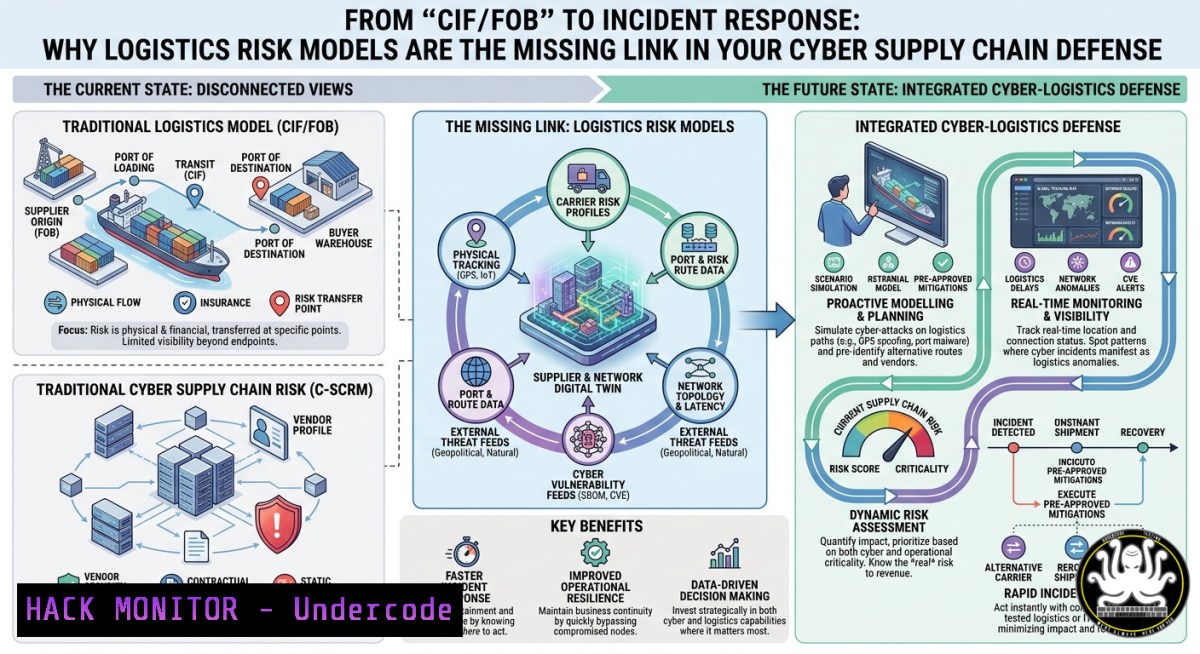
Introduction:
Every security architect understands risk transfer, but few apply the Incoterms framework—Cost, Insurance, Freight (CIF) versus Free on Board (FOB)—to cybersecurity. Reinaldo Moura’s logistics insight that “responsibility over transportation, exposure to failures, reaction capacity, and total operation cost” are redefined by this choice directly mirrors how organizations must treat data and system handoffs. This article reframes liability assignment as a technical security control, then provides hardened commands and blue-team playbooks to enforce it.
Learning Objectives:
- Apply risk-transfer modeling (CIF/FOB analogs) to cloud IAM roles and data egress policies.
- Execute Linux and Windows hardening commands that operationalize “handoff responsibility.”
- Implement API gateway rules and cloud-native controls that log and limit liability exposure.
You Should Know:
- The CIF‑to‑Access‑Log Bridge: Incident Response as Freight Management
Reinaldo Moura’s original post warns that transferring freight without assessing “client profile, available logistics structure, and required level of control” leads to delays, extra costs, and damaged commercial relationships. In cybersecurity, this is exactly the problem of third‑party API access, privileged identity delegation, and cloud service handoffs. When a security team fails to define who bears the risk of a compromised session token or a leaked S3 bucket, the “failure” shows up later as regulatory fines, forensic costs, and destroyed trust.
To operationalize this, implement a “freight ledger” for every data flow: log who initiates a transfer, who receives it, and what liability they accept. Below are practical commands to build that ledger on Linux and Windows.
Step‑by‑Step Guide (Linux):
a. Enable full command auditing to track every data‑related process.
 Install auditd if missing
sudo apt install auditd audispd-plugins -y

Add a rule that logs all executions of common data‑transfer tools
sudo auditctl -w /usr/bin/curl -p x -k data_egress_curl
sudo auditctl -w /usr/bin/wget -p x -k data_egress_wget
sudo auditctl -w /usr/bin/scp -p x -k data_egress_scp
sudo auditctl -w /usr/bin/rsync -p x -k data_egress_rsync

Monitor configuration changes (mimics “fiscal/negotiation” step)
sudo auditctl -w /etc/ssh/sshd_config -p wa -k ssh_config_change
sudo auditctl -w /etc/sudoers -p wa -k sudoers_change

View the audit log for egress events
sudo ausearch -k data_egress_curl --format raw | ts '%.s'
b. Automated log shipping to a central SIEM (the “insurance” component). Configure `audisp-remote` to forward all events immediately.
c. Enforce outbound network rules that mirror FOB (buyer assumes risk at a defined point). For example, block all direct internet egress from database servers, forcing traffic through an audited proxy.
Step‑by‑Step Guide (Windows):
Use PowerShell’s advanced audit policies and Sysmon to achieve the same “risk‑handoff ledger.”
 Install Sysmon from Microsoft’s official source
Invoke-WebRequest -Uri "https://live.sysinternals.com/sysmon64.exe" -OutFile "$env:TEMP\sysmon64.exe"
 Use a well‑known configuration (SwiftOnSecurity’s sysmon-config)
Invoke-WebRequest -Uri "https://raw.githubusercontent.com/SwiftOnSecurity/sysmon-config/master/sysmonconfig-export.xml" -OutFile "$env:TEMP\sysmonconfig.xml"
& "$env:TEMP\sysmon64.exe" -accepteula -i "$env:TEMP\sysmonconfig.xml"

Enable PowerShell script block logging (captures data transfer commands)
Set-ItemProperty -Path "HKLM:\SOFTWARE\Policies\Microsoft\Windows\PowerShell\ScriptBlockLogging" -Name "EnableScriptBlockLogging" -Value 1 -Type DWord

Turn on command line auditing for all processes (Windows Event ID 4688)
auditpol /set /subcategory:"Process Creation" /success:enable /failure:enable

Query the security log for data‑transfer artifacts
Get-WinEvent -FilterHashtable @{LogName='Security'; ID=4688} | Where-Object {$_.Message -match 'curl|wget|scp|ftp|powershell'}
- AI Supply‑Chain Threats: When Autonomous Malware Handles the “Freight”
The AI threat landscape in 2026 has moved decisively toward autonomous weaponization. Attackers now use AI‑generated exploit code and automated scanning of software dependencies to increase the scale of incidents, while AI‑native malware and deepfake fraud are expected to dominate cyber risk. More alarmingly, a frontier AI model released in April 2026 can autonomously find and exploit vulnerabilities in production software at a depth and speed that previously required experienced human researchers, collapsing the window from disclosure to in‑the‑wild exploitation from weeks to hours. Reinaldo Moura’s warning about “transferring freight without evaluating client profile and available structure” directly applies: organizations are handing over system access to AI agents without hardening the “client profile” (the AI model’s capabilities) or the “available structure” (runtime security tooling).
Step‑by‑Step Hardening Against AI‑Driven Exploits:
a. Deploy runtime anomaly detection on all containerized and serverless workloads.
 Install Falco (runtime security)
curl -fsSL https://falco.org/repo/falcosecurity-packages.asc | sudo gpg --dearmor -o /usr/share/keyrings/falco-archive-keyring.gpg
echo "deb [signed-by=/usr/share/keyrings/falco-archive-keyring.gpg] https://download.falco.org/packages/deb stable main" | sudo tee /etc/apt/sources.list.d/falcosecurity.list
sudo apt update && sudo apt install -y falco
sudo systemctl enable falco --now
b. Configure Falco rules to detect behavioral anomalies that AI malware attempts—like unexpected outbound calls or abuse of privileges. Add custom rules to /etc/falco/falco_rules.local.yaml:
- rule: Unexpected outbound network connection
desc: Detect AI‑generated malware initiating C2
condition: outbound and not fd.sip in (trusted_ips)
output: Outbound connection to unknown IP (command=%proc.cmdline)
priority: CRITICAL
c. Implement image scanning in CI/CD pipelines to catch known vulnerabilities before deployment, as AI scanners now find flaws faster than humans. Use Trivy:
trivy image --severity CRITICAL --exit-code 1 --ignore-unfixed your_app:latest
- API Security: Enforcing “FOB” at the Gateway Layer
In 2026, the OWASP API Top 10 lists Broken Object Level Authorization (BOLA) as the most critical risk. This is a pure liability‑handoff failure: the API accepts an object ID from the client and authorizes access based on that ID alone, effectively transferring risk to the client without any validation. Reinaldo Moura’s advice to assess “client profile, available logistics structure, and required level of control before transferring freight” is a perfect API security mandate.
Step‑by‑Step API Gateway Hardening (Kong + OPA):
a. Replace predictable IDs with non‑predictable alternatives (UUIDv7 or hashids) to prevent BOLA attacks. In your API code:
import uuid
 Generate a non‑sequential object ID
object_id = str(uuid.uuid4())
b. Enforce short expiration periods for API keys and tokens. Set expiration to 90 days or less, and automate rotation using a secrets manager.
 Example using HashiCorp Vault to auto‑rotate an API key
vault write -f aws/roles/my-role/rotate
c. Deploy a WAF that performs schema validation and blocks OWASP API Top 10 attacks at the edge. For Kong, enable the `request‑validator` plugin:
{
"name": "request-validator",
"config": {
"body_schema": "{\"type\":\"object\",\"properties\":{\"user_id\":{\"type\":\"string\",\"pattern\":\"^[0-9a-f]{8}-([0-9a-f]{4}-){3}[0-9a-f]{12}$\"}}}"
}
}
- Cloud Hardening: The “Available Structure” for Workload Handoffs
Moura emphasizes that the decision must be analyzed “in light of commercial strategy, risk policy, and the actual capacity to manage transportation”. For cloud security, this translates to implementing automated audit and hardening modules that enforce CIS benchmarks across AWS, Azure, and GCP. The key is shifting from reactive patching to a policy‑as‑code model that catches misconfigurations early in the pipeline.
Step‑by‑Step Multi‑Cloud Hardening:
a. Enforce encryption at rest and in transit using cloud‑native KMS services.
 AWS: Encrypt an S3 bucket
aws s3api put-bucket-encryption --bucket my-bucket --server-side-encryption-configuration '{"Rules":[{"ApplyServerSideEncryptionByDefault":{"SSEAlgorithm":"AES256"}}]}'
b. Restrict inbound/outbound traffic with security groups and network policies. Implement private subnets for all critical workloads.
 Terraform example for AWS
resource "aws_security_group" "db_sg" {
ingress {
from_port = 3306
to_port = 3306
protocol = "tcp"
cidr_blocks = [aws_subnet.private.cidr_block]  no public access
}
}
c. Use a secrets manager with automatic rotation to eliminate hardcoded credentials. For AWS Secrets Manager:
aws secretsmanager rotate-secret --secret-id my-db-password --rotation-rules "AutomaticallyAfterDays=30"
5. Exploitation Mitigation: Living‑off‑the‑Land (LOTL) and Zero‑Day Defense
Attackers in 2026 use LOTL techniques—PowerShell, WMIC, Certutil—to move laterally without triggering EDR alerts. The window to act on serious vulnerabilities has collapsed to 24‑48 hours, with predictions that time‑to‑exploit will be just minutes by 2028. Reinaldo Moura’s statement that “mistakes appear later, in delays, extra costs, conflicts over responsibility, and often in the deterioration of the commercial relationship” is a perfect description of a zero‑day disaster.
Step‑by‑Step Mitigation Playbook:
a. Define remediation SLAs based on severity and pre‑approve a low‑friction process to apply temporary mitigations, such as restricting public access or isolating affected systems, while permanent fixes are validated.
b. Deploy endpoint detection that monitors for native tool abuse.
 Windows: Enable PowerShell transcription to log all executed commands
Set-ItemProperty -Path "HKLM:\SOFTWARE\Policies\Microsoft\Windows\PowerShell\Transcription" -Name "EnableTranscripting" -Value 1 -Type DWord
Set-ItemProperty -Path "HKLM:\SOFTWARE\Policies\Microsoft\Windows\PowerShell\Transcription" -Name "OutputDirectory" -Value "C:\Logs\PowerShell" -Type String
c. Block suspicious command‑line patterns at the EDR level. Example for Sysmon (Windows) or Falco (Linux) to alert on `certutil -urlcache` (a common LOTL file downloader).
What Undercode Say:
- Key Takeaway 1: Incoterms (CIF/FOB) are not just shipping details—they are a mature risk‑transfer framework that cybersecurity has ignored for too long. Every API handoff, cloud IAM role, and third‑party integration needs a clearly defined “point of liability transfer,” backed by audited controls.
- Key Takeaway 2: The 2026 threat landscape—AI‑native malware, collapsed zero‑day windows, and autonomous vulnerability exploitation—makes Moura’s logistics principles urgent. Without hardening the “client profile” (AI capabilities) and the “available structure” (runtime security), organizations are effectively shipping their data FOB to adversaries.
Prediction:
By 2028, cyber insurance carriers will mandate CIF‑style clauses in security questionnaires, requiring policyholders to demonstrate audited handoff controls for every data flow. Regulators in the EU and US will follow, introducing “Digital Incoterms” that assign liability based on the presence of API gateways, immutable audit logs, and runtime anomaly detection. Organizations that treat liability as a logistics problem now will dominate the next decade of secure commerce; those who treat it as a “commercial detail” will find their operations delayed, their margins erased, and their commercial relationships shattered—just as Moura warns in the physical world.
▶️ Related Video (70% Match):
🎯Let’s Practice For Free:
IT/Security Reporter URL:
Reported By: Reinaldo Moura – Hackers Feeds
Extra Hub: Undercode MoN
Basic Verification: Pass ✅
🎓 Live Courses & Certifications:
Join Undercode Academy for Verified Certifications
🚀 Request a Custom Project:
Secure, high-velocity infrastructure and disruptive technological engineering. Contact our engineering team for high-tier development and proprietary systems:
[email protected]


